1
USER GUIDE PS-RIP HARLEQUINRIP8.0R0
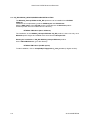
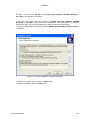
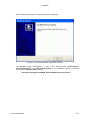
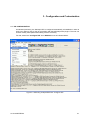
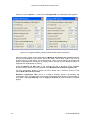
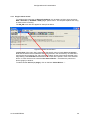
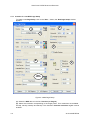
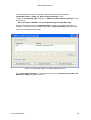
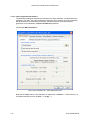
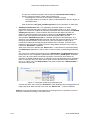
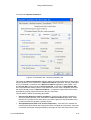
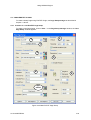
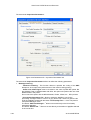
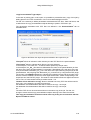
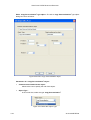
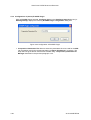
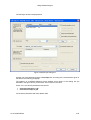
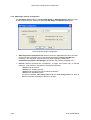
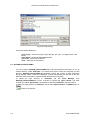
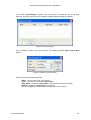
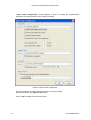
The window Configure RIP is as follows:
Figure 3-2 Configuration of NIPSON_HarlequinRIP8.0r0 RIP
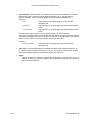
WorkSpace folder: This directory is used as general directory workspace, if there isn’t
enough RAM memory available, the RIP will create temporary files in this directory.
Page buffer folder. : When the RIP stores intermediate pages between itself and Output
Controller to hard disk, they are placed in this directory. If the checkbox Compress Page
buffer is checked, these pages are compressed and that generally improve the performance
while saving space on the hard disk.
Page buffering. : Allows to choose the working mode for intermediate pages management
between RIP and Output Controller (driving output Plugins). 4 modes:
-
Multiple (Parallel): The RIP creates a queue of intermediate pages between itself
and Output Controller on the disk, each process (RIP and Output Controller)
running at his proper speed.
- Multiple: Identical to previous mode when using NIPSON Plugins.
- Single (if required): The RIP creates a single page in memory and send it to the
Output Controller without writing it on a file on the hard disk before to process the
next page. This mode is selected at installation.
- Single: The RIP creates a single page on the hard disk and waits that this page is
processed by Output Controller before to process the next page.
When using RIP with NIPSON Plugin, Single (if required) mode is the speediest since it
doesn't use intermediate files on the hard disk.
In the two cases Single (if required) and Single, Output Controller window isn't viewed.
Network buffer: This buffer lets the RIP read data from the input source before actually
needing to processed it. Keep the default value.
Printer buffer: This value gives the size of the dialog buffer between Output Controller and
the output Plugin. Keep the default value.
Job timeout: allows to control the processing time used by the RIP for a job (For example, if
an error in PostScript file create an infinite process). Set it to minimum: 5 minutes).
3-2
22 A2 57NR REV20