1
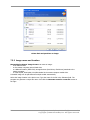
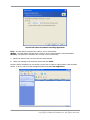
The license server has 10 server licenses
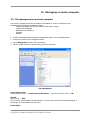
3.5.3 Adding licenses in command line mode
If you have installed ManageEngine License Server Management Tool, you can add licenses to the
ManageEngine License Server in the command line mode.
1. Run cmd.exe (Windows Command Prompt)
2. Go to the folder where ManageEngine License Server is installed. By default, it is
\Program Files\OSDeployer\LicenseServer
3. Enter the following command:
LicenseServerCmdLine --import-file [servername] [filename]
where:
servername – name of the computer where ManageEngine License Server is installed
filename – name of the file (*.txt or *.eml) with the serial numbers
Example:
30
Copyright © Acronis, Inc., 2009. All rights reserved.
Copyright © 2009 AdventNet, Inc. All rights reserved.