1
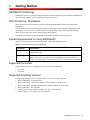
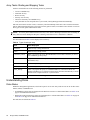
Array-Related Errors
•
•
•
•
•
•
•
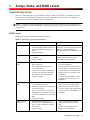
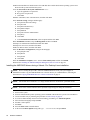
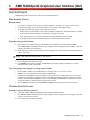
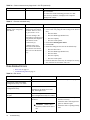
Table 31
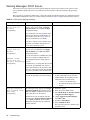
Cannot create an array on page 69
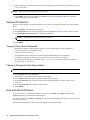
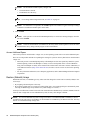
An array is in an Offline state on page 70
An array is in a Critical state on page 69
Cannot assign a dedicated spare to an array on page 70
Cannot create a global spare on page 70
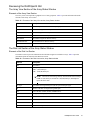
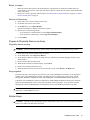
Cannot create an array larger than 2.199 TB on page 71
Recreate a deleted array on page 72
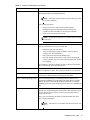
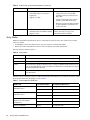
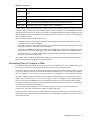
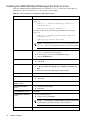
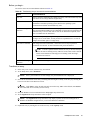
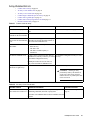
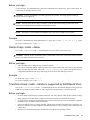
Cannot create an array
Possible Causes
Additional Information
Corrective Actions
The disk is not displayed.
The controller cannot communicate with the
disks.
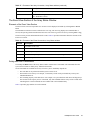
See Troubleshooting Disks on page 73.
Insufficient free space
available on the selected disks
Select a different combination of disks.
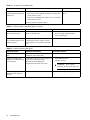
Incorrect number of disks
See RAID Levels on page 19 for a description Select the correct number of disks.
selected for the desired RAID of RAID levels and the allowable number of
level
disks used with each RAID level.
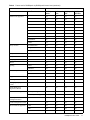
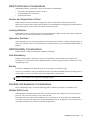
The desired disk is
unavailable.
•
•
•
The disk is a dedicated spare for a
different array.
The disk is full.
The disk’s available capacity is
insufficient.
Select a different disk.
The disk has SMART errors. An array can be created with a disk that has Use the BIOS Configuration Utility to create
SMART errors, but only if the array is created the array.
in the BIOS Configuration Utility.
RAIDXpert2 cannot be used to create an
array with a disk that has SMART errors.
The system already has a
maximum of eight arrays
Delete unused arrays.
CAUTION: Deleting an array
permanently destroys all data that is
on the array. This action cannot be
undone and it is very unlikely the data
can be recovered.
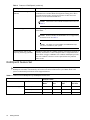
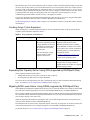
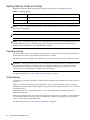
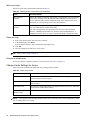
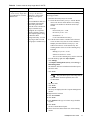
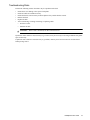
Table 32
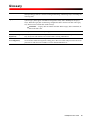
An array is in a Critical state
Possible Causes
Additional Information
One or more disks in the array Due to the failed disk or disks, the array is no longer
have failed or been removed. maintaining redundant (mirrored or parity) data.
Corrective Actions
See Troubleshooting Disks on
page 73.
The failure of an additional disk results in an Offline state and
lost data.
RAIDXpert2 User Guide
69