1
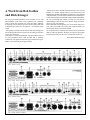
(20) Internal Speaker On/Off Switch (Combos only) Turns the internal speaker(s) on and off. In the "off" position, full power can be taken from the internal power amplifier(s) to drive external speakers(see Minimum External Speaker Impedances above). (21) AC Receptacle and Fuse Holder This combination grounded AC jack and fuse holder is designed to accept a detachable power cord. If a replacement is needed, it should be UL rated at 10amps/125vac or 5amps/240vac. The fuse (and spare are located as indicated in the drawing below. Never operate this amplifier with any other than the recommended fuse type : 5mm ´ 20mm, slow blow, 250V with ampere ratings as follows: Line Voltage 117VAC 220VAC 100VAC Fuse Rating 2.5 Amps 2.5 Amps 3 Amps Fuse# T2.5A • 250V T2.5A • 250V T3.0 • 250V The fuse can be easily removed with a screwdriver as shown on the right.A spare fuse is located in a sliding compartment. Warning : The Ground Pin on your power cord is for your protection. Do not remove it!!!! (22) Power Switch Turns the unit on (1) and off(0). Unplug the unit if it is not being used for an extended period. ML/E ONLY : (23) Compressor Switch Turns the Clean Channel's Compressor on and off. The compressor boosts low level signals while decreasing high level signals to add sustain. It is preset to an overall general purpose 2:1 compression ratio, ideal for most applications. The Compressor can be turned on and off with the RFG4 Foot Controller only when this switch is in the "on" position and the RFG4 is plugged in. (24) Stereo Reverb Control Controls the amount of delayed signal mixed with the main signal from the internal reverb. Clockwise rotation of this control increases the amount of reverberation effect in the ignal. The Reverb can be turned on and off using the RFG4 Foot Controller. (25) Stereo Chorus On/Off Indicator LED When lit, the Stereo Chorus effect is activated. (26) Stereo Chorus On/Off Switch Turns the Stereo Chorus on and off. The Chorus can be turned on and off with the RFG4 Foot Controller only when this switch is in the "on" position and the RFG4 is plugged in. (27) Stereo Chorus Rate and Depth Controls Allows for variation of the internal chorus effect from a very subtle "doubling" to a more dramatic "spatial" effect. Only the higher frequencies are chorused, allowing the lower frequencies to be unaffected and thereby eliminating the detuning problems found in some chorusing units. The Rate varies the speed of the effect and the Depth its intensity. (29) Stereo Aux Input Accepts a stereo 1/4'' phone plug to allow a stereo signal to be mixed with the internal preamp signal (post internal effects, pre Output Level). This input can be used in place of the Return when using stereo outboard effects through the Effects Loop. It can also accept a stereo signal from sources such as tape machines, recorders, stereo receivers, etc., for playing along with prerecorded music (see Sample Hookups). (30) Stereo Balanced Outputs These are standard XLR low impedance jacks providing a means of hooking your ML/E directly to a mixing console or recording equipment, in both live and studio settings (see Sample Hookups). It is suggested you use the GK VCV Recording Compensation Module when using these outputs. The Stereo Balanced Outputs are post internal effects and are not affected by the Output Level Control and can be switched to stereo or mono. (31) Balanced Outputs Stereo/Mono Switch In the mono mode, both outputs are providing identical signals, In the stereo mode, you have true stereo left and right output signals. (32) Balanced Outputs Ground Lift Disconnects the ground from the Balanced Outputs. There may be situations where a ground loop occurs when using the Balanced Outputs, resulting in a noticeable hum. By disconnecting the ground, the hum may be reduced or eliminated.