1
1. Manage your calls
1.1 Incoming calls
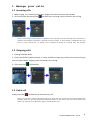
1 - While ringing, the “incoming call screen” displays the caller ID (name and number).
2 - You may answer by pressing the
Off-hook key. Incoming calls are stored in the call log.
NOTE : If the feature “Auto answer” is enabled on the handset, then the incoming call is answered no
matter of the handset is placed or removed from the charger. If “Auto answer” is disabled, then you
have to press “Green-key” no matter of the handset is placed or removed from the charger.
1.2 Outgoing calls
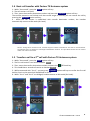
1 - Starting with Idle mode,
2 - Simply pre-dial the phone number, it is also possible to select any numbers from the call log or
from the phone book. Outgoing calls are stored in the call log.
3 - Then press the
Off-hook key.
1.3 End a call
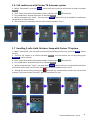
Simply press the
On-hook key to terminate any call.
NOTE : If one call is active and another call is on hold, then the active one will be terminated when
pressing “Red-Key” and the handsets automatically returns to the call on hold. The call on hold is now
active, you have to press “Red-key” again to terminate this call.
© Henri DEPAEPE SAS - France
3