1
Never connect or disconnect the hybrid power
cable from your ARCALINE2 3G if the cable is
still powered on!
In these cases, wait until the device has returned to ambient
temperature in the room in which it was located before use.
When your ARCALINE2 3G has been opened (for the
installation of a diffuser filter kit, for example), the ambient
air humidity trapped in the unit may lead to the formation
of condensation within the unit during its next use. This
condensation should rapidly disperse when used, since the
unit is fitted with a pressure balance system for the removal
of moisture.
This could produce electric arcs that damage your
ARCALINE2 3G and require its repair. Make sure you cut the
power to your ARCALINE2 3G by removing the plug from
the EASYBOX 3G connecting box before connecting or
disconnecting your ARCALINE2 3G.
WARNING !
Projector using class 2 led sources
(En60625-1 : 1994)
Do not shake your ARCALINE2 3G during installation or use.
Never move the ARCALINE2 3G by pulling it by one of its
cables. Handle it by gripping the body of the device.
This device uses multiple high-power (CLASS 2) LED (Light
Emitting Diode) light sources.
Never look directly at the light source when it is lit; never
stand directly in the device’s beam close up.
The choice of location for installing your ARCALINE2 3G is
very important :
Do not expose it to a heat source.
Do not install it in the vicinity of flammable materials.
Ensure that dust or other fragments do not gather around
the body of the unit, as this may affect the optimal cooling
and impair its proper operation.
The ARCALINE2 3G must be installed outside the reach
of the general public and anyone not authorised to work
on the device.
Always ensure the power is disconnected when installing,
dismantling or replacing the device to prevent any risk of glare
and to avoid any harm to your eyes.
WARNING !
The projector gets very hot quickly when used
Never handle or adjust the projector when has been on for
more than 10 minutes in order to prevent any risk of burns.
Some parts of the projector can reach high temperatures,
particularly the body/radiator. Switch the projector off and
wait until it cools down before handling it.
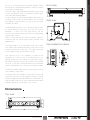
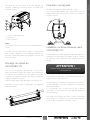
It is recommended to keep a minimum distance of 0.2 m
between the surface of the light output and the lit object.
The ARCALINE2 3G is capable of produced a mixed lighting
effect if the surface to be lit is very close to the unit (up to
approximately 50 centimetres). Depending on the case at
hand, the use of specific diffuser filters may be required for
this and are available as an accessory.
Operating conditions
Due to the nature of the cooling system (natural convection),
make sure you never prevent air from flowing freely around
the body of the device. Allow for a minimum free space of
0.2 m around your ARCALINE2 3G to facilitate the cooling
process.
Your ARCALINE2 3G is a linear luminaire fitted with multiple
LED (Light Emitting Diode) light sources for use in professional
environments (architectural lighting, event lighting, television,
theatre, museums, etc).
The ARCALINE2 3G luminaire has a protection index of IP65.
It may be used both indoors and outdoors.
Under no circumstances should it ever be partially or fully
immersed in water, even if only temporarily.
The ARCALINE2 3G can only be installed in a ground pit
or any other confined space under certain conditions.
The luminaire cools itself by means of natural convection;
therefore in this type of installation it will be necessary to
install a specially-designed forced ventilation system, which
allows air to flow around the device or devices. The air must
be constantly renewed; the use of a closed circuit is not
possible. Failure to comply with these constraints may cause
irreparable damage or premature wear to the ARCALINE2 3G
for which the manufacturer AYRTON cannot be held liable.
Condensation may develop on your ARCALINE2 3G in the
following cases:
Immediately after the heating is switched on.
In a misty or very humid location.
USER MANUAL
5
| ENGLISH
WARNING !
SAFETY INSTRUCTIONS | OPERATING CONDITIONS
When the device is suddenly brought from a cold
environment into a hot environment, or vice versa.