Transcript
WALL MOUNT
INSTALLATION GUIDE
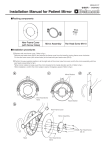
PARTS REFERENCE:
1、
(The following parts and hardware are included with this installation kit)
ITEM
DESCRIPTION
NO.
MODEL
QTY.
NO.
(PC)
1
Wall panel
1
2
Arm Kit (with swivel parts)
1
3
Mounting Plate
1
4
Transition Plate
1
5
Accessories Basket
1
6
Mounting kit for basket
1
Screw
7
(Fix the monitor)
Expansion screw
8
(fix the wall panel)
Screw
9
(Fix the basket)
10
Nylon Screw
M4×16
4
M8×60
4
M4×8
2
M5×10
2
M5×10
2
Hex Head Cap Screw (HHCS)
11
(Fix the mounting plate on the
arm kit)
2、Assembling the Wall Mount
1)
2)
-
Determine the locations of the holes to install the
wall panel to fix the patient monitor. Drill four Φ
10 mm holes on the wall.
- Align the wall panel with the holes on the wall and
screw them with four M8X60 flat expansion
screws.
AS SHOWN RIGHT
- Fix the mounting kit onto the arm kit with two
M5X10 hexagon socket set screws. Then fix it
with the hand lock screw (Nylon screw), ensure
the transition kit is locked with the mounting kit.
AS SHOWN RIGHT
WARNING: It is the responsibility of the installer to ensure that screws are not inserted too far into the display, causing damage
to internal components. Failure to adhere to this warning could result in damage to equipment or injury to patients or personnel.
115-000009-00 (VER A)
Page 1
Total 1
1