1
PhotoFont Start
Photofont Start In Adobe
Illustrator 10
Like in Adobe Photoshop the new command appears in the Filter menu in
Adobe Illustrator. The same command appears in the Effect menu as well.
Launch Adobe Illustrator and create a new or open an existing document.
To start using the Photofont Start plug-in:
1.
Select the Rectangle Tool in Illustrator’s toolbar.
2.
Draw a rectangle approximately equal to the expected size of your text.
3.
Make the rectangle transparent (unfilled). The stroke color doesn’t
matter but let it be ‘none’ too:
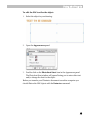
4.
Select the Photofont Start command in the FontLab hierarchical
menu in the Effect menu.
It may take a few seconds to initialize the plug-in. The more PhF fonts you
have installed in the system the more time it takes to start the plug-in.
Refer to the previous section for information on how to use the Photofont
Start plug-in.
After you apply the Photofont Start effect to an outline object the object
changes its default attributes, so the next time you use the Rectangle Tool
the Photofont Start is applied automatically. You may change the PhF text
in these objects.
22