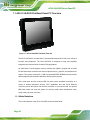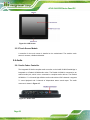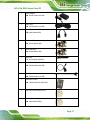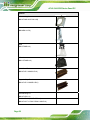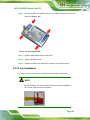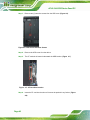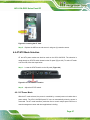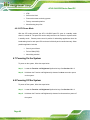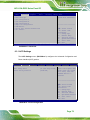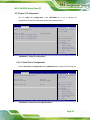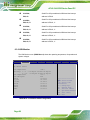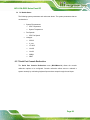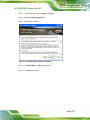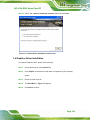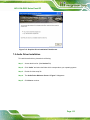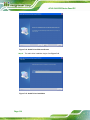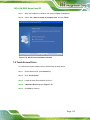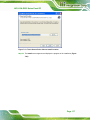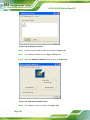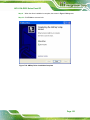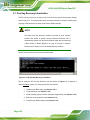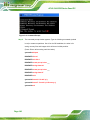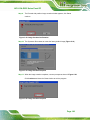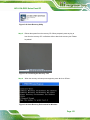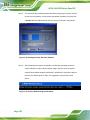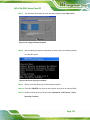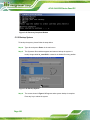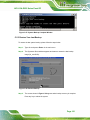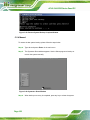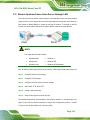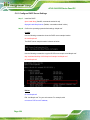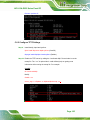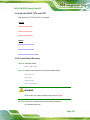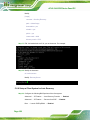
1
AFL2-12A-D525 Series Panel PC MODEL: AFL2-12A-D525 Fanless Flat Bezel Panel PC with 1.8 GHz Intel® Atom™ Processor TFT LCD, Wi-Fi, Touch Screen, RFID Reader, Dual GbE LAN RS-232/422/485, Camera, RoHS User Manual Page I Rev. 1.02 – 25 July, 2013 AFL2-12A-D525 Series Panel PC Revision Date Version Changes 25 July, 2013 1.02 Added information of the CPU temperature alert LED in Section 1.2.1.1 9 December, 2011 1.01 Added Warning page IV Revised Section 1.4 System Specifications Revised Section 3.1.1 Packing List Added Section 4.9.2 Stand Mounting Updated Section 4.10.2.1 DB-9 Serial Port Connection Updated Section 4.10.2.2 RJ-45 Serial Port Connection Updated Section 4.10.3 RS-422/485 Serial Port Added Section A.1.3 Product Disposal Updated Appendix C: One Key Recovery to Version 1.3 16 September, 2011 Page II 1.00 Initial release AFL2-12A-D525 Series Panel PC Copyright COPYRIGHT NOTICE The information in this document is subject to change without prior notice in order to improve reliability, design and function and does not represent a commitment on the part of the manufacturer. In no event will the manufacturer be liable for direct, indirect, special, incidental, or consequential damages arising out of the use or inability to use the product or documentation, even if advised of the possibility of such damages. This document contains proprietary information protected by copyright. All rights are reserved. No part of this manual may be reproduced by any mechanical, electronic, or other means in any form without prior written permission of the manufacturer. TRADEMARKS All registered trademarks and product names mentioned herein are used for identification purposes only and may be trademarks and/or registered trademarks of their respective owners. Page III AFL2-12A-D525 Series Panel PC WARNING: This equipment has been tested and found to comply with the limits for a Class A digital device, pursuant to Part 15 of the FCC Rules. These limits are designed to provide reasonable protection against harmful interference in a residential installation. This equipment generates, uses and can radiate radio frequency energy and, if not installed and used in accordance with the instructions, may cause harmful interference to radio communications. However, there is no guarantee that interference will not occur in a particular installation. If this equipment does cause harmful interference to radio or television reception, which can be determined by turning the equipment off and on, the user is encouraged to try to correct the interference by one or more of the following measures: Reorient or relocate the receiving antenna. Increase the separation between the equipment and receiver. Connect the equipment into an outlet on a circuit different from that to which the receiver is connected. Consult the dealer or an experienced radio/TV technician for help. FCC Caution: Any changes or modifications not expressly approved by the party responsible for compliance could void the user's authority to operate this equipment. This device and its antenna(s) must not be co-located or operating in conjunction with any other antenna or transmitter. IMPORTANT NOTE: For products available in the USA/Canada market, only channel 1~11 can be operated. Selection of other channels is not possible. This device complies with Part 15 of the FCC Rules. Operation is subject to the following two conditions: (1) This device may not cause harmful interference, and (2) this device must accept any interference received, including interference that may cause undesired operation. Page IV AFL2-12A-D525 Series Panel PC Table of Contents 1 INTRODUCTION........................................................................................................ 15 1.1 AFL2-12A-D525 FLAT BEZEL PANEL PC OVERVIEW .............................................. 16 1.1.1 Model Variations .............................................................................................. 16 1.1.2 Features ........................................................................................................... 17 1.1.3 Applications ..................................................................................................... 17 1.2 EXTERNAL OVERVIEW .............................................................................................. 18 1.2.1 Front Panel ...................................................................................................... 18 1.2.1.1 LED Indicators.......................................................................................... 19 1.2.2 Rear Panel ....................................................................................................... 21 1.2.3 I/O Interface Panel .......................................................................................... 22 1.2.4 Top Panel and Side Panels............................................................................... 23 1.3 INTERNAL OVERVIEW ............................................................................................... 24 1.4 SYSTEM SPECIFICATIONS .......................................................................................... 24 2 DETAILED SPECIFICATIONS ................................................................................ 27 2.1 DIMENSIONS ............................................................................................................. 28 2.2 INTEL® ATOM™ PROCESSOR ................................................................................... 29 2.3 MOTHERBOARD COMPONENTS ................................................................................. 29 2.3.1 Memory Support............................................................................................... 30 2.3.1.1 Installed Memory ...................................................................................... 30 2.3.2 Storage Capacity.............................................................................................. 30 2.4 EXTERNAL PERIPHERAL INTERFACE CONNECTORS ................................................... 30 2.4.1 Serial Port Connectors .................................................................................... 30 2.4.2 LAN Connectivity ............................................................................................. 31 2.4.3 External USB Connectors ................................................................................ 31 2.5 TOUCHSCREEN LCD................................................................................................. 31 2.5.1 Monitor ............................................................................................................ 31 2.5.2 Touch-Screen Module....................................................................................... 32 2.6 AUDIO ...................................................................................................................... 32 2.6.1 Audio Codec Controller ................................................................................... 32 2.6.2 Stereo Speakers ................................................................................................ 33 Page V AFL2-12A-D525 Series Panel PC 2.7 SYSTEM POWER ....................................................................................................... 33 2.7.1 Power Mode ..................................................................................................... 33 2.7.1.1 ATX Power Mode (Default)...................................................................... 33 2.7.1.2 AT Power Mode ........................................................................................ 33 2.7.2 Power Adapter ................................................................................................. 34 3 UNPACKING ............................................................................................................... 35 3.1 UNPACKING .............................................................................................................. 36 3.1.1 Packing List ..................................................................................................... 36 4 INSTALLATION ......................................................................................................... 40 4.1 ANTI-STATIC PRECAUTIONS ...................................................................................... 41 4.2 INSTALLATION PRECAUTIONS ................................................................................... 41 4.3 INSTALLATION AND CONFIGURATION STEPS ............................................................. 42 4.4 HDD INSTALLATION................................................................................................. 42 4.5 CF CARD INSTALLATION .......................................................................................... 45 4.6 AT/ATX MODE SELECTION ...................................................................................... 47 4.6.1 AT Power Mode................................................................................................ 47 4.6.2 ATX Power Mode ............................................................................................. 48 4.7 POWERING ON THE SYSTEM ..................................................................................... 48 4.8 POWERING OFF THE SYSTEM .................................................................................... 48 4.9 MOUNTING THE SYSTEM .......................................................................................... 49 4.9.1 Wall Mounting.................................................................................................. 49 4.9.2 Stand Mounting ................................................................................................ 52 4.9.3 Arm Mounting .................................................................................................. 53 4.9.4 Cabinet and Rack Installation ......................................................................... 54 4.10 BOTTOM PANEL CONNECTORS................................................................................ 56 4.10.1 LAN Connection............................................................................................. 56 4.10.2 Serial Device Connection .............................................................................. 57 4.10.2.1 DB-9 Serial Port Connection .................................................................. 57 4.10.2.2 RJ-45 Serial Port Connection.................................................................. 59 4.10.3 RS-422/485 Serial Port .................................................................................. 61 4.10.4 USB Device Connection................................................................................. 62 5 SYSTEM MAINTENANCE ....................................................................................... 64 5.1 SYSTEM MAINTENANCE INTRODUCTION .................................................................. 65 Page VI AFL2-12A-D525 Series Panel PC 5.2 ANTI-STATIC PRECAUTIONS ...................................................................................... 65 5.3 TURN OFF THE POWER .............................................................................................. 66 5.4 OPENING THE SYSTEM.............................................................................................. 66 5.4.1 Removing the Back Cover................................................................................ 66 5.4.2 Removing the Internal Aluminum Cover.......................................................... 67 5.5 REPLACING COMPONENTS........................................................................................ 68 5.5.1 Memory Module Replacement ......................................................................... 68 5.5.2 WLAN Card Replacement ................................................................................ 69 5.6 REINSTALLING THE COVERS ..................................................................................... 73 6 AMI BIOS SETUP ....................................................................................................... 74 6.1 INTRODUCTION......................................................................................................... 75 6.1.1 Starting Setup................................................................................................... 75 6.1.2 Using Setup ...................................................................................................... 75 6.1.3 Getting Help..................................................................................................... 76 6.1.4 Unable to Reboot After Configuration Changes.............................................. 76 6.1.5 BIOS Menu Bar................................................................................................ 76 6.2 MAIN........................................................................................................................ 77 6.3 ADVANCED ............................................................................................................... 78 6.3.1 ACPI Settings ................................................................................................... 79 6.3.2 CPU Configuration.......................................................................................... 80 6.3.3 IDE Configuration ........................................................................................... 82 6.3.4 USB Configuration........................................................................................... 83 6.3.5 Super IO Configuration ................................................................................... 85 6.3.5.1 Serial Port n Configuration ....................................................................... 85 6.3.6 H/W Monitor .................................................................................................... 88 6.3.7 Serial Port Console Redirection ...................................................................... 89 6.4 IEI FEATURE ............................................................................................................. 91 6.5 CHIPSET ................................................................................................................... 92 6.5.1 Host Bridge Configuration .............................................................................. 93 6.5.2 South Bridge Configuration............................................................................. 94 6.5.3 Intel IGD SWSCI OpRegion............................................................................. 96 6.6 BOOT........................................................................................................................ 98 6.7 SECURITY ............................................................................................................... 100 6.8 SAVE & EXIT .......................................................................................................... 102 Page VII AFL2-12A-D525 Series Panel PC 7 SOFTWARE DRIVERS ............................................................................................ 104 7.1 AVAILABLE SOFTWARE DRIVERS ............................................................................ 105 7.2 STARTING THE DRIVER PROGRAM .......................................................................... 105 7.3 CHIPSET DRIVER INSTALLATION ............................................................................. 105 7.4 GRAPHICS DRIVER INSTALLATION .......................................................................... 109 7.5 AUDIO DRIVER INSTALLATION ................................................................................113 7.6 TOUCH SCREEN DRIVER ..........................................................................................115 7.6.1 Calibrating the Touch Screen..........................................................................119 7.7 AMCAP DRIVER INSTALLATION ............................................................................. 121 A SAFETY PRECAUTIONS ....................................................................................... 124 A.1 SAFETY PRECAUTIONS .......................................................................................... 125 A.1.1 General Safety Precautions ........................................................................... 125 A.1.2 CPU Temperature Warning ........................................................................... 126 A.1.3 Product Disposal ........................................................................................... 126 A.1.4 Anti-static Precautions .................................................................................. 127 A.1.5 Product Disposal ........................................................................................... 128 A.2 MAINTENANCE AND CLEANING PRECAUTIONS ...................................................... 128 A.2.1 Maintenance and Cleaning............................................................................ 128 A.2.2 Cleaning Tools ............................................................................................... 129 B BIOS CONFIGURATION OPTIONS..................................................................... 130 B.1 BIOS CONFIGURATION OPTIONS ........................................................................... 131 C ONE KEY RECOVERY........................................................................................... 133 C.1 ONE KEY RECOVERY INTRODUCTION .................................................................... 134 C.1.1 System Requirement ...................................................................................... 135 C.1.2 Supported Operating System......................................................................... 136 C.2 SETUP PROCEDURE FOR WINDOWS ........................................................................ 137 C.2.1 Hardware and BIOS Setup ............................................................................ 138 C.2.2 Create Partitions ........................................................................................... 138 C.2.3 Install Operating System, Drivers and Applications..................................... 142 C.2.4 Building the Recovery Partition.................................................................... 143 C.2.5 Create Factory Default Image ...................................................................... 145 C.3 AUTO RECOVERY SETUP PROCEDURE .................................................................... 150 Page VIII AFL2-12A-D525 Series Panel PC C.4 SETUP PROCEDURE FOR LINUX .............................................................................. 154 C.5 RECOVERY TOOL FUNCTIONS ................................................................................ 158 C.5.1 Factory Restore ............................................................................................. 159 C.5.2 Backup System............................................................................................... 160 C.5.3 Restore Your Last Backup.............................................................................. 161 C.5.4 Manual .......................................................................................................... 162 C.6 RESTORE SYSTEMS FROM A LINUX SERVER THROUGH LAN .................................. 163 C.6.1 Configure DHCP Server Settings.................................................................. 164 C.6.2 Configure TFTP Settings ............................................................................... 165 C.6.3 Configure One Key Recovery Server Settings ............................................... 166 C.6.4 Start the DHCP, TFTP and HTTP ................................................................. 167 C.6.5 Create Shared Directory................................................................................ 167 C.6.6 Setup a Client System for Auto Recovery ...................................................... 168 C.7 OTHER INFORMATION ............................................................................................ 171 C.7.1 Using AHCI Mode or ALi M5283 / VIA VT6421A Controller ...................... 171 C.7.2 System Memory Requirement ........................................................................ 173 D WATCHDOG TIMER .............................................................................................. 174 E HAZARDOUS MATERIALS DISCLOSURE ....................................................... 177 E.1 HAZARDOUS MATERIAL DISCLOSURE TABLE FOR IPB PRODUCTS CERTIFIED AS ROHS COMPLIANT UNDER 2002/95/EC WITHOUT MERCURY ..................................... 178 Page IX AFL2-12A-D525 Series Panel PC List of Figures Figure 1-1: AFL2-12A-D525 Flat Bezel Panel PC .......................................................................16 Figure 1-2: AFL2-12A-D525 Front View ......................................................................................18 Figure 1-3: LED Indicators...........................................................................................................19 Figure 1-4: Function Keys ...........................................................................................................20 Figure 1-5: AFL2-12A-D525 Rear View .......................................................................................21 Figure 1-6: AFL2-12A-D525 I/O Interface Panel .........................................................................23 Figure 1-7: Top Panel View..........................................................................................................23 Figure 1-8: Side Panel Views.......................................................................................................24 Figure 2-1: AFL2-12A-D525 Dimensions (mm) ..........................................................................28 Figure 2-2: AFL2-12A-D525 Dimensions (mm) cont..................................................................29 Figure 2-3: COM Ports..................................................................................................................30 Figure 2-4: RJ-45 Ethernet Connectors......................................................................................31 Figure 2-5: External USB Ports ...................................................................................................31 Figure 2-6: LCD Screen................................................................................................................32 Figure 2-7: Audio Jack .................................................................................................................32 Figure 4-1: HDD Cover Retention Screws..................................................................................43 Figure4-2: HDD Bracket Screw....................................................................................................43 Figure4-3: Removing the HDD Bracket ......................................................................................44 Figure 4-4: Inserting the HDD......................................................................................................44 Figure4-5: Securing the HDD.......................................................................................................45 Figure 4-6: HDD Cover Retention Screws..................................................................................46 Figure4-7: CF Card Slot Location ...............................................................................................46 Figure 4-8: Inserting the CF Card................................................................................................47 Figure 4-9: AT/ATX Switch Location...........................................................................................47 Figure 4-10: Wall-mounting Bracket ...........................................................................................50 Figure 4-11: Chassis Support Screws ........................................................................................51 Figure 4-12: Secure the Panel PC ...............................................................................................52 Figure 4-13: Mounting screw location ........................................................................................52 Figure 4-14: Arm Mounting Retention Screw Holes..................................................................54 Figure 4-15: The Rack/Cabinet Bracket......................................................................................55 Figure 4-16: Secure the Rack/Cabinet Bracket..........................................................................55 Page X AFL2-12A-D525 Series Panel PC Figure 4-17: Install into a Rack/Cabinet .....................................................................................56 Figure 4-18: LAN Connection ......................................................................................................57 Figure 4-19: DB-9 Connector.......................................................................................................58 Figure 4-20: DB-9 Serial Port Connector....................................................................................59 Figure 4-21: Ethernet Connector.................................................................................................60 Figure 4-22: RJ-45 Serial Port Connector ..................................................................................60 Figure 4-23: RS-422/485 Serial Port ............................................................................................61 Figure 4-24: RS-422/485 Cable ....................................................................................................61 Figure 4-25: DB-9 Connector.......................................................................................................62 Figure 4-26: USB Device Connection .........................................................................................63 Figure 5-1: Back Cover Retention Screws .................................................................................67 Figure5-2: Internal Cover Retention Screws..............................................................................68 Figure 5-3: DDR SO-DIMM Module Installation..........................................................................69 Figure5-4: Removing the Antennas ............................................................................................70 Figure5-5: Releasing the WLAN Card.........................................................................................70 Figure5-6: Removing the WLAN card .........................................................................................71 Figure5-7: Attaching the Antennas.............................................................................................72 Figure 7-1: Chipset Driver Screen............................................................................................ 106 Figure 7-2: Chipset Driver Welcome Screen........................................................................... 106 Figure 7-3: Chipset Driver License Agreement ...................................................................... 107 Figure 7-4: Chipset Driver Read Me File ................................................................................. 108 Figure 7-5: Chipset Driver Setup Operations ......................................................................... 108 Figure 7-6: Chipset Driver Installation Finish Screen............................................................ 109 Figure 7-7: Graphics Driver Read Me File ............................................................................... 110 Figure 7-8: Graphics Driver Setup Files Extracted ................................................................ 110 Figure 7-9: Graphics Driver Welcome Screen ........................................................................ 111 Figure 7-10: Graphics Driver License Agreement.................................................................. 111 Figure 7-11: Graphics Driver Read Me File ............................................................................. 112 Figure 7-12: Graphics Driver Setup Operations ..................................................................... 112 Figure 7-13: Graphics Driver Installation Finish Screen ....................................................... 113 Figure 7-14: Audio Driver Welcome Screen............................................................................ 114 Figure 7-15: Audio Driver Installation...................................................................................... 114 Figure 7-16: AC’97 Driver Installation Complete .................................................................... 115 Figure 7-17: Touch Screen Driver Welcome Screen .............................................................. 116 Figure 7-18: Touch Screen Driver License Agreement.......................................................... 116 Page XI AFL2-12A-D525 Series Panel PC Figure 7-19: Touch Screen Driver Choose Install Location .................................................. 117 Figure 7-20: Touch Screen Driver Installation Screen........................................................... 118 Figure 7-21: Touch Screen Driver Update Complete ............................................................. 118 Figure 7-22: PenMount Monitor Icon ....................................................................................... 119 Figure 7-23: PenMount Monitor Popup Menu......................................................................... 119 Figure 7-24: Configuration Screen........................................................................................... 120 Figure 7-25: Calibration Initiation Screen ............................................................................... 120 Figure 7-26: Calibration Screen ............................................................................................... 121 Figure 7-27: AMCap Driver Welcome Screen ......................................................................... 122 Figure 7-28: AMCap Driver Choose Install Location.............................................................. 122 Figure 7-29: AMCap Driver Installation Complete.................................................................. 123 Figure C-1: IEI One Key Recovery Tool Menu ........................................................................ 134 Figure C-2: Launching the Recovery Tool .............................................................................. 139 Figure C-3: Recovery Tool Setup Menu .................................................................................. 139 Figure C-4: Command Prompt ................................................................................................. 140 Figure C-5: Partition Creation Commands.............................................................................. 141 Figure C-6: Launching the Recovery Tool .............................................................................. 143 Figure C-7: Manual Recovery Environment for Windows ..................................................... 143 Figure C-8: Building the Recovery Partition........................................................................... 144 Figure C-9: Press Any Key to Continue .................................................................................. 144 Figure C-10: Press F3 to Boot into Recovery Mode............................................................... 145 Figure C-11: Recovery Tool Menu ........................................................................................... 145 Figure C-12: About Symantec Ghost Window ........................................................................ 146 Figure C-13: Symantec Ghost Path ......................................................................................... 146 Figure C-14: Select a Local Source Drive ............................................................................... 147 Figure C-15: Select a Source Partition from Basic Drive ...................................................... 147 Figure C-16: File Name to Copy Image to ............................................................................... 148 Figure C-17: Compress Image.................................................................................................. 148 Figure C-18: Image Creation Confirmation ............................................................................. 149 Figure C-19: Image Creation Complete ................................................................................... 149 Figure C-20: Image Creation Complete ................................................................................... 149 Figure C-21: Press Any Key to Continue ................................................................................ 150 Figure C-22: Auto Recovery Utility .......................................................................................... 151 Figure C-23: Launching the Recovery Tool ............................................................................ 151 Figure C-24: Auto Recovery Environment for Windows ....................................................... 151 Page XII AFL2-12A-D525 Series Panel PC Figure C-25: Building the Auto Recovery Partition................................................................ 152 Figure C-26: Factory Default Image Confirmation ................................................................. 152 Figure C-27: Image Creation Complete ................................................................................... 153 Figure C-28: Press any key to continue .................................................................................. 153 Figure C-29: Partitions for Linux.............................................................................................. 155 Figure C-30: Manual Recovery Environment for Linux ......................................................... 156 Figure C-31: Access menu.lst in Linux (Text Mode) .............................................................. 157 Figure C-32: Recovery Tool Menu ........................................................................................... 157 Figure C-33: Recovery Tool Main Menu .................................................................................. 158 Figure C-34: Restore Factory Default ...................................................................................... 159 Figure C-35: Recovery Complete Window .............................................................................. 160 Figure C-36: Backup System.................................................................................................... 160 Figure C-37: System Backup Complete Window ................................................................... 161 Figure C-38: Restore Backup ................................................................................................... 161 Figure C-39: Restore System Backup Complete Window ..................................................... 162 Figure C-40: Symantec Ghost Window ................................................................................... 162 Page XIII AFL2-12A-D525 Series Panel PC List of Tables Table 1-1: AFL2-12A-D525 Model Variations .............................................................................17 Table 1-2: LED Indicators ............................................................................................................20 Table 1-3: Function Key Descriptions ........................................................................................21 Table 1-4: System Specifications................................................................................................26 Table 4-1: DB-9 Connector Pinouts ............................................................................................58 Table 4-2: Ethernet Connector Pinouts ......................................................................................60 Table 4-3: RS-422/485 Serial Port Pinouts .................................................................................61 Table 4-4: DB-9 Connector Pinouts ............................................................................................62 Table 6-1: BIOS Navigation Keys ................................................................................................76 Page XIV AFL2-12A-D525 Series Panel PC Chapter 1 1 Introduction Page 15 AFL2-12A-D525 Series Panel PC 1.1 AFL2-12A-D525 Flat Bezel Panel PC Overview Figure 1-1: AFL2-12A-D525 Flat Bezel Panel PC The AFL2-12A-D525 is an Intel® Atom™ powered flat bezel panel PC with a rich variety of functions and peripherals. The AFL2-12A-D525 is designed for easy and simplified integration into kiosk and point-of-sales (POS) applications. An Intel® Atom™ D525 graphics memory controller hub (GMCH) coupled with an Intel® ICH8-M input/output controller hub ensures optimal memory, graphics, and peripheral I/O support. The system comes with 1.0 GB of preinstalled DDR3 SDRAM ensuring smooth data throughputs with reduced bottlenecks and fast system access. Three serial ports and four external USB 2.0 ports ensure simplified connectivity to a variety of external peripheral devices. Wi-Fi capabilities and dual RJ-45 Ethernet connector provide the system with smooth connection to an external LAN. An optional MSR card reader can equip the system for scanning credit cards, identification cards, loyalty cards, gift cards, and more. 1.1.1 Model Variations The model variations of the AFL2-12A-D525 Series are listed below. Page 16 AFL2-12A-D525 Series Panel PC Model No. Touch Screen Type Optional Features AFL2-12A-D525/PC-EM/1G-R10 Projective capacitive EM card reader AFL2-12A-D525/PC-MF/1G-R10 Projective capacitive MIFARE card reader AFL2-12A-D525/PC/1G-R10 Projective capacitive N/A AFL2-12A-D525/R-EM/1G-R10 5-Wire Resistive EM card reader AFL2-12A-D525/R-MF/1G-R10 5-Wire Resistive MIFARE card reader AFL2-12A-D525/R/1G-R10 5-Wire Resistive N/A Table 1-1: AFL2-12A-D525 Model Variations 1.1.2 Features The AFL2-12A-D525 features are listed below: 12.1” 600 cd/m2 XGA LCD Intel® Atom™ D525 processor Intel® ICH8M chipset 1.0 GB 800 MHz DDR3 SO-DIMM preinstalled (4 GB maximum) RFID module compatible with EM or MIFARE cards Watchdog timer that triggers a system reset if the system hangs for some reason IP 64 compliant front panel AT or ATX power mode 5-Wire Resistive or Projected Capacitive type touch screen RoHS compliance Auto-dimming control 1.3 megapixel webcam 1.1.3 Applications AFL2-12A-D525 Series panel PCs are elegant, sophisticated systems that can be easily implemented in commercial, industrial and corporate environments. Page 17 AFL2-12A-D525 Series Panel PC 1.2 External Overview 1.2.1 Front Panel The front side of the AFL2-12A-D525 is a flat bezel panel TFT LCD screen surrounded by an ABS/PC plastic frame. Figure 1-2: AFL2-12A-D525 Front View Page 18 AFL2-12A-D525 Series Panel PC 1.2.1.1 LED Indicators There are fifteen LED indicator lights located along the front of the LCD screen (Figure 1-3). Figure 1-3: LED Indicators The descriptions of each LED indicator are listed below. LED Indicator Description Power Shows power on/off status. AT/ATX Mode Shows the power mode status. Controlled by the AT/ATX power mode switch. CPU Temperature Alert BLUE: CPU temperature is normal. RED: CPU temperature is at or over 95ºC. Wi-Fi The Wi-Fi module is enabled or disabled. Controlled by the BIOS. See Section 6.5.2 RFID The optional RFID reader is enabled or disabled. Controlled by the hot keys. See Table 1-3 Bluetooth The Bluetooth module is enabled or disabled. Controlled by the BIOS. See Section 6.5.2 Auto-Dimming The auto-dimming function is enabled or disabled. Controlled by the remote control Microphone The microphone is enabled or disabled. Controlled by the BIOS. See Section 6.5.2 Page 19 AFL2-12A-D525 Series Panel PC LED Indicator Description Audio Mute Lights on when the audio is turned off. Controlled by the hot keys. See Table 1-3 Function Shows the status of the function key below the LED indicator. Blinks when the corresponding button is pushed. LCD On/Off Audio Volume Down Audio Volume Up Brightness Down Brightness Up Table 1-2: LED Indicators NOTE: When the CPU temperature is at or over 95ºC, the CPU temperature alert LED shows in red. If the alert LED turns red, the user must lower the environment temperature or close some running applications to cool down the CPU. The corresponding Function Keys are located under the bottom right hand corner of the LCD screen (Figure 1-4). Figure 1-4: Function Keys Page 20 AFL2-12A-D525 Series Panel PC The Function Keys are described in Table 1-3: Key Combination Function Key Description Fn + LCD On/Off RFID Enable/Disable Fn + Audio Volume Down Audio Mute Fn + Audio Volume Up Camera Enable/Disable Fn + Brightness Down Mini USB / MicroSD Enable/Disable Fn + Brightness Up Power On/Off Note: To power on the system, hold down the Fn + Brightness buttons for 3 seconds. To power down the system, hold down the FN + Brightness buttons for six seconds. Table 1-3: Function Key Descriptions 1.2.2 Rear Panel The rear panel provides access to retention screw holes that support the wall mounting. Refer to Figure 1-5. Figure 1-5: AFL2-12A-D525 Rear View Page 21 AFL2-12A-D525 Series Panel PC 1.2.3 I/O Interface Panel The I/O interface panel located on the bottom of the AFL2-12A-D525 has the following features: Page 22 1 x Audio jack 1 x 9V ~ 36V DC-IN power jack 1 x VGA port 1 x RS-232 DB-9 connector 1 x RS-422/485 connector 2 x GbE connectors 4 x USB 2.0 connectors (MSR card reader connects to one of the USB ports) 1 x Power switch 1 x Reset button 1 x Clear CMOS switch 1 x AT/ATX Switch 6 x Function Keys AFL2-12A-D525 Series Panel PC The external I/O interface connector panel is shown in Figure 1-6. Figure 1-6: AFL2-12A-D525 I/O Interface Panel 1.2.4 Top Panel and Side Panels The top panel and side panels of AFL2-12A-D525 provide access to slots that support the panel mount and rack mount (Figure 1-7). Figure 1-7: Top Panel View Page 23 AFL2-12A-D525 Series Panel PC Figure 1-8: Side Panel Views 1.3 Internal Overview The AFL2-12A-D525 has the following components installed internally: 1 x Motherboard 1 x 1.0 GB 800 MHz DDR3 SO-DIMM 1.4 System Specifications The technical specifications for the AFL2-12A-D525 systems are listed in Table 1-4. Specification AFL2-12A-D525 LCD Size 12.1” Max. Resolution 1024 (W) x 768 (H) Brightness (cd/m2) 600 Page 24 AFL2-12A-D525 Series Panel PC Contrast Ratio 700:1 LCD Color 16.2M Pixel Pitch (H x V) (mm) 0.240 (H) x 0.240 (V) Viewing Angle (H-V) 176 / 176 Backlight MTBF (hr) 50,000 Touch Screen 5-Wire resistive type touchscreen (select models only) Projected capacitive type touchscreen (select models only) SBC Model AFL2MB2-PV-D525 CPU Intel® Atom™ D525 1.8 GHz Dual Core Processor Chipset Intel® ICH8M Ethernet Realtek RTL8111E PCIe GbE controller supports ASF2.0 Memory One 204-pin DDR3 SO-DIMM slot pre-installed (4 GB system max.) Expansion One PCIe x1 slot One PCIe x1 slot for LAN card expansion Drive Bay One CF Type II socket One 2.5” SATA HDD bay One PCIe mini slot with SATA signal and IEI MiniDOM support SSD One 2.5” SATA SSD Watchdog Timer Software Programmable supports 1 sec. ~ 255 sec. system reset Audio AMP 1.5 W + 1.5 W (built-in stereo speakers) Wi-Fi Wi-Fi module 802.11 b/g/n RFID EM or MIFARE card reader MSR Module MSR card reader (Optional) Construction Material ABS + PC plastic front frame Mounting Wall Rack Stand Arm (VESA 100 mm x 100 mm) Front Panel Color Black Net Weight 3.2 kg / 3.6 kg Dimensions (W x H x D) (mm) 310 x 265 x 52.6 Operation Temperature -20ºC ~ 50ºC Storage Temperature -20ºC ~ 60ºC IP level IP 64 compliant front panel Page 25 AFL2-12A-D525 Series Panel PC Power Adapter 65W Input: 100V AC ~ 240V AC @ 50 / 60 Hz Output: 19V DC Power Requirement 9V ~ 36V DC Power Consumption 42W LED Functions Power / RFID / MIC / Auto-dimming / Wi-Fi / RFID device / AT/ATX mode / Camera / Bluetooth / USB port / CPU temperature alert I/O Ports and Switches 1 x RS-232 (DB-9 connector) 1 x RS-232 (RJ-45 connector) 1 x RS-422/485 (4-pin box header) 2 x GbE LAN (RJ-45 connector) 4 x USB 2.0 connector 1 x Mini USB 2.0 connector (on front panel) 1 x Audio jack (line-out) 1 x VGA port (15-pin connector) 1 x SD card slot (on front panel) 1 x Reset button 1 x Power switch 1 x AT/ATX switch 1 x DC input jack 1 x Clear CMOS button Table 1-4: System Specifications Page 26 AFL2-12A-D525 Series Panel PC Chapter 2 2 Detailed Specifications Page 27 AFL2-12A-D525 Series Panel PC 2.1 Dimensions The AFL2-12A-D525 dimensions are shown below. Width: 310.0 mm Height: 265.0 mm Depth: 52.6 mm Figure 2-1: AFL2-12A-D525 Dimensions (mm) Page 28 AFL2-12A-D525 Series Panel PC Figure 2-2: AFL2-12A-D525 Dimensions (mm) cont. 2.2 Intel® Atom™ Processor An Intel® Atom™ D525 processor is installed in the system. The D525 CPU is a 1.8 GHz dual core processor with Direct Media Interface (DMI) speed of 2.5 GT/s. The CPU also features a 1.0 MB L2 cache. 2.3 Motherboard Components The following sections describe some of the features on the motherboard. Page 29 AFL2-12A-D525 Series Panel PC 2.3.1 Memory Support 2.3.1.1 Installed Memory One 204-pin 1.0 GB 800 MHz DDR3 SO-DIMM is installed in the AFL2-12A-D525 and controlled by the Intel® Atom™ D525 CPU installed on the internal motherboard. 2.3.2 Storage Capacity The AFL2-12A-D525 comes equipped with a CompactFlash® Type II (CF Type II) memory disk slot. The AFL2-12A-D525 also supports a 2.5” SATA HDD drive bay which can be easily accessed by removing two screws on the HDD cover. 2.4 External Peripheral Interface Connectors The following section describes the external peripheral interface connectors on the bottom panel of the subsystem. 2.4.1 Serial Port Connectors The AFL2-12A-D525 has three serial ports. COM1 and COM3 support only RS-232 serial communications. The other serial port (COM6) can be configured as an RS-422 or RS-485 serial port. Enabling COM devices to be powered through the COM port eliminates unnecessary and messy cabling. Figure 2-3: COM Ports Page 30 AFL2-12A-D525 Series Panel PC 2.4.2 LAN Connectivity The AFL2-12A-D525 has one RJ-45 LAN connector on the bottom panel. Figure 2-4: RJ-45 Ethernet Connectors The PCIe LAN from the Intel® ICH8M chipset of the AFL2-12A-D525 is interfaced to the Realtek RTL8111E PCIe gigabit Ethernet (GbE) controllers. The RTL8111E controller is connected directly to the RJ-45 connector on the bottom panel and provides external GbE connectivity. 2.4.3 External USB Connectors There are four USB 2.0 connectors on the bottom panel of the AFL2-12A-D525. All USB 2.0 connectors are interfaced directly to the USB controllers on the ICH8M southbridge. These USB connectors are fully compliant with USB specification Revision 2.0 and USB specification Revision 1.1 and can be interfaced to both USB 1.1 and USB 2.0 compliant devices. Figure 2-5: External USB Ports 2.5 Touchscreen LCD 2.5.1 Monitor A 12.1” LCD screen is installed on the front of the AFL2-12A-D525. The screen is shown in Figure 2-6 below. Page 31 AFL2-12A-D525 Series Panel PC Figure 2-6: LCD Screen 2.5.2 Touch-Screen Module A controller for the touch screen is installed on the motherboard. The sensitive touch screen is accurate, reliable and durable. 2.6 Audio 2.6.1 Audio Codec Controller The integrated HD Audio compliant audio controller on the Intel® ICH8-M Southbridge is integrated to a Realtek ALC888 audio codec. The Realtek ALC888 is connected to an external audio jack, which is then connected to compliant audio devices. The Realtek ALC888 is a 7.1+2 channel high definition audio codec with ten DAC channels. It supports 7.1 sound playback and 2 channels of independent stereo sound output. The audio connector is shown in Figure 2-7. Figure 2-7: Audio Jack Page 32 AFL2-12A-D525 Series Panel PC 2.6.2 Stereo Speakers Two internal 1.5 W stereo speakers on the sides of the AFL2-12A-D525 are interfaced to the system. 2.7 System Power 2.7.1 Power Mode The system can be run in the AT power mode or the ATX power mode. Both these power modes are described below. 2.7.1.1 ATX Power Mode (Default) With the ATX mode selected, the AFL2-12A-D525 panel PC goes in a standby mode when it is turned off. The panel PC can be easily turned on via network or a power switch in standby mode. Remote power control is perfect for advertising applications since the broadcasting time for each panel PC can be set individually and controlled remotely. Other possible application includes Security surveillance Point-of-Sale (POS) Advertising terminal 2.7.1.2 AT Power Mode With the AT mode selected, the power is controlled by a central power unit rather than a power switch. The AFL2-12A-D525 panel PC turns on automatically when the power is connected. The AT mode benefits a production line to control multiple panel PCs from a central management center and other applications including: ATM Self-service kiosk Plant environment monitoring system Factory automation platform Manufacturing shop flow Page 33 AFL2-12A-D525 Series Panel PC 2.7.2 Power Adapter The system is shipped with a 100 V to 240 V AC power adapter that has a maximum power output of 65 W. The power adapter has a 19 V DC output connector. Page 34 AFL2-12A-D525 Series Panel PC Chapter 3 3 Unpacking Page 35 AFL2-12A-D525 Series Panel PC 3.1 Unpacking To unpack the flat bezel panel PC, follow the steps below: WARNING! The front side LCD screen has a protective plastic cover stuck to the screen. Only remove the plastic cover after the flat bezel panel PC has been properly installed. This ensures the screen is protected during the installation process. Step 1: Use box cutters, a knife or a sharp pair of scissors that seals the top side of the external (second) box. Step 2: Open the external (second) box. Step 3: Use box cutters, a knife or a sharp pair of scissors that seals the top side of the internal (first) box. Step 4: Lift the monitor out of the boxes. Step 5: Remove both polystyrene ends, one from each side. Step 6: Pull the plastic cover off the flat bezel panel PC. Step 7: Make sure all the components listed in the packing list are present. Step 0: 3.1.1 Packing List The AFL2-12A-D525 flat bezel panel PC is shipped with the following components: Quantity Item Standard 1 Page 36 AFL2-12A-D525 panel PC Image AFL2-12A-D525 Series Panel PC 1 Power adapter (P/N: 63040-010065-010-RS) 1 Power cord (P/N: 32702-000401-100-RS) 1 Power Transfer Cord (P/N:32000-089400-RS) 4 M3 Screws Pack (P/N: 44013-030041-RS) 4 M4 Screws Pack (P/N: 44403-040061-RS) 1 Touch Pen (P/N: 43125-0002C0-00-RS) 1 RJ-45 to DB-9 COM Port Cable (P/N: 32005-000200-200-RS) 1 RS-422 cable (P/N: 32205-002400-100-RS) 1 IR Remote Control (P/N: 7Z000-8T00320ICP05G-RS) 1 User manual CD and driver CD 1 One Key Recovery CD (P/N: 7B000-000724-RS) Page 37 AFL2-12A-D525 Series Panel PC Optional Wall mounting kit (P/N: AFLWK-19/AFLWK-19B) Arm (P/N: ARM-11-RS) Stand (P/N: STAND-A12) V-Stand (P/N: VSTAND-A12) Hybrid Card Reader (P/N: AFL2P-12AMSI-U-R10) Magnetic Stripe Reader (P/N: AFL2P-12AMSR-U-R10) Rack Mounting Kit (P/N: AFL2RK-12) OS: Win CE 6.0 (128MB CF Card) (P/N: AFL2CF-12-D525-CE060-128M-R10) Page 38 AFL2-12A-D525 Series Panel PC OS: Win XPE (2GB CF Card) (P/N: AFL2CF-12-D525-XPE-2G-R10) OS: Win XPE (4GB CF Card) (P/N: AFL2CF-12-D525-XPE-4G-R10) OS: Linux (2GB CF Card) (P/N: AFL2CF-12A-D525-LNX-R10) OS: Win 7 Embedded (4GB CF Card) (P/N: AFL2CF-12-D525-WES7P-4G-R10 AFL2CF-12-D525-WES7E-4G-R10) If any of these items are missing or damaged, contact the distributor or sales representative immediately. Page 39 AFL2-12A-D525 Series Panel PC Chapter 4 4 Page 40 Installation AFL2-12A-D525 Series Panel PC 4.1 Anti-static Precautions WARNING: Failure to take ESD precautions during the maintenance of the AFL2-12A-D525 may result in permanent damage to the AFL2-12A-D525 and severe injury to the user. Electrostatic discharge (ESD) can cause serious damage to electronic components, including the AFL2-12A-D525. Dry climates are especially susceptible to ESD. It is therefore critical that whenever the AFL2-12A-D525 is accessed internally, or any other electrical component is handled, the following anti-static precautions are strictly adhered to. Wear an anti-static wristband: - Wearing a simple anti-static wristband can help to prevent ESD from damaging the board. Self-grounding: - Before handling the board touch any grounded conducting material. During the time the board is handled, frequently touch any conducting materials that are connected to the ground. Use an anti-static pad: - When configuring the AFL2-12A-D525, place it on an antic-static pad. This reduces the possibility of ESD damaging the AFL2-12A-D525. Only handle the edges of the PCB: - When handling the PCB, hold the PCB by the edges. 4.2 Installation Precautions When installing the flat bezel panel PC, please follow the precautions listed below: Power turned off: When installing the flat bezel panel PC, make sure the power is off. Failing to turn off the power may cause severe injury to the body and/or damage to the system. Certified Engineers: Only certified engineers should install and modify onboard functionalities. Page 41 AFL2-12A-D525 Series Panel PC Anti-static Discharge: If a user open the rear panel of the flat bezel panel PC, to configure the jumpers or plug in added peripheral devices, ground themselves first and wear and anti-static wristband. 4.3 Installation and Configuration Steps The following installation steps must be followed. Step 1: Unpack the flat bezel panel PC Step 2: Install an HDD Step 3: Configure the system Step 4: Connect peripheral devices to the bottom panel of the flat bezel panel PC Step 5: Mount the flat bezel panel PC Step 0: 4.4 HDD Installation WARNING: Over-tightening back cover screws will crack the plastic frame. Maximum torque for cover screws is 5 kg-cm (0.36 lb-ft/0.49 Nm). To install the HDD into the AFL2-12A-D525, please follow the steps below: Step 1: Remove two (2) retention screws from the HDD cover (Figure 4-1). Page 42 AFL2-12A-D525 Series Panel PC Figure 4-1: HDD Cover Retention Screws Step 2: Remove the HDD cover from the device. Step 3: Loosen the captive screw to release the HDD bracket from the chassis (Figureٛ 4-2). Figureٛ 4-2: HDD Bracket Screw Page 43 AFL2-12A-D525 Series Panel PC Step 4: Slide the HDD bracket out of the device as shown (Figureٛ 4-3). Figureٛ 4-3: Removing the HDD Bracket Step 5: Insert an HDD into the bracket as shown (Figure 4-4). Figure 4-4: Inserting the HDD Page 44 AFL2-12A-D525 Series Panel PC Step 6: Secure the HDD to the bracket using four (4) retention screws (two screws on each side) (Figureٛ 4-5). Figureٛ 4-5: Securing the HDD Step 7: Slide the HDD module back into the device. Step 8: Tighten the captive screw. Step 9: Replace the HDD cover and secure it using two (2) retention screws. Step 0: 4.5 CF Card Installation To install a CF Card into the AFL2-12A-D525, please follow the steps below: NOTE: Before installation, it is recommended that a piece of tape be applied to the CF card to aid in removal. See below: Page 45 AFL2-12A-D525 Series Panel PC Step 1: Remove two (2) retention screws from the HDD cover (Figure 4-6). Figure 4-6: HDD Cover Retention Screws Step 2: Remove the HDD cover from the device. Step 3: The CF card slot is located underneath the HDD bracket. (Figureٛ 4-7). Figureٛ 4-7: CF Card Slot Location Step 4: Insert the CF card into the slot until it cannot be pushed in any further. (Figure 4-8). Page 46 AFL2-12A-D525 Series Panel PC Figure 4-8: Inserting the CF Card Step 5: Replace the HDD cover and secure it using two (2) retention screws. Step 0: 4.6 AT/ATX Mode Selection AT and ATX power modes can both be used on the AFL2-12A-D525. The selection is made through an AT/ATX switch located on the I/O panel (Figure 4-9). To select AT mode or ATX mode, follow the steps below. Step 1: Locate the AT/ATX switch on the I/O panel (Figure 4-9). Figure 4-9: AT/ATX Switch Location Step 2: Adjust the AT/ATX switch. Step 0: 4.6.1 AT Power Mode With the AT mode selected, the power is controlled by a central power unit rather than a power switch. The AFL2-12A-D525 panel PC turns on automatically when the power is connected. The AT mode benefits a production line to control multiple panel PCs from a central management center and other applications including: Page 47 AFL2-12A-D525 Series Panel PC ATM Self-service kiosk Plant environment monitoring system Factory automation platform Manufacturing shop flow 4.6.2 ATX Power Mode With the ATX mode selected, the AFL2-12A-D525 panel PC goes in a standby mode when it is turned off. The panel PC can be easily turned on via network or a power switch in standby mode. Remote power control is perfect for advertising applications since the broadcasting time for each panel PC can be set individually and controlled remotely. Other possible application includes Security surveillance Point-of-Sale (POS) Advertising terminal 4.7 Powering On the System To power on the system, follow the steps below: Step 1: Locate the Function and Brightness Up function keys. See Section 1.2.1.1. Step 2: Hold down the Function and Brightness Up buttons for three seconds to power on the system. Step 0: 4.8 Powering Off the System To power off the system, follow the steps below: Step 1: Locate the Function and Brightness Up function keys. See Section 1.2.1.1. Step 2: Hold down the Function and Brightness Up buttons for six seconds to power off the system. Step 0: Page 48 AFL2-12A-D525 Series Panel PC 4.9 Mounting the System WARNING! When mounting the flat bezel panel PC onto an arm, onto the wall or onto a panel, it is better to have more than one person to help with the installation to make sure the panel PC does not fall down and get damaged. The four methods of mounting the AFL2-12A-D525 are listed below. Wall mounting Stand mounting Arm mounting Rack mounting The four mounting methods are described below. 4.9.1 Wall Mounting To mount the flat bezel panel PC onto the wall, please follow the steps below. Step 1: Select the location on the wall for the wall-mounting bracket. Step 2: Carefully mark the locations of the four screw holes in the bracket on the wall. Step 3: Drill four pilot holes at the marked locations on the wall for the bracket retention screws. Step 4: Align the wall-mounting bracket screw holes with the pilot holes. Step 5: Secure the mounting-bracket to the wall by inserting the retention screws into the four pilot holes and tightening them (Figure 4-10). Page 49 AFL2-12A-D525 Series Panel PC Figure 4-10: Wall-mounting Bracket Step 6: Insert the four monitor mounting screws provided in the wall mount kit into the four screw holes on the real panel of the flat bezel panel PC and tighten until the screw shank is secured against the rear panel (Figure 4-11). WARNING: Please use the M4 screws provided in the wall mount kit for the rear panel. If the screw is missing, the thread depth of the replacement screw should be not more than 4 mm. Page 50 AFL2-12A-D525 Series Panel PC Step 7: Align the mounting screws on the monitor rear panel with the mounting holes on the bracket. Step 8: Carefully insert the screws through the holes and gently pull the monitor downwards until the monitor rests securely in the slotted holes (Figure 4-11). Ensure that all four of the mounting screws fit snuggly into their respective slotted holes. NOTE: In the diagram below the bracket is already installed on the wall. Figure 4-11: Chassis Support Screws Step 9: Secure the panel PC by fastening the retention screw of the wall-mounting bracket. (Figure 4-12). Step 0: Page 51 AFL2-12A-D525 Series Panel PC Figure 4-12: Secure the Panel PC 4.9.2 Stand Mounting To mount the AFL2-12A-D525 using the stand mounting kit, please follow the steps below. Step 1: Locate the screw holes on the rear of the AFL2-12A-D525. This is where the bracket will be attached. (Figure 4-13) Figure 4-13: Mounting screw location Step 2: Align the bracket with the screw holes. Page 52 AFL2-12A-D525 Series Panel PC Step 3: To secure the bracket to the AFL2-12A-D525, insert the retention screws into the screw holes and tighten them. Step 0: 4.9.3 Arm Mounting The AFL2-12A-D525 is VESA (Video Electronics Standards Association) compliant and can be mounted on an arm with a 100mm interface pad. To mount the AFL2-12A-D525 on an arm, please follow the steps below. Step 1: The arm is a separately purchased item. Please correctly mount the arm onto the surface it uses as a base. To do this, refer to the installation documentation that came with the mounting arm. NOTE: When purchasing the arm please ensure that it is VESA compliant and that the arm has a 75 mm or 100 mm interface pad. If the mounting arm is not VESA compliant it cannot be used to support the AFL2-12A-D525 flat bezel panel PC. Step 2: Once the mounting arm has been firmly attached to the surface, lift the flat bezel panel PC onto the interface pad of the mounting arm. Step 3: Align the retention screw holes on the mounting arm interface with those in the flat bezel panel PC (Figure 4-14). Page 53 AFL2-12A-D525 Series Panel PC Figure 4-14: Arm Mounting Retention Screw Holes Step 4: Secure the flat bezel panel PC to the interface pad by inserting four retention screws through the bottom of the mounting arm interface pad and into the flat bezel panel PC. Step 0: 4.9.4 Cabinet and Rack Installation The AFL2-12A-D525 flat bezel panel PC can be installed into a cabinet or rack. The installation procedures are similar to the panel mounting installation. To do this, please follow the steps below: NOTE: When purchasing the cabinet/rack installation bracket, make sure it is compatible with both the AFL2-12A-D525 flat bezel panel PC and the rack/cabinet into which the AFL2-12A-D525 is installed. Step 1: Slide the rear chassis of the AFL2-12A-D525 flat bezel panel PC through the rack/cabinet bracket until the aluminum frame is flush against the front of the bracket (Figure 4-15). Page 54 AFL2-12A-D525 Series Panel PC Figure 4-15: The Rack/Cabinet Bracket Step 2: Insert the rack mounting clamps into the pre-formed holes along the edges of the flat bezel panel PC, behind the ABS/PC plastic frame. There are a total of 6 rack mounting clamps. Step 3: Tighten the screws that pass through the rack mounting clamps until the plastic caps at the front of all the screws are firmly secured to the bracket (Figure 4-16). Figure 4-16: Secure the Rack/Cabinet Bracket Page 55 AFL2-12A-D525 Series Panel PC Step 4: Slide the flat bezel panel PC with the attached rack/cabinet bracket into a rack or cabinet (Figure 4-17). Figure 4-17: Install into a Rack/Cabinet Step 5: Once the flat bezel panel PC with the attached rack/cabinet bracket has been properly inserted into the rack or cabinet, secure the front of the rack/cabinet bracket to the front of the rack or cabinet (Figure 4-17).Step 0: 4.10 Bottom Panel Connectors 4.10.1 LAN Connection There are two external RJ-45 LAN connectors. The RJ-45 connector enables connection to an external network. To connect a LAN cable with an RJ-45 connector, please follow the instructions below. Step 1: Locate the RJ-45 connectors on the bottom panel of the AFL2-12A-D525. Step 2: Align the connectors. Align the RJ-45 connector on the LAN cable with one of the RJ-45 connectors on the bottom panel of the AFL2-12A-D525. See Figure 4-18. Page 56 AFL2-12A-D525 Series Panel PC Figure 4-18: LAN Connection Step 3: Insert the LAN cable RJ-45 connector. Once aligned, gently insert the LAN cable RJ-45 connector into the onboard RJ-45 connector. Step 0: 4.10.2 Serial Device Connection The AFL2-12A-D525 has one male DB-9 port connector and one RJ-45 serial port connector on the I/O panel for serial device connection. 4.10.2.1 DB-9 Serial Port Connection CN Label: DB-9 CN Type: 9-pin connector CN Location: See Figure 4-19 CN Pinouts: See Table 4-1 A DB-9 serial port device can be connected to the DB-9 serial port on the bottom panel. The pinouts of the DB-9 serial port are shown below. Page 57 AFL2-12A-D525 Series Panel PC Figure 4-19: DB-9 Connector Pin Description Pin Description 1 DCD1 2 RX1 3 TX1 4 DTR1 5 GND 6 DSR1 7 RTS1 8 CTS1 9 RI1 Table 4-1: DB-9 Connector Pinouts Follow the steps below to connect a serial device to the DB-9 connector of the AFL2-12A-D525 panel PC. Step 1: Locate the DB-9 connector. The location of the DB-9 connector is shown in Chapter 2. Step 2: Insert the serial connector. Insert the DB-9 connector of a serial device into the DB-9 connector on the bottom panel. See Figure 4-20. Page 58 AFL2-12A-D525 Series Panel PC Figure 4-20: DB-9 Serial Port Connector Step 3: Secure the connector. Secure the serial device connector to the external interface by tightening the two retention screws on either side of the connector. 4.10.2.2 RJ-45 Serial Port Connection CN Label: COM3 CN Type: RJ-45 CN Location: See Figure 4-21 CN Pinouts: See Table 4-2 A 10/100/1000 Mb/s connection can be made to a Local Area Network. Pin Description Pin Description 1 DCD3 5 TXD3 2 DSR3 6 CTS3 3 RXD3 7 DTR3 Page 59 Step 0: AFL2-12A-D525 Series Panel PC Pin Description Pin Description 4 RTS3 8 RI3 Table 4-2: Ethernet Connector Pinouts Figure 4-21: Ethernet Connector Follow the steps below to connect a serial device to the RJ-45 serial port connector of the AFL2-12A-D525 panel PC. Step 1: Locate the RJ-45 serial port. The location of the RJ-45 serial port is shown in Chapter 2. Step 2: Connect the RJ-45 to COM port cable to the panel PC. Insert the RJ-45 connector end of cable into the RJ-45 serial port. See Figure 4-22 Step 3: Connect the serial device. Connect a serial device to the DB-9 connector end of the cable. See Figure 4-22 Figure 4-22: RJ-45 Serial Port Connector Step 4: Secure the connector. Secure the serial device connector to the external interface by tightening the two retention screws on either side of the connector. Page 60 Step 0: AFL2-12A-D525 Series Panel PC 4.10.3 RS-422/485 Serial Port CN Label: RS 422/485 CN Type: 4-pin connector CN Location: See Figure 4-23 CN Pinouts: See Table 4-3 and Figure 4-24 A RS-422/485 serial port device can be connected to the RS-422/485 serial port on the bottom panel. The pinouts of the RS-422/485 serial port are shown below. Figure 4-23: RS-422/485 Serial Port Pin RS-422 RS-485 1 RX+ 2 RX- 3 TX+ DATA+ 4 TX- DATA- Table 4-3: RS-422/485 Serial Port Pinouts To install the RS-422/485 devices, follow the steps below. Step 1: Locate the RS-422/RS485 connector. The location of the RS-422/RS-485 connector is shown in Figure 1-6. Step 2: Connect the RS-422/485 connector to the RS-422/485 cable. The RS-422/485 cable can be found in the packing list and is shown in Figure 4-24. Figure 4-24: RS-422/485 Cable Page 61 AFL2-12A-D525 Series Panel PC Step 3: Insert the serial connector. Insert the DB-9 connector of a serial device into the DB-9 connector on the RS-422/485 cable. Step 4: Secure the connector. Secure the serial device connector to the external interface by tightening the two retention screws on either side of the connector. Step 5: The DB-9 connector pinouts are listed below. Figure 4-25: DB-9 Connector Pin RS-422 RS-485 1 TX- DATA- 2 TX+ DATA+ 3 RX+ 4 RX- Table 4-4: DB-9 Connector Pinouts Step 0: 4.10.4 USB Device Connection There are two external USB 2.0 connectors. All connectors are perpendicular to the AFL2-12A-D525. To connect a USB 2.0 or USB 1.1 device, please follow the instructions below. Step 1: Located the USB connectors. The locations of the USB connectors are shown in Chapter 2. Step 2: Align the connectors. Align the USB device connector with one of the connectors on the bottom panel. See Figure 4-26. Page 62 AFL2-12A-D525 Series Panel PC Figure 4-26: USB Device Connection Step 3: Insert the device connector. Once aligned, gently insert the USB device connector into the onboard connector. Step 0: Page 63 AFL2-12A-D525 Series Panel PC Chapter 5 5 Page 64 System Maintenance AFL2-12A-D525 Series Panel PC 5.1 System Maintenance Introduction If the components of the AFL2-12A-D525 fail they must be replaced. Components that can be replaced include: SO-DIMM module WLAN Module Please contact the system reseller or vendor to purchase the replacement parts. Back cover removal instructions for the AFL2-12A-D525 are described below. 5.2 Anti-static Precautions WARNING: Failure to take ESD precautions during the maintenance of the AFL2-12A-D525 may result in permanent damage to the AFL2-12A-D525 and severe injury to the user. Electrostatic discharge (ESD) can cause serious damage to electronic components, including the AFL2-12A-D525. Dry climates are especially susceptible to ESD. It is therefore critical that whenever the AFL2-12A-D525 is accessed internally, or any other electrical component is handled, the following anti-static precautions are strictly adhered to. Wear an anti-static wristband: - Wearing a simple anti-static wristband can help to prevent ESD from damaging the board. Self-grounding: - Before handling the board touch any grounded conducting material. During the time the board is handled, frequently touch any conducting materials that are connected to the ground. Use an anti-static pad: - When configuring the AFL2-12A-D525, place it on an antic-static pad. This reduces the possibility of ESD damaging the AFL2-12A-D525. Only handle the edges of the PCB: - When handling the PCB, hold the PCB by the edges. Page 65 AFL2-12A-D525 Series Panel PC 5.3 Turn off the Power WARNING: Failing to turn off the system before opening it can cause permanent damage to the system and serious or fatal injury to the user. Before any maintenance procedures are carried out on the system, make sure the system is turned off. To power off the system, follow the steps below: Step 1: Locate the Function and Brightness Up function keys. See Section 1.2.1.1. Step 2: Hold down the Function and Brightness Up buttons for six seconds to power off the system. Step 0: 5.4 Opening the System 5.4.1 Removing the Back Cover WARNING: Over-tightening back cover screws will crack the plastic frame. Maximum torque for cover screws is 5 kg-cm (0.36 lb-ft/0.49 Nm). To access the AFL2-12A-D525 internally the back cover must be removed. To remove the back cover, please follow the steps below. Step 1: Follow all anti-static procedures. See Section 5.2. Step 2: Turn off the power. See Section 5.3. Page 66 AFL2-12A-D525 Series Panel PC Step 3: Remove a total of nine (9) retention screws from the back cover (Figure 5-1). Figure 5-1: Back Cover Retention Screws Step 4: Carefully separate the back cover from the chassis and lift the cover clear of the device Step 0: 5.4.2 Removing the Internal Aluminum Cover To remove the internal aluminum cover, follow the steps below. Step 1: Remove the six (6) retention screws securing the internal aluminum cover to the chassis (Figure 5-2). Page 67 AFL2-12A-D525 Series Panel PC Figureٛ 5-2: Internal Cover Retention Screws Step 2: Lift the aluminum cover off the AFL2-12A-D525. Step 0: 5.5 Replacing Components 5.5.1 Memory Module Replacement The flat bezel panel PC is preinstalled with a 1.0 GB DDR3 memory module. If the memory module fails, follow the instructions below to replace the memory module. Step 1: Follow all anti-static procedures. See Section 5.2. Step 2: Turn off the power. See Section 5.3. Step 3: Remove the back cover. See Section 5.4.1 above. Step 4: Remove the internal aluminum back cover. See Section 5.4.2 above. Step 5: Locate the DDR3 SO-DIMM on the motherboard. Step 6: Remove the DDR3 memory module by pulling both the spring retainer clips outward from the socket. Step 7: Grasp the DDR3 memory module by the edges and carefully pull it out of the socket. Page 68 AFL2-12A-D525 Series Panel PC Step 8: Install the new DDR3 memory module by pushing it into the socket at an angle (Figure 5-3). Step 9: Gently pull the spring retainer clips of the SO-DIMM socket out and push the rear of the DDR memory module down (Figure 5-3). Step 10: Release the spring retainer clips on the SO-DIMM socket. They clip into place and secure the DDR memory module in the socket. Figure 5-3: DDR SO-DIMM Module Installation Step 11: Replace the internal aluminum cover and secure it to the chassis using six (6) retention screws. Step 12: Replace the back cover and secure it using nine (9) previously removed retention screws. Step 0: 5.5.2 WLAN Card Replacement The AFL2-12A-D525 has one WLAN card slot. To replace the WLAN card, follow the instructions below. Step 1: Follow all anti-static procedures. See Section 5.2. Step 2: Turn off the power. See Section 5.3. Step 3: Remove the back cover. See Section 5.4.1. Step 4: Remove the internal aluminum back cover. See Section 5.4.2. Page 69 AFL2-12A-D525 Series Panel PC Step 5: Locate the WLAN card. Step 6: Disconnect the main and auxiliary antennas on the WLAN module (Figureٛ 5-4). Figureٛ 5-4: Removing the Antennas Step 7: Push the two spring clips in to release the WLAN card. Figureٛ 5-5: Releasing the WLAN Card Page 70 AFL2-12A-D525 Series Panel PC Step 8: Grasp the WLAN card by the edges and carefully pull it out of the socket (Figureٛ 5-6). Figureٛ 5-6: Removing the WLAN card Step 9: Install a new WLAN card by inserting the card into the slot at an angle Step 10: Push the WLAN card down until the spring retainer clips lock into place. Page 71 AFL2-12A-D525 Series Panel PC Step 11: Connect the main (1) and auxiliary (2) antennas. The main antenna is indicated with a strip of black electrical tape. See Figureٛ 5-7. NOTE: To ensure the WLAN module functions correctly, please make sure the WLAN antennas are attached in the proper configuration. Figureٛ 5-7: Attaching the Antennas Step 12: Replace the internal aluminum cover and secure it to the chassis using six (6) retention screws. Step 13: Replace the back cover and secure it using nine (9) previously removed retention screws. Step 0: Page 72 AFL2-12A-D525 Series Panel PC 5.6 Reinstalling the Covers WARNING: Failing to reinstall the covers may result in permanent damage to the system. Please make sure all coverings are properly installed. When maintenance procedures are complete, please make sure all the covers are replaced, including the following: Aluminum internal cover Plastic back cover Plastic HDD cover Page 73 AFL2-12A-D525 Series Panel PC Chapter 6 6 AMI BIOS Setup Page 74 AFL2-12A-D525 Series Panel PC 6.1 Introduction A licensed copy of the BIOS is preprogrammed into the ROM BIOS. The BIOS setup program allows users to modify the basic system configuration. This chapter describes how to access the BIOS setup program and the configuration options that may be changed. 6.1.1 Starting Setup The UEFI BIOS is activated when the computer is turned on. The setup program can be activated in one of two ways. 1. Press the F2 key as soon as the system is turned on or 2. Press the F2 key when the “Press F2 to enter SETUP” message appears on the screen. 0. If the message disappears before the F2 key is pressed, restart the computer and try again. 6.1.2 Using Setup Use the arrow keys to highlight items, press ENTER to select, use the PageUp and PageDown keys to change entries, press F1 for help and press ESC to quit. Navigation keys are shown in the following table. Key Function Up arrow Move to the item above Down arrow Move to the item below Left arrow Move to the item on the left hand side Right arrow Move to the item on the right hand side + Increase the numeric value or make changes - Decrease the numeric value or make changes Page Up key Move to the next page Page Dn key Move to the previous page Page 75 AFL2-12A-D525 Series Panel PC Esc key Main Menu – Quit and do not save changes into CMOS Status Page Setup Menu and Option Page Setup Menu -Exit current page and return to Main Menu F1 key General help, only for Status Page Setup Menu and Option Page Setup Menu F9 key Load optimized defaults F10 key Save changes and Exit BIOS Table 6-1: BIOS Navigation Keys 6.1.3 Getting Help When F1 is pressed a small help window describing the appropriate keys to use and the possible selections for the highlighted item appears. To exit the Help Window press ESC or the F1 key again. 6.1.4 Unable to Reboot After Configuration Changes If the computer cannot boot after changes to the system configuration are made, CMOS defaults. Use the jumper described in Chapter 4. 6.1.5 BIOS Menu Bar The menu bar on top of the BIOS screen has the following main items: Main Changes the basic system configuration. Advanced Changes the advanced system settings. Chipset Changes the chipset settings Boot Changes the system boot configuration. Security Sets User and Supervisor Passwords. Save & Exit Selects exit options and loads default settings The following sections completely describe the configuration options found in the menu items at the top of the BIOS screen and listed above. Page 76 AFL2-12A-D525 Series Panel PC 6.2 Main The Main BIOS menu (BIOS Menu 1) appears when the BIOS Setup program is entered. 6 The Main menu gives an overview of the basic system information. Aptio Setup Utility – Copyright (C) 2010 American Megatrends, Inc. Main Advanced Chipset Boot Security Save & Exit BIOS Information BIOS Vendor Core Version Compliency Project Version Build Date and Time American Megatrends 4.6.4.0 0.20 UEFI 2.0 SC55AR11.ROM 07/20/2011 16:55:39 Set the Date. Use Tab to switch between Data elements. ---------------------- ÅÆ: Select Screen ↑ ↓: Select Item Enter Select System Date [Fri 01/01/2010] +/-: Change Opt. System Time [00:21:27] F1: General Help F2: Previous Values Access Level Administrator F3: Optimized Defaults F4: Save & Exit ESC: Exit Version 2.10.1208. Copyright (C) 2010 American Megatrends, Inc. iWDD Vendor iWDD Version ICP SC55ER13.bin BIOS Menu 1: Main Î System Overview The System Overview lists a brief summary of different system components. The fields in System Overview cannot be changed. The items shown in the system overview include: BIOS Vendor: Installed BIOS vendor Core Version: Current BIOS version Compliency: Current BIOS compliant version Project Version: The board version Build Date and Time: Date the current BIOS version was made Access Level: User access level The System Overview field also has two user configurable fields: Î System Date [xx/xx/xx] Use the System Date option to set the system date. Manually enter the day, month and year. Page 77 AFL2-12A-D525 Series Panel PC Î System Time [xx:xx:xx] Use the System Time option to set the system time. Manually enter the hours, minutes and seconds. 6.3 Advanced Use the Advanced menu (BIOS Menu 2) to configure the CPU and peripheral devices 6 through the following sub-menus: WARNING: Setting the wrong values in the sections below may cause the system to malfunction. Make sure that the settings made are compatible with the hardware. Page 78 ACPI Settings CPU Configuration IDE Configuration USB Configuration Super IO Configuration H/W Monitor Serial Port Console Redirection iEi Feature AFL2-12A-D525 Series Panel PC Aptio Setup Utility – Copyright (C) 2010 American Megatrends, Inc. Main Advanced Chipset Boot Security Save & Exit > > > > > > > > ACPI Settings CPU Configuration IDE Configuration USB Configuration Super IO Configuration H/M Monitor Serial Port Console Redirection iEi Feature System ACPI Parameters. ---------------------- ÅÆ: Select Screen ↑ ↓: Select Item Enter Select +/-: Change Opt. F1: General Help F2: Previous Values F3: Optimized Defaults F4: Save & Exit ESC: Exit Version 2.10.1208. Copyright (C) 2010 American Megatrends, Inc. BIOS Menu 2: Advanced 6.3.1 ACPI Settings The ACPI Settings menu (BIOS Menu 3) configures the Advanced Configuration and 6 Power Interface (ACPI) options. Aptio Setup Utility – Copyright (C) 2010 American Megatrends, Inc. Advanced ACPI Sleep State Power Saving Function [S1 (CPU Stop Clock)] [Disabled] Select the highest ACPI sleep state the system will enter, when the SUSPEND button is pressed. ---------------------ÅÆ: Select Screen ↑ ↓: Select Item Enter Select +/-: Change Opt. F1: General Help F2: Previous Values F3: Optimized Defaults F4: Save & Exit ESC: Exit Version 2.10.1208. Copyright (C) 2010 American Megatrends, Inc. BIOS Menu 3: ACPI Configuration Page 79 AFL2-12A-D525 Series Panel PC Î ACPI Sleep State [S1 (CPU Stop Clock)] Use the ACPI Sleep State option to specify the sleep state the system enters when it is not being used. Î S1 (CPU Stop DEFAULT The system enters S1 (POS) sleep state. The system appears off. The CPU is stopped; RAM is Clock) refreshed; the system is running in a low power mode. Î S3 (Suspend The caches are flushed and the CPU is powered to off. Power to the RAM is maintained. The RAM) computer returns slower to a working state, but more power is saved. Î Power Saving Function [Disabled] Use the Power Saving Function option to enable power saving. Î Disabled Î Enabled DEFAULT Power saving disabled. Power saving is enabled. 6.3.2 CPU Configuration Use the CPU Configuration menu (BIOS Menu 4) to view detailed CPU specifications and configure the CPU. Page 80 AFL2-12A-D525 Series Panel PC Aptio Setup Utility – Copyright (C) 2010 American Megatrends, Inc. Advanced CPU Configuration Processor Type EMT64 Processor Speed System Bus Speed Ratio Status Actual Ratio Processor Stepping Microcode Revision L1 Cache RAM L2 Cache RAM Processor Core Hyper-Threading Intel(R) Atom(TM) CPU D525 @ 1.80GHz Supported 1800 MHz 800 MHz 9 9 106ca 263 2x56 k 2x512 k Dual Supported Enabled for Windows XP and Linux (OS optimized for Hyper-Threading Technology) and Disabled for other OS (OS not optimized for Hyper-Threading Technology). ---------------------- ÅÆ: Select Screen ↑ ↓: Select Item Enter Select +/-: Change Opt. F1: General Help Hyper-Threading [Enabled] F2: Previous Values F3: Optimized Defaults F4: Save & Exit ESC: Exit Version 2.10.1208. Copyright (C) 2010 American Megatrends, Inc. BIOS Menu 4: CPU Configuration The CPU Configuration menu (BIOS Menu 4) lists the following CPU details: Processor Type: Lists the brand name of the CPU being used EMT64: Indicates if EM64T is supported by the CPU. Processor Speed: Lists the CPU processing speed System Bus Speed: Lists the system bus speed Ratio Status: Lists the ratio status Actual Ratio: Lists the actual ratio Processor Stepping: Lists the CPU processing stepping Microcode Revision: Lists the microcode revision L1 Cache RAM: Lists the amount of storage space on the L1 Cache L2 Cache RAM: Lists the amount of storage space on the L2 Cache Processor Core: Lists the number of the processor cores Hyper-Threading: Indicates if Hyper-Threading is supported by the CPU. Page 81 AFL2-12A-D525 Series Panel PC 6.3.3 IDE Configuration Use the IDE Configuration menu (BIOS Menu 5) to change and/or set the configuration of the SATA devices installed in the system. Aptio Setup Utility – Copyright (C) 2010 American Megatrends, Inc. Advanced PATA Master PATA Slave Not Present Not Present SATA SATA SATA SATA KINGSTON SS100 (16.0G Not Present Not Present Not Present Port0 Port1 Port2 Port3 Select ATA/IDE Configuration --------------------- ÅÆ: Select Screen ↑ ↓: Select Item ATA/IDE Configuration [Enhanced] Enter Select Configure SATA as [IDE] +/-: Change Opt. F1: General Help F2: Previous Values F3: Optimized Defaults F4: Save & Exit ESC: Exit Version 2.10.1208. Copyright (C) 2010 American Megatrends, Inc. BIOS Menu 5: IDE Configuration Î ATA/IDE Configuration [Enhanced] Use the ATA/IDE Configuration option to configure the SATA controller. Î Disabled Î Compatible Disables the on-board SATA controller. DEFAULT Configures the on-board SATA controller to be in compatible mode. In this mode, a SATA channel will replace one of the IDE channels. This mode supports up to 6 storage devices. Î Enhanced Configures the on-board SATA controller to be in Enhanced mode. In this mode, IDE channels and SATA channels are separated. Î Configure SATA as [IDE] Use the SATA Mode option to configure SATA devices as normal IDE devices. Page 82 AFL2-12A-D525 Series Panel PC Î IDE Î AHCI Configures SATA devices as normal IDE device. DEFAULT Configures SATA devices as AHCI device. 6.3.4 USB Configuration Use the USB Configuration menu (BIOS Menu 6) to read USB configuration information and configure the USB settings. Aptio Setup Utility – Copyright (C) 2010 American Megatrends, Inc. Advanced USB Configuration USB Devices: 1 Drive, 1 Keyboard, 1 Hub Legacy USB Support [Enabled] Mass Storage Devices: Generic STORAGE DEVICE 9454 [Auto] Enables Legacy USB support. AUTO option disables legacy support if no USB devices are connected. DISABLE option will keep USB devices available only for EFI applications. --------------------ÅÆ: Select Screen ↑ ↓: Select Item Enter Select +/-: Change Opt. F1: General Help F2: Previous Values F3: Optimized Defaults F4: Save & Exit ESC: Exit Version 2.10.1208. Copyright (C) 2010 American Megatrends, Inc. BIOS Menu 6: USB Configuration Î USB Devices The USB Devices Enabled field lists the USB devices that are enabled on the system Î Legacy USB Support [Enabled] Use the Legacy USB Support BIOS option to enable USB mouse and USB keyboard support. Normally if this option is not enabled, any attached USB mouse or USB keyboard does not become available until a USB compatible operating system is fully booted with all USB drivers loaded. When this option is enabled, any attached USB mouse or USB Page 83 AFL2-12A-D525 Series Panel PC keyboard can control the system even when there is no USB driver loaded onto the system. Î Enabled Î Disabled Legacy USB support disabled Î Auto Legacy USB support disabled if no USB devices are DEFAULT Legacy USB support enabled connected Î Generic STORAGE DEVICE 9454 [Auto] Use the Generic STORAGE DEVICE 9454 BIOS option to configure the storage device. Î Auto Î Floppy Sets the storage device as floppy. Î Forced Sets the storage device as forced FDD. DEFAULT Automatically detects storage device. FDD Î Hard Disk Sets the storage device as HDD. Î CD-ROM Sets the storage device as CD-ROM. Page 84 AFL2-12A-D525 Series Panel PC 6.3.5 Super IO Configuration Use the Super IO Configuration menu (BIOS Menu 7) to set or change the configurations for the FDD controllers, parallel ports and serial ports. Aptio Setup Utility – Copyright (C) 2010 American Megatrends, Inc. Advanced Super IO Configuration Super IO > Serial > Serial > Serial Chip Port 0 Configuration Port 2 Configuration Port 5 Configuration Set Parameters of Serial Port 0 (COMA) Fintek F81865 --------------------ÅÆ: Select Screen ↑ ↓: Select Item Enter Select +/-: Change Opt. F1: General Help F2: Previous Values F3: Optimized Defaults F4: Save & Exit ESC: Exit Version 2.10.1208. Copyright (C) 2010 American Megatrends, Inc. BIOS Menu 7: Super IO Configuration 6.3.5.1 Serial Port n Configuration Use the Serial Port n Configuration menu (BIOS Menu 8) to configure the serial port n. Aptio Setup Utility – Copyright (C) 2010 American Megatrends, Inc. Advanced Serial Port 0 Configuration Serial Port Device Settings Enable or Disable Serial Port (COM) [Enabled] IO=3F8h; IRQ=4 --------------------ÅÆ: Select Screen ↑ ↓: Select Item Enter Select +/-: Change Opt. F1: General Help F2: Previous Values F3: Optimized Defaults F4: Save & Exit ESC: Exit Version 2.10.1208. Copyright (C) 2010 American Megatrends, Inc. Change Settings [Auto] BIOS Menu 8: Serial Port n Configuration Menu Page 85 AFL2-12A-D525 Series Panel PC 6.3.5.1.1 Serial Port 0 Configuration Î Serial Port [Enabled] Use the Serial Port option to enable or disable the serial port. Î Î Disabled Î Enabled Disable the serial port DEFAULT Enable the serial port Change Settings [Auto] Use the Change Settings option to change the serial port IO port address and interrupt address. Î Auto DEFAULT The serial port IO port address and interrupt address are automatically detected. Î Î Î IO=3F8h; Serial Port I/O port address is 3F8h and the interrupt IRQ=4 address is IRQ4 IO=3F8h; Serial Port I/O port address is 3F8h and the interrupt IRQ=3, 4 address is IRQ3, 4 IO=2F8h; Serial Port I/O port address is 2F8h and the interrupt IRQ=3, 4 address is IRQ3, 4 6.3.5.1.2 Serial Port 2 Configuration Î Serial Port [Enabled] Use the Serial Port option to enable or disable the serial port. Î Î Disabled Î Enabled Disable the serial port DEFAULT Enable the serial port Change Settings [Auto] Use the Change Settings option to change the serial port IO port address and interrupt address. Page 86 AFL2-12A-D525 Series Panel PC Î Auto DEFAULT The serial port IO port address and interrupt address are automatically detected. Î Î Î IO=3E8h; Serial Port I/O port address is 3E8h and the interrupt IRQ=11 address is IRQ11 IO=3E8h; Serial Port I/O port address is 3E8h and the interrupt IRQ=10,11 address is IRQ10,11 IO=2E8h; Serial Port I/O port address is 2E8h and the interrupt IRQ=10, 11 address is IRQ10,11 6.3.5.1.3 Serial Port 5 Configuration Î Serial Port [Enabled] Use the Serial Port option to enable or disable the serial port. Î Î Disabled Î Enabled Disable the serial port DEFAULT Enable the serial port Select Serial Mode [Auto] Use the Select Serial Mode option to set the serial port communication mode. Î Î RS422 Serial port mode is set to RS-422 communications. Î RS485 Serial port mode is set to RS-485 communications. Î Auto DEFAULT Serial port mode is set to Auto. Change Settings [Auto] Use the Change Settings option to change the serial port IO port address and interrupt address. Î Auto DEFAULT The serial port IO port address and interrupt address are automatically detected. Page 87 AFL2-12A-D525 Series Panel PC Î Î Î Î Î IO=2D0h; Serial Port I/O port address is 2D0h and the interrupt IRQ=10 address is IRQ10 IO=2E0h; Serial Port I/O port address is 2E0h and the interrupt IRQ=10, 11 address is IRQ10, 11 IO=2D0h; Serial Port I/O port address is 2D0h and the interrupt IRQ=10, 11 address is IRQ10, 11 IO=2D8h; Serial Port I/O port address is 2D8h and the interrupt IRQ=10, 11 address is IRQ10, 11 IO=2B0h; Serial Port I/O port address is 2B0h and the interrupt IRQ=10, 11 address is IRQ10, 11 6.3.6 H/W Monitor The H/W Monitor menu (BIOS Menu 9) shows the operating temperature, fan speeds and system voltages. Aptio Setup Utility – Copyright (C) 2010 American Megatrends, Inc. Advanced PC Health Status CPU Temperature :+49 C Accuracy: 1. -5 ~ +10 degree around 100 degree. 2. -10 ~ +15 degree around 50 degree. SYS Temperature :+37 C CPU FAN Speed :N/A VCC3V :+3.328 V V_core :+1.144 V +1.05S :+1.040 V Vcc3S :+3.357 V Vcc5V :+5.045 V VSB3V :+3.328 V VBAT :+3.232 V --------------------ÅÆ: Select Screen ↑ ↓: Select Item Enter Select +/-: Change Opt. F1: General Help F2: Previous Values F3: Optimized Defaults F4: Save & Exit ESC: Exit Version 2.10.1208. Copyright (C) 2010 American Megatrends, Inc. BIOS Menu 9: Hardware Health Configuration Page 88 AFL2-12A-D525 Series Panel PC Î PC Health Status The following system parameters and values are shown. The system parameters that are monitored are: System Temperatures: o o System Temperature Fan Speeds: o CPU Temperature CPU Fan Speed Voltages: o o o o o o o VCC3V V_core +V1.05S +Vcc3S +Vcc5V VSB3V VBAT 6.3.7 Serial Port Console Redirection The Serial Port Console Redirection menu (BIOS Menu 10) allows the console redirection options to be configured. Console redirection allows users to maintain a system remotely by re-directing keyboard input and text output through the serial port. Page 89 AFL2-12A-D525 Series Panel PC Aptio Setup Utility – Copyright (C) 2010 American Megatrends, Inc. Advanced COM1 Console Redirection > Console Redirection Settings [Disabled] COM3 Console Redirection > Console Redirection Settings [Disabled] Console Redirection Enable or Disable. --------------------ÅÆ: Select Screen ↑ ↓: Select Item Enter Select +/-: Change Opt. F1: General Help F2: Previous Values F3: Optimized Defaults F4: Save & Exit ESC: Exit Version 2.10.1208. Copyright (C) 2010 American Megatrends, Inc. BIOS Menu 10: Serial Port Console Redirection Î Console Redirection [Disabled] Use Console Redirection option to enable or disable the console redirection function. Î Disabled Î Enabled Page 90 DEFAULT Disabled the console redirection function Enabled the console redirection function AFL2-12A-D525 Series Panel PC 6.4 iEi Feature Use the iEi Feature menu (BIOS Menu 11) to configure the auto recovery function. Aptio Setup Utility – Copyright (C) 2010 American Megatrends, Inc. Advanced iEi Feature Auto Recovery Function [Disabled] Auto Recovery Function Reboot and recover system automatically within 10 min, when OS crashes. Please install Auto Recovery API service before enabling this function --------------------ÅÆ: Select Screen ↑ ↓: Select Item Enter Select +/-: Change Opt. F1: General Help F2: Previous Values F3: Optimized Defaults F4: Save & Exit ESC: Exit Version 2.10.1208. Copyright (C) 2010 American Megatrends, Inc. BIOS Menu 11: iEi Feature Î Auto Recovery Function [Disabled] Use the Auto Recovery Function option to enable or disable auto recovery on the system. Î Disabled Î Enabled DEFAULT Auto Recovery Function support disabled Auto Recovery Function support enabled Page 91 AFL2-12A-D525 Series Panel PC 6.5 Chipset Use the Chipset menu (BIOS Menu 12) to access the Northbridge and Southbridge configuration menus WARNING! Setting the wrong values for the Chipset BIOS selections in the Chipset BIOS menu may cause the system to malfunction. Aptio Setup Utility – Copyright (C) 2010 American Megatrends, Inc. Main Advanced Chipset Boot Security Save & Exit > Host Bridge > South Bridge > Intel IGD SWSCI OpRegion Host Bridge Parameters --------------------ÅÆ: Select Screen ↑ ↓: Select Item Enter Select +/-: Change Opt. F1: General Help F2: Previous Values F3: Optimized Defaults F4: Save & Exit ESC: Exit Version 2.10.1208. Copyright (C) 2010 American Megatrends, Inc. BIOS Menu 12: Chipset Page 92 AFL2-12A-D525 Series Panel PC 6.5.1 Host Bridge Configuration Use the Host Bridge Configuration menu (BIOS Menu 13) to configure the host bridge chipset. Aptio Setup Utility – Copyright (C) 2010 American Megatrends, Inc. Chipset ******Memory Information****** Memory Frequency 800 Mhz Total Memory 1024 MB DIMM#0 1024 MB --------------------ÅÆ: Select Screen ↑ ↓: Select Item Enter Select +/-: Change Opt. F1: General Help F2: Previous Values F3: Optimized Defaults F4: Save & Exit ESC: Exit Version 2.10.1208. Copyright (C) 2010 American Megatrends, Inc. BIOS Menu 13: Host Bridge Chipset Configuration Page 93 AFL2-12A-D525 Series Panel PC 6.5.2 South Bridge Configuration Use the South Bridge Configuration menu (BIOS Menu 14) to configure the south bridge chipset. Aptio Setup Utility – Copyright (C) 2010 American Megatrends, Inc. Chipset Auto Power Button Function Restore AC Power Loss HD Audio Controller USB Function USB 2.0(EHCI) Support Set Spread Spectrum function [Disabled] [Power Off] [Enabled] [Enabled] [Enabled] [Disabled] WIFI Function DMIC Function BT Function AutoDimming Function [Enabled] [Enabled] [Enabled] [Enabled] Select AC power state when power is re-applied after a power failure. When Auto Power Button Function select Enabled the AC power loss will always power on. --------------------ÅÆ: Select Screen ↑ ↓: Select Item Enter Select +/-: Change Opt. F1: General Help F2: Previous Values F3: Optimized Defaults F4: Save & Exit ESC: Exit Version 2.10.1208. Copyright (C) 2010 American Megatrends, Inc. BIOS Menu 14: Southbridge Chipset Configuration Î Restore AC Power Loss [Power Off] Use the Restore AC Power Loss BIOS option to specify what state the system returns to if there is a sudden loss of power to the system. Î Power Off Î Power On The system turns on Î Last State The system returns to its previous state. If it was on, it DEFAULT The system remains turned off turns itself on. If it was off, it remains off. Î HD Audio Controller [Enabled] Use the HD Audio Controller option to enable or disable the High Definition Audio controller. Page 94 AFL2-12A-D525 Series Panel PC Î Disabled Î Enabled The onboard High Definition Audio controller is disabled DEFAULT The onboard High Definition Audio controller automatically detected and enabled Î USB Function [Enabled] Use the USB Function BIOS option to enable or disable USB function support. Î Î Disabled Î Enabled USB function support disabled DEFAULT USB function support enabled USB 2.0(EHCI) Support [Enabled] Use the USB 2.0 (EHCI) Support BIOS option to enable or disable the USB 2.0 controller Î Î Disabled Î Enabled USB 2.0 controller disabled DEFAULT USB 2.0 controller enabled Set Spread Spectrum function [Disabled] Use the Set Spread Spectrum function option to enable or disable the Set Spread Spectrum function. Î Î Disabled Î Enabled DEFAULT Set Spread Spectrum is disabled Set Spread Spectrum is enabled WIFI Function [Enabled] Use the WIFI Function option to enable or disable the Wi-Fi function. Î Î Disabled Î Enabled Wi-Fi function disabled DEFAULT Wi-Fi function enabled DMIC Function [Enabled] Use the DMIC Function option to enable or disable the DMIC function. Page 95 AFL2-12A-D525 Series Panel PC Î Î Disabled Î Enabled DMIC function disabled DEFAULT DMIC function enabled BT Function [Enabled] Use the BT Function option to enable or disable the BT function. Î Î Disabled Î Enabled BT function disabled DEFAULT BT function enabled AutoDimming Function [Enabled] Use the AutoDimming Function option to enable or disable the auto dimming function. Î Disabled Î Enabled Auto dimming function disabled DEFAULT Auto dimming function enabled 6.5.3 Intel IGD SWSCI OpRegion Use the Intel IGD SWSCI OpRegion menu (BIOS Menu 15) to configure the video device connected to the system. Aptio Setup Utility – Copyright (C) 2010 American Megatrends, Inc. Chipset Intel IGD SWSCI OpRegion Configuration DVMT Mode Select DVMT/FIXED Memory IGD – Boot Type LCD Panel Type Panel ID Resolution [DVMT Mode] [Maximum] [CRT + LFP] [1024x768 18bit] 640x480 18bit Select DVMT/FIXED Mode Memory size used by Internal Graphics Device --------------------ÅÆ: Select Screen ↑ ↓: Select Item Enter Select +/-: Change Opt. F1: General Help F2: Previous Values F3: Optimized Defaults F4: Save & Exit ESC: Exit Version 2.10.1208. Copyright (C) 2010 American Megatrends, Inc. BIOS Menu 15: Intel IGD SWSCI OpRegion Page 96 AFL2-12A-D525 Series Panel PC Î DVMT Mode Select [DVMT Mode] Use the DVMT Mode Select option to select the Intel Dynamic Video Memory Technology (DVMT) operating mode. Î Fixed Mode DEFAULT A fixed portion of graphics memory is reserved as graphics memory. Î Graphics memory is dynamically allocated according DVMT Mode to the system and graphics needs. Î DVMT/FIXED Memory [Maximum] Use the DVMT/FIXED Memory option to specify the maximum amount of memory that can be allocated as graphics memory. Configuration options are listed below. Î 128 MB 256 MB Maximum Default IGD - Boot Type [CRT + LFP] Use the IGD - Boot Type option to select the display device used by the system when it boots. Configuration options are listed below. Î VBIOS Default CRT LFP CRT + LFP DEFAULT LCD Panel Type [1024x768 18bit] Use the LCD Panel Type option to select the type of flat bezel panel connected to the system. Configuration options are listed below. Select by Panel ID 640x480 18bit 800x480 18bit 800x600 18bit Page 97 AFL2-12A-D525 Series Panel PC 1024x768 18bit 1280x1024 18bit 1366x768 18bit 1280x800 18bit 1280x600 18bit DEFAULT 6.6 Boot Use the Boot menu (BIOS Menu 16) to configure system boot options. Aptio Setup Utility – Copyright (C) 2010 American Megatrends, Inc. Main Advanced Chipset Boot Security Save & Exit Boot Configuration Bootup NumLock State [On] Quiet Boot Launch PXE OpROM [Enabled] [Disabled] Select the keyboard NumLock state --------------------ÅÆ: Select Screen Boot Option Priorities ↑ ↓: Select Item Boot Option #1 [Generic STORAGE DE…] Enter Select +/-: Change Opt. Floppy Drive BBS Priorities F1: General Help F2: Previous Values F3: Optimized Defaults F4: Save & Exit ESC: Exit Version 2.10.1208. Copyright (C) 2010 American Megatrends, Inc. BIOS Menu 16: Boot Î Bootup NumLock State [On] Use the Bootup NumLock State BIOS option to specify if the number lock setting must be modified during boot up. Î On DEFAULT Allows the Number Lock on the keyboard to be enabled automatically when the computer system boots up. This allows the immediate use of the 10-key numeric keypad located on the right side of the keyboard. To confirm this, the Number Lock LED light on the keyboard is lit. Page 98 AFL2-12A-D525 Series Panel PC Î Does not enable the keyboard Number Lock Off automatically. To use the 10-keys on the keyboard, press the Number Lock key located on the upper left-hand corner of the 10-key pad. The Number Lock LED on the keyboard lights up when the Number Lock is engaged. Î Quiet Boot [Enabled] Use the Quiet Boot BIOS option to select the screen display when the system boots. Î Î Disabled Î Enabled Normal POST messages displayed DEFAULT OEM Logo displayed instead of POST messages Launch PXE OpROM [Disabled] Use the Launch PXE OpROM option to enable or disable boot option for legacy network devices. Î Î Disabled Î Enabled DEFAULT Ignore all PXE Option ROMs Load PXE Option ROMs Boot Option #1 [Generic STORAGE DE…] Use Boot Option #1 to enable or disable booting from the detected drive. Î Î Î Generic DEFAULT Enables booting from the detected storage STORAGE DE… device. Disabled Disables boot option. Hard Drive BBS Priorities Use Hard Drive BBS Priorities option to set the system boot order. Page 99 AFL2-12A-D525 Series Panel PC 6.7 Security Use the Security menu (BIOS Menu 17) to set system and user passwords. Aptio Setup Utility – Copyright (C) 2010 American Megatrends, Inc. Main Advanced Chipset Boot Security Save & Exit Password Description If ONLY the Administrator’s password is set, then this only limits access to Setup and is only asked for when entering Setup If ONLY the User’s password is set, then this is a power on password and must be entered to boot or enter Setup. In Setup the User will have Administrator rights. The password must be 3 to 20 characters long. Administrator Password User Password Set Setup Administrator Password --------------------ÅÆ: Select Screen ↑ ↓: Select Item Enter Select +/-: Change Opt. F1: General Help F2: Previous Values F3: Optimized Defaults F4: Save & Exit ESC: Exit Set User Password Set Master Password HDD Security Configuration: HDD 0:KINGSTON SS1 Version 2.10.1208. Copyright (C) 2010 American Megatrends, Inc. BIOS Menu 17: Security Î Administrator Password Use the Administrator Password field to set or change an administrator password. Î User Password Use the User Password field to set or change a user password. Î Set User Password Use the Set User Password field to set or change an HDD user password. Page 100 AFL2-12A-D525 Series Panel PC NOTE: It is recommended that the system be reset after setting a new HDD password. Î Set Master Password Use the Set Master Password field to set or change the master HDD password. NOTE: It is recommended that the system be reset after setting a new master HDD password. Î HDD Password Configuration The HDD 0:KINGSTON SS1 submenu displays the HDD password security features supported by the system. Security Supported: Yes Security Enabled: No Security Locked: No Security Frozen: No HDD User Pwd Status: Not installed HDD Master Pwd Status: Installed Page 101 AFL2-12A-D525 Series Panel PC 6.8 Save & Exit Use the Save & Exit menu (BIOS Menu 18) to load default BIOS values, optimal failsafe values and to save configuration changes. Aptio Setup Utility – Copyright (C) 2010 American Megatrends, Inc. Main Advanced Chipset Boot Security Save & Exit Save Changes and Reset Discard Changes and Reset Reset the system after saving the changes. Restore Defaults Save as User Defaults Restore User Defaults --------------------ÅÆ: Select Screen ↑ ↓: Select Item Enter Select +/-: Change Opt. F1: General Help F2: Previous Values F3: Optimized Defaults F4: Save & Exit ESC: Exit Version 2.10.1208. Copyright (C) 2010 American Megatrends, Inc. BIOS Menu 18: Exit Î Save Changes and Reset Use the Save Changes and Reset option to save the changes made to the BIOS options and reset the system. Î Discard Changes and Reset Use the Discard Changes and Reset option to exit the system without saving the changes made to the BIOS configuration setup program. Î Restore Defaults Use the Restore Defaults option to load the optimal default values for each of the parameters on the Setup menus. F3 key can be used for this operation. Page 102 AFL2-12A-D525 Series Panel PC Î Save as User Defaults Use the Save as User Defaults option to save the changes done so far as user defaults. Î Restore User Defaults Use the Restore User Defaults option to restore the user defaults to all the setup options. Page 103 AFL2-12A-D525 Series Panel PC Chapter 7 7 Software Drivers Page 104 AFL2-12A-D525 Series Panel PC 7.1 Available Software Drivers NOTE: The content of the CD may vary throughout the life cycle of the product and is subject to change without prior notice. Visit the IEI website or contact technical support for the latest updates. The following drivers can be installed on the system: Chipset Graphic Audio Touch Screen AMCap Installation instructions are given below. 7.2 Starting the Driver Program To access the driver installation programs, please do the following. Step 1: Insert the CD-ROM that came with the system into a CD-ROM drive attached to the system. Step 2: Click AFL2-12A-D525. Step 3: A list of available drivers appears.Step 0: 7.3 Chipset Driver Installation To install the chipset driver, please do the following. Step 1: Access the driver list. (See Section 7.2) Step 2: Click “Chipset.” Step 3: Locate the setup file and double click on it. Page 105 AFL2-12A-D525 Series Panel PC Step 4: The setup files are extracted as shown in Figure 7-1. Figure 7-1: Chipset Driver Screen Step 5: When the setup files are completely extracted the Welcome Screen in Figure 7-2 appears. Step 6: Click Next to continue. Figure 7-2: Chipset Driver Welcome Screen Page 106 AFL2-12A-D525 Series Panel PC Step 7: The license agreement in Figure 7-3 appears. Step 8: Read the License Agreement. Step 9: Click Yes to continue. Figure 7-3: Chipset Driver License Agreement Step 10: The Read Me file in Figure 7-4 appears. Step 11: Click Next to continue. Page 107 AFL2-12A-D525 Series Panel PC Figure 7-4: Chipset Driver Read Me File Step 12: Setup Operations are performed as shown in Figure 7-5. Step 13: Once the Setup Operations are complete, click Next to continue. Figure 7-5: Chipset Driver Setup Operations Step 14: The Finish screen in Figure 7-6 appears. Page 108 AFL2-12A-D525 Series Panel PC Step 15: Select “Yes, I want to restart this computer now” and click Finish.Step 0: Figure 7-6: Chipset Driver Installation Finish Screen 7.4 Graphics Driver Installation To install the Graphics driver, please do the following. Step 1: Access the driver list. (See Section 7.2) Step 2: Click “Graphic” and select the folder which corresponds to your operating system. Step 3: Double click the setup file. Step 4: The Read Me file in Figure 7-7 appears. Step 5: Click Next to continue. Page 109 AFL2-12A-D525 Series Panel PC Figure 7-7: Graphics Driver Read Me File Step 6: The installation files are extracted. See Figure 7-8. Step 7: Click Next to continue. Figure 7-8: Graphics Driver Setup Files Extracted Step 8: The Welcome Screen in Figure 7-9 appears. Step 9: Click Next to continue. Page 110 AFL2-12A-D525 Series Panel PC Figure 7-9: Graphics Driver Welcome Screen Step 10: The License Agreement in Figure 7-10 appears. Step 11: Click Yes to accept the agreement and continue. Figure 7-10: Graphics Driver License Agreement Step 12: The Read Me file in Figure 7-11 appears. Step 13: Click Next to continue. Page 111 AFL2-12A-D525 Series Panel PC Figure 7-11: Graphics Driver Read Me File Step 14: Setup Operations are performed as shown in Figure 7-12. Step 15: Once the Setup Operations are complete, click Next to continue. Figure 7-12: Graphics Driver Setup Operations Step 16: The Finish screen in Figure 7-13 appears. Step 17: Select “Yes, I want to restart this computer now” and click Finish.Step 0: Page 112 AFL2-12A-D525 Series Panel PC Figure 7-13: Graphics Driver Installation Finish Screen 7.5 Audio Driver Installation To install the audio driver, please do the following. Step 1: Access the driver list. (See Section 7.2) Step 2: Click “Audio” and select the folder which corresponds to your operating system. Step 3: Double click the setup file. Step 4: The Audio Driver Welcome Screen in Figure 7-14 appears. Step 5: Click Next to continue. Page 113 AFL2-12A-D525 Series Panel PC Figure 7-14: Audio Driver Welcome Screen Step 6: The audio driver installation begins. See Figure 7-15. Figure 7-15: Audio Driver Installation Page 114 AFL2-12A-D525 Series Panel PC Step 7: When the installation is complete, the screen in Figure 7-16 appears. Step 8: Select “Yes, I want to restart my computer now” and click Finish. Step 0: Figure 7-16: AC’97 Driver Installation Complete 7.6 Touch Screen Driver To install the touch panel software driver, please follow the steps below. Step 1: Access the driver list. (See Section 7.2) Step 2: Click “Touch Screen.” Step 3: Locate the setup file and double click on it. Step 4: A Welcome Screen appears (Figure 7-17). Step 5: Click NEXT to continue. Page 115 AFL2-12A-D525 Series Panel PC Figure 7-17: Touch Screen Driver Welcome Screen Step 6: The License Agreement shown in Figure 7-18 appears. Step 7: Click I AGREE to accept and continue. Figure 7-18: Touch Screen Driver License Agreement Step 8: Browse for an install location or use the one suggested (Figure 7-19). Step 9: Click INSTALL to continue. Page 116 AFL2-12A-D525 Series Panel PC Figure 7-19: Touch Screen Driver Choose Install Location Step 10: The Install screen appears and displays the progress of the installation (Figure 7-20). Page 117 AFL2-12A-D525 Series Panel PC Step 11: Click NEXT to continue. Figure 7-20: Touch Screen Driver Installation Screen Step 12: When the installation is complete, click FINISH to exit setup. (Figure 7-21). Step 0: Figure 7-21: Touch Screen Driver Update Complete Page 118 AFL2-12A-D525 Series Panel PC 7.6.1 Calibrating the Touch Screen To calibrate the touch screen cursor with the motion of the touch screen pen (or finger), please follow the steps below: Step 1: Make sure the touch screen driver is properly installed. Step 2: Locate the PenMount Monitor icon in the bottom right corner of the screen. Figure 7-22: PenMount Monitor Icon Step 3: Click the icon. A pop up menu appears. See Figure 7-23. Figure 7-23: PenMount Monitor Popup Menu Step 4: Click Control Panel in the pop up menu shown in Figure 7-23. Step 5: The configuration screen in Figure 7-24 appears. Page 119 AFL2-12A-D525 Series Panel PC Figure 7-24: Configuration Screen Step 6: Double click the PenMount 9000 icon as shown in Figure 7-24. Step 7: The calibration initiation screen in Figure 7-25 appears. Step 8: Select the Standard Calibration button as shown in Figure 7-25. Figure 7-25: Calibration Initiation Screen Step 9: The calibration screen in is shown. See Figure 7-26. Page 120 AFL2-12A-D525 Series Panel PC Figure 7-26: Calibration Screen Step 10: Follow the instructions. The user is asked touch the screen at five specified points after which the screen is calibrated. Step 0: 7.7 AMCap Driver Installation To install the AMCap driver, please do the following. Step 1: Access the driver list. (See Section 7.2) Step 2: Click “AMCap” and select the folder which corresponds to your operating system. Step 3: Double click the setup file. Step 4: The Welcome Screen in Figure 7-27 appears. Step 5: Click Next to continue. Page 121 AFL2-12A-D525 Series Panel PC Figure 7-27: AMCap Driver Welcome Screen Step 6: Browse for an install location or use the one suggested (Figure 7-28). Step 7: Click INSTALL to continue. Figure 7-28: AMCap Driver Choose Install Location Step 8: The program begins to install. Page 122 AFL2-12A-D525 Series Panel PC Step 9: When the driver installation is complete, the screen in Figure 7-29 appears. Step 10: Click Finish to save and exit. Step 0: Figure 7-29: AMCap Driver Installation Complete Page 123 AFL2-12A-D525 Series Panel PC Appendix A A Safety Precautions Page 124 AFL2-12A-D525 Series Panel PC WARNING: The precautions outlined in this chapter should be strictly followed. Failure to follow these precautions may result in permanent damage to the AFL2-12A-D525. A.1 Safety Precautions Please follow the safety precautions outlined in the sections that follow: A.1.1 General Safety Precautions Please ensure the following safety precautions are adhered to at all times. Follow the electrostatic precautions outlined below whenever the AFL2-12A-D525 is opened. Make sure the power is turned off and the power cord is disconnected whenever the AFL2-12A-D525 is being installed, moved or modified. Do not apply voltage levels that exceed the specified voltage range. Doing so may cause fire and/or an electrical shock. Electric shocks can occur if the AFL2-12A-D525 chassis is opened when the AFL2-12A-D525 is running. Do not drop or insert any objects into the ventilation openings of the AFL2-12A-D525. If considerable amounts of dust, water, or fluids enter the AFL2-12A-D525, turn off the power supply immediately, unplug the power cord, and contact the AFL2-12A-D525 vendor. DO NOT: o o o o Drop the AFL2-12A-D525 against a hard surface. Strike or exert excessive force onto the LCD panel. Touch any of the LCD panels with a sharp object In a site where the ambient temperature exceeds the rated temperature Page 125 AFL2-12A-D525 Series Panel PC A.1.2 CPU Temperature Warning WARNING: If the CPU Temperature Alert LED shows RED, the CPU core temperature is too high. To lower the CPU temperature, lower the environment temperature or decrease the amount of running programs. A.1.3 Product Disposal CAUTION: Risk of explosion if battery is replaced by and incorrect type. Only certified engineers should replace the on-board battery. Dispose of used batteries according to instructions and local regulations. Outside the European Union - If you wish to dispose of used electrical and electronic products outside the European Union, please contact your local authority so as to comply with the correct disposal method. Within the European Union: EU-wide legislation, as implemented in each Member State, requires that waste electrical and electronic products carrying the mark (left) must be disposed of separately from normal household waste. This includes monitors and electrical accessories, such as signal cables or power cords. When you need to dispose of your display products, please follow the guidance of your local authority, or ask the shop where you purchased the product. The mark on electrical and electronic products only applies to the current European Union Member States. Please follow the national guidelines for electrical and electronic product disposal. Page 126 AFL2-12A-D525 Series Panel PC A.1.4 Anti-static Precautions WARNING: Failure to take ESD precautions during the installation of the AFL2-12A-D525 may result in permanent damage to the AFL2-12A-D525 and severe injury to the user. Electrostatic discharge (ESD) can cause serious damage to electronic components, including the AFL2-12A-D525. Dry climates are especially susceptible to ESD. It is therefore critical that whenever the AFL2-12A-D525 is opened and any of the electrical components are handled, the following anti-static precautions are strictly adhered to. Wear an anti-static wristband: Wearing a simple anti-static wristband can help to prevent ESD from damaging any electrical component. Self-grounding: Before handling any electrical component, touch any grounded conducting material. During the time the electrical component is handled, frequently touch any conducting materials that are connected to the ground. Use an anti-static pad: When configuring or working with an electrical component, place it on an antic-static pad. This reduces the possibility of ESD damage. Only handle the edges of the electrical component: When handling the electrical component, hold the electrical component by its edges. Page 127 AFL2-12A-D525 Series Panel PC A.1.5 Product Disposal CAUTION: Risk of explosion if battery is replaced by and incorrect type. Only certified engineers should replace the on-board battery. Dispose of used batteries according to instructions and local regulations. Outside the European Union - If you wish to dispose of used electrical and electronic products outside the European Union, please contact your local authority so as to comply with the correct disposal method. Within the European Union: EU-wide legislation, as implemented in each Member State, requires that waste electrical and electronic products carrying the mark (left) must be disposed of separately from normal household waste. This includes monitors and electrical accessories, such as signal cables or power cords. When you need to dispose of your display products, please follow the guidance of your local authority, or ask the shop where you purchased the product. The mark on electrical and electronic products only applies to the current European Union Member States. Please follow the national guidelines for electrical and electronic product disposal. A.2 Maintenance and Cleaning Precautions When maintaining or cleaning the AFL2-12A-D525, please follow the guidelines below. A.2.1 Maintenance and Cleaning Prior to cleaning any part or component of the AFL2-12A-D525, please read the details below. Page 128 AFL2-12A-D525 Series Panel PC Except for the LCD panel, never spray or squirt liquids directly onto any other components. To clean the LCD panel, gently wipe it with a piece of soft dry cloth or a slightly moistened cloth. The interior of the AFL2-12A-D525X does not require cleaning. Keep fluids away from the AFL2-12A-D525 interior. Be cautious of all small removable components when vacuuming the AFL2-12A-D525. Turn the AFL2-12A-D525 off before cleaning the AFL2-12A-D525. Never drop any objects or liquids through the openings of the AFL2-12A-D525. Be cautious of any possible allergic reactions to solvents or chemicals used when cleaning the AFL2-12A-D525. Avoid eating, drinking and smoking within vicinity of the AFL2-12A-D525. A.2.2 Cleaning Tools Some components in the AFL2-12A-D525 may only be cleaned using a product specifically designed for the purpose. In such case, the product will be explicitly mentioned in the cleaning tips. Below is a list of items to use when cleaning the AFL2-12A-D525. Cloth – Although paper towels or tissues can be used, a soft, clean piece of cloth is recommended when cleaning the AFL2-12A-D525. Water or rubbing alcohol – A cloth moistened with water or rubbing alcohol can be used to clean the LAFL2-12A-D525. Using solvents – The use of solvents is not recommended when cleaning the LAFL2-12A-D525 as they may damage the plastic parts. Vacuum cleaner – Using a vacuum specifically designed for computers is one of the best methods of cleaning the AFL2-12A-D525. Dust and dirt can restrict the airflow in the AFL2-12A-D525 and cause its circuitry to corrode. Cotton swabs - Cotton swaps moistened with rubbing alcohol or water are excellent tools for wiping hard to reach areas. Foam swabs - Whenever possible, it is best to use lint free swabs such as foam swabs for cleaning. Page 129 AFL2-12A-D525 Series Panel PC Appendix B B BIOS Configuration Options Page 130 AFL2-12A-D525 Series Panel PC B.1 BIOS Configuration Options Below is a list of BIOS configuration options described in Chapter 6. System Overview .................................................................................................................77 System Date [xx/xx/xx] ........................................................................................................77 System Time [xx:xx:xx] .......................................................................................................78 ACPI Sleep State [S1 (CPU Stop Clock)] ...........................................................................80 Power Saving Function [Disabled].....................................................................................80 ATA/IDE Configuration [Enhanced] ...................................................................................82 Configure SATA as [IDE].....................................................................................................82 USB Devices .........................................................................................................................83 Legacy USB Support [Enabled]..........................................................................................83 Generic STORAGE DEVICE 9454 [Auto]............................................................................84 Serial Port [Enabled]............................................................................................................86 Change Settings [Auto] .......................................................................................................86 Serial Port [Enabled]............................................................................................................86 Change Settings [Auto] .......................................................................................................86 Serial Port [Enabled]............................................................................................................87 Select Serial Mode [Auto]....................................................................................................87 Change Settings [Auto] .......................................................................................................87 PC Health Status ..................................................................................................................89 Console Redirection [Disabled] .........................................................................................90 Auto Recovery Function [Disabled]...................................................................................91 Restore AC Power Loss [Power Off]..................................................................................94 HD Audio Controller [Enabled] ...........................................................................................94 USB Function [Enabled]......................................................................................................95 USB 2.0(EHCI) Support [Enabled] ......................................................................................95 Set Spread Spectrum function [Disabled].........................................................................95 WIFI Function [Enabled]......................................................................................................95 DMIC Function [Enabled] ....................................................................................................95 BT Function [Enabled].........................................................................................................96 AutoDimming Function [Enabled]......................................................................................96 DVMT Mode Select [DVMT Mode].......................................................................................97 DVMT/FIXED Memory [Maximum] ......................................................................................97 Page 131 AFL2-12A-D525 Series Panel PC IGD - Boot Type [CRT + LFP] ..............................................................................................97 LCD Panel Type [1024x768 18bit].......................................................................................97 Bootup NumLock State [On]...............................................................................................98 Quiet Boot [Enabled] ...........................................................................................................99 Launch PXE OpROM [Disabled] .........................................................................................99 Boot Option #1 [Generic STORAGE DE…]........................................................................99 Hard Drive BBS Priorities....................................................................................................99 Administrator Password .................................................................................................. 100 User Password .................................................................................................................. 100 Set User Password ........................................................................................................... 100 Set Master Password........................................................................................................ 101 HDD Password Configuration.......................................................................................... 101 Save Changes and Reset ................................................................................................. 102 Discard Changes and Reset ............................................................................................ 102 Restore Defaults ............................................................................................................... 102 Save as User Defaults ...................................................................................................... 103 Restore User Defaults ...................................................................................................... 103 Page 132 AFL2-12A-D525 Series Panel PC Appendix C C One Key Recovery Page 133 AFL2-12A-D525 Series Panel PC C.1 One Key Recovery Introduction The IEI one key recovery is an easy-to-use front end for the Norton Ghost system backup and recovery tool. This tool provides quick and easy shortcuts for creating a backup and reverting to that backup or reverting to the factory default settings. NOTE: The latest One Key Recovery software provides an auto recovery function that allows a system running Microsoft Windows OS to automatically restore from the factory default image after encountering a Blue Screen of Death (BSoD) or a hang for around 10 minutes. Please refer to Section C.3 for the detailed setup procedure. The IEI One Key Recovery tool menu is shown below. Figure C-1: IEI One Key Recovery Tool Menu Prior to using the IEI One Key Recovery tool (as shown in Figure C-1) to backup or restore Windows system, five setup procedures are required. 1. Hardware and BIOS setup (see Section C.2.1) 2. Create partitions (see Section C.2.2) 3. Install operating system, drivers and system applications (see Section C.2.3) 4. Build the recovery partition (see Section C.2.4) 5. Create factory default image (see Section C.2.5) Page 134 AFL2-12A-D525 Series Panel PC After completing the five initial setup procedures as described above, users can access the recovery tool by pressing <F3> while booting up the system. The detailed information of each function is described in Section C.5. NOTE: The initial setup procedures for Linux system are described in Section C.3. C.1.1 System Requirement NOTE: The recovery CD can only be used with IEI products. The software will fail to run and a warning message will appear when used on non-IEI hardware. To create the system backup, the main storage device must be split into two partitions (three partitions for Linux). The first partition will be for the operating system, while the second partition will be invisible to the operating system and contain the backup made by the one key recovery software. The partition created for recovery images must be big enough to contain both the factory default image and the user backup image. The size must be calculated before creating the Page 135 AFL2-12A-D525 Series Panel PC partitions. Please take the following table as a reference when calculating the size of the partition. OS OS Image after Ghost Compression Ratio Windows® 7 7 GB 5 GB 70% Windows® XPE 776 MB 560 MB 70% Windows® CE 6.0 36 MB 28 MB 77% NOTE: Specialized tools are required to change the partition size if the operating system is already installed. C.1.2 Supported Operating System The recovery CD is compatible with both Microsoft Windows and Linux operating systems (OS). The supported OS versions are listed below. Microsoft Windows o o o o o o Windows Vista Windows 7 Windows CE 5.0 Windows CE 6.0 Windows XP Embedded Linux o o o o o o o Page 136 Windows XP (Service Pack 2 or 3 required) Fedora Core 12 (Constantine) Fedora Core 11 (Leonidas) Fedora Core 10 (Cambridge) Fedora Core 8 (Werewolf) Fedora Core 7 (Moonshine) RedHat RHEL-5.4 RedHat 9 (Ghirke) AFL2-12A-D525 Series Panel PC o o o o o o o Ubuntu 8.10 (Intrepid) Ubuntu 7.10 (Gutsy) Ubuntu 6.10 (Edgy) Debian 5.0 (Lenny) Debian 4.0 (Etch) SuSe 11.2 SuSe 10.3 NOTE: Installing unsupported OS versions may cause the recovery tool to fail. C.2 Setup Procedure for Windows Prior to using the recovery tool to backup or restore, a few setup procedures are required. Step 1: Hardware and BIOS setup (see Section C.2.1) Step 2: Create partitions (see Section C.2.2) Step 3: Install operating system, drivers and system applications (see Section C.2.3) Step 4: Build the recovery partition (see Section C.2.4) or build the auto recovery partition (see Section C.3) Step 5: Create factory default image (see Section C.2.5) Step0: The detailed descriptions are described in the following sections. NOTE: The setup procedures described below are for Microsoft Windows operating system users. For Linux, most of the setup procedures are the same except for several steps described in Section C.3. Page 137 AFL2-12A-D525 Series Panel PC C.2.1 Hardware and BIOS Setup Step 1: Make sure the system is powered off and unplugged. Step 2: Install a hard drive or SSD in the system. An unformatted and unpartitioned disk is recommended. Step 3: Connect an optical disk drive to the system and insert the recovery CD. Step 4: Turn on the system. Step 5: Press the <DELETE> key as soon as the system is turned on to enter the BIOS. Step 6: Select the connected optical disk drive as the 1st boot device. (Boot Æ Boot Device Priority Æ 1st Boot Device). Step 7: Save changes and restart the computer. Continue to the next section for instructions on partitioning the internal storage.Step0: C.2.2 Create Partitions To create the system backup, the main storage device must be split into two partitions (three partitions for Linux). The first partition will be for the operating system, while the second partition will be invisible to the operating system and contain the backup made by the one key recovery software. Step 1: Put the recovery CD in the optical drive of the system. Step 2: Boot the system from recovery CD. When prompted, press any key to boot from the recovery CD. It will take a while to launch the recovery tool. Please be patient! Page 138 AFL2-12A-D525 Series Panel PC Figure C-2: Launching the Recovery Tool Step 3: The recovery tool setup menu is shown as below. Figure C-3: Recovery Tool Setup Menu Step 4: Press <6> then <Enter>. Page 139 AFL2-12A-D525 Series Panel PC Figure C-4: Command Prompt Step 5: The command prompt window appears. Type the following commands (marked in red) to create two partitions. One is for the OS installation; the other is for saving recovery files and images which will be an invisible partition. (Press <Enter> after entering each line below) system32>diskpart DISKPART>list vol DISKPART>sel disk 0 DISKPART>create part pri size= ___ DISKPART>assign letter=N DISKPART>create part pri size= ___ DISKPART>assign letter=F DISKPART>exit system32>format N: /fs:ntfs /q /y system32>format F: /fs:ntfs /q /v:Recovery /y system32>exit Page 140 AFL2-12A-D525 Series Panel PC Figure C-5: Partition Creation Commands Page 141 AFL2-12A-D525 Series Panel PC NOTE: Use the following commands to check if the partitions were created successfully. Step 6: Press any key to exit the recovery tool and automatically reboot the system. Please continue to the following procedure: Build the Recovery Partition.Step0: C.2.3 Install Operating System, Drivers and Applications Install the operating system onto the unlabelled partition. The partition labeled "Recovery" is for use by the system recovery tool and should not be used for installing the operating system or any applications. NOTE: The operating system installation program may offer to reformat the chosen partition. DO NOT format the partition again. The partition has already been formatted and is ready for installing the new operating system. To install the operating system, insert the operating system installation CD into the optical drive. Restart the computer and follow the installation instructions. Page 142 AFL2-12A-D525 Series Panel PC C.2.4 Building the Recovery Partition Step 1: Put the recover CD in the optical drive. Step 2: Start the system. Step 3: Boot the system from the recovery CD. When prompted, press any key to boot from the recovery CD. It will take a while to launch the recovery tool. Please be patient! Figure C-6: Launching the Recovery Tool Step 4: When the recovery tool setup menu appears, press <2> then <Enter>. Figure C-7: Manual Recovery Environment for Windows Page 143 AFL2-12A-D525 Series Panel PC Step 5: The Symantec Ghost window appears and starts configuring the system to build a recovery partition. In this process the partition created for recovery files in Section C.2.2 is hidden and the recovery tool is saved in this partition. Figure C-8: Building the Recovery Partition Step 6: After completing the system configuration, press any key in the following window to reboot the system. Figure C-9: Press Any Key to Continue Step 7: Eject the recovery CD.Step0: Page 144 AFL2-12A-D525 Series Panel PC C.2.5 Create Factory Default Image NOTE: Before creating the factory default image, please configure the system to a factory default environment, including driver and application installations. To create a factory default image, please follow the steps below. Step 1: Turn on the system. When the following screen displays (Figure C-10), press the <F3> key to access the recovery tool. The message will display for 10 seconds, please press F3 before the system boots into the operating system. Figure C-10: Press F3 to Boot into Recovery Mode Step 2: The recovery tool menu appears. Type <4> and press <Enter>. (Figure C-11) Figure C-11: Recovery Tool Menu Step 3: The About Symantec Ghost window appears. Click OK button to continue. Page 145 AFL2-12A-D525 Series Panel PC Figure C-12: About Symantec Ghost Window Step 4: Use mouse to navigate to the option shown below (Figure C-13). Figure C-13: Symantec Ghost Path Step 5: Select the local source drive (Drive 1) as shown in Figure C-14. Then click OK. Page 146 AFL2-12A-D525 Series Panel PC Figure C-14: Select a Local Source Drive Step 6: Select a source partition (Part 1) from basic drive as shown in Figure C-15. Then click OK. Figure C-15: Select a Source Partition from Basic Drive Step 7: Select 1.2: [Recovery] NTFS drive and enter a file name called iei (Figure C-16). Click Save. The factory default image will then be saved in the selected recovery drive and named IEI.GHO. WARNING: The file name of the factory default image must be iei.GHO. Page 147 AFL2-12A-D525 Series Panel PC Figure C-16: File Name to Copy Image to Step 8: When the Compress Image screen in Figure C-17 prompts, click High to make the image file smaller. Figure C-17: Compress Image Page 148 AFL2-12A-D525 Series Panel PC Step 9: The Proceed with partition image creation window appears, click Yes to continue. Figure C-18: Image Creation Confirmation Step 10: The Symantec Ghost starts to create the factory default image (Figure C-19). Figure C-19: Image Creation Complete Step 11: When the image creation completes, a screen prompts as shown in Figure C-20. Click Continue and close the Ghost window to exit the program. Figure C-20: Image Creation Complete Page 149 AFL2-12A-D525 Series Panel PC Step 12: The recovery tool main menu window is shown as below. Press any key to reboot the system. Step0: Figure C-21: Press Any Key to Continue C.3 Auto Recovery Setup Procedure The auto recovery function allows a system to automatically restore from the factory default image after encountering a Blue Screen of Death (BSoD) or a hang for around 10 minutes. To use the auto recovery function, follow the steps described in the following sections. CAUTION: The setup procedure may include a step to create a factory default image. It is suggested to configure the system to a factory default environment before the configuration, including driver and application installations. Step 1: Follow the steps described in Section C.2.1 ~ Section C.2.3 to setup BIOS, create partitions and install operating system. Step 2: Install the auto recovery utility into the system by double clicking the Utility/AUTORECOVERY-SETUP.exe in the One Key Recovery CD. This utility MUST be installed in the system, otherwise, the system will automatically restore from the factory default image every ten (10) minutes. Page 150 AFL2-12A-D525 Series Panel PC Figure C-22: Auto Recovery Utility Step 3: Reboot the system from the recovery CD. When prompted, press any key to boot from the recovery CD. It will take a while to launch the recovery tool. Please be patient! Figure C-23: Launching the Recovery Tool Step 4: When the recovery tool setup menu appears, press <4> then <Enter>. Figure C-24: Auto Recovery Environment for Windows Page 151 AFL2-12A-D525 Series Panel PC Step 5: The Symantec Ghost window appears and starts configuring the system to build an auto recovery partition. In this process the partition created for recovery files in Section C.2.2 is hidden and the auto recovery tool is saved in this partition. Figure C-25: Building the Auto Recovery Partition Step 6: After completing the system configuration, the following message prompts to confirm whether to create a factory default image. Type Y to have the system create a factory default image automatically. Type N within 6 seconds to skip this process (The default option is YES). It is suggested to choose YES for this option. Figure C-26: Factory Default Image Confirmation Page 152 AFL2-12A-D525 Series Panel PC Step 7: The Symantec Ghost starts to create the factory default image (Figure C-27). Figure C-27: Image Creation Complete Step 8: After completing the system configuration, press any key in the following window to restart the system. Figure C-28: Press any key to continue Step 9: Eject the One Key Recovery CD and restart the system. Step 10: Press the <DELETE> key as soon as the system is turned on to enter the BIOS. Step 11: Enable the Auto Recovery Function option (Advanced Æ iEi Feature Æ Auto Recovery Function). Page 153 AFL2-12A-D525 Series Panel PC Main Advanced PCIPNP BIOS SETUP UTILITY Boot Security Chipset Exit iEi Feature ⎯⎯⎯⎯⎯⎯⎯⎯⎯⎯⎯⎯⎯⎯⎯⎯⎯⎯⎯⎯⎯⎯⎯⎯⎯⎯⎯ Auto Recovery Function [Enabled] Recover from PXE [Disabled] ÅÆ ↑ ↓ Enter F1 F10 ESC Select Screen Select Item Go to SubScreen General Help Save and Exit Exit v02.61 ©Copyright 1985-2006, American Megatrends, Inc. BIOS Menu 19: IEI Feature Step 12: Save changes and restart the system. If the system encounters a Blue Screen of Death (BSoD) or a hang for around 10 minutes, it will automatically restore from the factory default image. Step 0: CAUTION: The auto recovery function can only apply on a Microsoft Windows system running the following OS versions: Windows XP Windows Vista Windows 7 C.4 Setup Procedure for Linux The initial setup procedure for Linux system is mostly the same with the procedure for Microsoft Windows. Please follow the steps below to setup recovery tool for Linux OS. Step 1: Hardware and BIOS setup. Refer to Section C.2.1. Page 154 AFL2-12A-D525 Series Panel PC Step 2: Install Linux operating system. Make sure to install GRUB (v0.97 or earlier) MBR type and Ext3 partition type. Leave enough space on the hard drive to create the recover partition later. NOTE: If the Linux OS is not installed with GRUB (v0.97 or earlier) and Ext3, the Symantec Ghost may not function properly. While installing Linux OS, please create two partitions: Partition 1: / Partition 2: SWAP NOTE: Please reserve enough space for partition 3 for saving recovery images. Figure C-29: Partitions for Linux Step 3: Create a recovery partition. Insert the recovery CD into the optical disk drive. Follow Step 1 ~ Step 3 described in Section C.2.2. Then type the following commands (marked in red) to create a partition for recovery images. system32>diskpart DISKPART>list vol DISKPART>sel disk 0 Page 155 AFL2-12A-D525 Series Panel PC DISKPART>create part pri size= ___ DISKPART>assign letter=N DISKPART>exit system32>format N: /fs:ntfs /q /v:Recovery /y system32>exit Step 4: Build the recovery partition. Press any key to boot from the recovery CD. It will take a while to launch the recovery tool. Please be patient. When the recovery tool setup menu appears, type <3> and press <Enter> (Figure C-30). The Symantec Ghost window appears and starts configuring the system to build a recovery partition. After completing the system configuration, press any key to reboot the system. Eject the recovery CD. Figure C-30: Manual Recovery Environment for Linux Step 5: Access the recovery tool main menu by modifying the “menu.lst”. To first access the recovery tool main menu, the menu.lst must be modified. In Linux, enter Administrator (root). When prompt appears, type: cd /boot/grub vi menu.lst Page 156 AFL2-12A-D525 Series Panel PC Figure C-31: Access menu.lst in Linux (Text Mode) Step 6: Modify the menu.lst as shown below. Step 7: The recovery tool menu appears. (Figure C-32) Figure C-32: Recovery Tool Menu Step 8: Create a factory default image. Follow Step 2 ~ Step 12 described in Section C.2.5 to create a factory default image. Step0: Page 157 AFL2-12A-D525 Series Panel PC C.5 Recovery Tool Functions After completing the initial setup procedures as described above, users can access the recovery tool by pressing <F3> while booting up the system. However, if the setup procedure in Section C.3 has been completed and the auto recovery function is enabled, the system will automatically restore from the factory default image without pressing the F3 key. The recovery tool main menu is shown below. Figure C-33: Recovery Tool Main Menu The recovery tool has several functions including: 1. Factory Restore: Restore the factory default image (iei.GHO) created in Section C.2.5. 2. Backup system: Create a system backup image (iei_user.GHO) which will be saved in the hidden partition. 3. Restore your last backup: Restore the last system backup image 4. Manual: Enter the Symantec Ghost window to configure manually. 5. Quit: Exit the recovery tool and restart the system. WARNING: Please do not turn off the system power during the process of system recovery or backup. Page 158 AFL2-12A-D525 Series Panel PC WARNING: All data in the system will be deleted during the system recovery. Please backup the system files before restoring the system (either Factory Restore or Restore Backup). C.5.1 Factory Restore To restore the factory default image, please follow the steps below. Step 1: Type <1> and press <Enter> in the main menu. Step 2: The Symantec Ghost window appears and starts to restore the factory default. A factory default image called iei.GHO is created in the hidden Recovery partition. Figure C-34: Restore Factory Default Step 3: The screen shown in Figure C-35 appears when completed. Press any key to reboot the system. Page 159 AFL2-12A-D525 Series Panel PC Figure C-35: Recovery Complete Window C.5.2 Backup System To backup the system, please follow the steps below. Step 4: Type <2> and press <Enter> in the main menu. Step 5: The Symantec Ghost window appears and starts to backup the system. A backup image called iei_user.GHO is created in the hidden Recovery partition. Figure C-36: Backup System Step 6: The screen shown in Figure C-37 appears when system backup is complete. Press any key to reboot the system. Step0: Page 160 AFL2-12A-D525 Series Panel PC Figure C-37: System Backup Complete Window C.5.3 Restore Your Last Backup To restore the last system backup, please follow the steps below. Step 1: Type <3> and press <Enter> in the main menu. Step 2: The Symantec Ghost window appears and starts to restore the last backup image (iei_user.GHO). Figure C-38: Restore Backup Step 3: The screen shown in Figure C-39 appears when backup recovery is complete. Press any key to reboot the system. Page 161 AFL2-12A-D525 Series Panel PC Figure C-39: Restore System Backup Complete Window C.5.4 Manual To restore the last system backup, please follow the steps below. Step 4: Type <4> and press <Enter> in the main menu. Step 5: The Symantec Ghost window appears. Use the Ghost program to backup or recover the system manually. Figure C-40: Symantec Ghost Window Step 6: When backup or recovery is completed, press any key to reboot the system. Step0: Page 162 AFL2-12A-D525 Series Panel PC C.6 Restore Systems from a Linux Server through LAN The One Key Recovery allows a client system to automatically restore to a factory default image saved in a Linux system (the server) through LAN connectivity after encountering a Blue Screen of Death (BSoD) or a hang for around 10 minutes. To be able to use this function, the client system and the Linux system MUST reside in the same domain. NOTE: The supported client OS includes: Windows 2000 Windows 7 Windows XP Windows CE Windows Vista Windows XP Embedded Prior to restoring client systems from a Linux server, a few setup procedures are required. Step 1: Configure DHCP server settings Step 2: Configure TFTP settings Step 3: Configure One Key Recovery server settings Step 4: Start DHCP, TFTP and HTTP Step 5: Create a shared directory Step 6: Setup a client system for auto recovery The detailed descriptions are described in the following sections. In this document, two types of Linux OS are used as examples to explain the configuration process – CentOS 5.5 (Kernel 2.6.18) and Debian 5.0.7 (Kernel 2.6.26). Page 163 AFL2-12A-D525 Series Panel PC C.6.1 Configure DHCP Server Settings Step 7: Install the DHCP #yum install dhcp (CentOS, commands marked in red) #apt-get install dhcp3-server (Debian, commands marked in blue) Step 8: Confirm the operating system default settings: dhcpd.conf. CentOS Use the following command to show the DHCP server sample location: #vi /etc/dhcpd.conf The DHCP server sample location is shown as below: Use the following command to copy the DHCP server sample to etc/dhcpd.conf: #cp /usr/share/doc/dhcp-3.0.5/dhcpd.conf.sample /etc/dhcpd.conf #vi /etc/dhcpd.conf Debian #vi /etc/dhcpd.conf Edit “/etc/dhcpd.conf” for your environment. For example, add next-server PXE server IP address; Page 164 AFL2-12A-D525 Series Panel PC filename “pxelinux.0”; C.6.2 Configure TFTP Settings Step 9: Install the tftp, httpd and syslinux. #yum install tftp-server httpd syslinux (CentOS) #apt-get install tftpd-hpa xinetd syslinux (Debian) Step 10: Enable the TFTP server by editing the “/etc/xinetd.d/tftp” file and make it use the remap file. The “-vvv” is optional but it could definitely help on getting more information while running the remap file. For example: CentOS #vi /etc/xinetd.d/tftp Modify: disable = no server_args = -s /tftpboot –m /tftpboot/tftpd.remap -vvv Page 165 AFL2-12A-D525 Series Panel PC Debian Replace the TFTP settings from “inetd” to “xinetd” and annotate the “inetd” by adding “#”. #vi /etc/inetd.conf Modify: #tftp dgram udp wait root /usr/sbin....... (as shown below) #vi /etc/xinetd.d/tftp C.6.3 Configure One Key Recovery Server Settings Step 11: Copy the Utility/RECOVERYR10.TAR.BZ2 package from the One Key Recovery CD to the system (server side). Step 12: Extract the recovery package to /. #cp RecoveryR10.tar.bz2 / #cd / #tar –xvjf RecoveryR10.tar.bz2 Step 13: Copy “pxelinux.0” from “syslinux” and install to “/tftboot”. #cp /usr/lib/syslinux/pxelinux.0 /tftpboot/ Page 166 AFL2-12A-D525 Series Panel PC C.6.4 Start the DHCP, TFTP and HTTP Start the DHCP, TFTP and HTTP. For example: CentOS #service xinetd restart #service httpd restart #service dhcpd restart Debian #/etc/init.d/xinetd reload #/etc/init.d/xinetd restart #/etc/init.d/dhcp3-server restart C.6.5 Create Shared Directory Step 14: Install the samba. #yum install samba Step 15: Create a shared directory for the factory default image. #mkdir /share #cd /share #mkdir /image #cp iei.gho /image WARNING: The file name of the factory default image must be iei.gho. Step 16: Confirm the operating system default settings: smb.conf. #vi /etc/samba/smb.conf Page 167 AFL2-12A-D525 Series Panel PC Modify: [image] comment = One Key Recovery path = /share/image browseable = yes writable = yes public = yes create mask = 0644 directory mask = 0755 Step 17: Edit “/etc/samba/smb.conf” for your environment. For example: Step 18: Modify the hostname #vi /etc/hostname Modify: RecoveryServer C.6.6 Setup a Client System for Auto Recovery Step 19: Configure the following BIOS options of the client system. Advanced → iEi Feature → Auto Recovery Function → Enabled Advanced → iEi Feature → Recover from PXE → Enabled Boot → Launch PXE OpROM → Enabled Page 168 AFL2-12A-D525 Series Panel PC Step 20: Continue to configure the Boot Option Priorities BIOS option of the client system: Boot Option #1 Æ remain the default setting to boot from the original OS. Boot Option #2 Æ select the boot from LAN option. Step 21: Save changes and exit BIOS menu. Exit Æ Save Changes and Exit Step 22: Install the auto recovery utility into the system by double clicking the Utility/AUTORECOVERY-SETUP.exe in the One Key Recovery CD. This utility MUST be installed in the system, otherwise, the system will automatically restore from the factory default image every ten (10) minutes. Step 23: Restart the client system from LAN. If the system encounters a Blue Screen of Death (BSoD) or a hang for around 10 minutes, it will automatically restore from the factory default image. The following screens will show when the system starts auto recovering. Page 169 AFL2-12A-D525 Series Panel PC NOTE: A firewall or a SELinux is not in use in the whole setup process. If there is a firewall or a SELinux protecting the system, modify the configuration information to accommodate them. Page 170 AFL2-12A-D525 Series Panel PC C.7 Other Information C.7.1 Using AHCI Mode or ALi M5283 / VIA VT6421A Controller When the system uses AHCI mode or some specific SATA controllers such as ALi M5283 or VIA VT6421A, the SATA RAID/AHCI driver must be installed before using one key recovery. Please follow the steps below to install the SATA RAID/AHCI driver. Step 24: Copy the SATA RAID/AHCI driver to a floppy disk and insert the floppy disk into a USB floppy disk drive. The SATA RAID/AHCI driver must be especially designed for the on-board SATA controller. Step 25: Connect the USB floppy disk drive to the system. Step 26: Insert the One Key Recovery CD into the system and boot the system from the CD. Step 27: When launching the recovery tool, press <F6>. Page 171 AFL2-12A-D525 Series Panel PC Step 28: When the following window appears, press <S> to select “Specify Additional Device”. Step 29: In the following window, select a SATA controller mode used in the system. Then press <Enter>. The user can now start using the SATA HDD. Page 172 AFL2-12A-D525 Series Panel PC Step 30: After pressing <Enter>, the system will get into the recovery tool setup menu. Continue to follow the setup procedure from Step 4 in Section C.2.2 Create Partitions to finish the whole setup process.Step0: C.7.2 System Memory Requirement To be able to access the recovery tool by pressing <F3> while booting up the system, please make sure to have enough system memory. The minimum memory requirement is listed below. Using Award BIOS: 128 MB system memory Using AMI BIOS: 512 MB system memory. Page 173 AFL2-12A-D525 Series Panel PC Appendix D D Watchdog Timer Page 174 AFL2-12A-D525 Series Panel PC NOTE: The following discussion applies to DOS environment. IEI support is contacted or the IEI website visited for specific drivers for more sophisticated operating systems, e.g., Windows and Linux. The Watchdog Timer is provided to ensure that standalone systems can always recover from catastrophic conditions that cause the CPU to crash. This condition may have occurred by external EMI or a software bug. When the CPU stops working correctly, Watchdog Timer either performs a hardware reset (cold boot) or a Non-Maskable Interrupt (NMI) to bring the system back to a known state. A BIOS function call (INT 15H) is used to control the Watchdog Timer: INT 15H: AH – 6FH Sub-function: AL – 2: Sets the Watchdog Timer’s period. BL: Time-out value (Its unit-second is dependent on the item “Watchdog Timer unit select” in CMOS setup). Table D-1: AH-6FH Sub-function Call sub-function 2 to set the time-out period of Watchdog Timer first. If the time-out value is not zero, the Watchdog Timer starts counting down. While the timer value reaches zero, the system resets. To ensure that this reset condition does not occur, calling sub-function 2 must periodically refresh the Watchdog Timer. However, the Watchdog timer is disabled if the time-out value is set to zero. A tolerance of at least 10% must be maintained to avoid unknown routines within the operating system (DOS), such as disk I/O that can be very time-consuming. Page 175 AFL2-12A-D525 Series Panel PC NOTE: When exiting a program it is necessary to disable the Watchdog Timer, otherwise the system resets. Example program: ; INITIAL TIMER PERIOD COUNTER ; W_LOOP: MOV AX, 6F02H ;setting the time-out value MOV BX, 05 ;time-out value is 5 seconds INT 15H ; ; ADD THE APPLICATION PROGRAM HERE ; CMP EXIT_AP, 1 JNE W_LOOP ;No, restart the application MOV AX, 6F02H ;disable Watchdog Timer MOV BX, 0 ; INT 15H ; ; EXIT ; Page 176 ;is the application over? AFL2-12A-D525 Series Panel PC Appendix E E Hazardous Materials Disclosure Page 177 AFL2-12A-D525 Series Panel PC E.1 Hazardous Material Disclosure Table for IPB Products Certified as RoHS Compliant Under 2002/95/EC Without Mercury The details provided in this appendix are to ensure that the product is compliant with the Peoples Republic of China (China) RoHS standards. The table below acknowledges the presences of small quantities of certain materials in the product, and is applicable to China RoHS only. A label will be placed on each product to indicate the estimated “Environmentally Friendly Use Period” (EFUP). This is an estimate of the number of years that these substances would “not leak out or undergo abrupt change.” This product may contain replaceable sub-assemblies/components which have a shorter EFUP such as batteries and lamps. These components will be separately marked. Please refer to the table on the next page. Page 178 AFL2-12A-D525 Series Panel PC Part Name Toxic or Hazardous Substances and Elements Lead Mercury Cadmium Hexavalent Polybrominated Polybrominated (Pb) (Hg) (Cd) Chromium Biphenyls Diphenyl Ethers (CR(VI)) (PBB) (PBDE) Housing X O O O O X Display X O O O O X Printed Circuit X O O O O X Metal Fasteners X O O O O O Cable Assembly X O O O O X Fan Assembly X O O O O X Power Supply X O O O O X O O O O O O Board Assemblies Battery O: This toxic or hazardous substance is contained in all of the homogeneous materials for the part is below the limit requirement in SJ/T11363-2006 X: This toxic or hazardous substance is contained in at least one of the homogeneous materials for this part is above the limit requirement in SJ/T11363-2006 Page 179 AFL2-12A-D525 Series Panel PC 此附件旨在确保本产品符合中国 RoHS 标准。以下表格标示此产品中某有毒物质的含量符 合中国 RoHS 标准规定的限量要求。 本产品上会附有”环境友好使用期限”的标签,此期限是估算这些物质”不会有泄漏或突变”的 年限。本产品可能包含有较短的环境友好使用期限的可替换元件,像是电池或灯管,这些 元件将会单独标示出来。 部件名称 有毒有害物质或元素 铅 汞 镉 六价铬 多溴联苯 多溴二苯醚 (Pb) (Hg) (Cd) (CR(VI)) (PBB) (PBDE) 壳体 X O O O O X 显示 X O O O O X 印刷电路板 X O O O O X 金属螺帽 X O O O O O 电缆组装 X O O O O X 风扇组装 X O O O O X 电力供应组装 X O O O O X 电池 O O O O O O O: 表示该有毒有害物质在该部件所有物质材料中的含量均在 SJ/T11363-2006 标准规定的限量要求以下。 X: 表示该有毒有害物质至少在该部件的某一均质材料中的含量超出 SJ/T11363-2006 标准规定的限量要求。 Page 180