1
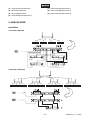
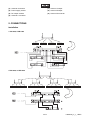
Connect the antenna distributor via the Audio Out-socket and a standard microphone lead with a microphone
input socket of your mixer.
Connect the wireless receivers via the BNC-sockets and the DC OUT-sockets with the antenna distributor.
Adjust the antennas vertically.
6. OPERATION
With the ON/OFF-switch, you can switch the device on and off.
If microphone signals are being received, the RF-LEDs are illuminated.
For optimum receiving please follow these instructions:
• Maintain a line-of-sight between the transmitter and receiver antennas, if possible. Avoid placing
transmitter and receiver where metal or other dense materials may be present.
• Avoid placing the receiver near computers or other RF generating equipment.
If the receiver is no longer used, switch the device off.
IMPORTANT: Every wireless microphone installation is a unique situation, and can present a variety of
problems. Never attempt a live performance without first conducting a test of the system in the performing
area. If major changes (additional wireless systems or intercoms, relocation of scenery, etc.) have been
made since the last test, check the wireless system again - as close to performance time as possible.
7. CLEANING AND MAINTENANCE
DANGER TO LIFE!
Disconnect from mains before starting maintenance operation!
We recommend a frequent cleaning of the device. Please use a soft lint-free and moistened cloth. Never use
alcohol or solvents!
There are no servicable parts inside the device except for the fuse. Maintenance and service operations are
only to be carried out by authorized dealers.
Replacing the fuse
If the fine-wire fuse of the device fuses, only replace the fuse by a fuse of same type and rating.
Please note: This fuse is being used for both 115 V and 230 V.
Before replacing the fuse, unplug mains lead.
Procedure:
Step 1: Open the fuseholder on the rearpanel with a fitting screwdriver.
Step 2: Remove the old fuse from the fuseholder.
Step 3: Install the new fuse in the fuseholder.
Step 4: Replace the fuseholder in the housing.
Should you need any spare parts, please use genuine parts.
If the power supply cable of this device becomes damaged, it has to be replaced by a special power supply
cable available at your dealer.
Should you have further questions, please contact your dealer.
16/17
13063020_V_1_1.DOC