
1
BEDIENUNGSANLEITUNG
USER'S MANUAL
MODE D'EMPLOI
GEQ-215 XL
2 x 15 band equalizer
Für weiteren Gebrauch aufbewahren!
Keep this manual for future needs!
Gardez ce mode d’emploi pour des
utilisations ultérieures!
© Copyright
Nachdruck verboten!
Reproduction prohibited!
Réproduction interdit!
MULTI-LANGUAGE-INSTRUCTIONS
Inhaltsverzeichnis/Table of contents/Sommaire
EINFÜHRUNG................................................................................................................................................... 5
SICHERHEITSHINWEISE................................................................................................................................. 6
BESTIMMUNGSGEMÄSSE VERWENDUNG .................................................................................................. 7
GERÄTEBESCHREIBUNG .............................................................................................................................. 8
INSTALLATION ................................................................................................................................................ 8
INBETRIEBNAHME .......................................................................................................................................... 9
EINFÜHRUNG IN DEN EQUALIZER................................................................................................................ 9
BEDIENUNG ................................................................................................................................................... 10
REINIGUNG UND WARTUNG........................................................................................................................ 11
TECHNISCHE DATEN .................................................................................................................................... 12
INTRODUCTION ............................................................................................................................................. 13
SAFETY INSTRUCTIONS .............................................................................................................................. 14
OPERATING DETERMINATIONS.................................................................................................................. 15
DESCRIPTION ................................................................................................................................................ 15
INSTALLATION .............................................................................................................................................. 16
STARTING UP ................................................................................................................................................ 17
STARTERS' GUIDE TO EQUALIZERS.......................................................................................................... 17
OPERATION ................................................................................................................................................... 18
CLEANING AND MAINTENANCE ................................................................................................................. 19
TECHNICAL SPECIFICATIONS..................................................................................................................... 19
NTRODUCTION .............................................................................................................................................. 20
INSTRUCTIONS DE SÉCURITÉ .................................................................................................................... 20
EMPLOI SELON LES PRESCRIPTIONS ....................................................................................................... 22
DESCRIPTION DE L’APPAREIL.................................................................................................................... 22
INSTALLATION .............................................................................................................................................. 22
MISE EN MARCHE ......................................................................................................................................... 23
QUELQUES CONSEILS AUX DÉBUTANTS ................................................................................................. 23
MANIEMENT ................................................................................................................................................... 24
NETTOYAGE ET MAINTENANCE ................................................................................................................. 25
CARACTÉRISTIQUES TECHNIQUES ........................................................................................................... 25
Das neueste Update dieser Bedienungsanleitung finden Sie im Internet unter:
You can find the latest update of this user manual in the Internet under:
Vous pouvez trouvez la dernière version de ce mode d'emploi dans l'Internet sous:
www.omnitronic.com
4/25
10355530_V_1_0.DOC
BEDIENUNGSANLEITUNG
GEQ-215 XL Equalizer
Lesen Sie vor der ersten Inbetriebnahme zur eigenen Sicherheit diese Bedienungsanleitung sorgfältig durch!
Alle Personen, die mit der Aufstellung, Inbetriebnahme, Bedienung, Wartung und Instandhaltung dieses
Gerätes zu tun haben, müssen
- entsprechend qualifiziert sein
- diese Bedienungsanleitung genau beachten
- die Bedienungsanleitung als Teil des Produkts betrachten
- die Bedienungsanleitung während der Lebensdauer des Produkts behalten
- die Bedienungsanleitung an jeden nachfolgenden Besitzer oder Benutzer des Produkts weitergeben
- sich die letzte Version der Anleitung im Internet herunter laden
EINFÜHRUNG
Wir freuen uns, dass Sie sich für einen OMNITRONIC GEQ-215 XL entschieden haben. Wenn Sie
nachfolgende Hinweise beachten, sind wir sicher, dass Sie lange Zeit Freude an Ihrem Kauf haben werden.
Nehmen Sie den GEQ-215 XL aus der Verpackung.
Features
2 x 15-Band Equalizer
•XL-Faderweg 50 mm
•Über den Bereichswahlschalter lässt sich die Anzeige von ±6 dB auf ±15 dB umschalten
•EQ-In/Out Schalter zum schnellen Vergleich des Sounds mit bzw. ohne Equalizer
•Über die Level-Control lässt sich die Lautstärke für die linke und rechte Seite getrennt einstellen
•LED-Anzeigen für alle wichtigen Funktionen
•Ein- und Ausgänge über Klinken-, XLR-Buchsen und Klemmleiste
•19" Rackeinbau möglich
5/25
10355530_V_1_0.DOC
SICHERHEITSHINWEISE
ACHTUNG!
Seien Sie besonders vorsichtig beim Umgang mit gefährlicher Netzspannung. Bei dieser Spannung können Sie einen lebensgefährlichen elektrischen Schlag erhalten!
Dieses Gerät hat das Werk in sicherheitstechnisch einwandfreiem Zustand verlassen. Um diesen Zustand zu
erhalten und einen gefahrlosen Betrieb sicherzustellen, muss der Anwender unbedingt die Sicherheitshinweise und die Warnvermerke beachten, die in dieser Gebrauchsanweisung enthalten sind.
Unbedingt lesen:
Bei Schäden, die durch Nichtbeachtung dieser Bedienungsanleitung verursacht werden, erlischt der
Garantieanspruch. Für daraus resultierende Folgeschäden übernimmt der Hersteller keine Haftung.
Bitte überprüfen Sie vor der ersten Inbetriebnahme, ob kein offensichtlicher Transportschaden vorliegt.
Sollten Sie Schäden an der Netzleitung oder am Gehäuse entdecken, nehmen Sie das Gerät nicht in Betrieb
und setzen sich bitte mit Ihrem Fachhändler in Verbindung.
Der Aufbau entspricht der Schutzklasse I. Der Netzstecker darf nur an eine Schutzkontakt-Steckdose
angeschlossen werden, deren Spannung und Frequenz mit dem Typenschild des Gerätes genau
übereinstimmt. Ungeeignete Spannungen und ungeeignete Steckdosen können zur Zerstörung des Gerätes
und zu tödlichen Stromschlägen führen.
Den Netzstecker immer als letztes einstecken. Der Netzstecker muss dabei gewaltfrei eingesetzt werden.
Achten Sie auf einen festen Sitz des Netzsteckers.
Lassen Sie die Netzleitung nicht mit anderen Kabeln in Kontakt kommen! Seien Sie vorsichtig beim Umgang
mit Netzleitungen und -anschlüssen. Fassen Sie diese Teile nie mit feuchten Händen an! Feuchte Hände
können tödliche Stromschläge zu Folge haben.
Netzleitungen nicht verändern, knicken, mechanisch belasten, durch Druck belasten, ziehen, erhitzen und
nicht in die Nähe von Hitze- oder Kältequellen bringen. Bei Missachtung kann es zu Beschädigungen der
Netzleitung, zu Brand oder zu tödlichen Stromschlägen kommen.
Die Kabeleinführung oder die Kupplung am Gerät dürfen nicht durch Zug belastet werden. Es muss stets
eine ausreichende Kabellänge zum Gerät hin vorhanden sein. Andernfalls kann das Kabel beschädigt
werden, was zu tödlichen Stromschlägen führen kann.
Achten Sie darauf, dass die Netzleitung nicht gequetscht oder durch scharfe Kanten beschädigt werden
kann. Überprüfen Sie das Gerät und die Netzleitung in regelmäßigen Abständen auf Beschädigungen.
Werden Verlängerungsleitungen verwendet muss sichergestellt werden, dass der Adernquerschnitt für die
benötigte Stromzufuhr des Gerätes zugelassen ist. Alle Warnhinweise für die Netzleitung gelten auch für
evtl. Verlängerungsleitungen.
Gerät bei Nichtbenutzung und vor jeder Reinigung vom Netz trennen! Fassen Sie dazu den Netzstecker an
der Griffläche an und ziehen Sie niemals an der Netzleitung! Ansonsten kann das Kabel und der Stecker
beschädigt werden was zu tödlichen Stromschlägen führen kann. Sind Stecker oder Geräteschalter, z. B.
durch Einbau nicht erreichbar, so muss netzseitig eine allpolige Abschaltung vorgenommen werden.
Wenn der Netzstecker oder das Gerät staubig ist, dann muss es außer Betrieb genommen werden, der
Stromkreis muss allpolig unterbrochen werden und das Gerät mit einem trockenen Tuch gereinigt werden.
Staub kann die Isolation reduzieren, was zu tödlichen Stromschlägen führen kann. Stärkere Verschmutzungen im und am Gerät dürfen nur von einem Fachmann beseitigt werden.
Es dürfen unter keinen Umständen Flüssigkeiten aller Art in Steckdosen, Steckverbindungen oder in
irgendwelche Geräteöffnungen oder Geräteritzen eindringen. Besteht der Verdacht, dass - auch nur
minimale - Flüssigkeit in das Gerät eingedrungen sein könnte, muss das Gerät sofort allpolig vom Netz
getrennt werden. Dies gilt auch, wenn das Gerät hoher Luftfeuchtigkeit ausgesetzt war. Auch wenn das
Gerät scheinbar noch funktioniert, muss es von einen Fachmann überprüft werden ob durch den
6/25
10355530_V_1_0.DOC
Flüssigkeitseintritt eventuell Isolationen beeinträchtigt wurden. Reduzierte Isolationen können tödliche
Stromschläge hervorrufen.
In das Gerät dürfen keine fremden Gegenstände gelangen. Dies gilt insbesondere für Metallteile. Sollten
auch nur kleinste Metallteile wie Heft- und Büroklammern oder gröbere Metallspäne in das Gerät gelangen,
so ist das Gerät sofort außer Betrieb zu nehmen und allpolig vom Netz zu trennen. Durch Metallteile
hervorgerufene Fehlfunktionen und Kurzschlüsse können tödliche Verletzungen zur Folge haben.
Bevor das Gerät eingeschaltet wird, müssen alle Fader und Lautstärkeregler auf "0" bzw. auf minimum
gestellt werden.
ACHTUNG: Endstufen immer zuletzt einschalten und zuerst ausschalten!
Kinder und Laien vom Gerät fern halten!
GESUNDHEITSRISIKO!
Beim Betreiben einer Beschallungsanlage lassen sich Lautstärkepegel erzeugen, die zu irreparablen Gehörschäden führen können.
Im Geräteinneren befinden sich keine zu wartenden Teile. Eventuelle Servicearbeiten sind ausschließlich
dem autorisierten Fachhandel vorbehalten!
BESTIMMUNGSGEMÄSSE VERWENDUNG
Bei diesem Gerät handelt es sich um einen professionellen Equalizer, mit dem sich die Frequenzanteile der
ankommenden Audiosignale verändern lassen. Dieses Produkt ist für den Anschluss an 230 V, 50 Hz Wechselspannung zugelassen und wurde ausschließlich zur Verwendung in Innenräumen konzipiert.
Vermeiden Sie Erschütterungen und jegliche Gewaltanwendung bei der Installierung oder Inbetriebnahme
des Gerätes.
Achten Sie bei der Wahl des Installationsortes darauf, dass das Gerät nicht zu großer Hitze, Feuchtigkeit
und Staub ausgesetzt wird. Vergewissern Sie sich, dass keine Kabel frei herumliegen. Sie gefährden Ihre
eigene und die Sicherheit Dritter!
Betreiben Sie das Gerät nicht in extrem heißen (über 35° C) oder extrem kalten (unter 5° C) Umgebungen.
Halten Sie das Gerät von direkter Sonneneinstrahlung (auch beim Transport in geschlossenen Wägen) und
Heizkörpern fern.
Nehmen Sie das Gerät erst in Betrieb, nachdem Sie sich mit seinen Funktionen vertraut gemacht haben.
Lassen Sie das Gerät nicht von Personen bedienen, die sich nicht mit dem Gerät auskennen. Wenn Geräte
nicht mehr korrekt funktionieren, ist das meist das Ergebnis von unsachgemäßer Bedienung!
Reinigen Sie das Gerät niemals mit Lösungsmitteln oder scharfen Reinigungsmitteln, sondern verwenden
Sie ein weiches und angefeuchtetes Tuch.
Soll das Gerät transportiert werden, verwenden Sie bitte die Originalverpackung, um Transportschäden zu
vermeiden.
Beachten Sie bitte, dass eigenmächtige Veränderungen an dem Gerät aus Sicherheitsgründen verboten
sind.
Der Serienbarcode darf niemals vom Gerät entfernt werden, da ansonsten der Garantieanspruch erlischt.
Wird das Gerät anders verwendet als in dieser Bedienungsanleitung beschrieben, kann dies zu Schäden am
Produkt führen und der Garantieanspruch erlischt. Außerdem ist jede andere Verwendung mit Gefahren, wie
z. B. Kurzschluss, Brand, elektrischem Schlag, etc. verbunden.
7/25
10355530_V_1_0.DOC
GERÄTEBESCHREIBUNG
Der OMNITRONIC Equalizer ist für den professionellen Anwendungsbereich vorgesehen. Die Anschlüsse
befinden sich auf der Rückseite des Gerätes, die Bedienelemente befinden sich auf der Frontseite.
Die Ein- und Ausgänge des OMNITRONIC Equalizers sind mit Klinkenbuchsen, XLR-Einbaukupplungen und
-steckern und Klemmleisten ausgestattet.
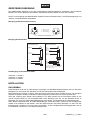
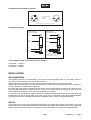
Belegung symmetrische XLR-Leitung:
Symmetrische XLR-Verbindung
1
2
3
1 = Masse / Schirm
2 = Plus-Phase (+)
3 = Minus-Phase (-)
1
Eingang
2
3
Ausgang
Um eine XLR-Verbindung unsymmetrisch an zu schließen,
müssen Pin 1 und 3 gebrückt werden.
Belegung Klinkenstecker:
Unsymmetrischer 6,35 mm
Mono-Klinkenstecker
Symmetrischer 6,35 mm
Stereo-Klinkenstecker
Tip =
Signal (+)
Tip =
Plus-Phase (+)
Ring =
Minus-Phase (-)
Sleeve =
Masse / Schirm
Sleeve =
Masse / Schirm
Tip
Tip
Sleeve
Ring
Sleeve
Zugentlastung
Zugentlastung
Um einen Stereo-Klinkenstecker unsymmetrisch an zu schließen, müssen Ring und
Sleeve gebrückt werden.
Die Belegung der Klemmleiste lautet:
Anschluss 1 = Signal +
Anschluss 2 = Signal –
Anschluss 3 = Masse
INSTALLATION
RACKEINBAU
Dieser Equalizer ist für ein 19" Rack/483mm vorgesehen. Die Mindesteinbautiefe liegt bei 185 mm. Die Höhe
beträgt 88 mm. Sie können den Equalizer mit vier Schrauben M6 im Rack befestigen.
Beim Rackeinbau ist darauf zu achten, dass die warme Luft aus dem Rack entweichen kann und genügend
Abstand zu anderen Geräten vorhanden ist. Das Rackgehäuse sollte mit einem Lüfter versehen sein.
Seien Sie vorsichtig beim Einbau des Equalizers in ein Rack. Bauen Sie die schwersten Geräte in den
unteren Teil des Racks ein. Die Frontplatte allein reicht allerdings nicht aus, um den Equalizer sicher zu
befestigen. Es muss eine gleichmäßige Befestigung durch Boden- und Seitenschienen gewährleistet sein.
Wenn Racks transportiert oder für mobile Beschallungen verwendet werden, sollte man die Rückbügel der
Geräte noch zusätzlich an den Boden- oder den Seitenschienen des Racks befestigen. So kann sich der
Equalizer beim Transport nicht nach hinten verschieben, da die Frontplatte Beschleunigungskräfte, wie sie
im Roadbetrieb vorkommen, nicht alleine auffangen kann.
8/25
10355530_V_1_0.DOC
EINGÄNGE
Gute Kabelführung verbessert die Klangqualität Ihres PA-Systems enorm. Eingangskabel sollten kurz und
direkt sein, da hohe Frequenzen stark gedämpft werden, wenn die Kabel unnötig lang sind. Außerdem ist die
Gefahr von Brummeinstreuungen und Rauschen bei langen Kabeln erheblich größer. Müssen jedoch lange
Kabelwege zurückgelegt werden, sollten auf jeden Fall symmetrische Kabel verwendet werden.
Die Eingänge Ihres OMNITRONIC Equalizers sind mit XLR- und Klinkenbuchsen und Klemmleisten
ausgestattet.
AUSGÄNGE
Die Ausgänge Ihres OMNITRONIC Equalizers sind mit XLR- und Klinkenbuchsen und Klemmleisten
ausgestattet.
NETZANSCHLUSS
Der OMNITRONIC Equalizer darf erst dann ans Stromnetz angeschlossen werden, wenn sichergestellt ist,
dass die richtige Netzspannung (230 V) vorhanden ist. Ihr Gerät ist mit einer T 0,5 A, 250 V Sicherung
abgesichert.
INBETRIEBNAHME
Versichern Sie sich, dass der Equalizer vor den Verstärkern angeschaltet wird, um den
Einschalt(bass)schlag zu vermeiden. Dadurch wird verhindert, dass Sie Ihr Publikum verärgern und schützt
Ihre Lautsprecher und Endstufen vor Beschädigung.
EINFÜHRUNG IN DEN EQUALIZER
Auf den ersten Blick scheint ein Equalizer ein kompliziertes Gerät zu sein. Jedoch ist in Theorie und Praxis
ein Equalizer ein einfach zu handhabendes Gerät. Die meisten Leute sind mit Höhen- und Tiefenregelungen
bereits vertraut. Diese Steuerung teilt das Audiosignal in zwei Frequenzen - die niedrigen und die hohen
Frequenzen. Der Bassknopf ist nun ein Lautstärkeregler für die Bässe, und der Höhenknopf ist nun ein
Lautstärkeregler für die Höhen.
"Hz" steht für Hertz. "KHz" steht für Kilohertz (tausend Hertz). Das ist die Maßeinheit für Schwingungen
(Perioden) pro Sekunde. Sie sehen, dass Musikwellen in Schwingungen pro Sekunde gemessen werden.
Sehr tiefe Töne wie eine Bassgitarre haben sehr viel weniger Schwingungen pro Sekunde wie ein hoher Ton
von z.B. einem Becken.
Es ist somit offensichtlich, dass wenn nur die Lautstärke der Becken ohne die Bassgitarre erhöht werden
soll, der Regler für die Höhen (treble) aufgedreht wird.
Die Becken beanspruchen nur einen kleinen Frequenzbereich, der von dem Höhenregler eingestellt werden
kann. Im Bereich der Höhenregelung befindet sich auch der Frequenzbereich des Gesanges. Diese
beanspruchen einen ähnlich nahe liegenden Frequenzbereich wie die Becken, nur etwas tiefer.
Eine Höhenregelung alleine bietet also keine Möglichkeit, die Lautstärke der Becken zu erhöhen, ohne dass
auch der Gesang lauter wird. Was gebraucht wird ist eine Möglichkeit, das Audiosignal nicht nur in zwei,
sondern in so viel wie möglich Frequenzbereiche zu teilen. Das ermöglicht uns eine nahezu unbegrenzte
Flexibilität der Lautstärkenregelung des ganzen Frequenzbandes in unserem Audioprogramm.
Das ist genau das, was ein Graphic Equalizer ermöglicht. Er gibt uns eine präzise Kontrolle über die
Lautstärke von vielen nahe liegenden Frequenzbereichen. Jede von ihnen kann dem gesamten
Audioprogramm hinzugefügt oder "abgezogen" werden.
In einem Aufnahmestudio oder auf einer Bühne werden Graphic Equalizer für drei spezielle Zwecke
verwendet:
1.) ROOM EQUALIZATION: Jeder Raum (Zimmer, Halle usw.), in dem Musik gespielt wird, fügt der Musik
ihren eigenen Charakter zu. Das hängt ganz von den Wänden, Böden, Decken, Möbeln und Leuten ab,
welche sich in dem Raum befinden und die Musik mehr oder weniger absorbieren. Jeder Raum verstärkt
9/25
10355530_V_1_0.DOC
oder schwächt einige Frequenzen. Hier werden die Graphic Equalizer eingesetzt, um die Veränderung
aufzufangen.
2.) FEEDBACK CONTROL: Ohne einen Graphic Equalizer ist es sehr schwierig, eine Rückkopplung (das
ohrenbetäubende, pfeifende Geräusch, wenn vom Mikrofon ein Signal von einem Lautsprecher
aufgenommen und erneut verstärkt wird) zu vermeiden oder abzustellen. Ein Graphic Equalizer kann die
entsprechende Frequenz absenken, ohne die verbleibenden Frequenzen zu beeinflussen.
3.) CREATIVE RECORDING: Hier werden Graphic Equalizer dazu verwendet, um einen Sound "heller",
"voller" oder ganz anders zu gestalten. Das hängt ganz von der Kreativität des Bedieners ab. Eine Stimme
kann dahin verändert werden, dass man glaubt, sie käme z.B. aus einem Telefon. Einer akustischen Gitarre
kann ein "metallischer" Klang verliehen werden. Dem Bassdrum kann mehr Präsenz gegeben werden.
BEDIENUNG
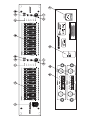
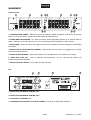
Frontseite
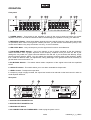
1. NETZSCHALTER - Schaltet Ihren Equalizer an und aus. Versichern Sie sich, dass der Equalizer vor den
Verstärkern angeschaltet wird, um den Einschalt(bass)schlag zu vermeiden. Dadurch wird verhindert, dass
Sie Ihr Publikum verärgern und schützt Ihre Lautsprecher und Endstufen vor Beschädigung.
2. FREQUENZ-Fader - Wenn Sie den jeweiligen Fader hochziehen, erhöhen Sie die Lautstärke. Wenn Sie
diesen Fader herunterziehen, verringern Sie die Lautstärke.
Wenn Sie diesen Fader unter "Null" bewegen, spüren Sie eine Rasterung. Das macht es Ihnen sehr einfach,
den Nullpunkt zu finden.
3. LED-AUSSTEUERUNGSANZEIGE - Dient zur Überwachung der Signalpegel, um Verzerrungen durch
Übersteuerung zu vermeiden.
4. EQUALISATIONSBEREICH-Wahlschalter (RANGE) - Einer der Gründe, warum man einen Graphic
Equalizer verwendet, ist, dass die eingestellten Frequenzfader selbst eine Kurve bilden, je nach dem, wie
Sie sie eingestellt haben. Sollten Ihre Einstellungen jedoch zu nahe beieinander liegen, ist die Anzeige
schwer einzustellen und abzulesen.
Für vereinfachtes Einstellen der gewünschten Pegelkurve verlängern Sie den Faderweg, indem Sie den
Range Selector Schalter drücken. Sie können den maximal regelbaren Bereich der Frequenzfader von 15
dB auf 6 dB absenken und Ihre Einstellungen vornehmen. Sie haben nun den Vorteil, dass die Fader weiter
bewegt werden müssen, um dasselbe Ergebnis zu bekommen wie zuvor.
5. EQ BYPASS-Schalter - Dieser Schalter erlaubt einen unmittelbaren Vergleich des Sounds mit und ohne
Equalizer.
6. LOW CUT-Schalter - Dieser Schalter erlaubt es Ihnen die unerwünschten tiefen Frequenzen abschalten.
7. LEVEL-Regler - Hiermit wird der Ausgangspegel des Gerätes eingestellt.
Werden Frequenzbänder stark angehoben, muss der Ausgangspegel über den Level-Regler abgesenkt
werden, um eine Übersteuerung der Endstufe zu vermeiden.
10/25
10355530_V_1_0.DOC
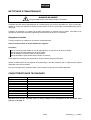
Rückseite
1. EINGANGS-/AUSGANGSBUCHSEN CH-1
2. EINGANGS-/AUSGANGSBUCHSEN CH-2
3. GROUND LIFT-Schalter
4. NETZANSCHLUSS mit SICHERUNGSHALTER - Stecken Sie hier die Netzleitung ein.
REINIGUNG UND WARTUNG
LEBENSGEFAHR!
Vor Wartungsarbeiten unbedingt allpolig vom Netz trennen!
Das Gerät sollte regelmäßig von Verunreinigungen wie Staub usw. gereinigt werden. Verwenden Sie zur
Reinigung ein fusselfreies, angefeuchtetes Tuch. Auf keinen Fall Alkohol oder irgendwelche Lösungsmittel
zur Reinigung verwenden!
Im Geräteinneren befinden sich außer der Sicherung keine zu wartenden Teile. Wartungs- und Servicearbeiten sind ausschließlich dem autorisierten Fachhandel vorbehalten!
Sicherungswechsel
Wenn die Feinsicherung des Gerätes defekt ist, darf diese nur durch eine Sicherung gleichen Typs ersetzt
werden.
Vor dem Sicherungswechsel ist das Gerät allpolig von der Netzspannung zu trennen (Netzstecker
ziehen).
Vorgehensweise:
Schritt 1: Öffnen Sie den Sicherungshalter an der Geräterückseite mit einem passenden
Schraubendreher.
Schritt 2: Entfernen Sie die defekte Sicherung aus dem Sicherungshalter.
Schritt 3: Setzen Sie die neue Sicherung in den Sicherungshalter ein.
Schritt 4: Setzen Sie den Sicherungshalter wieder im Gehäuse ein.
Sollten einmal Ersatzteile benötigt werden, verwenden Sie bitte nur Originalersatzteile.
Wenn die Anschlussleitung dieses Gerätes beschädigt wird, muss sie durch eine besondere Anschlussleitung ersetzt werden, die von Ihrem Fachhändler erhältlich ist.
Sollten Sie noch weitere Fragen haben, steht Ihnen Ihr Fachhändler jederzeit gerne zur Verfügung.
11/25
10355530_V_1_0.DOC
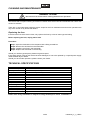
TECHNISCHE DATEN
Spannungsversorgung:
Gesamtanschlusswert:
Eingangsimpedanz:
Ausgangsimpedanz:
Anschlussbuchsen:
Geräuschspannungsabstand:
Übersprechen:
Klirrfaktor:
Frequenzbereich:
Ausgangsregelung:
Kontrollbereich:
Frequenzen:
Low Cut:
Maße (BxTxH):
Gewicht:
230 V AC, 50 Hz ~
10 W
10/20 kOhm (uns./symm.)
300/150 kOhm (uns./symm.)
XLR, Klinke, Klemmleiste
>95 dB
>90 dB
<0,01 %
20 Hz - 20 kHz, ±0,5 dB
- ~ bis + 6 dB
±6 dBu oder ±15 dBu
25/40/63/100/160/250/400/630 Hz/1k/1,6k/2,5k/4k/6,3k/10k/16 kHz
30 Hz, -3 dB
483 x 175 x 88 mm
3 kg
Bitte beachten Sie: Technische Änderungen ohne vorherige Ankündigung und Irrtum vorbehalten.
16.05.2006 ©
12/25
10355530_V_1_0.DOC
USER MANUAL
GEQ-215 XL Equalizer
CAUTION!
Keep this device away from rain and moisture!
Unplug mains lead before opening the housing!
For your own safety, please read this user manual carefully before you initial start-up.
Every person involved with the installation, operation and maintenance of this device has to
- be qualified
- follow the instructions of this manual
- consider this manual to be part of the total product
- keep this manual for the entire service life of the product
- pass this manual on to every further owner or user of the product
- download the latest version of the user manual from the Internet
INTRODUCTION
Thank you for having chosen an OMNITRONIC GEQ-231. If you follow the instructions given in this manual,
we are sure that you will enjoy this device for a long period of time.
Unpack your GEQ-231.
Features
2 x 15-band equalizer
•XL fader way 50 mm
•Via the EQ range selector, the display can be switched from ±6 dB to ±15 dB
•EQ-In/Out switch for quick comparison of the sound with equalizer or without
•The overall output-level can be adjusted via the level-control
•LED-displays for all important functions
•Inputs and outputs via 6.3" jack sockets, XLR-sockets and screw terminals
•19" rack-mounting possible
13/25
10355530_V_1_0.DOC
SAFETY INSTRUCTIONS
CAUTION!
Be careful with your operations. With a dangerous voltage you can suffer a dangerous
electric shock when touching the wires!
This device has left our premises in absolutely perfect condition. In order to maintain this condition and to
ensure a safe operation, it is absolutely necessary for the user to follow the safety instructions and warning
notes written in this user manual.
Important:
Damages caused by the disregard of this user manual are not subject to warranty. The dealer will
not accept liability for any resulting defects or problems.
If the device has been exposed to drastic temperature fluctuation (e.g. after transportation), do not switch it
on immediately. The arising condensation water might damage your device. Leave the device switched off
until it has reached room temperature.
Please make sure that there are no obvious transport damages. Should you notice any damages on the A/C
connection cable or on the casing, do not take the device into operation and immediately consult your local
dealer.
This device falls under protection-class I. The power plug must only be plugged into a protection class I
outlet. The voltage and frequency must exactly be the same as stated on the device. Wrong voltages or
power outlets can lead to the destruction of the device and to mortal electrical shock.
Always plug in the power plug least. The power plug must always be inserted without force. Make sure that
the plug is tightly connected with the outlet.
Never let the power-cord come into contact with other cables! Handle the power-cord and all connections
with the mains with particular caution! Never touch them with wet hands, as this could lead to mortal
electrical shock.
Never modify, bend, strain mechanically, put pressure on, pull or heat up the power cord. Never operate next
to sources of heat or cold. Disregard can lead to power cord damages, fire or mortal electrical shock.
The cable insert or the female part in the device must never be strained. There must always be sufficient
cable to the device. Otherwise, the cable may be damaged which may lead to mortal damage.
Make sure that the power-cord is never crimped or damaged by sharp edges. Check the device and the
power-cord from time to time.
If extension cords are used, make sure that the core diameter is sufficient for the required power
consumption of the device. All warnings concerning the power cords are also valid for possible extension
cords.
Always disconnect from the mains, when the device is not in use or before cleaning it. Only handle the
power-cord by the plug. Never pull out the plug by tugging the power-cord. Otherwise, the cable or plug can
be damaged leading to mortal electrical shock. If the power plug or the power switch is not accessible, the
device must be disconnected via the mains.
If the power plug or the device is dusty, the device must be taken out of operation, disconnected and then be
cleaned with a dry cloth. Dust can reduce the insulation which may lead to mortal electrical shock. More
severe dirt in and at the device should only be removed by a specialist.
There must never enter any liquid into power outlets, extension cords or any holes in the housing of the
device. If you suppose that also a minimal amount of liquid may have entered the device, it must immediately
be disconnected. This is also valid, if the device was exposed to high humidity. Also if the device is still
14/25
10355530_V_1_0.DOC
running, the device must be checked by a specialist if the liquid has reduced any insulation. Reduced
insulation can cause mortal electrical shock.
There must never be any objects entering into the device. This is especially valid for metal parts. If any metal
parts like staples or coarse metal chips enter into the device, the device must be taken out of operation and
disconnected immediately. Malfunction or short-circuits caused by metal parts may cause mortal injuries.
Before the device is switched on all faders and volume controls have to be set to "0" or "min" position.
CAUTION: Turn the amplifier on last and off first!
Please note that damages caused by manual modifications on the device or unauthorized operation by
unqualified persons are not subject to warranty.
Keep away children and amateurs!
HEALTH HAZARD!
By operating an amplifying system, you can produce excessive sound pressure levels that may
lead to permanent hearing loss.
There are no serviceable parts inside the device. Maintenance and service operations are only to be carried
out by authorized dealers.
OPERATING DETERMINATIONS
This device is a professional equalizer for modifying the frequencies of the incoming audio-signal. This
product is allowed to be operated with an alternating current of 230 V, 50 Hz and was designed for indoor
use only.
Do not shake the device. Avoid brute force when installing or operating the device.
When choosing the installation-spot, please make sure that the device is not exposed to extreme heat,
moisture or dust. There should not be any cables lying around. You endanger your own and the safety of
others!
Do not operate the device in extremely hot (more than 30° C) or extremely cold (less than 5° C)
surroundings. Keep away from direct insulation (particularly in cars) and heaters.
Operate the device only after having familiarized with its functions. Do not permit operation by persons not
qualified for operating the device. Most damages are the result of unprofessional operation!
Never use solvents or aggressive detergents in order to clean the device! Rather use a soft and damp cloth.
Please use the original packaging if the device is to be transported.
Please consider that unauthorized modifications on the device are forbidden due to safety reasons!
Never remove the serial barcode from the device as this would make the guarantee void.
If this device will be operated in any way different to the one described in this manual, the product may suffer
damages and the guarantee becomes void. Furthermore, any other operation may lead to dangers like shortcircuit, burns, electric shock, etc.
DESCRIPTION
The OMNITRONIC Equalizer is designed for professional application. The inputs and outputs are located on
the rear panel, the gain controls on the front panel.
15/25
10355530_V_1_0.DOC
Occupation balanced XLR-connection:
Balanced use with XLR connectors
2
1
3
1 = Ground / Shield
2 = Hot (+)
3 = Cold (-)
1
Input
2
3
Output
For unbalanced use pin 1 and pin 3 have to be bridged
Occupation jack plug:
Unbalanced use of
mono 1/4" jack plugs
Balanced use of
stereo 1/4" jack plugs
Tip =
Signal (+)
Tip =
hot (+)
Ring =
cold (-)
Sleeve =
Ground / Shield
Sleeve =
Ground / Shield
Tip
Tip
Sleeve
Ring
Sleeve
Strain relief clamp
Strain relief clamp
For connection of balanced and
unbalanced plugs, ring and sleeve have
to be bridged at the stereo plug.
The occupation of the screw connctors is as follows:
Connection 1 = Signal +
Connection 2 = Signal Connection 3 = Shield
INSTALLATION
RACK MOUNTING
The equalizer is built for 19" racks/483mm. The minimum mounting depth is 185 mm. The height is 88 mm.
You can fix the equalizer with four screws M6 in the rack.
When mounting the equalizer into a rack, please make sure that there is a proper air circulation.
Please make sure that there is enough space around the device so that the heated air can be passed on.
The rack should be provided with a cooling fan.
Be careful when mounting the equalizer into the rack. Put the heaviest devices into the lower part of the rack.
Be aware that fastening the equalizer with four screws on the front panel is not enough. In order to ensure
safety, additional fastening by using ground and side bars is necessary.
If racks are to be transported or used for mobile use, additionally fasten the devices by connecting the rear
brackets with the side or ground bars of the rack. In this way, the equalizer cannot be pushed backwards.
The front panel alone is not designed to absorb acceleration forces occuring during transportation.
INPUTS
A good cable run improves the sound quality remarkably. Input cables should be short and direct, since high
frequencies will be mostly be absorbed if the cables are unnecessarily long. Besides that a longer cable may
lead to humming and noise trouble. If long cable runs are unavoidable, you should use balanced cables.
16/25
10355530_V_1_0.DOC
The inputs of your OMNITRONIC GEQ-215 XL are equipped with XLR and ¼“ jack-sockets and screw
connectors.
OUTPUTS
The high damping factor of your equalizer supplies a clear sound reproduction. Unnecessarily long and thin
cables will influence the damping factor and thus the low frequencies in a negative way. In order to
safeguard good sound quality, the damping factor should lie around 50.
The outputs of your OMNITRONIC GEQ-215 XL are equipped with 6.35 jacks, XLR and screw connectors.
CONNECTION TO THE MAINS
Connect the OMNITRONIC GEQ-215 XL only after having made sure that the right voltage (230 V) is
available. This device features a T 0.5 A, 250 V fuse.
STARTING UP
Make sure to power-up before your power amplifier is turned in order to avoid loud transients which could
damage your speakers or annoy your audience.
STARTERS' GUIDE TO EQUALIZERS
At first glance, a graphic equalizer may appear to be a complicated device, but actually, in theory and
operation, a graphic equalizer is a very simple device. Most people are familiar with bass and treble tone
controls. These controls work by dividing the audio signal into two frequency bands - the low frequencies and
the high frequencies. The bass knob, then, effectively becomes a volume control for the lows and the treble
knob gives us volume control over the highs.
"Hz" stands for "Hertz". "KHz" stands for "thousands of Hertz". These are measures of sound-cycles per
second. You see, sound waves are measured by the number of cycles or vibrations they make in one
second. Very low-pitched sounds like bass guitars have far fewer cycles per second than high-pitched
sounds like cymbals. So, if you want to increase the volume of the cymbals in a recording without affecting
the volume of the bass guitar, use the treble control.
The cymbals occupy only a very small band of frequencies within those controlled by the treble control. Also
included in the range of the treble control are vocal sounds. They occupy a similarly narrow band of
frequencies somewhat lower than the cymbals. A treble control alone does not offer enough flexibility of
control to allow us to increase the volume of the cymbals without also increasing
the volume of the vocals. What is needed is a type of control that divides the audio signal, not into two
bands, but as many bands as possible. This would allow us almost unlimited flexibility of control over the
tone "colors" in our audio program.
That's exactly what a graphic equalizer allows us to do. It gives us precise control over the volume of
manynarrow frequency bands, each of which can add (or subtract) their own particular tone "color" to our
overall sound.
In the recording studio and on stage, graphic equalizers are generally used for three distinct purposes:
1.) ROOM EQUALIZATION: Every room adds its own "character" to the sound of music played in it because
of the way the walls, floors, ceilings, furnishings and people absorb or reflect the sound waves. Every room
boosts some frequencies and attenuates others in this way. So graphic equalizers are used, in this context,
to compensate for the "damage" done to the sound by the room itself.
2.) FEEDBACK CONTROL: Without a graphic equalizer, it is quite difficult to stop feedback (that piercing,
whistling sound that happens when microphones pick-up and reamplify the sound from the speakers). A
graphic equalizer can zero in on the offending frequency and reduce it, leaving the rest of the music
unchanged.
3.) CREATIVE RECORDING: Graphic equalizers are routinely used to make certain sounds "brighter" or
"fuller" or even radically different, depending on the creative whims of the operator. A voice can be made to
sound as though it's coming through a telephone line, for example. An acoustic guitar can be given a metallic
sparkle. A kick drum can get more "snap". It may be a cliché, but it's true: With a graphic equalizer, you are
only limited by your own imagination!
17/25
10355530_V_1_0.DOC
OPERATION
Front panel
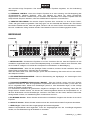
1. POWER Switch - Turns power to the equalizer on and off. Be sure to power-up before your power
amplifier is turned on to avoid loud transients which could damage your speakers or annoy your audience.
2. FREQUENCY Faders - Move these sliders upwards to boost a specific frequency. Move them downwards
cut (decrease) them. When moving these controls past zero, you will feel the center-detent (notch) in the
control which makes it very easy to find zero in a hurry, or even in the dark.
3. LED LEVEL-Meter - Lets you keep an eye on the signal level in order to avoid distortion.
4. EQUALIZER RANGE Selector - One of the reasons to use a graphic equalizer is that the frequency
sliders themselves form a graphic depiction of the frequency response curve you have set. But if your
settings are very subtle, the "graph" becomes difficult to set and see. If you encounter this difficulty, simply
push this Range Selector Switch. You can reduce the maximum boost/cut range of the frequency sliders
from 15 dB to 6 dB and make your adjustments, taking advantage of the greater fader travel necessary to
get the same amount of hoost or cut.
5. EQ BYPASS Selector - This switch allows instant comparison of the original sound with the equalized
sound.
6. LOW CUT Selector - This switch allows you to cut down unwanted low frequencies.
7. LEVEL Control - To adjust the output level.
If a frequency range is highly boosted, the output level needs to be reduced via the level-control in order to
avoid amplifier distorsion.
Rear panel
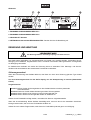
1. INPUT/OUTPUT-SOCKETS CH-1
2. INPUT/OUTPUT-SOCKETS CH-2
3. GROUND LIFT-Switch
4. AC-CONNECTION with FUSEHOLDER - Used to plug the power-cord in.
18/25
10355530_V_1_0.DOC
CLEANING AND MAINTENANCE
DANGER TO LIFE!
Disconnect from mains before starting maintenance operation!
We recommend a frequent cleaning of the device. Please use a soft lint-free and moistened cloth. Never use
alcohol or solvents!
There are no servicable parts inside the device except for the fuse. Maintenance and service operations are
only to be carried out by authorized dealers.
Replacing the fuse
If the fine-wire fuse of the device fuses, only replace the fuse by a fuse of same type and rating.
Before replacing the fuse, unplug mains lead.
Procedure:
Step 1: Open the fuseholder on the rearpanel with a fitting screwdriver.
Step 2: Remove the old fuse from the fuseholder.
Step 3: Install the new fuse in the fuseholder.
Step 4: Replace the fuseholder in the housing.
Should you need any spare parts, please use genuine parts.
If the power supply cable of this device becomes damaged, it has to be replaced by a special power supply
cable available at your dealer.
Should you have further questions, please contact your dealer.
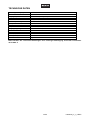
TECHNICAL SPECIFICATIONS
Power supply:
Power consumption:
Input impedance:
Output impedance:
In/Out connectors:
S/N-ratio:
Crosstalk:
Distortion:
Frequency range:
Output level:
Control range:
Frequencies:
Low Cut:
Dimensions (WxDxH):
Weight:
230 V AC, 50 Hz ~
10 W
10/20 kOhms (unb./bal.)
300/150 kOhms (unb./bal.)
XLR, jack, screw connectors
>95 dB
>90 dB
< 0.01 %
20 Hz - 20 kHz, ±0.5 dB
- ~ to + 6 dB
±6 dBu or ±15 dBu
25/40/63/100/160/250/400/630Hz/1k/1.6k/2.5k/4k/6.3k/10k/16 kHz
30 Hz, -3 dB
483 x 175 x 88 mm
3 kg
Please note: Every information is subject to change without prior notice. 16.05.2006 ©
19/25
10355530_V_1_0.DOC
MODE D'EMPLOI
GEQ-215 XL égalisateur
ATTENTION!
Protéger de l'humidité.
Débrancher avant d’ouvrier le boîtier!
Pour votre propre sécurité, veuillez lire ce mode d'emploi avec attention avant la première mise en service.
Toute personne ayant à faire avec le montage, la mise en marche, le maniement et l’entretien de cet
appareil doit
- être suffisamment qualifiée
- suivre strictement les instructions de service suivantes
- considérer ce mode d'emploi comme faisant partie de l'appareil
- conserver le mode d'emploi pendant la durée de vie de l'article
- transmettre le mode d'emploi à un éventuel acheteur ou utilisateur de l'appareil
- télécharger la version ultérieure du mode d'emploi d'Internet
INTRODUCTION
Nous vous remercions d'avoir choisi un OMNITRONIC GEQ-231. Si vous respectez les instructions de
service suivantes, vous allez profiter longtemps de votre achat.
Sortez le GEQ-215 XL de son emballage.
INSTRUCTIONS DE SECURITE
ATTENTION!
Soyez prudent, lors de manipulations électriques avec une tension dangereuse vous
êtes soumis à des risques d'électrocution!
Cet appareil a quitté les ateliers dans un état irréprochable. Pour assurer un bon fonctionnement, sans
danger, l'utilisateur doit suivre les instructions contenues dans ce mode d'emploi.
Attention:
Tout dommage occasionné par la non observation des instructions de montage ou d'utilisation n'est
pas couvert par la garantie.
L'appareil ne doit pas être mis en service lorsqu'il à été transporté d'un endroit froid à un endroit chaud. Il se
forme de la condensation qui pourrait endommager l'appareil. Laissez celui-ci atteindre la température
ambiante avant de le mettre en service.
20/25
10355530_V_1_0.DOC
Avant tout, assurez-vous que l'appareil n'a pas subi de dommages lors de son transport. Si l'appareil ou le
câble d'alimentation est endommagé, ne jamais mettre l'appareil en service. Contactez immédiatement votre
revendeur.
La construction de l'appareil correspond à la classe de protection I. La fiche secteur doit être connectée
uniquement à une prise secteur à contact de protection. La tension et la fréquence doivent correspondre
exactement à la plaque signalétique de l'appareil. Des tensions inappropriées et des prises secteur
inappropriées peuvent mener à la destruction de l'appareil et à des électrocutions mortelles.
Toujours connecter la fiche secteur en dernier. Il faut insérer la fiche secteur de manière non-violente. Faites
attention à une position bien fixée de la fiche secteur.
Ne laissez pas entrer le câble secteur en contact avec d'autres câbles! Soyez prudent lors du travail avec
des câbles secteur et des alimentations secteur. Ne touchez jamais ces parties avec des mains mouillées!
Des mains mouillées peuvent causer des électrocutions mortelles.
Ne pas modifier, plier, charger de manière mécanique, charger de pression, tirer, chauffer et ne pas
positionner des câbles secteur à proximité de sources de chaleur ou de froid. En cas de non-respect des
dommages du câble secteur, des feux ou des électrocutions mortelles peuvent en résulter.
L'insertion de câble ou l'accouplement à l'appareil ne doit pas être chargé par tension. Il faut toujours avoir
une longueur de câble vers l'appareil, manque de quoi le câble peut être endommagé, ce qui peut mener à
des électrocutions mortelles.
Prenez garde de ne pas coincer ou abimer le câble d'alimentation. Contrôler l'appareil et le câble
d'alimentation régulièrement.
En cas d'utilisation de rallonges il faut s´assurer que la section du fil est admissible pour l'alimentation en
courant nécessaire pour l'appareil. Toutes les indications d'avertissement pour le câble secteur sont aussi
valables pour des rallonges éventuellement utilisées.
Débranchez l'appareil lorsque vous ne l'utilisez pas et avant de le nettoyer. Pour ce faire, utilisez les
surfaces de maintien sur la fiche; ne tirez jamais le câble secteur! Sinon, le câble et la fiche peuvent être
endommagées, ce qui peut mener à des électrocutions mortelles. Si la fiche ou l'interrupteur de l'appareil ne
sont pas accessibles, par exemple parce qu'ils sont enfermés par d'autres pièces, il faut procéder à une
disjonction de tous les pôles du côté secteur.
Si la fiche secteur ou l'appareil sont couverts de poussière, il faut le mettre hors service, il faut interrompre le
circuit sur tous les pôles, et nettoyer l'appareil avec un chiffon sec. La poussière peut réduire l'isolation, ce
qui peut mener à des électrocutions mortelles. Des encrassements plus importants dans l'appareil et sur
l'extérieur de l'appareil ne doivent être enlevés que par un technicien compétent.
Dans aucun cas des liquides de tout genre doivent pénétrer dans des fiches secteur, des connecteurs ou
dans des ouvertures ou fentes d'appareil. S'il y a un doute sur le fait que même une quantité minimale de
liquide aurait pénétré dans l'appareil, il faut immédiatement séparer l'appareil du secteur avec tous les pôles.
C'est valable aussi, si l'appareil a été exposé à une humidité de l'air élevée. Même si l'appareil apparemment
fonctionne toujours, il doit être examiné par un technicien compétent, si par la pénétration de liquide des
isolations ont été éventuellement endommagées. Des isolations réduites peuvent causer des électrocutions
mortelles.
Des objets étranges ne doivent pas entrer dans l'appareil. C'est valable particulièrement pour des pièces
métalliques. Au cas où mêmes des pièces métalliques les plus petites comme des agrafes et trombones ou
des éclats métalliques devaient entrer dans l'appareil, il faut immédiatement mettre l'appareil hors service et
le séparer du secteur avec tous les pôles (tirer la fiche secteur). Des dysfonctionnements et court-circuits
peuvent causer des blessures mortelles.
Avant la mise en marche de l'appareil, assurez-vous que tous les faders et tous les régulateurs de volumes
soient en position "0" ou au minimum.
ATTENTION: Allumez toujour l'amplificateur en dernier lieu et éteignez le en premier!
21/25
10355530_V_1_0.DOC
Tenir les enfants et les novices éloignées de l'appareil.
ATTENTION: Un volume d'écoute trop élevé peut causer des troubles auditifs!
L'intérieur de l'appareil ne contient pas de parties nécessitant un entretien. L'entretien et les réparations
doivent être effectués par un technicien compétent!
EMPLOI SELON LES PRESCRIPTIONS
Cet appareil est un egalisateur professionel pour modifier les fréquences du signal audio. Cet appareil doit
être connecté avec une tension alternative de 230 V, 50 Hz et a été conçu pour un usage dans des locaux
clos.
Eviter les secousses et l'emploi de force lors de l’installation ou l'utilisation de l'appareil.
Quand choisir le place d'installation, évitez toutefois les endroits humides, poussiéreux ou trop chauds.
Assurez-vous que les câbles ne traînent pas au sol. Il en va de votre propre sécurité et de celle d'autrui.
Ne pas utiliser l'appareil lorsque la température ambiante est supérieure à 35° C ou inférieure à 5° C. Ne pas
exposer l'appareil directement aux rayons solaires (lors d'un transport dans un véhicule fermé par exemple).
N'utilisez l'appareil qu'après avoir pris connaissance de ses fonctions et possibilités. Ne laissez pas des
personnes incompétentes utiliser cet appareil. La plupart des pannes survenant sur cet appareil sont dues à
une utilisation inappropriée par des personnes incompétentes.
Ne nettoyez pas l'appareil avec des produits de nettoyages trop puissants ou abrasifs. Utilisez un chiffon
doux, humide.
Si vous deviez transporter l'appareil, utilisez l'emballage d'origine pour éviter tout dommage.
Notez que pour des raisons de sécurité, il est interdit d'entreprendre toutes modifications sur l'appareil.
Il est interdit de retirer le code barre de l'appareil. Ceci annulerait toute garantie.
Si l'appareil est utilisé autrement que décrit dans ce mode d'emploi, ceci peut causer des dommages au
produit et la garantie cesse alors. Par ailleurs, chaque autre utilisation est liée à des dangers, comme par ex.
court circuit, incendie, électrocution, etc.
DESCRIPTION DE L’APPAREIL
Cet égalisateur est concu pour l'usage professionel. Les connexions se trouvent au dos de l’appareil et les
régulateurs au face.
Les entrées et les sorties équipées avec des douilles de jack 6,3 mm.
INSTALLATION
Instructions pour l’installation en rack
Cet égalisateur est concu pour être installé dans un rack 19"/483mm. Le profondeur minimum pour
l'installation est 185 mm. Fixez l'égalisateur avec 4 vis M6 au rack.
Lors de l’installation du rack faire attention à ce que l’air chaud puisse s’échapper du rack et qu’il y ait
suffisamment de distance entre les étages de sortie. Le boîtier du rack devrait être équipé d’un ventilateur.
Pour cette raison ils sont munis de ventilateurs qui assurent le refroidissement nécessaire.
Soyez prudent lors de l’installation de l’égalisateur dans un rack. Intégrer les appareils les plus lourds dans
la partie inférieure du rack. La face avant ne suffit pas elle-même pour fixer un égalisateur. Procéder à une
fixation proportionnée à l'aidedes barres transversales et laterales.
22/25
10355530_V_1_0.DOC
Si des racks sont transportés ou utilisés pour des sonorisations mobiles, les ceintres au revers de l’appareil
devraient être fixés en plus à la base ou aux barres du rack. Ainsi l'égalisateur ne se deplacera pas en
arrière lors du transport.
Raccords d’entrée
Un bon guidage des câbles ameliore remarquablement la qualité du son de votre système PA. Monter les
câbles d’entrée le plus court et le plus direct possible. Une longueur inutile du cablage affaiblira les hautes
fréquences, le risque de ronflement et de bruit en sera plus grand. Si de longs cablages sont inévitables,
utilisez des câbles symmétriques. Les entrées de votre OMNITRONIC GEQ-215 XL sont équipés avec
douilles de jack 6,3 mm et XLR et borniers.
Raccords de sortie
Les sorties de votre OMNITRONIC GEQ-215 XL sont équipés avec douilles de jack 6,3 mm et XLR et
borniers.
Connexion au secteur
Brancher le OMNITRONIC GEQ-215 XL seulement au réseau après avoir assuré une tension de réseau de
230 V. Votre appareil est protégé par un fusible T 0,5 A, 250 V.
MISE EN MARCHE
Mettre l'équaliseur sous tension en premier de façon à éviter les larsens qui peuvent endommager vos hauts
parleurs.
QUELQUES CONSEILS AUX DÉBUTANTS
A première vue un équaliseur graphique peut paraître compliqué, alors qu'en théorie comme en pratique
c'est un appareil des plus simple. La plupart des gens sont familiarisés avec les égalisateurs de graves et
d'aiguës. Ces contrôles partagent les fréquences en deux groupes: fréquences basses et fréquences aiguës.
"Hz" signifie "Hertz" et "Khz" signifie Kilohertz. Ce sont les mesures des cycles sonores par secondes. Les
ondes sonores sont mesurées au nombre de cycles ou vibrations qu'ils produisent en une seconde.
Les sons à tonalités graves comme ceux d'une guitare basse ont peu de cycles alors que les sons à
tonalités aiguës comme ceux de cymbales ont beaucoup plus de cycles. Il devient donc évident si vous
voulez augmenter les graves sans affecter les aiguës d'utiliser le potentiomètre des graves.
Les fréquences aiguës prennent une bande très fine. La voix, par exemple occupe une gamme de fréquence
inférieure aux cymbales. Le contrôle des graves et des aiguës seulement n'offre qu'un nombre de
possibilités limitées alors que nous aurions besoin d'un appareil divisant le signal en autant de fréquences
possible.
C'est exactement ce que fait un équaliseur graphique. Il offre un contrôle de l'ensemble des fréquences
divisées.
Sur scène et en concert les équaliseurs graphiques ont trois utilisations possibles:
1.) EGALISATION DE LA PIÈCE: chaque pièce à son propre son et c'est pourquoi on utilise un équaliseur
pour compenser ou eventuellement augmenter les fréquences.
2.) CONTRÔLE DU FEEDBACK: Il est difficile sans équaliseur d'éliminer les larsens ou retour feedback.
Avec, on peux travailler la fréquence incriminée.
3.) ENREGISTREMENT: Les équaliseur graphiques sont souvent utilisés pour rendre les sons plus "nets" ou
plus "ronds". Une voix peux apparaitre comme provenant du téléphone, par exemple. Une guitare
accoustique peux se tranformer en guitare métallique. Une caisse claire peut être travaillée pour donner un
son qui ait la "pêche". Avec un équaliseur graphique vous n'êtes limité que par votre imagination!
23/25
10355530_V_1_0.DOC
MANIEMENT
Panneau avant
1. INTERRUPTEUR POWER - Mise sous tension de l'appareil. Mettre l'équaliseur sous tension en premier
de façon à éviter les larsens qui peuvent endommager vos hauts parleurs.
2. FADER DES FREQUENCES - Le curseur en position haute augmente l'impulsion et en position basse la
réduit. L'utilisation du curseur dans le noir ou si vous êtes pressé est facilitée par le repère central.
3. AFFICHAGE - Indique le niveau des signaux et permet de visulaliser et d’éviter l’apparition d’éventuelles
surcharges.
4. SÉLÉCTION DE L'ÉGALISATION (RANGE) - Cette fonction est utile quand vos réglages sont si subtils
qu'ils en deviennent illisibles.
5. SÉLÉCTION EQ BYPASS - Cette fonction permet une comparaison du son travaillé avec l'original.
6. SÉLÉCTION LOW CUT - Avec ce sélecteur des fréquences Low Cut, vous pouvez éliminer les
fréquences graves pas désirées.
7. REGULATEUR DU NIVEAU - Pour régler le niveau de sortie.
Dos
1. DOUILLES D'ENTRÉE/DE SORTIES CH-1
2. DOUILLES D'ENTRÉE/DE SORTIES CH-2
3. Commutateur GROUND LIFT
4. CONNEXION DE TENSION avec PORTE-FUSIBLE - Connecter le câble d'alimentation ici.
24/25
10355530_V_1_0.DOC
NETTOYAGE ET MAINTENANCE
DANGER DE MORT!
Toujours débrancher avant de proceder à l'entretien!
L'appareil doit être nettoyé régulièrement de contaminations comme de la poussière etc. Pour le nettoyage,
utilisez un torchon non pelucheux humide. Ne pas utiliser un aucun cas de l’alcool ou des détergents pour le
nettoyage.
L'intérieur de l'appareil ne contient pas de parts nécessitant un entretien sauf le fusible. L'entretien et les
réparations doivent être effectués uniquement par du personnel de service compétent!
Remplacer le fusible
Toujours remplacer un fusible par un autre de modèle identique.
Avant le remplacement du fusible débrancher l'appareil.
Procédure:
Pas 1: Ouvriez le porte-fusible au dos de l'appareil avec un tournevis et le retirer du boîtier.
Pas 2: Retirez le fusible défectueux du porte-fusible.
Pas 3: Installez le nouveau fusible au porte-fusible.
Pas 4: Remettez le porte-fusible dans le boîtier et vissez-le.
Si des pièces de rechange sont nécéssaires, toujours utiliser des pièces d'origine.
Quand le câble secteur de cet appareil est endommagé, il doit être remplacé par un câble secteur spécial
disponible chez votre revendeur.
Pour tout renseignement complémentaire, votre revendeur se tient à votre entière disposition.
CARACTÉRISTIQUES TECHNIQUES
Alimentation:
Puissance de rendement:
Impedance d'entrée:
Impedance de sortie:
Bande de fréquences:
Rapport s/n:
Fréquences:
Bande de contrôle:
Distortion:
Dimensions:
Poids:
230 V AC, 50 Hz ~
10 W
10/20 kOhm
300/150 kOhm
20 Hz - 20 kHz, ±0.5 dB
>90 dB
25/40/63/100/160/250/400/630 Hz/1k/1,6k/2,5k/4k/6,3k/10k/16 kHz
±6 dBu oder ±15 dBu
< 0,01 %
483 x 175 x 88 mm
3 kg
Attention! Les donnés imprimée dans ce mode d’emploi sont susceptibles d’être modifiées sans
préavis. 16.05.2006 ©
25/25
10355530_V_1_0.DOC





![3URIHVVLRQDO HTXDOL]HU [ EDQG](http://vs1.manualzilla.com/store/data/006777932_1-770431aef94eb6d0b1e65f32ec91758b-150x150.png)