1
1.2
Quick start
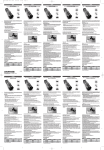
Visit www.secu4.com/check to check the compatibility of your phone.
1 Verification of the compatibility o mobile Phone
Follow section 2.2 below.
1.1 Via an SMS
Send a text message with the key word BWD followed with the number corresponding to the brand
of your mobile (see table) example: BWD01 for Nokia at The number corresponding to your country
of residence (see table).
2
Downloading the application on your mobile phone
2.1
If the brand of your mobile phone is not on the table, it is not compatible.
Brand
Nokia
Sony
Motorola
Samsung
Blackberry
HTC
HP
Sharp
Qtek
Orange
Via the Internet on your computer
SMS
BWD01
BWD02
BWD03
BWD04
BWD05
BWD06
BWD07
BWD08
BWD09
BWD10
Country
Number
Tariff
France
Germany
Switzerland
United Kingdom
Spain
Netherlands
Norway
Portugal
Denmark
Ireland
United States
Belgium
Sweden
53800
50200
911
89892
5332
3555
2098
4001
1231
57800
91010
3236
72720
EUR 0.20
EUR 0.29
CHF 0.20
GBP 0.25
EUR 1.39
EUR 0.25
NOK 1.00
EUR 2.00
DKK 0.50
EUR 2.50
USD 0.25
EUR 0.50
SEK 2.00
(Local rate of your de operator + cost of the sms, max. 2 sms received)
In return, you will receive an SMS containing the list of compatible phone models
Via an sms
Check beforehand that your mobile phone is configured to access the mobile Internet. If this is
not the case, proceed to section 2.2.
Send an SMS with the keyword BWDS at The number corresponding to your country of
residence (see table). and follow the instructions that will be sent back.
If you have trouble, go to section 2.2.
2.2
Via the Internet on your computer
Browse on www.secu4.com/install and follow the download process described on the site.
3 Setting up the card
First use – IMPORTANT
Load your BlueWatchDog™ on your computer or using the travel charger.
The light
flashes. The charging time is approximately 5 hours.
During this first period of charge, it is advised not to disconnect the BlueWatchDog™ before
the light
is completely switched off.
Make sure your phone model is in this list
Thereafter, follow section 2.1 to download the application.
If your phone model is not included in the list of SMS received, it entails that you can not use the BlueWatchDog™
with this phone.
4
English
Layout.indd 4-5
English
5
26.9.2008 9:23:31