1
Chapter 2. Installing TouchKit
TouchKit is software, which contains drivers and two utilities of the touch panel
controllers for RS232, PS/2 and USB on Linux operation system. The two utilities are
as follows:
•
Configuration support
The calibration and draw test of touch panel are done by this utility.
•
Right button support
This is utility for emulating the right and left button of mouse through controlling
touch panel. Users can toggle between right or left mouse buttons by this utility.
We provide two way to install the driver, one is automatic installation and the other is
install manually.
Automatic Installation
Before install TouchKit for Linux, please make sure that (1) users have root privilege
and that (2) X window system has been configured correctly.
TouchKit driver package was compressed with uuencode software, it needs
uudecode to extract it. The uuencode/uudecode software was include in the package
sharutils-x.x.x-xx.xxxx.rpm
This package should be found in the Linux CD disc or in Touchkit driver CD disc.
Follow these steps to install TouchKit for Linux. ( For ex. InMandrake 9.x )
1. Put the TouchKit CD to CD-ROM and mount it on Linux operation system.
e.g. with command: mount /dev/cdrom /mnt/cdrom
2. Change directory to /mnt/cdrom/Linux/Mandrake9
3. Launch the installation script file ( touchkit.setup.sh or touchkit.setupxxx.sh )
with command “sh [scrip file name]”. For ex. “sh touchkit.setup.sh”
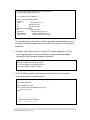
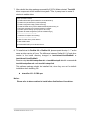
4. The script will extract the driver source files to the directory “/tmp/touchkit”, and
start driver installation.
TouchKit Manual for Linux v1.0.2
5