1
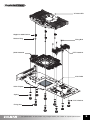
8. Spring Insertion onto the Fixing Nuts
Spring
Slowly turn the Spring in counterclockwise motion so that the
Spring is completely attached to the Fixing Nut.
Note 1) Ends of the spring have different diameters. Use the
end with smaller diameter to install on the fixing nut.
Note 2) Make sure that the Spring is installed perpendicularly
and not leaning to one side.
Fixing Nut
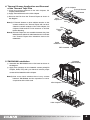
9. Assembly of Fixing Nuts onto the Nipples
① Place a PVC Washer over each Nipple for 8800 Series.
② Slightly screw each of the four Spring-attached Fixing
Nuts onto each Nipple, then tighten each Fixing Nut one
rotation at a time until all are completely tightened.
③ In SLI or CrossFire setups, interference may occur
between one card’s cooler(VF1000 LED) and the other
card’s cooler fixing Nuts. In such a case, please use the
enclosed Fixing Nuts for SLI/CrossFire.
Note 1) Fully tightening one Fixing Nut at a time may result in
damaging the VGA Chipset. Please tighten each
Fixing Nut one rotation at a time until all are
completely tightened.
Note 2) Make sure that the VGA Cooler’s base and the VGA
Chipset are completely in contact with each other.
Note 3) Make sure that the VGA Cooler does not
interfere with the VGA card’s capacitors and other
components.
Fixing Nut
PVC Washer
Fixing Nut
for SLI/CrossFire
VF1000 LED
Fixing Nut
Spring
10. ZM-RHS88 Assembly
PVC Washer
① After installing the VF1000 LED, place a PVC Washer
over each Nipple.
② Slightly screw each of the Spring-attached Fixing Nuts
onto each Nipple, then tighten each Fixing Nut one
rotation at a time until all are completely tightened.
Note 1) Fully tightening one Fixing Nut at a time may result in
damaging the Chipset. Please tighten each of the
five Fixing Nuts one rotation at a time until all are
completely tightened.
Note 2) Make sure that the VF1000 LED and ZM-RHS88 do
not interfere with the VGA card’s capacitors and
other components.
Nipple
VF1000 LED
Nipple
PCIe Slot
11. VGA Card Installation
Insert the assembled VGA card into the motherboard’s PCIe
slot. Use the Fixing Bolt to secure the VGA card onto the
computer case.
Fixing
Bolt
(Note) The Geforce 8800 Series VGA card has a power
connector. Please plug in the power connector.
※
The specifications of the product may change without prior notice to improve performance.
6