1
Spatial effects of the projection patterns can be created by using a smoke-machine. Make sure that you do
not use too much smoke so that the laser beam is swallowed after a short distance and the audience cannot
see the projections.
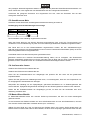
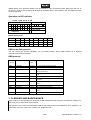
Operation via DIP-switches
0=OFF 1=ON X=0FF or ON
FUNCTION
DIPSWITCH CHART
1 2 3 4 5 6 7 8 9 10
X X X X X X X X X 1 AUTO MODE
X X X X X X X X 1 1 Sound Active
SET DMX
0 DMX MODE
ADDRESS
Sound-active mode:
DIP1
DIP2
DIP3
PAGE
OFF
OFF
OFF
1
ON
OFF ON
OFF ON ON
OFF OFF OFF
2
3
4
OFF ON
OFF ON
OFF OFF ON ON
ON ON ON ON
5
6
7
8
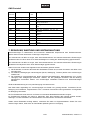
DMX-controlled operation
You can control the devices individually via your DMX-controller. Every DMX-channel has a different
occupation with different features.
DMX-protocol
DMX
Channel
CH1
CH2
CH3
Function
DMX512
data
enabling
Page Selection
Image Selection
0 255
0 255
0 255
CH4
Speed
0 255
CH5
CH6
Fade out
Zoom
0 255
0 255
x size
0 255
CH8
CH9
CH10
Y size
Spinning
X position
0 255
0 255
0 255
CH11
Y position
0 255
CH7
Description
Above 32 enable DMX controller
9 Page
N static/moving images with numbers of
average distribution.
scanning
speed
project only above 53
0 for the minimum, 255 for the
maximum.
Adjust
the
horizontal
rotation
Adjust the vertical ratation
The overal pattern spinning
Adjust
the
horizontal
position
Adjust the vertical position
7. CLEANING AND MAINTENANCE
Laser products in discotheques are technical working installations and fall under the Equipment Safety Act.
This is why they must fulfill its requirements.
The operator has to make sure that safety-relating and machine-technical installations are inspected by an
expert after every four years in the course of an acceptance test.
30/31
00042042.DOC, Version 1.0