1
Settings
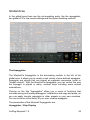
The Settings on the "Rear Panel" of the LinPlug MorphoX are accessed by
clicking on the LinPlug MorphoX logo at the bottom left of the LinPlug
MorphoX's front panel or the Setup button at the bottom right of the front
panel. Several controls have been located here to make the front panel
less crowded, and also so that they are not changed accidentally while the
LinPlug MorphoX is in use.
Dial Mode is used to select the LinPlug MorphoX's dial operation mode.
Two modes are available: Circular and Linear. In Circular mode the
MorphoX's dials track cursor movement in a circular fashion around the
dial. In Linear mode the MorphoX's dials track vertical cursor movement.
It's important to note that some sequencers can override the instrument's
dial mode settings so if the MorphoX's dials are not operating in the correct
manner, check the host program's settings.
Master Tune is used to set the overall tuning of the LinPlug MorphoX if no
micro-tuning file is loaded . Tuning can be set from 415.3 Hz to 466.2 Hz.
ECS to A and B when this option is checked, the MorphoX's MIDI Learn
will not only allow to control a certain parameter, but will also support
LinPlug MorphoX 1.0
35