1
Caution
The LCD screen can be damaged by excessive pressure, direct sunlight, or liquids.
Joystick and keyboard should be used in environments within the temperature and
humidity range specified.
Please follow instructions defined in this manual for setup and operation.
List Of Items
1. Power adapter (Input: 100-240VAC 50/60Hz, Output: DC 12V)
2. Users Manual
Keyboard Specs
Exit key: exit and back to previous menu;
(Setup) Setup key: press and hold for 3s to setup keyboard’s parameter.
(F1) Adjust the control speed, it has 4 level: 1, 2, 3, 4
(Preset) Preset special status of ptz (including direction and zoom times). This key should be used together with number key;
(Shot)
Recall special status of ptz (including direction and zoom times).
This key should be used together with number key.
(Pattern) Start/stop pattern record: press for 3 seconds to start pattern record, after all operation, press this key again to stop pattern record, this key should be used together with number key.
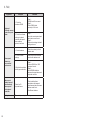
Item
Parameters
(Run)
Recall the stored pattern, this key should be used together with Power Supply
DC12V 1A ±10%
number key.
Temperature
-10°C ~ 55°C
Humidity
≤90%RH (No cream node)
(0) ~ (9) Number key: 0, 1, 2, 3, 4, 5, 6, 7, 8, 9.
Communication
RS485 Half-duplex
Baud Rate
2400bps, 4800bps, 9600bps, 19200bps, 38400bps
Screen
128*32 LCD screen
Package Size
180 (L) x 165 (W) x 90 (H)mm
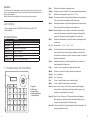
1.1 Function Keys On Front Panel
②
①
③
④
2
(Esc)
Es c
Setu p
F1
Prese t
1
2
Shot
4
5
Patter n
7
89
ut o
0
Ru nA
3
6
Ca m
Tele
Wide
Nea r
Far
Ope n
Clos e
Aux on
Aux off
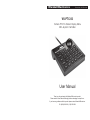
1. Joystick
2. LCD screen
3. Function keys
4. Speed dome Setup and recall keys
(Auto)
Control ptz rotate in horizontal direction automatically or clear input number: when user input some numbers, press this key can delete the numbers, else it will control ptz rotate in horizontal direction automatically.
(Cam)
Address selection key: select ptz address; this key should be used together with number key.
(Tele)
Zoom in: zoom in the object, enlarge the object size.
(Wide)
Zoom out: zoom out the object, reduce the object size.
(Open)
Iris + / enlarge iris.
(Close)
Iris - / reduce iris.
(Far)
Focus+ / adjust the lens focus on distant object.
(Near)
Focus- / adjust the lens focus on near object.
(Aux on) Aux on: turn on ptz’s aux. This key should be used together
with number key; directly press this key without keying in any number, the controlled ptz ID will add 1.
(Aux off) Aux off: turn off ptz’s aux. This key should be used together with number key; directly press this key without keying in any number, the controlled ptz ID will take away 1.
(Aux off) Press and hold for 3s to recall number 95 preset, normally it will be opening the menu of ptz.
3