1
5. Recommended Use
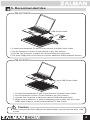
ZM-NC3000S
USB Power Cable
USB device
① Connect the Notebook PC and Cooler with the included Power Cable.
② Set the Notebook Cooler’s Power Switch to the ‘ON’ position.
③ Use the Fan Controller to adjust the desired RPM and noise level.
※ The extra USB ports can be used to connect additional USB peripheral devices.
ZM-NC3000U
Y-type USB Power Cable
① Connect the Notebook PC and Cooler with the included Power Cable.
② Set the Notebook Cooler’s Power Switch to the ‘ON’ position.
③ Use the Fan Controller to adjust the desired RPM and noise level.
※ When using a USB hub, to ensure adequate power supply, use the Y-type
USB Power Cable to connect the Notebook PC and Cooler.
Caution
▶ When using the NC3000 USB port for data transfer, use devices that draw 1.9W
or less.
.COM
4