1
6. OPERATION
Prior to switching on, set the master control to zero to avoid damage to the hearing by a volume which is too
high when switching on. Switch on the mixer with the power switch and then the connected units. After
operation, switch off the mixer with the power switch.
6.1 Basic adjustment of the input channels
1
2
First set both gain controls and the crossfader to mid-position.
3
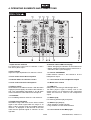
Press the selector switch CUE TO METER to switch on the monitoring mode (red LED lights). Now the
LED level display indicates the prefader signal of channel 1 on the left side and the prefader signal of
channel 2 on the right side.
4
Via the LED level display, adjust the input amplification of both input channels with the channel faders.
An optimum level control is obtained if level values in the 0 dB range are shown at average volume. If
the red LEDs of the meter light up, there is an overload of the channel signal. After level adjustment, the
cannel faders should be at approx. 2/3 of their maximum. With the faders advanced only slightly or very
far, the level must be matched by adjusting the input amplification. Turn up or turn back the respective
gain control accordingly.
The master control determines the total level of all connected audio sources. Set the control to approx.
2/3 of its maximum.
6.2 Adjustment of the output level
The output signal is fed to the adjustable master output and to the recording output without individual level
control.
1
2
Disengage the switch CUE TO METER. Now the LED level display indicates the master signal.
3
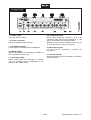
The recording signal at the output REC OUT is not affected by the master control.
Via the LED level display, adjust the master signal to an optimum level with the master control. Usually
an optimum level control is obtained if the LED level display shows values in the 0 dB range at average
volume. However, if the output level at the master output is too high for the following unit, the master
signal must be controlled to a corresponding lower level.
6.3 Crossfading between the input channels
The crossfader allows crossfading between both input channels:
• crossfader moved to the left: fade-in of channel 1 and fade-out of channel 2
• crossfader moved to the right: fade-in of channel 2 and fade-out of channel 1
• For hearing the signals of the two channels at the same level, set the crossfader to mid-position.
6.4 Prefader listening to the input channels
The cue function allows monitoring each of the input channels via headphones connected to the jack
HEADPHONES even if the corresponding channel is faded out. Thus, it is possible, e. g. to time the moment
for fading in an audio source.
1
For prefader listening to a channel, adjust the control CUE MIXING: Turn the control to the left to
monitor channel 1, turn the control to the right to monitor channel 2. In mid-position, both channels can
be heard at the same volume.
2
Adjust the desired headphones volume with the control CUE LEVEL.
18/20
00072954.DOC, Version 1.0