1
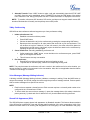
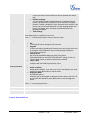
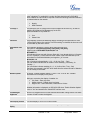
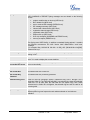
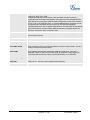
Disable Missed Call
Backlight
Default is “No”. By default, LCD backlight will light up whenever there is a missed call.
HEADSET Key Mode
Default Mode:
- Toggle to Headset when using Speaker/Handset
- Dial, pick up call or hang up call using Headset
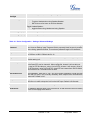
Toggle Headset/Speaker:
- toggle between using Headset and using Speaker
Headset TX gain (dB)
Set headset TX gain to -6, 0 or +6. Default is 0 db.
Headset RX gain (dB)
Set headset RX gain to -6, 0 or +6. Default is 0 db.
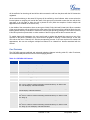
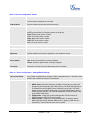
Table 14: Device Configuration – Settings /Advanced Settings
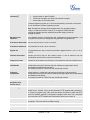
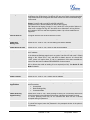
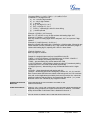
Admin
Password
Administrator password. Only the administrator can access the “Advanced Settings”
and “Account Settings” page. Password field is purposely blank for security reasons
after clicking update and saved. The maximum password length is 25 characters.
Layer 3 QoS
This field defines the layer 3 QoS parameter. It is the value used for IP Precedence
or Diff-Serv or MPLS. Default value is 12.
Layer 2 QoS
This contains the value used for layer 2 802.1Q/VLAN tag and 802.1p priority value.
Default setting is 0.
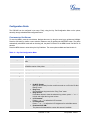
Local RTP port
This parameter defines the local RTP-RTCP port pair used to listen and transmit. It
is the base RTP port for channel 0. When configured, channel 0 will use this port
_value for RTP and the port_value+1 for its RTCP; channel 1 will use port_value+2
for RTP and port_value+3 for its RTCP. Local RTP port ranges from 1024 to 65400
and must be even. The default value is 5004.
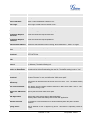
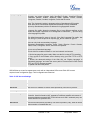
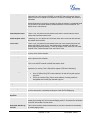
Use Random Port
This parameter, when set to “Yes”, will force random generation of both the local
SIP and RTP ports. This is usually necessary when multiple GXPs are behind the
same NAT. Default is “No”.
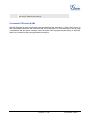
Keep-alive interval
This parameter specifies how often the GXP1450 sends a blank UDP packet to the
SIP server in order to keep the “hole” on the NAT open. Default is 20 seconds.
Use NAT IP
NAT IP address used in SIP/SDP message. Default is blank.
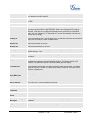
STUN Server
IP address or Domain name of the STUN server. STUN resolution result will display
in the STATUS page of the Web UI.
GXP1450 User Manual
Firmware 1.0.1.66
Page 24 of 38
Last Updated: 05/2011