1
CAWT - COM Automation With Tcl
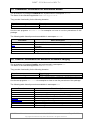
WorksheetToHtmlFile
WorksheetToImg
WorksheetToMatlabFile
WorksheetToMediaWikiFile
WorksheetToRawImageFile
WorksheetToTablelist
WorksheetToWikitFile
WorksheetToWordTable
WriteCsvFile
WriteHtmlFile
WriteMatlabFile
WriteMediaWikiFile
WriteRawImageFile
WriteWikitFile
Table 3: CawtExcel Reference
Write the values of a worksheet into a HTML table file.
Put worksheet background colors into a photo image.
Insert the values of a worksheet into a Matlab file.
Insert the values of a worksheet into a MediaWiki table file.
Insert the values of a worksheet into a raw photo image
file.
Insert the values of a worksheet into a tablelist.
Insert the values of a worksheet into a Wikit table file.
Insert the values of a worksheet into a Word table.
Write the values of a matrix into a CSV file.
Write the values of a matrix into a Html table file.
Write the values of a matrix into a Matlab file.
Write the values of a matrix into a MediaWiki table file.
Write the values of a matrix into a raw photo image file.
Write the values of a matrix into a Wikit table file.
2.4 CawtExplorer: Automation for Internet Explorer
The procedures of package CawtExplorer are implemented in namespace Explorer.
The name of the controlled application is InternetExplorer.Application.
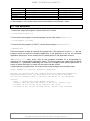
They provide functionality for the following domains:
Domain
Application handling
URL navigation
Examples
Open, Quit
Navigate, GoBack, GoHome
See the test programs Explorer-*.tcl for examples on how to use the procedures of this
package.
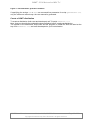
Note: If running on Windows Vista or 7, you have to lower the security settings like follows:
Internet Options -> Security -> Trusted Sites
: Low
Internet Options -> Security -> Internet
: Medium + unchecked Enable Protected Mode
Internet Options -> Security -> Restricted Sites : unchecked Enable Protected Mode
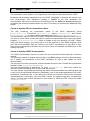
The following table lists all procedures available in namespace Explorer.
Procedure
FullScreen
Go
IsBusy
Navigate
Open
OpenNew
Quit
Visible
Short description
Toggle the fullscreen mode of an Internet Explorer application
window.
Go to a specific page.
Check, if an Internet Explorer instance is busy.
Navigate to a URL or local file.
Open an Internet Explorer instance. Use an already running
instance, if available.
Open a new Internet Explorer instance.
Quit an Internet Explorer instance.
Toggle the visibility of an Internet Explorer application
window.
Table 4: CawtExplorer Reference
CAWT User Manual
Version 2.1.0, 2015-09-01
Copyright © 2008-2015 by Paul Obermeier. All rights reserved.
Page 14 of 32