1
User guide
ALFRED Light
Issue 2.00
Play back
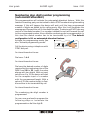
You can hear to the recorded message
all time pressing the PLAY button.
During the play back the green LED will
light.
After recording the message to your
sadisfaction you can connect the device
to the PABX. For any question about
this matter refer to your technical
support for the PABX.
After
the
connection
and
programmation of the PABX test the
installation calling the PABX and
waiting until ALFRED Light will answer
the call.
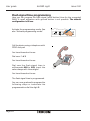
With a small screwdriver you can now
regulate the volume of the message
level on the telephone line. If the
message will still be too low, you
should record the message again using
a higher output level on the external
device or getting closer to the
microphone
Page 22
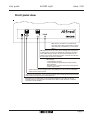
Alfred
PROG
ON PWR
RS 232
JA
JB
JC
LINE
To the PABX
PROG
Alfred