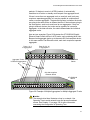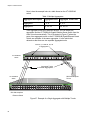
1
Management
Software
AT-S106
Web Browser
User’s Guide
For the AT-GS950/48 Gigabit Ethernet Smart Switch
Version 1.0.0
613-001339 Rev. A
Copyright © 2010 Allied Telesis, Inc.
All rights reserved. No part of this publication may be reproduced without prior written permission from Allied Telesis, Inc.
Allied Telesis and the Allied Telesis logo are trademarks of Allied Telesis, Incorporated. All other product names, company
names, logos or other designations mentioned herein are trademarks or registered trademarks of their respective owners
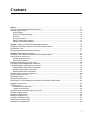
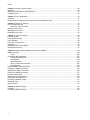
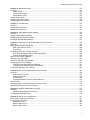
Contents
Preface ............................................................................................................................................................ 11
Where to Find Web-based Product Information ............................................................................................... 12
Contacting Allied Telesis .................................................................................................................................. 13
Online Support ........................................................................................................................................... 13
Email and Telephone Support.................................................................................................................... 13
Warranty..................................................................................................................................................... 13
Returning Products .................................................................................................................................... 13
Sales or Corporate Information .................................................................................................................. 13
Management Software Updates................................................................................................................. 13
Chapter 1: Starting a Web Browser Management Session ............................................................................ 15
Establishing a Remote Connection to the Web Browser Interface................................................................... 16
Web Browser Tools .......................................................................................................................................... 20
Quitting a Web Browser Management Session................................................................................................ 21
Chapter 2: Basic Switch Parameters .............................................................................................................. 23
Configuring an IP Address, Subnet Mask and Gateway Address .................................................................... 24
Setting Up the IP Access List ........................................................................................................................... 26
Creating an IP Access List ......................................................................................................................... 26
Deleting an IP Address .............................................................................................................................. 27
Enabling and Disabling the DHCP Client ......................................................................................................... 28
Configuring System Management Information ................................................................................................. 31
Configuring System Administration Information ............................................................................................... 33
Adding System Administration Information ................................................................................................ 33
Modifying Administration Information ......................................................................................................... 34
Deleting Administration Information ........................................................................................................... 35
Setting the User Interface Configuration .......................................................................................................... 36
Viewing System Information ............................................................................................................................. 37
Rebooting a Switch........................................................................................................................................... 40
Pinging a Remote System ................................................................................................................................ 42
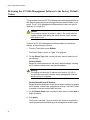
Returning the AT-S106 Management Software to the Factory Default Values ................................................ 44
Chapter 3: Virtual LANs .................................................................................................................................. 45
VLAN Overview ................................................................................................................................................ 46
Port-based VLAN Overview ....................................................................................................................... 47
Tagged VLAN Overview............................................................................................................................. 48
Displaying Ports and Assigning Ports to a VLAN ............................................................................................. 50
Creating a Tagged VLAN ................................................................................................................................. 51
Modifying a Tagged VLAN................................................................................................................................ 53
Deleting a Tagged VLAN.................................................................................................................................. 55
Creating a Port-Based VLAN............................................................................................................................ 56
Modifying a Port-Based VLAN.......................................................................................................................... 57
Deleting a Port-Based VLAN ............................................................................................................................ 58
3
Contents
Chapter 4: Quality of Service (QoS) ............................................................................................................... 59
Overview ........................................................................................................................................................... 60
Mapping CoS Priorities to Egress Queues ....................................................................................................... 63
Configuring CoS................................................................................................................................................ 65
Chapter 5: Port Configuration ......................................................................................................................... 69
Overview ........................................................................................................................................................... 70
Displaying and Configuring Ports Using the Port Configuration Page .............................................................. 71
Chapter 6: Static Port Trunking ....................................................................................................................... 75
Port Trunking Overview .................................................................................................................................... 76
Static Port Trunk Overview......................................................................................................................... 76
Creating a Port Trunk........................................................................................................................................ 79
Modifying a Port Trunk ...................................................................................................................................... 81
Disabling a Port Trunk ...................................................................................................................................... 83
Chapter 7: LACP Port Trunks ......................................................................................................................... 85
LACP Overview................................................................................................................................................. 86
LACP System Priority ....................................................................................................................................... 90
Key Parameter .................................................................................................................................................. 90
LACP Port Priority Value................................................................................................................................... 90
Guidelines ......................................................................................................................................................... 92
Displaying LACP Group Status ......................................................................................................................... 94
Selecting Port Priority ....................................................................................................................................... 97
Chapter 8: Simple Network Management Protocol (SNMP) ........................................................................... 99
SNMP Overview..............................................................................................................................................100
Traps ........................................................................................................................................................100
Community String Attributes ...........................................................................................................................102
Community String Name ..........................................................................................................................102
Access Mode ............................................................................................................................................102
Operating Status.......................................................................................................................................102
Open or Closed Access Status.................................................................................................................102
Trap Receivers .........................................................................................................................................102
Default SNMP Community Strings ..................................................................................................................104
Creating an SNMP Community .......................................................................................................................105
Modifying an SNMP Community .....................................................................................................................106
Deleting an SNMP Community .......................................................................................................................107
Creating a Host Table .....................................................................................................................................108
Modifying a Host Table Entry ..........................................................................................................................109
Deleting a Host Table Entry ............................................................................................................................110
Enabling or Disabling Traps ............................................................................................................................111
Modifying Traps ..............................................................................................................................................112
Deleting Traps.................................................................................................................................................113
Chapter 9: IGMP Snooping ...........................................................................................................................115
Overview .........................................................................................................................................................116
Configuring IGMP Snooping ...........................................................................................................................118
4
AT-S79 Management Software User’s Guide
Chapter 10: Bandwidth Control .................................................................................................................... 121
Overview......................................................................................................................................................... 122
Storm Control ........................................................................................................................................... 122
Ingress Rate Limiting ............................................................................................................................... 123
Egress Rate Limiting ................................................................................................................................ 123
Setting Storm Control ..................................................................................................................................... 124
Setting Ingress Rate Limiting.......................................................................................................................... 126
Setting Egress Rate Limiting .......................................................................................................................... 128
Chapter 11: Port Mirroring ............................................................................................................................ 131
Overview......................................................................................................................................................... 132
Configuring Port Mirroring .............................................................................................................................. 133
Disabling Port Mirroring .................................................................................................................................. 134
Chapter 12: Static Multicast MAC Address .................................................................................................. 135
Overview......................................................................................................................................................... 136
Setting a Static Multicast Address .................................................................................................................. 138
Modifying a Static Multicast Address.............................................................................................................. 140
Deleting a Static Multicast Address ................................................................................................................ 141
Chapter 13: Spanning Tree and Rapid Spanning Tree Protocols ................................................................ 143
Overview......................................................................................................................................................... 144
Bridge Priority and the Root Bridge ................................................................................................................ 145
Path Costs and Port Costs....................................................................................................................... 146
Port Priority .............................................................................................................................................. 146
Forwarding Delay and Topology Changes ..................................................................................................... 148
Hello Time and Bridge Protocol Data Units (BPDU) ................................................................................ 148
Point-to-Point and Edge Ports.................................................................................................................. 149
Mixed STP and RSTP Networks .................................................................................................................... 151
Spanning Tree and VLANs............................................................................................................................. 152
Basic STP and RSTP Configuration............................................................................................................... 154
Configuring RSTP Port Settings ..................................................................................................................... 157
Configuring the Basic RSTP Port Settings............................................................................................... 157
Configuring the Advanced RSTP Port Settings........................................................................................ 159
Viewing the Spanning Tree Topology............................................................................................................. 163
Chapter 14: 802.1x Port-based Network Access Control ............................................................................. 165
Overview......................................................................................................................................................... 166
Authentication Process ............................................................................................................................ 167
Authenticator Ports................................................................................................................................... 167
General Steps .......................................................................................................................................... 169
Port-based Network Access Control Guidelines ...................................................................................... 170
Guest VLANs.................................................................................................................................................. 172
Configuring 802.1x Port-based Network Access Control ............................................................................... 173
Displaying the Port Access Control Status ..................................................................................................... 176
Chapter 15: RADIUS Authentication Protocol .............................................................................................. 177
Overview......................................................................................................................................................... 178
RADIUS Implementation Guidelines ........................................................................................................ 178
Configuring the RADIUS Client ...................................................................................................................... 179
Chapter 16: Dial-in User Configuration ......................................................................................................... 181
Dial-in User Configuration Overview .............................................................................................................. 182
Configuring a Dial-in User .............................................................................................................................. 183
Add a Dial-in User .................................................................................................................................... 183
Modify a Dial-in User................................................................................................................................ 183
Delete a Dial-in User ................................................................................................................................ 184
5
Contents
Chapter 17: Destination MAC Filter ..............................................................................................................185
Overview .........................................................................................................................................................186
Configuring a Destination MAC Filter..............................................................................................................187
Deleting a Destination MAC Filter ...................................................................................................................188
Chapter 18: Management Software Updates ................................................................................................189
Overview .........................................................................................................................................................190
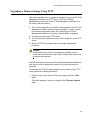
Upgrading a Firmware Image Using HTTP .....................................................................................................191
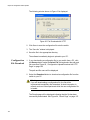
Upgrading a Firmware Image Using TFTP .....................................................................................................193
Downloading or Uploading a Configuration File via HTTP..............................................................................195
Configuration File Upload .........................................................................................................................195
Configuration File Download ....................................................................................................................196
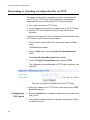
Downloading or Uploading a Configuration File via TFTP ..............................................................................198
Configuration File Upload .........................................................................................................................198
Configuration File Download ....................................................................................................................199
Chapter 19: Statistics ....................................................................................................................................201
Overview .........................................................................................................................................................202
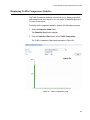
Displaying Traffic Comparison Statistics.........................................................................................................203
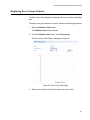
Displaying Error Group Statistics ....................................................................................................................207
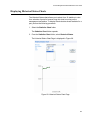
Displaying Historical Status Charts .................................................................................................................209
Appendix A: AT-S106 Management Software Web Browser Default Parameters .......................................213
Index.............................................................................................................................................................. 223
6
List of Figures
Figure 1. Entering a Switch’s IP Address in the URL Field..................................................................................................16
Figure 2. AT-S106 Login Dialog Box ...................................................................................................................................17
Figure 3. AT-GS950/48 Home Page....................................................................................................................................18
Figure 4. AT-GS950/48 Front Panel Page...........................................................................................................................19
Figure 5. IP Setup Page ......................................................................................................................................................24
Figure 6. IP Access List Page .............................................................................................................................................26
Figure 7. Management Page ...............................................................................................................................................31
Figure 8. Administration Page .............................................................................................................................................33
Figure 9. Modify Administration Page..................................................................................................................................34
Figure 10. User Interface Page ...........................................................................................................................................36
Figure 11. Switch Information Page.....................................................................................................................................37
Figure 12. Reboot Page ......................................................................................................................................................40
Figure 13. Ping Test Configuration Page.............................................................................................................................42
Figure 14. Ping Test Results Page ......................................................................................................................................43
Figure 15. VLAN Mode Page...............................................................................................................................................50
Figure 16. Tagged VLAN Page ...........................................................................................................................................51
Figure 17. Example of Tagged VLAN Page.........................................................................................................................52
Figure 18. Modify VLAN Page .............................................................................................................................................53
Figure 19. Port-Based VLAN Page......................................................................................................................................56
Figure 20. Modify Port-based VLAN ....................................................................................................................................57
Figure 21. CoS Page ...........................................................................................................................................................63
Figure 22. Default Port VLAN & CoS Page .........................................................................................................................65
Figure 23. Physical Interface Page......................................................................................................................................71
Figure 24. Static Port Trunk Example..................................................................................................................................76
Figure 25. Trunking Page ....................................................................................................................................................79
Figure 26. Example of Multiple Aggregators for Multiple Aggregate Trunks .......................................................................87
Figure 27. Example of a Single Aggregator with Multiple Trunks ........................................................................................88
Figure 28. LACP Group Status Page ..................................................................................................................................94
Figure 29. LACP Group Status Page with No Cables Connected .......................................................................................95
Figure 30. LACP Group Status Page with Four Cables Connected ....................................................................................96
Figure 31. Port Priority Page ...............................................................................................................................................97
Figure 32. Community Table Page ....................................................................................................................................105
Figure 33. Host Table Page...............................................................................................................................................108
Figure 34. Trap Setting Page ............................................................................................................................................111
Figure 35. IGMP Snooping Page.......................................................................................................................................118
Figure 36. IGMP Snooping Page with MAC Address ........................................................................................................119
Figure 37. IGMP Snooping —Group Members Page ........................................................................................................120
Figure 38. Storm Control Page ..........................................................................................................................................124
Figure 39. Ingress Rate Limiting Page ..............................................................................................................................126
Figure 40. Egress Rate Limiting Page ...............................................................................................................................128
Figure 41. Mirroring Page ..................................................................................................................................................133
Figure 42. Static Multicast Address Table Page................................................................................................................138
Figure 43. Modify Static Multicast Address Page ..............................................................................................................140
Figure 44. Point-to-Point Ports ..........................................................................................................................................149
Figure 45. Edge Port .........................................................................................................................................................150
Figure 46. STP and VLAN Fragmentation with Untagged Ports........................................................................................152
Figure 47. STP and VLAN Compatibility with Tagged Ports..............................................................................................153
Figure 48. Rapid Spanning Tree Configuration Page........................................................................................................154
Figure 49. RSTP Basic Port Configuration Page...............................................................................................................157
Figure 50. RSTP Advanced Port Configuration Page........................................................................................................160
7
Figures
Figure 51.
Figure 52.
Figure 53.
Figure 54.
Figure 55.
Figure 56.
Figure 57.
Figure 58.
Figure 59.
Figure 60.
Figure 61.
Figure 62.
Figure 63.
Figure 64.
Figure 65.
Figure 66.
Figure 67.
Figure 68.
8
Designated Topology Information Page ...........................................................................................................163
Example of the Authenticator Role ...................................................................................................................168
Port-based Authentication Across Multiple Switches........................................................................................171
802.1x Access Control Configuration Page ......................................................................................................173
802.1x Access Control Configuration Page ......................................................................................................176
RADIUS Page...................................................................................................................................................179
Dial-In User Page .............................................................................................................................................183
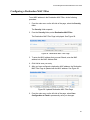
Destination MAC Filter Page ............................................................................................................................187
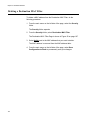
Updated Destination MAC Filter Page..............................................................................................................187
Firmware Upgrade via HTTP Page...................................................................................................................192
Firmware Upgrade via TFTP Page ...................................................................................................................194
Configuration Upload/Download via HTTP Page..............................................................................................195
File Download with HTTP .................................................................................................................................196
Result Page ......................................................................................................................................................197
Configuration Upload/Download via TFTP Page ..............................................................................................198
Traffic Comparison Page ..................................................................................................................................203
Error Group Chart Page....................................................................................................................................207
Historical Status Chart Page.............................................................................................................................209
Tables
Table 1.
Table 2.
Table 3.
Table 4.
Table 5.
Table 6.
Table 7.
Table 8.
Default Mappings of IEEE 802.1p Priority Levels to Egress Port Priority Queues ...............................................61
Multiple Aggregators .............................................................................................................................................88
Bridge Priority Value Increments ........................................................................................................................145
Valid Port Priority Values ....................................................................................................................................147
RSTP Point-to-Point Status ................................................................................................................................162
Traffic Comparison Options ................................................................................................................................204
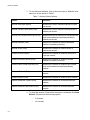
Historical Status Options ....................................................................................................................................210
AT-S106 Management Software Default Settings ..............................................................................................213
9
List of Tables
10
Preface
This guide contains instructions on how to use the AT-S106 Management
software to manage and monitor the AT-GS950/48 Gigabit Ethernet Smart
Switch.
The AT-S106 Management software has a web browser interface that you
can access from any management workstation on your network that has a
web browser application.
This preface contains the following sections:
“Where to Find Web-based Product Information” on page 12
“Contacting Allied Telesis” on page 13
11
Preface
Where to Find Web-based Product Information
The installation and user guides are available for all Allied Telesis
products in portable document format (PDF) on our web site. Management
software updates are also available. Go to
http://www.alliedtelesis.com/support/software/.
Enter your hardware product model in the Search by Product Name
field; for example, enter AT-GS950/48. You can view the documents
online or download them onto your local workstation or server.
12
AT-S106 Management Software Web Browser User’s Guide
Contacting Allied Telesis
This section provides Allied Telesis contact information for technical
support as well as sales and corporate information.
Online Support
You can request technical support online by accessing the Allied Telesis
Knowledge Base: www.alliedtelesis.com/support/kb.aspx. You can use
the Knowledge Base to submit questions to our technical support staff and
review answers to previously asked questions.
Email and
Telephone
Support
For Technical Support via email or telephone, refer to the Support &
Services section of the Allied Telesis web site: www.alliedtelesis.com.
Select your country from the list displayed on the website. then select the
appropriate menu tab.
Warranty
For hardware warranty information, refer to the Allied Telesis web site:
www.alliedtelesis.com/support/warranty.
Returning
Products
Products for return or repair must first be assigned a return materials
authorization (RMA) number. A product sent to Allied Telesis without an
RMA number will be returned to the sender at the sender’s expense.
To obtain an RMA number, contact the Allied Telesis Technical Support
group at our web site: www.alliedtelesis.com/support/rma. Select your
country from the list displayed on the website. Then select the appropriate
menu tab.
Sales or
Corporate
Information
Management
Software Updates
You can contact Allied Telesis for sales or corporate information through
our web site: www.alliedtelesis.com. To find the contact information for
your country, select Contact Us -> Worldwide Contacts.
New releases of management software for our managed products are
available on our Allied Telesis web site at
http://www.alliedtelesis.com/support/software/.
Go to “Where to Find Web-based Product Information” on page 12 for
instructions on navigating to this information.
13
Preface
14
Chapter 1
Starting a Web Browser Management
Session
This chapter contains the procedures for starting, using, and quitting a web
browser management session on the AT-GS950/48 Gigabit Ethernet
Smart Switch. This chapter includes the following sections:
“Establishing a Remote Connection to the Web Browser Interface” on
page 16
“Web Browser Tools” on page 20
“Quitting a Web Browser Management Session” on page 21
15
Chapter 1: Starting a Web Browser Management Session
Establishing a Remote Connection to the Web Browser Interface
The AT-GS950/48 Gigabit Ethernet Smart Switch is shipped with a preassigned IP address of 192.168.1.1.
After your initial login, you may want to assign a new IP address to your
switch. To manually assign an IP address to the switch, refer to
“Configuring an IP Address, Subnet Mask and Gateway Address” on
page 24. To configure the switch to obtain its IP configuration from a
DHCP server, refer to “Enabling and Disabling the DHCP Client” on
page 28.
Whether you use the pre-assigned IP address or assign a new one, you
must set your local PC to the same subnet as the switch.
To start a web browser management session, do the following procedure:
1. Start your web browser.
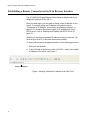
2. In the URL field of the browser, enter 192.168.1.1 which is the default
IP address of the switch. See Figure 1.
Switch’s IP Address
Figure 1. Entering a Switch’s IP Address in the URL Field
16
AT-S106 Management Software Web Browser User’s Guide
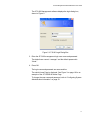
The AT-S106 Management software displays the login dialog box,
shown in Figure 2.
Figure 2. AT-S106 Login Dialog Box
3. Enter the AT-S106 management login user name and password.
The default user name is “manager” and the default password is
“friend.”
4. Press OK.
The login name and password are case-sensitive.
The switch Home Page is displayed. See Figure 3 on page 18 for an
example of the AT-GS950/48 Home Page
To change the user name and password, refer to “Configuring System
Administration Information” on page 33.
17
Chapter 1: Starting a Web Browser Management Session
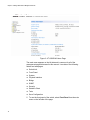
Figure 3. AT-GS950/48 Home Page
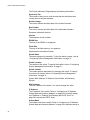
The main menu appears on the left side and is common for all of the
management pages discussed in this manual. It consists of the following
folders and web pages:
Switch Info.
Front Panel
System
Physical Interface
Bridge
SNMP
Security
Statistics Chart
Tools
Save Configuration
5. To see the front panel of the switch, select Front Panel from the main
menu on the left side of the page.
18
AT-S106 Management Software Web Browser User’s Guide
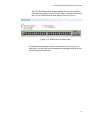
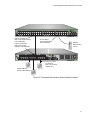
The AT-S106 Management software displays the front of the switch.
Ports that have a link to an end node are green. Ports without a link are
grey. The AT-GS950/48 front panel page is shown in Figure 4.
Figure 4. AT-GS950/48 Front Panel Page
A web browser management session remains active even if you link to
other sites. You can return to the management web pages anytime as long
as you do not quit the browser.
19
Chapter 1: Starting a Web Browser Management Session
Web Browser Tools
You can use the web browser tools to move around the management
pages. Selecting Back on your browser’s toolbar returns you to the
previous display. You can also use the browser’s bookmark feature to
save the link to the switch.
20
AT-S106 Management Software Web Browser User’s Guide
Quitting a Web Browser Management Session
To exit a web browser management session, close the web browser.
21
Chapter 1: Starting a Web Browser Management Session
22
Chapter 2
Basic Switch Parameters
This chapter provides procedures to perform basic switch activities such
as reassigning the IP address, enabling the DHCP Client, configuring new
user names and passwords, and rebooting the system.
This chapter contains the following sections:
“Configuring an IP Address, Subnet Mask and Gateway Address” on
page 24
“Setting Up the IP Access List” on page 26
“Enabling and Disabling the DHCP Client” on page 28
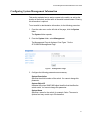
“Configuring System Management Information” on page 31
“Configuring System Administration Information” on page 33
“Setting the User Interface Configuration” on page 36
“Viewing System Information” on page 37
“Rebooting a Switch” on page 40
“Pinging a Remote System” on page 42
“Returning the AT-S106 Management Software to the Factory Default
Values” on page 44
Note
To permanently save your new settings or any changes to the
configuration file, select Save Configuration to Flash from the main
menu on the left side of the page.
23
Chapter 2: Basic Switch Parameters
Configuring an IP Address, Subnet Mask and Gateway Address
This procedure explains how to change the IP address, subnet mask, and
gateway address of the switch. Before performing the procedure, note the
following:
A gateway address is only required if you want to remotely manage
the device from a management station that is separated from the
switch by a router.
To configure the switch to automatically obtain its IP configuration from
a DHCP server on your network, go to “Enabling and Disabling the
DHCP Client” on page 28.
To change the switch’s IP configuration, do the following procedure:
1. From the main menu on the left side of the page, click the System
folder.
The System folder expands.
2. From the System folder, select IP Setup.
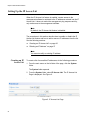
The IP Setup Page is displayed. See Figure 5.
Figure 5. IP Setup Page
24
AT-S106 Management Software Web Browser User’s Guide
3. Change the IP configuration parameters by entering new information in
the following fields:
System MAC Address
This parameter displays the MAC address of the switch. You cannot
change this parameter.
System IP Address
Displays the current IP address of the switch. To change the IP
address, enter a new IP address.
System Subnet Mask
Displays the current subnet mask of the switch. To change the subnet
mask, enter a new subnet mask.
System Default Gateway
Displays the default gateway of the switch. To change the default
gateway, enter a new gateway.
DHCP Mode
For information about setting this parameter, refer to “Enabling and
Disabling the DHCP Client” on page 28.
Caution
Before enabling DHCP Mode, record the MAC address of your
switch. For more information, refer to “Enabling and Disabling the
DHCP Client” on page 28.
4. Click Apply.
Note
Changing the IP address ends your management session. To
resume managing the device, enter the new IP address of the switch
in the web browser’s URL field, as shown in Figure 1 on page 16.
5. After you log on to the switch with the new IP address, select Save
Configuration to Flash from the main menu on the left side of the
page to save the new IP address to memory.
Caution
If you do not select Save Configuration to Flash, the IP address
will revert to its default or original setting when you power cycle the
switch.
25
Chapter 2: Basic Switch Parameters
Setting Up the IP Access List
When the IP Access List feature is enabled, remote access to the
management software is restricted to the IP addresses entered into the IP
Access List. It does not restrict the management ping response activity,
only web access to the management software.
Note
By default, the IP Access List feature is disabled.
The procedures in this section describe how to enable or disable the IP
Access List feature and how to add or remove IP addresses from the list.
See the following sections:
“Creating an IP Access List” on page 26
“Deleting an IP Address” on page 27
Note
You cannot modify an existing IP address.
Creating an IP
Access List
To create a list of accessible IP addresses, do the following procedure:
1. From the main menu on the left side of the page, click the System
folder.
The System folder expands.
2. From the System folder, select IP Access List. The IP Access List
Page is displayed. See Figure 6.
.
Figure 6. IP Access List Page
26
AT-S106 Management Software Web Browser User’s Guide
3. Enter an IP address in the IP Address field using a xxx.xxx.xxx.xxx
format.
4. Click Add.
The IP address is added to the IP Access List Table.
5. To set the IP restriction status, select Disable or Enable in the pulldown menu next to the IP Restriction Status field.
By default, the IP Restriction Status field is set to Disable.
6. Click Apply.
7. From the main menu (not shown in Figure 6) on the left side of the
page, select Save Configuration to Flash to permanently save your
changes.
Deleting an IP
Address
To delete an IP address from the IP Access List, do the following
procedure:
1. From the main menu on the left side of the page, click the System
folder.
The System folder expands.
2. From the System folder, select IP Access List.
The IP Access List Page is displayed. See Figure 6 on page 26.
3. Select delete next to the IP address that you want to remove.
The IP address is removed from the IP Access List Table. If you
remove the last IP address from the table, the IP Restriction Status
field is set to Disable.
4. From the main menu (not shown in Figure 6) on the left side of the
page, select Save Configuration to Flash to permanently save your
changes.
27
Chapter 2: Basic Switch Parameters
Enabling and Disabling the DHCP Client
Since the AT-GS950/48 Gigabit Ethernet Smart Switch only has a web
management interface and does not have local console connections, you
must be careful when you change the IP address of the switch by enabling
the DHCP client. With DHCP enabled, the DHCP server automatically
assigns the next available IP address to your switch from a range of
unassigned IP addresses. This IP address is not be advertised over the
network and as a consequence, you do not know which IP address has
been assigned. Once the switch obtains a new IP address from the DHCP
server, the switch becomes inaccessible and the MAC address can no
longer be viewed with the AT-S106 Management software using the
previous IP address.
To find the new IP address, you must look it up on your DHCP server
which requires you to have the MAC address of your switch as a
reference.
Before you enable the DHCP client, record the switch’s MAC address.
You can view the MAC address on the System Information Page when
you first log onto the switch. See “Viewing System Information” on
page 37. Or, you can find the MAC address on the label affixed to the
switch. Provide this information to your system administrator for reference.
Note
The MAC address may also be obtained from the agency label that
you can find on the bottom of the chassis.
If the switch power cycles or if you press the Reset button before you save
the new configuration, the software reverts to the default IP address value.
In either case, the IP address value reverts to 192.168.1.1.
This procedure explains how to activate and deactivate the DHCP client
on the switch. When the client is activated, the switch obtains its IP
configuration, its IP address and subnet mask, from a DHCP server on
your network. Before performing the procedure, note the following:
28
By default, the DHCP client is disabled on the switch.
The DHCP client does not support BOOTP.
After you enable DHCP, you end the current management session.
Log on with the new IP address (provided by your system
administrator) using the procedure described in “Establishing a
Remote Connection to the Web Browser Interface” on page 16.
AT-S106 Management Software Web Browser User’s Guide
Caution
Record the MAC address of your switch before you begin this
procedure.
To activate or deactivate the DHCP client on the switch, do the following
procedure:
1. From the main menu on the left side of the page, click the System
folder.
The System folder expands.
2. From the System folder, select IP Setup.
The IP Setup Page is shown in Figure 5 on page 24.
3. From the pull-down menu next to the DHCP Mode field, select Enable
or Disable.
By default, this field is set to Disable.
4. Click Apply.
If you enable the DHCP client, the web server connection to the switch
will be lost.
Before you disable the DHCP client, you need to assign a new System
IP Address value in “Configuring an IP Address, Subnet Mask and
Gateway Address” on page 24. Record this value for future use.
Caution
Enabling or disabling DHCP ends your management session.
Caution
If you do not select Save Configuration to Flash, the DHCP mode
and the IP Address reverts to the previous configuration when you
power cycle the switch.
5. Log on to the switch with the new IP address and immediately save
your configuration by selecting Save Configuration to Flash from the
main menu on the left side of the page.
If you enable DHCP and then save your configuration, you save the IP
address obtained from the DHCP server.
29
Chapter 2: Basic Switch Parameters
If you disable DHCP, enter a new IP address, and then save your
configuration, you have saved the DHCP setting and the new IP
address on the switch.
30
AT-S106 Management Software Web Browser User’s Guide
Configuring System Management Information
This section explains how to assign a name to the switch, as well as the
location of the switch, and the name of the switch’s administrator. Entering
this information is optional.
To set a switch’s administration information, do the following procedure:
1. From the main menu on the left side of the page, click the System
folder.
The System folder expands.
2. From the System folder, select Management.
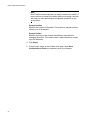
The Management Page is displayed. See Figure 7 for the
AT-GS950/48 Management Page.
Figure 7. Management Page
3. Configure the following parameters as necessary:
System Description
Specifies the model number of the switch. You cannot change this
parameter.
System Object ID
Indicates the unique SNMP MIB object identifier that identifies the
switch model. You cannot change this parameter.
System Name
Specifies a name for the switch, for example, Sales. The name is
optional and may contain up to 50 characters.
31
Chapter 2: Basic Switch Parameters
Note
Allied Telesis recommends that you assign a name to the switch. A
name can help you identify the switch when you manage it and can
also help you avoid performing a configuration procedure on the
wrong switch.
System Location
Specifies the location of the switch. The location is optional and may
contain up to 50 characters.
System Contact
Specifies the name of the network administrator responsible for
managing the switch. This contact name is optional and may contain
up to 50 characters.
4. Click Apply.
5. From the main menu on the left side of the page, select Save
Configuration to Flash to permanently save your changes.
32
AT-S106 Management Software Web Browser User’s Guide
Configuring System Administration Information
This section explains how to enable password protection and create users
in the web interface. See the following sections:
Adding System
Administration
Information
“Adding System Administration Information” on page 33
“Modifying Administration Information” on page 34
“Deleting Administration Information” on page 35
To set a switch’s administration information, do the following procedure:
1. From the main menu on the left side of the page, click the System
folder.
The System folder expands.
2. From the System folder, select Administration.
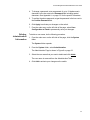
The Administration Page is displayed. See Figure 8.
Figure 8. Administration Page
3. To enable or disable password protection, select Enable or Disable
from the pull-down menu next to the Password Protection field.
4. Click Apply.
You can control login authentication by enabling password protection
which requires a user to supply a password when logging onto the
switch. If you disable password protection, a user can login without
inputting a password. By default, this field is set to Enable.
33
Chapter 2: Basic Switch Parameters
5. To create an entry number, type 1 through 8 in the box next to the
Entry number field. An entry number cannot be duplicated if it already
exists.
This value appears as the Index value in the Administration table at
the bottom of the page.
6. To create a user name, enter a user name in the box next to the User
Name field.
You can enter a value of up to 12 alphanumeric characters including
special characters. See Appendix A, on page 213 for the specific
characters.
7. To add a password for the above user name, enter a password of up
to 12 alphanumeric characters in the box next to the Password field
including special characters. See Appendix A, on page 213 for the
specific characters.
8. To confirm the above password, retype the password in the box next
to the Confirm Password field.
9. Click Add to activate your changes on the switch.
10. From the main menu on the left side of the page, select Save
Configuration to Flash to permanently save your changes.
Modifying
Administration
Information
To modify the a user name password, do the following procedure:
1. From the main menu on the left side of the page, click the System
folder.
The System folder expands.
2. From the System folder, select Administration.
The Administration Page is shown in Figure 8 on page 33.
3. Select the user name that you want to change and click modify.
The Modify Administration Page is displayed. See Figure 9.
Figure 9. Modify Administration Page
34
AT-S106 Management Software Web Browser User’s Guide
4. To change a password, enter a password of up to 12 alphanumeric
characters in the box next to the Password field including special
characters. See Appendix A, on page 213 for the specific characters.
5. To confirm the above password, retype the password in the box next to
the Confirm Password field.
6. Click Apply to activate your changes on the switch.
7. From the main menu on the left side of the page, select Save
Configuration to Flash to permanently save your changes.
Deleting
Administration
Information
To delete a user name, do the following procedure.
1. From the main menu on the left side of the page, click the System
folder.
The System folder expands.
2. From the System folder, select Administration.
The Administration Page is shown in Figure 8 on page 33.
3. Select the user name that you want to delete and click delete.
The user name is removed from the Administration Table.
4. Click Add to activate your changes on the switch.
35
Chapter 2: Basic Switch Parameters
Setting the User Interface Configuration
This procedure explains how to adjust the user interface and security
features on the switch. With this procedure you can enable an SNMP
Agent. For more information on SNMP, go to Chapter 8, on page 99.
To set the switch’s user interface configuration, do the following
procedure:
1. From the main menu on the left side of the page, click the System
folder.
The System folder expands.
2. From the System folder, select User Interface.
The User Interface Page is displayed. See Figure 10.
Figure 10. User Interface Page
3. To enable or disable an SNMP agent, do the following:
a. Click the SNMP Agent parameter and choose Enable or Disable
from the list. The default is Enable. When you enable this
parameter, the SNMP agent is enabled.
b. Click Apply.
4. From the main menu on the left side of the page, select Save
Configuration to Flash to permanently save your changes.
36
AT-S106 Management Software Web Browser User’s Guide
Viewing System Information
To view general information about the switch, do the following procedure:
1. From the main menu on the left side of the page, click the System
folder.
The System folder expands.
2. Select Switch Info.
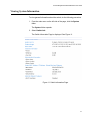
The Switch Information Page is displayed. See Figure 11.
Figure 11. Switch Information Page
37
Chapter 2: Basic Switch Parameters
The Switch Information Page displays the following information:
System Up For
The number of days, hours, and minutes that the switch has been
running since it was last rebooted.
Runtime Image
The version number and build date of the runtime firmware.
Boot Loader
The version number and build date of the bootloader firmware.
Hardware Information Section:
Version
The hardware version number.
DRAM Size
The size of the DRAM, in megabytes.
Flash Size
The size of the flash memory, in megabytes.
Administration Information Section:
Switch Name
The name assigned to the switch. To give the switch a name, refer to
“Configuring System Management Information” on page 31.
Switch Location
The location of the switch. To specify the location, refer to “Configuring
System Management Information” on page 31.
Switch Contact
The contact person responsible for managing the switch. To specify
the name of a contact, refer to “Configuring System Management
Information” on page 31.
System MAC Address, IP Address, Subnet Mask, and Gateway
Section:
MAC Address
The MAC address of the switch. You cannot change this value.
IP Address
The IP address of the switch. Refer to “Configuring an IP Address,
Subnet Mask and Gateway Address” on page 24 to manually assign
an IP address or “Enabling and Disabling the DHCP Client” on
page 28 to activate the DHCP client.
Subnet Mask
The subnet mask for the switch. Refer to “Configuring an IP Address,
Subnet Mask and Gateway Address” on page 24 to manually assign a
38
AT-S106 Management Software Web Browser User’s Guide
subnet mask or “Enabling and Disabling the DHCP Client” on page 28
to activate the DHCP client.
Default Gateway
Default gateway’s IP address. Refer to “Configuring an IP Address,
Subnet Mask and Gateway Address” on page 24 to manually assign a
gateway address or “Enabling and Disabling the DHCP Client” on
page 28 to activate the DHCP client.
Automatic Network Features Section:
DHCP Mode
The status of the DHCP client on the switch. For information about
setting this parameter, refer to “Enabling and Disabling the DHCP
Client” on page 28.
39
Chapter 2: Basic Switch Parameters
Rebooting a Switch
This procedure reboots the switch and reloads the AT-S106 Management
software from flash memory. You may want to reboot the device if you
believe it is experiencing a problem.
Caution
The switch does not forward network traffic during the reboot
process. Some network traffic may be lost.
To reboot a switch, do the following procedure:
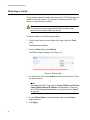
1. From the main menu on the left side of the page, select the Tools
folder.
The Tools folder expands.
2. From the Tools folder, select Reboot.
The Reboot Page is displayed. See Figure 12.
Figure 12. Reboot Page
3. For the Reboot Type, select Normal from the pull-down menu. This is
the default setting.
Note
Two additional Reboot Type options, Factory Default and Reset to
Factory Default Except IP Address, are described in “Returning
the AT-S106 Management Software to the Factory Default Values”
on page 44.
4. For the Reboot Status, use the pull-down menu to select Start to
begin the reboot.
5. Click Apply.
40
AT-S106 Management Software Web Browser User’s Guide
The switch immediately begins to reload the AT-S106 Management
software. This process takes approximately one minute to complete.
You can not manage the device during the reboot. After the reboot is
finished, you can log in again if you want to continue to manage the
device.
41
Chapter 2: Basic Switch Parameters
Pinging a Remote System
This procedure instructs the switch to ping a node on your network. This
procedure is useful in determining whether an active link exists between
the switch and another network device.
Note
The device you are pinging must be a member of the Default VLAN
and within the same local area network as your switch. In other
words, the port on the switch through which the node is
communicating with the switch must be an untagged or tagged
member of the Default VLAN.
To ping a network device, do the following procedure:
1. From the main menu on the left side of the page, select the Tools
folder.
The Tools folder expands.
2. From the Tools folder, select Ping.
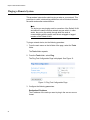
The Ping Test Configuration Page is displayed. See Figure 13.
Figure 13. Ping Test Configuration Page
3. Configure the following parameters:
Destination IP Address
The IP address of the node you want to ping in the xxx.xxx.xxx.xxx
format.
42
AT-S106 Management Software Web Browser User’s Guide
Timeout Value
Specifies the length of time, in seconds, the switch waits for a
response before assuming that a ping has failed. The default is 3
seconds.
Number of Ping Requests
Specifies the number of ping requests you want the switch to perform.
The default is 10.
4. Click Start.
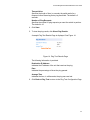
5. To view the ping results, click Show Ping Results.
A sample Ping Test Results Page is displayed. See Figure 14.
Figure 14. Ping Test Results Page
The following information is provided:
Destination IP Address
Indicates the IP address of the unit that receives the ping.
Pass
Indicates the percentage of times the ping passed.
Average Time
Indicates the time, in milliseconds, the ping was received.
6. Click Back to Ping Test to return to the Ping Test Configuration Page.
43
Chapter 2: Basic Switch Parameters
Returning the AT-S106 Management Software to the Factory Default
Values
This procedure returns all AT-S106 Management software parameters to
their default values and deletes all tagged and port-based VLANs on the
switch. The AT-S106 Management software default values are listed in
Appendix A, on page 213.
Caution
This procedure causes the switch to reboot. The switch does not
forward network traffic during the reboot process. Some network
traffic may be lost.
To return the AT-S106 Management software software to the default
settings, do the following procedure:
1. From the Tools folder, select Reboot.
The Reboot Page is shown in Figure 12 on page 40.
2. For the Reboot Type field, use the pull-down menu to select one of
the following:
Factory Default
Resets all switch parameters to the factory default settings, including
the IP address, subnet mask, and gateway address.
Warning
This setting will cause the IP address to be reset to 192.168.1.1.
You will loose connectivity with the switch management software
after the reboot is completed
Factory Default Except IP Address
Resets all switch parameters to the factory default settings, but retains
the IP address, subnet mask, and gateway settings. If the DHCP client
is enabled, it remains enabled after this reset.
3. For the Reboot Status field, use the pull-down menu to select Start to
begin the reboot.
4. Click Apply.
The switch is rebooted. You must wait for the switch to complete the
reboot process before establishing your management session again.
44
Chapter 3
Virtual LANs
This chapter contains a description of Virtual Local Area Networks
(VLANs) and procedures for creating, modifying, and deleting port-based
and tagged VLANs from a web browser management session. This
chapter contains the following sections:
“VLAN Overview” on page 46
“Displaying Ports and Assigning Ports to a VLAN” on page 50
“Creating a Tagged VLAN” on page 51
“Modifying a Tagged VLAN” on page 53
“Deleting a Tagged VLAN” on page 55
“Creating a Port-Based VLAN” on page 56
“Modifying a Port-Based VLAN” on page 57
“Deleting a Port-Based VLAN” on page 58
Note
To permanently save your new settings or any changes to the
configuration file, select Save Configuration to Flash from the main
menu on the left side of the page.
45
Chapter 3: Virtual LANs
VLAN Overview
A VLAN is a group of ports on an Ethernet switch that form a logical
Ethernet segment. The ports of a VLAN form an independent traffic
domain where the traffic generated by the nodes of a VLAN remains within
the VLAN.
With VLANs, you can segment your local area network through the
switch’s AT-S106 Management software and group nodes with related
functions into their own separate, logical, VLAN segments. These VLAN
groupings can be based on similar data needs or security requirements.
For example, you can create separate VLANs for each department in your
company, such as one for Sales and another for Accounting.
VLANs offer several important benefits:
Improved network performance
Network performance often suffers as networks grow in size and as
data traffic increases. The more nodes on each LAN segment vying for
bandwidth, the greater the likelihood overall network performance
decreases.
VLANs improve network performance because traffic stays within the
separate, logical LAN segment of the VLAN. The nodes of a VLAN
receive traffic only from nodes of the same VLAN. This reduces the
need for nodes to handle traffic that is not destined for them. It also
frees up bandwidth within all the logical workgroups.
In addition, because each VLAN constitutes a separate broadcast
domain, broadcast traffic remains within the VLAN. This too can
improve overall network performance.
Increased security
Because data traffic generated by a node in a VLAN is restricted only
to the other nodes of the same VLAN, you can use VLANs to control
the flow of packets in your network and prevent packets from flowing
to unauthorized end nodes.
Simplified network management
VLANs can simplify network management. Before VLANs became a
layer 2 feature, physical changes to the network often had to been
made at the switches in the wiring closets. For example, if an
employee changed departments, changing the employee’s LAN
segment assignment might require a change to the cabling of the
switches.
With VLANS, you can change the LAN segment assignment of an end
node connected to the switch through the AT-S106 Management
46
AT-S106 Management Software Web Browser User’s Guide
software. Also, you can change the VLAN memberships without
moving the workstations physically or change group memberships
without moving cables from one port to another.
In addition, a virtual LAN can span more than one switch. This means
that the end nodes of a VLAN do not need to be connected to the
same switch and so are not restricted to being in the same physical
location.
The AT-GS950/48 Gigabit Ethernet Smart Switch supports the following
types of VLANs:
Port-based VLANs
Tagged VLANs
Both types of VLANs are described in the following sections.
Port-based
VLAN Overview
As explained in the “VLAN Overview” on page 46, a VLAN consists of a
group of ports on an Ethernet switch that form an independent traffic
domain. Traffic generated by the end nodes of a VLAN remains within the
VLAN and does not cross over to the end nodes of other VLANs unless
there is an interconnection device, such as a router or Layer 3 switch.
A port-based VLAN is a group of ports on the switch that form a logical
Ethernet segment. A port-based VLAN can have as many or as few ports
as needed. The VLAN can consist of all the ports on an Ethernet switch, or
just a few ports.
There are two components of a port-based VLAN in the AT-S106
Management software:
VLAN name
Group ID
VLAN Name
To create a port-based VLAN, you must give it a name. This name can
reflect the function of the network devices that are VLAN members, such
as Sales, Production, and Engineering.
Index
You must assign each VLAN in a network unique number. This number is
called the Port-Based VLAN Index. This number uniquely identifies a
VLAN in the switch.
47
Chapter 3: Virtual LANs
Each port of a port-based VLAN can belong to as many VLANs as
needed. Therefore, traffic can be forwarded to the members of the groups
to which the port is assigned. For example, port 1 and port 2 are members
of group 1 and ports 1 and 3 are members of group 2. In this case, traffic
from port 1 is forwarded to ports 2 and 3, traffic from port 2 is forwarded
only to port 1, and traffic from port 3 is forwarded only to port 1.
General Rules for Creating a Port-based VLAN
Here is a summary of general rules to observe when creating a port-based
VLAN:
Tagged VLAN
Overview
Assign a name to each port-based VLAN.
Assign each port-based VLAN a Group ID.
Assign up to 64 port-based VLANs.
The second type of VLAN supported by the AT-S106 Management
software is the tagged VLAN. In this type of VLAN, membership is
determined by information within the frames that are received on a port
and the VLAN configuration of each port.
The VLAN information within an Ethernet frame is referred to as a tag or
tagged header. A tag, which follows the source and destination addresses
in a frame, contains the Group ID of the VLAN to which the frame belongs
(IEEE 802.3ac standard). This number uniquely identifies each VLAN in a
network.
When a switch receives a frame with a VLAN tag, referred to as a tagged
frame, the switch forwards the frame only to those ports whose Group ID
equals the VLAN tag.
A port that receives or transmits tagged frames is referred to as a tagged
port. Any network device connected to a tagged port must be IEEE
802.1Q-compliant. This is the standard that outlines the requirements and
standards for tagging. The device must be able to process the tagged
information on received frames and add tagged information to transmitted
frames.
A tagged VLAN consists of the following:
48
VLAN Name
Group ID
Tagged and Untagged Ports
Port VLAN identifier (PVID)
AT-S106 Management Software Web Browser User’s Guide
Tagged and Untagged Ports
When you specify that a port is a member of a tagged VLAN, you need to
specify that it is tagged or untagged. You can have a combination of
tagged and untagged ports in the same VLAN.
Packet transmission from a tagged port differs from packet transmission
from an untagged port. When a packet is transmitted from a tagged port,
the tagged information within the packet is maintained when it is
transmitted to the next network device. If the packet is transmitted from an
untagged port, the VLAN tag information is removed from the packet
before it is transmitted to the next network device.
The IEEE 802.1Q standard describes how tagging information within a
packet is used to forward or discard traffic throughout the switch. If the
incoming packet has a VLAN tag that matches one of the Group IDs of
which the port is a member, the packet is accepted and forwarded to the
appropriate port(s) within that VLAN. If the incoming packet’s VLAN tag
does not match one of the Group IDs assigned to the port, the packet is
discarded.
Port VLAN Identifier
When an untagged packet is received on a port in a tagged VLAN, it is
assigned to one of the VLANs of which that port is a member. The
deciding factor in this process is the Port VLAN Identifier (PVID). Both
tagged and untagged ports in a tagged VLAN must have a PVID assigned
to them. The default value of the PVID for each port is 1. The switch
associates a received untagged packet to the Group ID that matches the
PVID assigned to the port. As a result, the packet is only forwarded to
those ports that are members of that VLAN.
General Rules for Creating a Tagged VLAN
Here is a summary of the rules to observe when you create a tagged
VLAN:
Each tagged VLAN must be assigned a unique VID. If a particular
VLAN spans multiple switches, each part of the VLAN on the different
switches must be assigned the same VID.
A tagged port can be a member of multiple VLANs.
The AT-GS950/48 Gigabit Ethernet Smart Switch can support up to
255 tagged VLANS per switch.
49
Chapter 3: Virtual LANs
Displaying Ports and Assigning Ports to a VLAN
By default, all of the ports on the switch are assigned to the Tagged VLAN.
The procedure described in this section allows you to display the current
VLAN assignment of ports. In addition, it permits you to assign ports to
tagged or a port-based VLAN. However, you can assign ports to a portbased VLAN only after you have created a port-based VLAN with the
procedure described in “Creating a Port-Based VLAN” on page 56.
To assign ports to a tagged or port-based VLAN, do the following
procedure:
1. From the main menu on the left side of the page, select Bridge.
The Bridge folder expands.
2. From the Bridge folder, select VLAN.
The VLAN folder expands.
3. From the VLAN folder, select VLAN Mode.
The VLAN Mode Page is displayed. See Figure 15.
Figure 15. VLAN Mode Page
4. To add ports to a Tagged or Port-Based VLAN, select the ports.
5. Click Apply.
50
AT-S106 Management Software Web Browser User’s Guide
Creating a Tagged VLAN
To create a tagged VLAN, do the following procedure:
1. From the main menu on the left side of the page, select Bridge.
The Bridge folder expands.
2. From the Bridge folder, select VLAN.
The VLAN folder expands.
3. From the VLAN folder, select Tagged VLAN.
The Tagged VLAN Page is displayed. See Figure 16
Figure 16. Tagged VLAN Page
4. To assign a VLAN ID, type a VLAN ID in the VLAN ID field.
Choose a value between 2 and 4,093. You can configure up to 255
tagged VLANs.
5. To assign a name to the VLAN, type a name in the VLAN Name field.
Enter a value of up to 32 characters. For more information on this field,
refer to “VLAN Name” on page 47.
51
Chapter 3: Virtual LANs
6. To assign ports to the VLAN, click on the port numbers labeled either
Static Tagged or Static Untagged.
By default, all the ports are assigned to the Not Member category. For
an example of Tagged VLANs, see Figure 17.
Figure 17. Example of Tagged VLAN Page
7. Click Apply.
8. From the main menu on the left side of the page, select Save
Configuration to Flash to permanently save your changes.
52
AT-S106 Management Software Web Browser User’s Guide
Modifying a Tagged VLAN
To modify the name or port assignments of a tagged VLAN, do the
following procedure:
1. From the main menu on the left side of the page, select Bridge.
The Bridge folder expands.
2. From the Bridge folder, select VLAN.
The VLAN folder expands.
3. From the VLAN folder, select Tagged VLAN.
An Example of a Tagged VLAN page is shown in Figure 17 on page
52.
4. In the VLAN Action column, click modify next to the VLAN that you
want to change.
The Modify VLAN Page is displayed, see Figure 18
Figure 18. Modify VLAN Page
5. To change the VLAN Name, type a new VLAN Name in the VLAN
Name field.
For more information on this field, refer to “VLAN Name” on page 47.
6. To change the port selections, click on the port numbers labeled either
Static Tagged or Static Untagged.
7. Click Apply.
53
Chapter 3: Virtual LANs
8. From the main menu on the left side of the page, select Save
Configuration to Flash to permanently save your changes.
54
AT-S106 Management Software Web Browser User’s Guide
Deleting a Tagged VLAN
To delete a tagged VLAN, do the following procedure:
1. From the main menu on the left side of the page, select Bridge.
The Bridge folder expands.
2. From the Bridge folder, select VLAN.
The VLAN folder expands.
3. From the VLAN folder, select Tagged VLAN.
An example of the Tagged VLAN Page is shown in Figure 17 on page
52.
4. In the VLAN Action column, click delete next to the VLAN that you
want to delete.
A confirmation prompt is displayed.
5. Click OK to delete the VLAN or Cancel to cancel the deletion.
Note
You cannot delete the Default VLAN which has a VID of 1.
6. From the main menu on the left side of the page, select Save
Configuration to Flash to permanently save your changes.
55
Chapter 3: Virtual LANs
Creating a Port-Based VLAN
To create a port-based VLAN, do the following procedure:
1. From the main menu on the left side of the page, select Bridge.
The Bridge folder expands.
2. From the Bridge folder, select VLAN.
The VLAN folder expands.
3. From the VLAN folder, select Port-Based VLAN.
The Port-Based VLAN Page is displayed. See Figure 19.
Figure 19. Port-Based VLAN Page
4. To assign a VLAN Index, type a VLAN ID in the VLAN Index field.
Choose a value between 1 and 64.
5. To assign a name to a VLAN, type a name in the VLAN Name field.
Enter a value of up to 32 characters.
For more information on this field, refer to “VLAN Name” on page 47.
6. To assign ports to the VLAN, click on the port numbers labeled Group
Member.
7. Click Apply.
8. From the main menu on the left side of the page, select Save
Configuration to Flash to permanently save your changes.
56
AT-S106 Management Software Web Browser User’s Guide
Modifying a Port-Based VLAN
To modify the name or port assignments of a port-based VLAN, do the
following procedure:
1. From the main menu on the left side of the page, select Bridge.
The Bridge folder expands.
2. From the Bridge folder, select VLAN.
The VLAN folder expands.
3. From the VLAN folder, select Port-Based VLAN.
The Port-Based VLAN Page is shown in Figure 19 on page 56.
4. In the VLAN Action column, click modify next to the VLAN that you
want to change.
The Modify Port-based VLAN Page is displayed. See Figure 20.
Figure 20. Modify Port-based VLAN
5. To change the name of the VLAN, type a new name in the VLAN
Name field.
Enter a value of up to 32 characters. For more information on this field,
refer to “VLAN Name” on page 47.
6. To assign ports to the VLAN, click on the port numbers labeled either
Group Member or Not Member.
7. Click Apply.
8. From the main menu on the left side of the page, select Save
Configuration to Flash to permanently save your changes.
57
Chapter 3: Virtual LANs
Deleting a Port-Based VLAN
To delete a port-based VLAN, do the following procedure:
1. From the main menu on the left side of the page, select Bridge.
The Bridge folder expands.
2. From the Bridge folder, select VLAN.
The VLAN folder expands.
3. From the VLAN folder, select Port-Based VLAN.
The Port-Based VLAN Page is shown in Figure 19 on page 56.
4. In the VLAN Action column, click delete next to the VLAN that you
want to delete.
A confirmation prompt is displayed.
5. Click OK to delete the VLAN or Cancel to cancel the deletion.
Note
You cannot delete the Default VLAN which has a VID of 1.
6. From the main menu on the left side of the page, select Save
Configuration to Flash to permanently save your changes.
58
Chapter 4
Quality of Service (QoS)
This chapter contains a description of the QoS feature and the procedures
for configuring Quality of Service (QoS). This chapter includes the
following sections:
“Overview” on page 60
“Mapping CoS Priorities to Egress Queues” on page 63
“Configuring CoS” on page 65
Note
To permanently save your new settings or any changes to the
configuration file, select Save Configuration to Flash from the main
menu on the left side of the page.
59
Chapter 4: Quality of Service (QoS)
Overview
When a port on an Ethernet switch becomes oversubscribed—its egress
queues contain more packets than the port can handle in a timely
manner—the port may be forced to delay the transmission of some
packets, which delays packets from reaching their destinations. A port
may be forced to delay transmission of packets while it handles other
traffic, and, in some situations, some packets destined to be forwarded to
an oversubscribed port from other switch ports may be discarded.
Minor delays are often inconsequential to a switch or its performance. But
there are applications, referred to as delay or time sensitive applications,
that can be impacted by packet delays. Voice transmission and video
conferencing are two examples. If packets carrying data for either of these
are delayed from reaching their destination, the audio or video quality may
suffer.
This is where the QoS feature can be of value. It allows you to manage the
flow of traffic through a switch by having the switch ports give higher
priority to some packets, such as delay sensitive traffic, over other
packets. This is referred to as prioritizing traffic.
The QoS feature actually consists of several different elements. The
element supported by the AT-GS950/48 Gigabit Ethernet Smart Switch is
called Class of Service (CoS) and applies primarily to tagged packets. As
explained in “Tagged VLAN Overview” on page 48, a tagged packet
contains information that specifies the VLAN to which the packet belongs.
A tagged packet can also contain a priority level. This priority level is used
by switches and other networking devices to determine how important
(delay sensitive) a packet is in comparison to other packets. Packets of a
high priority are typically handled before packets of a low priority.
CoS, as defined in the IEEE 802.1p standard, has eight levels of traffic
classes. In the AT-S106 Management software, the priorities are 0 to 7,
with 0 the lowest priority and 7 the highest priority.
When a tagged packet is received by a port, it is examined by the
AT-S106 Management software for its priority. The switch software uses
the priority to determine which egress priority queue the packet should be
stored in on the egress port.
60
AT-S106 Management Software Web Browser User’s Guide
Each port on the AT-GS950/48 Gigabit Ethernet Smart Switch has four
priority queues, 0 (low) to 3 (high). When a tagged packet enters a switch
port, the switch responds by placing the packet into one of the queues
according to the assignments shown in Table 1. A packet in a high priority
egress queue is typically transmitted from a port sooner than a packet in a
low priority queue.
Table 1. Default Mappings of IEEE 802.1p Priority Levels
to Egress Port Priority Queues
AT-GS950/48 Egress
Port Priority Queue
IEEE 802.1p Traffic Class
0
0
1
0
2
1
3
1
4
2
5
2
6
3
7
3
For example, a tagged packet with a priority tag of 6 is placed in the
egress port’s highest priority queue of 3, while a packet with a priority tag
of 1 is placed in the lowest priority queue.
Note
QoS is disabled by default on the switch.
You can customize these priority-to-queue assignments using the
AT-S106 Management software. The procedure for changing the default
mappings is found in “Mapping CoS Priorities to Egress Queues” on
page 63. Note that because all ports must use the same priority-to-egress
queue mappings, these mappings are applied at the switch level. They
cannot be set on a per-port basis.
You can configure a port to ignore the priority levels in its tagged packets
and use a temporary priority level assigned to the port instead. For
instance, perhaps you decide that all tagged packets received by port 4
should be assigned a priority level of 5, regardless of the priority level in
the packets themselves. The procedure for overriding priority levels is
explained in “Configuring CoS” on page 65.
CoS relates primarily to tagged packets rather than untagged packets
61
Chapter 4: Quality of Service (QoS)
because untagged packets do not contain a priority level information. By
default, all untagged packets are placed in a port’s Q0 egress queue, the
queue with the lowest priority. But you can override this and instruct a
port’s untagged frames to be stored in a higher priority queue. The
procedure for this is also explained in “Configuring CoS” on page 65.
One last thing to note is that the CoS feature does not change the priority
level in a tagged packet. The packet leaves the switch with the same
priority it had when it entered. This is true even if you change the default
priority-to-egress queue mappings.
The default setting for the Quality of Service feature is disabled. When the
feature is disabled, all tagged packets are stored in the lowest priority
queue of a port.
62
AT-S106 Management Software Web Browser User’s Guide
Mapping CoS Priorities to Egress Queues
This procedure explains how to change the default mappings of CoS
priorities to egress priority queues, as shown in Table 1 on page 61. This
is set at the switch level. You cannot set these mappings on a per-port
level. You can also use this procedure to enable and disable QoS on the
switch.
To change the default mappings of CoS priorities to egress priority queues
or to enable or disable the QoS feature, do the following procedure:
1. From the main menu on the left side of the page, select Bridge.
The Bridge folder expands to show the VLAN folder.
2. From the VLAN folder, select CoS.
The CoS Page is displayed. See Figure 21.
Figure 21. CoS Page
3. To enable or disable QoS, select Enable or Disable from the QoS
Status pull-down menu. The default is Disable.
4. To change the egress priority queue assignment of an 802.1p priority
class, click the dialog circle of the queue for the corresponding priority.
For example, to direct all tagged traffic with a traffic class of 4 to egress
queue 3 on the ports, click the dialog circle for queue 3 in the traffic
class 4 row.
63
Chapter 4: Quality of Service (QoS)
5. Click Apply.
Note
The switch does not alter the original priority level in tagged frames.
Frames leave the switch with the same priority level they had when
they entered the switch.
6. From the main menu on the left side of the page, select Save
Configuration to Flash to permanently save your changes.
64
AT-S106 Management Software Web Browser User’s Guide
Configuring CoS
As explained in “Overview” on page 60, a packet received by a port is
placed it into one of four priority queues on the egress port according to
the switch’s mapping of 802.1p priority levels to egress priority queues.
The default mappings are shown in Table 1 on page 61.
You can override the mappings at the port level by assigning a new default
egress queue to a port. Note that this assignment is made on the ingress
port before the frame is forwarded to the egress port. Consequently, you
need to configure this feature on the ingress port. For example, you can
configure a port so that all ingress frames are stored in egress queue 3 of
the egress port, regardless of the priority levels that might be in the frames
themselves, as found in tagged frames.
Note
Configuring CoS for a port only affects packets as they pass
internally through the switch. The switch does not alter the original
priority level of tagged frames themselves. Frames leave the switch
with the same priority level they had when they entered the switch.
To configure CoS for a port, do the following procedure:
1. From the main menu on the left side of the page, select Bridge.
The Bridge folder expands to show the VLAN folder.
2. From the VLAN folder, select Default Port VLAN & CoS.
The Default Port VLAN & CoS Page is displayed. A partial view is
shown in Figure 22.
Figure 22. Default Port VLAN & CoS Page
65
Chapter 4: Quality of Service (QoS)
The columns in Figure 22 on page 65 display the following information:
Port Index
Displays the port number. The All value refers to ports 1 through 48 on
the AT-GS950/48 switch.
Trunk
Displays the trunk number if the port is a member of a trunk.
PVID
Displays the Port VLAN identifier (PVID) of the port. For more
information about this field, see “Port VLAN Identifier” on page 49.
Queue
Displays the number of the queue where untagged packets received
on the port are stored on the egress queue. In this field, 0 is the lowest
value and 3 is the highest value.
Override
Displays whether the priority level in ingress tagged frames is being
used or not. If the parameter is set to Disable, the override is
deactivated and the port uses the priority levels contained within the
frames to determine the egress queue. If the parameter is set
to Enable, the override is activated and the tagged packets are stored
in the egress queue specified in the Queue column.
3. To change the egress queue where ingress untagged frames received
on a port will be stored on the egress port, use the pull-down menu in
the Queue column and select the desired queue. The range is 0
(lowest) to 3 (highest). The default is 0. For example, if you select 3 for
queue 3 for a port, all ingress untagged packets received on the port
are stored in egress queue 3 on the egress port. (If you perform Step 3
and override the priority level in ingress tagged packets, this also
applies to tagged packets as well.)
If the selected port is part of a port trunk, all ports in the trunk are
automatically assigned the same egress queue.
4. To configure a tagged port so that the switch ignores the priority tag in
ingress tagged frames, select Enable from the Override column for the
corresponding port.
The default for this parameter is Disable, meaning that the priority
level of tagged frames is determined by the priority level specified in
the frame itself.
5. Click Apply.
66
AT-S106 Management Software Web Browser User’s Guide
Note
The tagged information in a frame is not changed as the frame
traverses the switch. A tagged frame leaves a switch with the same
priority level that it had when it entered.
6. From the main menu on the left side of the page, select Save
Configuration to Flash to permanently save your changes.
67
Chapter 4: Quality of Service (QoS)
68
Chapter 5
Port Configuration
This chapter provides a description of the physical characteristics of the
ports and a procedure that explains how to view and change the port
settings. This chapter includes the following sections:
“Overview” on page 70
“Displaying and Configuring Ports Using the Port Configuration Page”
on page 71
Note
To permanently save your new settings or any changes to the
configuration file, select Save Configuration to Flash from the main
menu on the left side of the page.
69
Chapter 5: Port Configuration
Overview
This chapter describes how to display and modify the physical
characteristics of an AT-GS950/48 or AT-GS950/48 switch. You can
display and modify the settings of all the ports on one web page. The port
characteristics displayed are:
Trunk Group Number
Port type
Link Status
Admin Status setting
Duplex Mode setting
Flow control setting
EAP Pass setting
These characteristics are described in the next section.
70
AT-S106 Management Software Web Browser User’s Guide
Displaying and Configuring Ports Using the Port Configuration Page
This procedure explains how to configure the ports on the switch using the
Port Configuration Page. This page allows you to view and configure the
parameter settings of all the switch ports at one time.
To configure the ports, do the following procedure:
1. From the main menu on the left side of the page, select Physical
Interface.
The Physical Interface Page is displayed. See Figure 23. Although
only 8 ports are shown here, the full page lists all the ports on the
switch and their current settings.
Figure 23. Physical Interface Page
2. Adjust the port settings as needed. Not all parameters are adjustable.
The parameters that can be configured are defined here:
Port
Specifies the port number. The All value indicates ports 1 through 48
on the AT-GS950/48 switch. You cannot change this parameter.
Note
You can use the All value to set the Admin. Status, Mode, Jumbo,
Flow Ctrl, and EAP Pass fields to the same values on all 48 ports.
71
Chapter 5: Port Configuration
Trunk
Indicates the trunk group number. A number in this column indicates
that the port has been added to a trunk. This parameter is can not be
configured on this page, However, for information about configuring a
trunk, refer to Chapter 6, “Static Port Trunking” on page 75.
Type
Indicates the port type. On the AT-GS950/48, the port type is 1000TX
for 10/100/1000Base-T twisted-pair ports (1 through 45, 44R through
48R) and 100FX or 1000X for the optional SFP fiber ports (47 and 48).
Link Status
Indicates the status of the link between the port and the end node
connected to the port. The possible values are:
Up - Indicates a valid link exists between the port and the end
node.
Down - Indicates the port and the end node have not established a
valid link.
Admin. Status
Indicates the operating status of the port.
You can use this parameter to enable or disable a port. You may want
to disable a port and prevent packets from being forwarded if a
problem occurs with the node or cable connected to the port. You can
enable the port to resume normal operation after the problem has
been fixed. You can also disable an unused port to secure it from
unauthorized connections. The possible values are:
Ignore - Indicates the All setting does not apply to the Admin.
Status field. In other words, each port is set individually.
Enabled - The port is able to send and receive Ethernet frames.
This is the default setting for a port.
Disabled - The port is not able to send and receive Ethernet
frames.
72
AT-S106 Management Software Web Browser User’s Guide
Mode
Indicates the speed and duplex mode settings for the port.
You can use this parameter to set the speed and duplex mode of a
port. Possible settings are:
Ignore - Indicates the All setting does not apply to the Mode field. In
other words, each port is set individually.
Auto - The port is using Auto-Negotiation to set the operating
speed and duplex mode. This is the default setting for all ports. The
actual operating speed and duplex mode of the port are displayed
in parentheses (for example, “1000F” for 1000 Mbps full duplex
mode) after a port establishes a link with an end node.
Auto (1000F) - 1000 Mbps in full-duplex mode
1000/Full - 1000 Mbps in full-duplex mode
100/Full - 100 Mbps in full-duplex mode
10/Full - 10 Mbps in full-duplex mode
1000/Half - 1000 Mbps half-duplex mode
100/Half - 100 Mbps in half-duplex mode
10/Half - 10 Mbps in half-duplex mode
When selecting a setting, note the following:
When a twisted-pair port is set to Auto-Negotiation, the default
setting, the end node should also be set to Auto-Negotiation to
prevent a duplex mode mismatch. A switch port using AutoNegotiation defaults to half-duplex if it detects that the end node is
not using Auto-Negotiation. This can result in a mismatch if the end
node is operating at a fixed duplex mode of full-duplex. To avoid
this problem when connecting an end node with a fixed duplex
mode of full-duplex to a switch port, disable Auto-Negotiation on
the port and set the port’s speed and duplex mode manually.
The only valid setting for an optional SFP port is Auto-Negotiation.
Flow Control
The current flow control setting on the port. The switch uses a special
pause packet to notify the end node to stop transmitting for a specified
period of time. The possible values are:
Ignore—Indicates the All setting does not apply to the Flow Control
field. In other words, each port is set individually.
Enabled—The port is permitted to use flow control. This is the
default setting for all ports on the switch.
Disabled—The port is not permitted to use flow control.
73
Chapter 5: Port Configuration
EAP Pass
Extensible Authentication Protocol (EAP) packets are allowed on the
port.
Ignore—Indicates the All setting does not apply to the Admin.
Status field. In other words, each port is set individually.
Enabled—The port is able to send and receive EAP packets.
Disabled—The port is disabled and is not able to send or receive
EAP packets. This is the default setting for a port.
3. Click Apply to save the configuration.
4. From the main menu on the left side of the page, select Save
Configuration to Flash to permanently save your changes.
74
Chapter 6
Static Port Trunking
This chapter contains a description of port trunking and procedures for
working with static port trunking. The following topics are discussed:
“Port Trunking Overview” on page 76
“Creating a Port Trunk” on page 79
“Modifying a Port Trunk” on page 81
“Disabling a Port Trunk” on page 83
Note
For information about Link Aggregation Control Protocol (LACP) port
trunking, see Chapter 7, “LACP Port Trunks” on page 85.
Note
To permanently save your new settings or any changes to the
configuration file, select Save Configuration to Flash from the main
menu on the left side of the page.
75
Chapter 6: Static Port Trunking
Port Trunking Overview
A port trunk is an economical way for you to increase the bandwidth
between the Ethernet switch and another networking device, such as a
network server, router, workstation, or another Ethernet switch. A port
trunk is a group of ports that have been grouped together to function as
one logical path. A port trunk increases the bandwidth between the switch
and another network device and is useful in situations where a single
physical link between the devices is insufficient to handle the traffic load.
Static Port Trunk
Overview
A static port trunk consists of two to eight ports on the switch that function
as a single virtual link between the switch and another device. A static port
trunk improves performance by distributing the traffic across multiple ports
between the devices and enhances reliability by reducing the reliance on a
single physical link.
A static trunk is easy to configure. You designate the ports on the switch
that are in the trunk and the management software on the switch
automatically groups them together.
The example in Figure 24 illustrates a static port trunk of four links
between two AT-GS950/48 switches.
Static Trunk
1865
Figure 24. Static Port Trunk Example
76
AT-S106 Management Software Web Browser User’s Guide
Network equipment vendors tend to employ different techniques to
implement static trunks. Consequently, a static trunk on one device may
be incompatible with the same feature on a device from a different
manufacturer. For this reason static trunks are typically employed only
between devices from the same vendor. That is not to say that an Allied
Telesis Layer 2 managed switch cannot form a static trunk with a device
from another manufacturer; however, the implementations of static
trunking on the two devices may be incompatible.
Also, note that a static trunk does not provide for redundancy or link
backup. If a port in a static trunk loses its link, the trunk’s total bandwidth is
diminished. Although the traffic carried by the lost link is shifted to one of
the remaining ports in the trunk, the bandwidth remains reduced until the
lost link is re-established or you reconfigure the trunk by adding another
port to it.
Static Port Trunk Guidelines
Following are the guidelines for creating a static trunk:
Allied Telesis recommends setting static port trunks between Allied
Telesis networking devices to ensure compatibility.
A static trunk can contain up to eight ports.
The ports of a static trunk must be of the same medium type. They can
be all twisted-pair ports or all fiber optic ports.
The ports of a trunk can be either consecutive (for example, Ports 2
through 4) or nonconsecutive (for example, ports 3, 5, and 7).
Before creating a port trunk, verify that the settings are the same for all
ports in the trunk including speed (100/Full), duplex mode, flow control,
back pressure settings and VLAN membership. If these settings are
not the same, then the switch does not allow you to create the trunk.
Note
When a trunk group is formed, all port members including the combo
ports are configured to the forced port mode at 1000/Full. The trunk
ports on the connecting network switch should also be configured for
1000/Full to insure speed and duplex compatibility between the
switches.
After you have created a port trunk, a change to the speed, duplex
mode, flow control, or back pressure of any port in the trunk
automatically implements the same change on all the other member
ports.
A port can belong to only one static trunk at a time.
The ports of a static trunk can be configured to be members of more
than one VLAN.
77
Chapter 6: Static Port Trunking
The ports of a static trunk can be either untagged or untagged
members of the same VLAN.
The switch selects a port in the trunk to handle broadcast packets and
packets of unknown destination. The switch makes this choice based on a
hash algorithm, depending upon the source and destination MAC
addresses.
78
AT-S106 Management Software Web Browser User’s Guide
Creating a Port Trunk
This procedure explains how to create a static port trunk.
Caution
Do not connect the cables of a port trunk to the ports on the switch
until you have configured the ports on both the switch and the end
node. Connecting the cables prior to configuring the ports can create
loops in your network topology. Loops can result in broadcast storms
which can adversely affect the operation of your network.
To create a port trunk, do the following procedure:
1. Select the Bridge folder.
The Bridge folder expands.
2. From the Bridge folder, select the Trunk Config. folder.
The Trunk Config. folder expands.
3. From the Trunk Config. folder, select Trunking.
The Trunking Page is displayed. See Figure 25 for a partial view of the
Trunking page.
Figure 25. Trunking Page
79
Chapter 6: Static Port Trunking
If the switch does not contain a port trunk, all of the ports on the switch
are unchecked. If there is a port trunk, the ports in the trunk are
checked.
4. Click the dialog boxes of the ports that will make up the port trunk.
A check in a box indicates the port is a member of the trunk. No check
means the port is not a member. A port trunk can contain up to eight
ports.
5. Change the Trunk Status from Disable to Manual. The choice in the
status field are the following:
Active
The aggregator will broadcast and respond to LACPDU (LACP
Data Unit) packets. This setting enables the LACP feature.
Passive
The aggregator will not broadcast LACPDU packets, but it will
respond to them. This setting enables the LACP feature.
Manual
Enables static port trunking and disables the LACP feature.
6. Click Apply.
The trunk is now operational on the switch.
7. Configure the port trunk on the other switch and connect the cables.
8. From the main menu on the left side of the page, select Save
Configuration to Flash to permanently save your changes.
80
AT-S106 Management Software Web Browser User’s Guide
Modifying a Port Trunk
This procedure explains how to change the status of a port trunk and add
or remove ports from a port trunk.
Caution
Before you disable a port trunk, disconnect all of the cables from the
ports of the trunk. Leaving the cables connected during the
reconfiguration of a trunk can create loops in your network topology
because the ports of a disabled port trunk function as normal
network ports, forwarding individual network traffic.
To add or remove ports from a trunk, do the following procedure:
1. Select the Bridge folder.
The Bridge folder expands.
2. From the Bridge folder, select the Trunk Config. folder.
The Trunk Config. folder expands.
3. From the Trunk Config. folder, select Trunking.
The Trunking Page is shown in Figure 25 on page 79.
4. Click the status of the port trunk you want to modify and change the
status to one of the following options:
Disable
Disables the port trunk.
Active
The aggregator will broadcast and respond to LACPDU (LACP
Data Unit) packets. This setting enables the LACP feature.
Passive
The aggregator will not broadcast LACPDU packets, but it will
respond to them. This setting enables the LACP feature.
Manual
Enables static port trunking and disables the LACP feature.
5. To add or remove a port from a trunk, click the dialog box for the port in
the corresponding trunk row.
A check in a box indicates the port is a member of the trunk. No check
means the port is not a member. A port trunk can contain up to eight
ports.
81
Chapter 6: Static Port Trunking
6. Click Apply.
7. Modify the port trunk on the other switch and reconnect the cables.
8. From the main menu on the left side of the page, select Save
Configuration to Flash to permanently save your changes.
82
AT-S106 Management Software Web Browser User’s Guide
Disabling a Port Trunk
This procedure explains how to disable a port trunk.
Note
Before you disable a port trunk, disconnect all of the cables from the
ports of the trunk. Leaving the cables connected during the
reconfiguration of a trunk can create loops in your network topology
because the ports of a disabled port trunk function as normal
network ports, forwarding individual network traffic.
To disable a port trunk, do the following procedure:
1. Select the Bridge folder.
The Bridge folder expands.
2. From the Bridge folder, select the Trunk Config. folder.
The Trunk Config. folder expands.
3. From the Trunk Config. folder, select Trunking.
The Trunking Page is shown in Figure 25 on page 79.
4. To disable a port trunk, select Disable from the pull-down menu next
to the trunk that you want to disable.
5. Click Apply.
6. Modify the port trunk on the other switch and disconnect the cables.
7. From the main menu on the left side of the page, select Save
Configuration to Flash to permanently save your changes.
83
Chapter 6: Static Port Trunking
84
Chapter 7
LACP Port Trunks
This chapter contains overview information about LACP port trunks and
the procedures for setting this feature. This chapter contains the following
sections:
“LACP Overview” on page 86
“LACP System Priority” on page 90
“Key Parameter” on page 90
“LACP Port Priority Value” on page 90
“Guidelines” on page 92
“Displaying LACP Group Status” on page 94
“Selecting Port Priority” on page 97
Note
For information about port trunking, see Chapter 6, on page 75.
Note
To permanently save your new settings or any changes to the
configuration file, select Save Configuration to Flash from the main
menu on the left side of the page.
85
Chapter 7: LACP Port Trunks
LACP Overview
LACP (Link Aggregation Control Protocol) port trunks perform the same
function as static trunks. They increase the bandwidth between network
devices by distributing the traffic load over multiple physical links. The
advantage of an LACP trunk over a static port trunk is its flexibility. While
implementations of static trunking tend to be vendor specific, the AT-S106
Management software software implementation of LACP is compliant with
the IEEE 802.3ad standard, making it interoperable with equipment from
other vendors that also comply with the standard. Therefore, you can
create an LACP trunk between an Allied Telesis device and network
devices from other manufacturers.
Another advantage is that ports in an LACP trunk can function in a
standby mode. This adds redundancy and resiliency to the trunk. If a link
in a static trunk goes down, the overall bandwidth of the trunk is reduced
until the link is reestablished or another port is added to the trunk. In
contrast, an LACP trunk can automatically activate ports in a standby
mode when an active link fails so that the maximum possible bandwidth of
the trunk is maintained.
For example, assume you create an LACP trunk of ports 11 to 20 on a
switch and the switch is using ports 11 to 18 as the active ports and ports
19 and 20 as reserve. If an active port loses its link, the switch
automatically activates one of the reserve ports to maintain maximum
bandwidth of the trunk.
The main component of an LACP trunk is an aggregator which manages a
group of ports on the switch. Before the ports of a trunk are physically
connected and linked up between two switches with LACP activated, each
port on the switch is assigned an individual aggregator. After the network
cables are connected between the trunk ports and the ports are linked up,
the first aggregator in the trunk group assumes the aggregator role for all
active ports in the trunk group. Depending on your network topology, the
switch ports can be grouped into one or more trunks, referred to as
aggregate trunks.
An aggregate trunk can consist of any number of ports on a switch, but
only a maximum of eight ports can be active at a time. If an aggregate
trunk contains more ports than can be active at once, the extra ports are
placed in a standby mode. Ports in the standby mode do not pass network
traffic, but they do transmit and accept LACP Data Unit (LACPDU)
packets, which the switch uses to search for LACP-compliant devices.
Only ports that are part of an aggregator transmit LACPDU packets. A port
that is part of an aggregator assumes that the other port is not part of an
LACP trunk if it does not receive LACPDU packets from its corresponding
port on the other device. Instead, it functions as a normal Ethernet port by
forwarding network traffic. However, it does continue to send LACPDU
86
AT-S106 Management Software Web Browser User’s Guide
packets. If it begins to receive LACPDU packets, it automatically
transitions to an active or standby mode as part of an aggregate trunk.
If there is more than one aggregate trunk on a switch, each trunk may
requires a separate aggregator or it may be possible to combine them
under a common aggregator. The determining factor is whether the trunks
are going to the same device or different devices. If the trunks are going to
the same device, each trunk must have its own aggregator. If they are
going to different devices, the trunks can be members of a common
aggregator. In the latter situation, the switch differentiates the individual
aggregate trunks.
Here are two examples. Figure 26 illustrates the AT-GS950/48 Gigabit
Ethernet Smart Switch with two LACP trunks, each containing three links.
Because both aggregate trunks go to the same 802.3ad-compliant device,
in this case another Fast Ethernet switch, each trunk requires a separate
aggregator.
Ports 4, 6, 8
in Aggregator 1
Ports 20, 22, 24
in Aggregator 2
Aggregate Trunks
in Different Aggregators
AT-GS950/48
Switch
802.3ad-compliant
Ethernet Switch
AT-GS950/48
Switch
Figure 26. Example of Multiple Aggregators for Multiple Aggregate Trunks
Caution
The example cited here illustrates a loop in a network. Use
Spanning Tree to avoid network loops and prevent broadcast
storms. See Chapter 13, on page 143 for more information
concerning the configuration of Spanning Tree.
87
Chapter 7: LACP Port Trunks
Here is how the example looks in a table format on the AT-GS950/48
switch.
Table 2. Multiple Aggregators
Aggregator Description
Aggregator Ports
Aggregate Trunk Ports
Aggregator 1
4, 6, 8
4, 6, 8
Aggregator 2
20, 22, 24
20, 22, 24
If the aggregate trunks go to different devices, you can create one
aggregator and the AT-GS950/48 Gigabit Ethernet Smart Switch form the
trunk or trunks automatically. This is illustrated in Figure 27 where the
ports of two aggregate trunks on the AT-GS950/48 Gigabit Ethernet Smart
Switch are members of the same aggregator. It is the switch that
determines that there are two separate aggregate trunks.
Ports 4, 6, 8 and 20, 22, 24
in Aggregator 4
AT-GS950/48
Switch
Aggregate Trunks
in Common Aggregators
AT-GS950/48
Switch
802.3ad-compliant
Server
1864
802.3ad-compliant
Ethernet Switch
Figure 27. Example of a Single Aggregator with Multiple Trunks
88
AT-S106 Management Software Web Browser User’s Guide
Here is how this example looks in table format.
Aggregator Description
Aggregator Ports
Aggregate Trunk Ports
Aggregator 1
4, 6, 8, 20, 22, 24
4, 6, 8
20, 22, 24
You can create separate aggregators for the different aggregate trunks in
the example above. However, letting the switch make the determination
saves time later if you physically reassign ports to a different trunk
connected to another device.
89
Chapter 7: LACP Port Trunks
LACP System Priority
It is possible for two devices interconnected by an aggregate trunk to
encounter a conflict when they form the trunk. For example, the two
devices might not support the same number of active ports in an
aggregate trunk or might not agree on which ports are active and which
are in standby mode.
If a conflict does occur, the two devices need a mechanism for resolving
the problem and deciding whose LACP settings take precedence. This is
the function of the system LACP priority value. A hexadecimal value of
from 1 to FFFF, this value is used whenever the devices encounter a
conflict creating a trunk—the lower the number, the higher the priority. As
a result, the settings on the device with the higher priority take precedence
over the settings on the other device. If both devices have the same
system LACP priority value, the settings on the switch with the lowest
MAC address take precedence. In the AT-S106 Management software,
the MAC address is called the System ID.
The LACP System Priority is pre-assigned and you cannot alter this
parameter.
Key Parameter
The key parameter is a hexadecimal value from 1 to FFFF that identifies
an aggregator. Each aggregator on a switch must have a unique key
parameter value. The key is restricted to a switch. Two aggregators on
different switches can have the same key without generating a conflict.
The switch automatically assigns these keys and you cannot be change
this parameter.
LACP Port Priority Value
The switch uses a port’s LACP priority to determine which ports are active
and which are in the standby mode in situations where the number of ports
in the aggregate trunk exceeds the highest allowed number of active
ports. This parameter is a hexadecimal value in a range of 1 to FFFF,
based on the port number. For instance, the priority values for ports 2 and
11 are 0002 and 000B, respectively. The lower the number, the higher the
priority. Ports with the highest priorities are designated as the active ports
in an aggregate trunk.
For example, if both 802.3ad-compliant devices support up to eight active
ports and there are a total of ten ports in the trunk, the eight ports with the
highest priorities (lowest priority values) are designated as the active
90
AT-S106 Management Software Web Browser User’s Guide
ports, and the others are placed in the standby mode. If an active link goes
down on a active port, the standby port with the next highest priority is
automatically activated to take its place.
The selection of the active links in an aggregate trunk is dynamic and
changes as links are added, removed, lost, or reestablished. For example,
if an active port loses its link and is replaced by another port in the standby
mode, the reestablishment of the link on the originally active port causes
the port to return to the active state by virtue of having a higher priority
value than the replacement port, which returns to the standby mode.
Two conditions must be met for a port in an aggregate trunk to function in
the standby mode. First, the number of ports in the trunk must exceed the
highest allowed number of active ports and, second, the port must be
receiving LACPDU packets from the other device. A port functioning in the
standby mode does not forward network traffic. However, it continues to
send LACPDU packets. If a port that is part of an aggregator does not
receive LACPDU packets, it functions as a normal Ethernet port and
forwards network packets along with LACPDU packets.
Note
You can adjust the value of a port’s priority.
91
Chapter 7: LACP Port Trunks
Guidelines
The following guidelines apply when creating aggregators:
92
LACP must be activated on both the switch and the other device.
The other device must be 802.3ad-compliant.
An aggregator can consist of any number of ports.
The AT-S106 Management software supports up to eight active ports
in an aggregate trunk at a time.
The AT-GS950/48 Gigabit Ethernet Smart Switch can support up to
ten static and LACP aggregate trunk groups at a time (for example,
four static trunks and six LACP trunks). An LACP trunk is counted
against the maximum number of trunks only when it is active.
The ports of an aggregate trunk must be the same medium type: all
twisted pair ports or all fiber optic ports.
The ports of a trunk can be consecutive (for example ports 1-5) or
nonconsecutive (for example, ports 2, 4, 6, 8).
A port can belong to only one aggregator at a time.
A port cannot be a member of an aggregator and a static trunk at the
same time.
The ports of an aggregate trunk must be untagged members of the
same VLAN.
Twisted pair ports must be set to Auto-Negotiation or 1000 Mbps, fullduplex mode. LACP trunking is not supported in half-duplex mode.
1000Base-X fiber optic ports must be set to full-duplex mode.
You can create an aggregate trunk of transceivers with 1000Base-X
fiber optic ports.
Only those ports that are members of an aggregator transmit LACPDU
packets.
A member port of an aggregator functions as part of an aggregate
trunk only if it receives LACPDU packets from the remote device. If it
does not receive LACPDU packets, it functions as a regular Ethernet
port, forwarding network traffic while also continuing to transmit
LACPDU packets.
The port with the highest priority in an aggregate trunk carries
broadcast packets and packets with an unknown destination.
Prior to creating an aggregate trunk between an Allied Telesis device
and another vendor’s device, refer to the vendor’s documentation to
determine the maximum number of active ports the device can support
in a trunk. If the number is less than eight, the maximum number for
the AT-GS950/48 Gigabit Ethernet Smart Switch, you should assign
the other vendor’s device a higher system LACP priority than your
AT-S106 Management Software Web Browser User’s Guide
AT-GS950/48 Gigabit Ethernet Smart Switch. This can help avoid a
conflict between the devices if some ports are placed in the standby
mode when the devices create the trunk. For background information,
refer to “LACP System Priority” on page 90.
LACPDU packets are transmitted as untagged packets.
93
Chapter 7: LACP Port Trunks
Displaying LACP Group Status
To display the LACP Group Status, do the following procedure:
1. Select the Bridge folder.
The Bridge folder expands.
2. From the Bridge folder, select the Trunk Config. folder.
The Trunk Config. folder expands.
3. From the Trunk Config. folder, select LACP Group Status.
The LACP Group Status Page is displayed. See Figure 28 for an
example of the default display.
Figure 28. LACP Group Status Page
Note
Go to “Creating a Port Trunk” on page 79 to directly change the
parameters on this page:
94
AT-S106 Management Software Web Browser User’s Guide
The System Priority is a preassigned value that you cannot alter. This
value applies to the switch. See “LACP System Priority” on page 90.
The System ID is a MAC address value assigned to the switch. You
cannot change this value.
Key 1 - Key 10
Indicates the ID number of the trunk (aggregation group). See “Key
Parameter” on page 90 for more information.
4. Use the procedure given in “Creating a Port Trunk” on page 79 to
configure Trunk ID 1 as Active for ports 5, 7, 9, and 11 (see “Creating
a Port Trunk” on page 79).
The LACP Group Status Page is updated. An example of these
updates is shown in Figure 29 before the trunking cables are installed.
Figure 29. LACP Group Status Page with No Cables Connected
You can see that each port still has an individual Aggregator assigned
to it.
95
Chapter 7: LACP Port Trunks
5. Physically connect the network cables between the switch and a
second LACP device configure with an LACP activated trunk of four or
more ports.
The LACP Group Status Page is updated. An example of these
updates is shown in Figure 30 after four trunking cables are installed
and the ports have Link-Up status.
Figure 30. LACP Group Status Page with Four Cables Connected
You can now see that each port has been grouped under a single
aggregator since the ports are now in a Link-Up status.
96
AT-S106 Management Software Web Browser User’s Guide
Selecting Port Priority
To select port priority, do the following procedure:
1. Select the Bridge folder.
The Bridge folder expands.
2. From the Bridge folder, select the Trunk Config. folder.
The Trunk Config. folder expands.
3. From the Trunk Config. folder, select Port Priority.
The Port Priority Page is displayed. See Figure 31 for a partial view.
Figure 31. Port Priority Page
97
Chapter 7: LACP Port Trunks
The System Priority is a preassigned value that you cannot alter. This
value applies to the switch. See “LACP System Priority” on page 90.
The System ID is a MAC address value assigned to the switch. You
cannot change this value.
4. To set the port priority, select a value from 0 to 255 in the Priority
column for the port you want to alter.
For more information, see “LACP Port Priority Value” on page 90
5. Select Apply.
6. From the main menu on the left side of the page, select Save
Configuration to Flash to permanently save your changes.
98
Chapter 8
Simple Network Management Protocol
(SNMP)
This chapter contains a description of SNMP and procedures for working
with this protocol. This chapter contains the following sections:
“SNMP Overview” on page 100
“Community String Attributes” on page 102
“Default SNMP Community Strings” on page 104
“Creating an SNMP Community” on page 105
“Modifying an SNMP Community” on page 106
“Deleting an SNMP Community” on page 107
“Creating a Host Table” on page 108
“Modifying a Host Table Entry” on page 109
“Deleting a Host Table Entry” on page 110
“Enabling or Disabling Traps” on page 111
“Modifying Traps” on page 112
“Deleting Traps” on page 113
Note
To permanently save your new settings or any changes to the
configuration file, select Save Configuration to Flash from the main
menu on the left side of the page.
99
Chapter 8: Simple Network Management Protocol (SNMP)
SNMP Overview
You can manage a switch by viewing and configuring the management
information base (MIB) objects on the device with the Simple Network
Management Program (SNMP). The IP address of the switch and at least
one of the switch’s community strings is required to manage the switch
using SNMP. The AT-S106 Management software supports SNMPv1 and
SNMPv2c.
To manage a switch using an SNMP application program, you must do the
following:
Activate SNMP management on your switch. The default setting for
SNMP management is enabled.
Compile the Allied Telesis private MIB associated with your switch with
the Network Management Software (NMS) on your management
workstation.
Note
The MIB file is available from the Allied Telesis web site at
www.alliedtelesis.com/support/software.
Enter your hardware product model in the Search by Product
Name field; for example, enter AT-GS950/48. Links for the latest
product software and documentation are displayed. To obtain the
latest MIB file, click on the link of the most recent version of
AT-S106 Management software.
Traps
A trap is a message sent by the switch to a management workstation or
server to signal an operating event, such as when the device is reset.
An authentication failure trap is similar to other the traps. It too signals an
operating event on the switch. But this trap is somewhat special because it
relates to SNMP management. A switch that sends this trap could be
indicating an attempt by someone to gain unauthorized management
access using an SNMP application program to the switch. There are two
events that can cause a switch to send this trap:
An SNMP management station attempts to access the switch using an
incorrect or invalid community name.
An SNMP management station tried to access a closed access
community string, to which its IP address is not assigned.
Given the importance of this trap to the protection of your switch, the
management software allows you to disable and enable it separately from
the other traps. If you enable it, the switch sends this trap if either of the
100
AT-S106 Management Software Web Browser User’s Guide
above events occur. If you disable it, the switch does not send this trap.
The default is disabled.
If you enable this trap, be sure to add one or more IP addresses of trap
receivers to the community strings so that the switch will know where to
send the trap if it needs to. See “Trap Receivers” on page 102 for more
information.
101
Chapter 8: Simple Network Management Protocol (SNMP)
Community String Attributes
A community string has attributes for controlling who can use the string
and what the string will allow a network management to do on the switch.
The community string attributes are defined below.
Community
String Name
A community string must have a name of one to eight alphanumeric
characters. Spaces are allowed.
Access Mode
This attribute defines the permissions of a community string. There are
two access modes: Read and Read/Write. A community string with an
access mode of Read can only be used to view but not change the MIB
objects on a switch. A community string with a Read/Write access can be
used to both view the MIB objects and change them.
Operating Status
Open or Closed
Access Status
A community string can be enabled or disabled. When disabled, no one
can use it to access the switch. You might disable a community string if
you suspect someone is using it for unauthorized access to the device.
When a community string is enabled, then it is available for use.
This feature controls which management stations on your network can use
a community string. An open access status permits any network manager
who knows the community string to use it. A closed access status restricts
the string to those network managers who work at particular workstations,
identified by their IP addresses. You specify the workstations by assigning
the IP addresses of the workstations to the community string. You can
assign up to eight IP addresses for each community string.
If you decide to activate SNMP management on the switch, it is a good
idea to assign a closed status to all community strings that have a Read/
Write access mode and then assign the IP addresses of your
management workstations to those strings. This helps reduce the chance
of someone gaining management access to a switch through a community
string and making unauthorized configuration changes.
Trap Receivers
102
A trap is a signal sent to one or more management workstations by the
switch to indicate the occurrence of a particular operating event on the
device. There are numerous operating events that can trigger a trap. For
instance, resetting the switch or the failure of a cooling fan are two
examples of occurrences that cause a switch to send a trap to the
management workstations. You can use traps to monitor activities on the
switch.
AT-S106 Management Software Web Browser User’s Guide
Trap receivers are the devices, typically management workstations or
servers, that you want to receive the traps sent by the switch. You specify
the trap receivers by their IP addresses. You assign the IP addresses to
the community strings.
Each community string can have up to eight trap IP addresses.
When the switch sends a trap, it looks at all the community strings and
sends the trap to all trap receivers on all community strings. This is true
even for community strings that have a access mode of Read only.
If you are not interested in receiving traps, then you do not need to enter
the IP addresses of trap receivers.
103
Chapter 8: Simple Network Management Protocol (SNMP)
Default SNMP Community Strings
The AT-S106 Management software provides two default community
strings: public and private. The public string has an access mode of ReadOnly and the private string has an access mode of Read/Write. If you
activate SNMP management on the switch, you should delete or disable
the private community string, which is a standard community string in the
industry. Or, change the status of the community string from Read/Write to
Read which prevents unauthorized changes to the switch.
104
AT-S106 Management Software Web Browser User’s Guide
Creating an SNMP Community
This procedure explains how to create an SNMP community.
To create an SNMP community, do the following procedure:
1. From the main menu on the left side of the page, select the SNMP
folder.
The SNMP folder expands.
2. From the SNMP folder, select Community Table.
The Community Table Page is displayed. See Figure 32.
Figure 32. Community Table Page
3. Type an available entry number from 1 through 8 next to the Entry
number field.
4. To select the read/write access for the community, use the pull-down
menu next to the Access field to select Read-Only access or ReadWrite access.
5. Type the name of the new SNMP community in the Community field.
Enter a name between 1 and 20 characters in length.
6. Click Add.
7. From the main menu on the left side of the page, select Save
Configuration to Flash to permanently save your changes.
105
Chapter 8: Simple Network Management Protocol (SNMP)
Modifying an SNMP Community
Use the following procedure to modify the access level or a community
name of an SNMP community in the Community Table.
1. From the main menu on the left side of the page, select the SNMP
folder.
The SNMP folder expands.
2. From the SNMP folder, select Community Table.
The Community Table Page is shown in Figure 32 on page 105.
3. To change the access level of an SNMP community, select the pulldown menu under the Access column in the Community table for the
community you want to modify.
4. Select Read-Only access or Read-Write access.
5. To change the community name, type over an existing community
name.
Note
You cannot change the index number of an SNMP community.
6. Click Apply.
7. From the main menu on the left side of the page, select Save
Configuration to Flash to permanently save your changes.
106
AT-S106 Management Software Web Browser User’s Guide
Deleting an SNMP Community
Use the following procedure to delete an existing SNMP community in the
Community Table.
1. From the main menu on the left side of the page, select the SNMP
folder.
The SNMP folder expands.
2. From the SNMP folder, select Community Table.
The Community Table page is shown in Figure 32 on page 105.
3. To delete a community, select delete in the Community Table next to
the community that you want to remove.
The Community Table Page is updated.
4. From the main menu on the left side of the page, select Save
Configuration to Flash to permanently save your changes.
107
Chapter 8: Simple Network Management Protocol (SNMP)
Creating a Host Table
Use the following procedure to create a Host Table.
1. From the main menu on the left side of the page, select the SNMP
folder.
The SNMP folder expands.
2. From the SNMP folder, select Host Table.
The Host Table Page is displayed. See Figure 33.
Figure 33. Host Table Page
3. To specify an entry number, type a value between 1 and 10 in the
Entry number field.
4. For an SNMP community that you previously defined in the
Community Table page, enter an IP address.
The IP address must be in the xxx.xxx.xxx.xxx format.
5. Select a community name from the pull-down menu next to the
Community Name field.
6. Click Add.
The new host is added to the table.
7. From the main menu on the left side of the page, select Save
Configuration to Flash to permanently save your changes.
108
AT-S106 Management Software Web Browser User’s Guide
Modifying a Host Table Entry
To modify the IP address or community name of an entry in the Host
Table, use the following procedure:
1. From the main menu on the left side of the page, select the SNMP
folder.
The SNMP folder expands.
2. From the SNMP folder, select Host Table.
The Host Table Page is shown in Figure 33 on page 108.
3. To change an IP Address in the table, type over the old IP address with
a new one.
4. To change the community name, use the pull-down menu to select a
new community name in the Host Table.
5. To activate your changes on the switch, click Apply next to the entry
that you want to modify.
6. From the main menu on the left side of the page, select Save
Configuration to Flash to permanently save your changes.
109
Chapter 8: Simple Network Management Protocol (SNMP)
Deleting a Host Table Entry
Use the following procedure to delete a Host Table entry:
1. From the main menu on the left side of the page, select the SNMP
folder.
The SNMP folder expands.
2. From the SNMP folder, select Host Table.
The Host Table Page is shown in Figure 33 on page 108.
3. To delete an entry in the host table, click delete next to the entry in the
table that you want to remove.
The Host Table entry is removed from the table. No confirmation
message is displayed.
4. From the main menu on the left side of the page, select Save
Configuration to Flash to permanently save your changes.
110
AT-S106 Management Software Web Browser User’s Guide
Enabling or Disabling Traps
To enable or disable a trap for an SNMP community, do the following
procedure:
1. From the main menu on the left side of the page, select the SNMP
folder.
The SNMP folder expands.
2. From the SNMP folder, select Trap Setting.
The Trap Setting Page is displayed. See Figure 34.
Figure 34. Trap Setting Page
3. Type a trap number between 1 and 10 in the Entry number field.
4. Select the SNMP version of the trap by selecting V1 for SNMP version
1 or V2c for SNMP version v2c in the Version field.
5. Enter an IP address, in the xxx.xxx.xxx.xxx format, in the IP Address
field.
6. Enter a previously defined community name in the Community field.
7. Click Add.
A new trap is displayed in the Trap Setting table.
8. From the main menu on the left side of the page, select Save
Configuration to Flash to permanently save your changes.
111
Chapter 8: Simple Network Management Protocol (SNMP)
Modifying Traps
To modify the SNMP version, IP address, or community name of a trap, do
the following procedure:
1. From the main menu on the left side of the page, select the SNMP
folder.
The SNMP folder expands.
2. From the SNMP folder, select Trap Setting.
The Trap Setting Page is shown in Figure 34 on page 111.
3. Within the Trap Setting table, select a pull-down menu in the Version
column to the change the SNMP version of a trap that you want to
modify.
Select the SNMP version of the trap by selecting V1 for SNMP version
1 or V2c for SNMP version 2vc.
4. Change an IP address by typing in the new IP address for a particular
community within the Trap Setting table.
Use the IP address format: xxx.xxx.xxx.xxx
5. Change the Community Name by replacing the old name with the new
one.
6. To activate your changes on the switch click Apply.
The Trap Setting Page is updated.
7. From the main menu on the left side of the page, select Save
Configuration to Flash to permanently save your changes.
112
AT-S106 Management Software Web Browser User’s Guide
Deleting Traps
To delete a trap from an SNMP community, do the following procedure:
1. From the main menu on the left side of the page, select the SNMP
folder.
The SNMP folder expands.
2. From the SNMP folder, select Trap Setting.
The Trap Setting Page is shown in Figure 34 on page 111.
3. In the Trap table, click delete next to the trap you want to delete from
the table.
The trap is removed from the Trap Setting Page. A warning message
is not displayed.
4. From the main menu on the left side of the page, select Save
Configuration to Flash to permanently save your changes.
113
Chapter 8: Simple Network Management Protocol (SNMP)
114
Chapter 9
IGMP Snooping
This chapter contains a description of the IGMP Snooping procedure as
well as procedures for working with IGMP Snooping in the web interface.
The following topics are discussed:
“Overview” on page 116
“Configuring IGMP Snooping” on page 118
Note
To permanently save your new settings or any changes to the
configuration file, select Save Configuration to Flash from the main
menu on the left side of the page.
115
Chapter 9: IGMP Snooping
Overview
IGMP enables IPv4 routers to create lists of nodes that are members of
multicast groups. (A group of end nodes that receive multicast packets
from a multicast application is defined as a multicast group.) The router
creates a multicast membership list by periodically sending out queries to
the local area networks connected to its ports.
A node that wants to become a member of a multicast group responds to a
query by sending a report which indicates an end node’s desire to become
a member of a multicast group. Nodes that join a multicast group are
referred to as host nodes. After becoming a member of a multicast group,
a host node must continue to periodically issue reports to remain a
member.
After the router has received a report from a host node, it notes the
multicast group that the host node wants to join and the port on the router
where the node is located. Any multicast packets belonging to that
multicast group are then forwarded by the router out the port. If a particular
port on the router has no nodes that want to be members of multicast
groups, the router does not send multicast packets from the port. This
improves network performance by restricting multicast packets only to
router ports where host nodes are located.
There are three versions of IGMP — versions 1, 2, and 3. One of the
differences between the versions is how a host node signals that it no
longer wants to be a member of a multicast group. In version 1, it stops
sending reports. If a router does not receive a report from a host node
after a predefined length of time, referred to as a time-out value. It
assumes that the host node no longer wants to receive multicast frames
and removes it from the membership list of the multicast group.
In version 2, a host node exits from a multicast group by sending a leave
request. After receiving a leave request from a host node, the router
removes the node from appropriate membership list. The router also stops
sending multicast packets from the port to which the node is connected if it
determines there are no further host nodes on the port.
Version 3 adds the ability of host nodes to join or leave specific sources in
a multicast group.
The IGMP snooping feature on the AT-GS950/48 switch supports IGMP
versions 1 and 2. The switch monitors the flow of queries from a router
and reports and leave messages from host nodes to build its own
multicast membership lists. It uses the lists to forward multicast packets
only to ports where there are host nodes that are members of multicast
groups. This improves switch performance and network security by
restricting the flow of multicast packets only to those ports connected to
host nodes.
116
AT-S106 Management Software Web Browser User’s Guide
Without IGMP snooping, a switch floods multicast packets from all of its
ports, except the port on which it received the packet. Such flooding of
packets can negatively impact network performance.
The AT-GS950/48 switch maintains a list of multicast groups through an
adjustable time out value, which controls how frequently it expects to see
reports from end nodes that want to remain members of multicast groups,
and by processing leave requests.
Note
By default, IGMP snooping is disabled on the switch.
117
Chapter 9: IGMP Snooping
Configuring IGMP Snooping
This procedure explains how to set IGMP snooping on the switch and set
the IGMP Snooping age-out timer.
To configure IGMP snooping, do the following procedure:
1. From the main menu on the left side of the page, select the Bridge
folder.
The Bridge folder expands.
2. From the Bridge folder, select IGMP Snooping.
The IGMP Snooping Page is displayed. See Figure 35.
Figure 35. IGMP Snooping Page
3. To enable or disable IGMP Snooping on the switch, select Enable or
Disable. Then press Apply.
By default, IGMP is disabled.
4. To set the age-out timer, type the number of seconds you want the
switch to wait before it purges an inactive dynamic MAC address.
Then press Apply.
The Set Age-Out Timer field is set to 280 seconds by default. The
range of this parameter is between 280 to 420 seconds.
118
AT-S106 Management Software Web Browser User’s Guide
5. After you have configured a Group MAC Address on the Static
Multicast Address Page, the IGMP Snooping Page is updated with
the Multicast Group address. See Figure 36.
Note
The Multicast Group Address table contains MAC addresses of
nodes that are members of multicast groups. To set a Multicast
Group Address, see “Setting a Static Multicast Address” on
page 138.
Figure 36. IGMP Snooping Page with MAC Address
6. To display more information about the multicast group address, click
on the MAC address.
The IGMP - Group Members Page is displayed. See Figure 37.
119
Chapter 9: IGMP Snooping
Figure 37. IGMP Snooping —Group Members Page
7. From the main menu on the left side of the page, select Save
Configuration to Flash to permanently save your changes.
120
Chapter 10
Bandwidth Control
This chapter contains a description of the bandwidth features and
procedures for configuring them. The following topics are discussed:
“Overview” on page 122
“Setting Ingress Rate Limiting” on page 126
“Setting Egress Rate Limiting” on page 128
Note
To permanently save your new settings or any changes to the
configuration file, select Save Configuration to Flash from the main
menu on the left side of the page.
121
Chapter 10: Bandwidth Control
Overview
The features available in the AT-S106 Management software allow you to
limit Ethernet traffic within your switch based on specific criteria. You can
use Storm Control to limit the switching of various types of Ethernet
packets. With Ingress and Egress Rate Limiting, you can limit the traffic
volume at the input or output ports respectively.
Storm Control
The Storm Control feature allows you regulate the reception rate of
broadcast, multicast, and destination lookup failure (DLF) packets. The
AT-S106 Management software allows you to set separate limits for each
port beyond which each of the different packet types are discarded. Each
setting can be configured on individual ports or on all of the ports of the
AT-GS950/48 switch. Traffic is measured in packets per second. See the
following definitions for more information about these settings.
Destination Lookup Failure - The Destination Lookup Failure (DLF)
setting is concerned with comparing the destination MAC address of a
packet received by the switch to the forwarding database. When the
AT-GS950/48 Gigabit Ethernet Smart Switch receives a packet, it
scans the forwarding database and looks for a match to the destination
MAC address in the received packet. If the MAC address is not
present in the forwarding database, then the packet is flooded
according to the VLAN ingress and egress rules. By default, this
setting is disabled on the switch which means that all DLF packets are
automatically forwarded according to the VLAN ingress and egress
rules.
Broadcast Setting - The broadcast setting applies to allowing or
denying broadcast packets on each port.
Multicast Setting - The multicast setting applies to allowing or denying
multicast packets on each port.
Threshold Level - In regards to Bandwidth control, the threshold level
is the number of DLF, broadcast, and multicast packets that are sent
by or received from a port. This value is measured in packets per
second. You can set the threshold level to low, medium, or high.
Note
The packet sizes affected by this threshold level can vary in size
from 64 Bytes to 1024 Bytes.
122
AT-S106 Management Software Web Browser User’s Guide
Ingress Rate
Limiting
The Ingress Rate Limiting feature restricts the traffic to a pre-configured
data rate that can flow into a port. This data rate limit can be configured in
64 Kbps increments within a range from 64 Kbps to 1000 Mbps. The
formula for calculating the bandwidth limit is as follows:
Bandwidth = 64Kbps x rate limit
For the AT-GS950/48, the rate limit parameter is an integer ranging
from 1 to 15625 ports 1 - 48.
Egress Rate
Limiting
The Egress Rate Limiting feature restricts the traffic to a pre-configured
data rate that can flow out of a port. This data rate limit can be configured
in 64 Kbps increments within a range from 64 Kbps to 1000 Mbps. The
formula for calculating the bandwidth limit for the 10/100/1000Base-T ports
is as follows:
Bandwidth = 64Kbps x rate limit
The rate limit parameter is an integer ranging from 1 to 15625 for
ports 1 - 48.
123
Chapter 10: Bandwidth Control
Setting Storm Control
This procedure explains how to set DLF, broadcast, multicast, and
threshold levels for each port on the AT-GS950/48 Gigabit Ethernet Smart
Switch.
To change the default settings of the storm control feature, do the
following procedure:
1. From the main menu on the left side of the page, select the Bridge
folder.
2. From the Bridge folder, select Bandwidth Control.
3. The Bandwidth Control folder expands.
4. From the Bandwidth Control folder, select Storm Control.
The Storm Control page is displayed. A partial view is shown in Figure
38.
Figure 38. Storm Control Page
124
AT-S106 Management Software Web Browser User’s Guide
5. To enable or disable the DLF field, select Enable or Disable from the
DLF pull-down menu next to the port that you want to change.
The default is Disable. You can use the option next to the ALL row to
set all of the ports to the same setting.
6. Click Apply.
7. To enable or disable ingress and egress Broadcast packets, select
Enable or Disable from the Broadcast pull-down menu next to the port
that you want to change.
The default is Disable. You can use the option next to the ALL row to
set all of the ports to the same setting.
8. Click Apply.
9. To enable or disable ingress and egress Multicast packets, select
Enable or Disable from the Multicast pull-down menu next to the port
that you want to change.
The default is Disable. You can use the option next to the ALL row to
set all of the ports to the same setting.
10. Click Apply.
11. To set the Threshold field, use the pull-down menu next to the port
that you want to change. Select Low, Medium, or High which
correspond to the following values:
Low
Specifies 450 to 550 packets per second.
Medium
Specifies 880 to 1,000 packets per second.
High
Specifies 2,200 to 2,500 packets per second.
The default is Low. You can use the option next to the ALL row to set
all of the ports to the same setting.
12. Click Apply.
13. From the main menu on the left side of the page, select Save
Configuration to Flash to permanently save your changes.
125
Chapter 10: Bandwidth Control
Setting Ingress Rate Limiting
This procedure explains how to set Bandwidth levels and Status for
Ingress Rate Limiting on each port of the AT-GS950/48 Gigabit Ethernet
Smart Switch.
To change the default settings, do the following procedure:
1. From the main menu on the left side of the page, select the Bridge
folder
2. From the Bridge folder, select Bandwidth Control.
3. The Bandwidth Control folder expands.
4. From the Bandwidth Control folder, select Ingress Rate Filtering.
The Ingress Rate Limiting page is displayed. A partial view is shown in
Figure 39.
Figure 39. Ingress Rate Limiting Page
5. To set the Bandwidth field on the AT-GS950/48, enter a number in
the range of 1 - 15625.
126
AT-S106 Management Software Web Browser User’s Guide
6. To enable or disable ingress rate filter, select Enable or Disable from
the Status pull-down menu next to the port that you want to change.
The default is Disable. You can use the option next to the ALL row to
set all of the ports to the same setting.
7. Click Apply.
8. From the main menu on the left side of the page, select Save
Configuration to Flash to permanently save your changes.
127
Chapter 10: Bandwidth Control
Setting Egress Rate Limiting
This procedure explains how to set Bandwidth levels and Status for
Egress Rate Limiting on each port of the AT-GS950/48 Gigabit Ethernet
Smart Switch.
To change the default settings, do the following procedure:
1. From the main menu on the left side of the page, select the Bridge
folder.
2. From the Bridge folder, select Bandwidth Control.
3. The Bandwidth Control folder expands.
4. From the Bandwidth Control folder, select Egress Rate Filtering.
The Egress Rate Limiting page is displayed. A partial view is shown in
Figure 40.
Figure 40. Egress Rate Limiting Page
5. To set the Bandwidth field, enter a number in the range of 1 to 15625.
You can use the option next to the ALL row to set all of the ports to the
same setting.
128
AT-S106 Management Software Web Browser User’s Guide
6. To enable or disable egress rate filter, select Enable or Disable from
the Status pull-down menu next to the port that you want to change.
The default is Disable. You can use the option next to the ALL row to
set all of the ports to the same setting.
7. Click Apply.
8. From the main menu on the left side of the page, select Save
Configuration to Flash to permanently save your changes.
129
Chapter 10: Bandwidth Control
130
Chapter 11
Port Mirroring
This chapter describes the Port Mirroring feature and the procedure for
setting up port mirroring. Port mirroring allows you to unobtrusively monitor
the ingress and egress traffic on a port by having the traffic copied to
another port. This chapter contains the following sections:
“Overview” on page 132
“Configuring Port Mirroring” on page 133
“Disabling Port Mirroring” on page 134
Note
To permanently save your new settings or any changes to the
configuration file, select Save Configuration to Flash from the main
menu on the left side of the page.
131
Chapter 11: Port Mirroring
Overview
The port mirroring feature allows you to unobtrusively monitor the traffic
received and transmitted on one or more ports by copying the traffic to
another switch port. You can connect a data analyzer to the port where the
traffic is copied and monitor the traffic on the other ports without impacting
network performance or speed.
A port mirror has two component ports. The port or ports whose traffic you
want to mirror is called the source port(s). The port where the traffic will be
copied to is called the mirroring port.
Observe the following guidelines when you create a port mirror:
132
You can select more than one source port at a time. However, the
more ports you mirror, the less likely the monitor port is able to handle
all the traffic. For example, if you mirror the traffic of six heavily active
ports, the destination port is likely to drop packets, meaning that it
does not provide an accurate mirror of the traffic of the six source
ports.
The source and mirror ports must be located on the same switch.
You can mirror the ingress or egress traffic of the source ports or both.
AT-S106 Management Software Web Browser User’s Guide
Configuring Port Mirroring
To set up port mirroring, do the following procedure:
1. Select the Bridge folder.
The Bridge folder expands.
2. From the Bridge folder, select Mirroring.
The Mirroring Page is displayed. See Figure 41.
Figure 41. Mirroring Page
3. Click Mirroring Port and from the pull-down menu select the port
where the data analyzer is connected.
4. For the mirrored port, select the port whose ingress, egress, or both
ingress and egress traffic you want to monitor.
A check in a box indicates the Ingress or Egress Port has been
selected.
5. Click Apply on the right-hand side of the page.
Port mirroring is immediately enabled on the switch. You can now
connect a data analyzer to the mirroring port to monitor the traffic on
the other port.
6. From the main menu on the left side of the page, select Save
Configuration to Flash to permanently save your changes.
133
Chapter 11: Port Mirroring
Disabling Port Mirroring
To disable port mirroring, do the following procedure:
1. Select the Bridge folder.
The Bridge folder expands.
2. From the Bridge folder, select Mirroring.
The Mirroring page is shown in Figure 41 on page 133.
3. From the Mirroring Status list, select Disable and click Apply.
Port mirroring is immediately disabled on the switch. You can now use
the mirroring port for regular network operations.
4. From the main menu on the left side of the page, select Save
Configuration to Flash to permanently save your changes.
134
Chapter 12
Static Multicast MAC Address
This chapter contains a description of the static multicast MAC address
feature and the procedure for configuring it. This chapter includes the
following sections:
“Overview” on page 136
“Setting a Static Multicast Address” on page 138
“Modifying a Static Multicast Address” on page 140
“Deleting a Static Multicast Address” on page 141
Note
To permanently save your new settings or any changes to the
configuration file, select Save Configuration to Flash from the main
menu on the left side of the page.
135
Chapter 12: Static Multicast MAC Address
Overview
The AT-GS950/48 switch has a MAC address table with a storage
capacity of up to 8,000 entries. The table stores the MAC addresses of the
network nodes connected to its ports and the port number where each
address was learned.
There are two types of MAC addresses - dynamic and static.
Dynamic MAC addresses are addresses that the switch learns
automatically by examining the source MAC addresses of the frames
received by the ports. This type of MAC address is not stored indefinitely
in the MAC address table. The switch deletes a dynamic MAC address
from the table if it does not receive any frames from the node after a
specified period of time. The switch assumes that the node is no longer
active and that its MAC address can be purged from the table. This
prevents the MAC address table from becoming filled with addresses of
nodes that are no longer active.
The MAC address table can also store a static MAC address which is a
MAC address of an end node that you assign to a switch port manually. A
static MAC address remains in the table indefinitely and is never deleted
by the switch, even when the end node is inactive. You can only delete a
static MAC address by manually configuring the switch with the AT-S106
Management software.
There are two reasons to enter static MAC addresses. You may want to
enter end nodes the switch does not learn in its normal dynamic learning
process. Or, you want a MAC address to remain permanently in the table,
even when the end node is inactive.
Static multicast addresses are a subset of the static MAC addresses. With
the Static Multicast Address feature, you can add static multicast
addresses to the MAC address table. You can then assign the static
MAC address to a port or ports which are called Group Members in the
AT-S106 Management software interface. Each port has a maximum limit
of 32 static multicast addresses.
In some network environments that are confined to one LAN (such as an
industrial application with a server, a switch and many controllers), there
may be various multicast streams that need to be distributed to some
network nodes, but not others. If the data sent in these streams is timesensitive and cannot be delayed because of the configuration time
associated with the IGMP Snooping feature, then static multicast
addresses may be the solution.
If a multicast address and its associated ports of the switch are predefined
within the network design and they will not change over time, then they
can be manually entered as static entries into the MAC address table. This
136
AT-S106 Management Software Web Browser User’s Guide
allows the multicast stream to be forwarded immediately to those
predefined ports entered in the MAC table without any configuration
delays or loss of data.
137
Chapter 12: Static Multicast MAC Address
Setting a Static Multicast Address
This procedure explains how to set the static multicast feature for each
port on the AT-GS950/48 Gigabit Ethernet Smart Switch.
To add a static MAC address to the switch, do the following procedure:
1. From the main menu on the left side of the page, select the Bridge
folder.
2. From the Bridge folder, select Static Multicast.
The Static Multicast Address Table Page is displayed. See Figure 42.
Figure 42. Static Multicast Address Table Page
Before continuing, you must create an 802.1Q VLAN ID(s) or a PortBased VLAN Index(es). For information about defining these
parameters, go to:
“Creating a Tagged VLAN” on page 51 regarding the 802.1Q
VLAN ID parameter.
“Creating a Port-Based VLAN” on page 56 regarding the PortBased VLAN Index parameter.
3. Select either the 802.1Q VLAN ID or Port-Based VLAN Index radio
button and enter the respective VLAN ID (1-4093) or VLAN Index (1 65).
Note
An error message will be generated if you enter a VLAN ID or VLAN
Index which has not been defined.
138
AT-S106 Management Software Web Browser User’s Guide
4. In the Group MAC Address field, enter a multicast MAC address.
The range is from 01:00:5E:00:01:00 to 01:00:5E:7F:FF:FF.
5. Assign the MAC address a Group Member (or members) for selecting
the check box below each group member.
Note
Each group member corresponds to a port number. In addition, you
can assign a maximum limit of 256 static multicast addresses on the
switch.
6. Click Add.
The Static Multicast Address Table is updated with the new Group
MAC Address.
Note
The Group MAC Address values that you enter on the Static
Multicast Address Table Page are also displayed on the IGMP
Snooping Page. For more information, see “Configuring IGMP
Snooping” on page 118.
7. From the main menu on the left side of the page, select Save
Configuration to Flash to permanently save your changes.
139
Chapter 12: Static Multicast MAC Address
Modifying a Static Multicast Address
To modify the port assignment of a multicast MAC address in the MAC
address table, do the following procedure:
1. From the main menu on the left side of the page, select the Bridge
folder.
1. From the Bridge folder, select Static Multicast.
The Static Multicast Address Table Page is displayed. See Figure 42
on page 138.
2. Select modify next to the static MAC address that you want to modify.
The Modify Static Multicast Address Page is displayed. See Figure 43.
Figure 43. Modify Static Multicast Address Page
3. In the Group Member row, select the ports that you want to include in
the group MAC address.
Selected ports are indicated with a check mark. The switch can have a
maximum limit of 256 static multicast addresses.
4. Click Apply.
Note
To restore the original group member ports, click Restore.
5. From the main menu on the left side of the page, select Save
Configuration to Flash to permanently save your changes.
140
AT-S106 Management Software Web Browser User’s Guide
Deleting a Static Multicast Address
To delete a multicast MAC address from the MAC address table, do the
following procedure:
1. From the main menu on the left side of the page, select the Bridge
folder.
1. From the Bridge folder, select Static Multicast.
The Static Multicast Address Table Page is displayed. See Figure 42
on page 138.
2. Select delete next to the static multicast address that you want to
remove.
The static multicast address is removed from the Static Multicast
Address Table Page.
3. From the main menu on the left side of the page, select Save
Configuration to Flash to permanently save your changes.
141
Chapter 12: Static Multicast MAC Address
142
Chapter 13
Spanning Tree and Rapid Spanning
Tree Protocols
This chapter provides background information about the Spanning Tree
Protocol (STP) and the Rapid Spanning Tree Protocol (RSTP). In addition,
there are procedures to configure STP and RSTP. The sections in the
chapter include:
“Overview” on page 144
“Bridge Priority and the Root Bridge” on page 145
“Forwarding Delay and Topology Changes” on page 148
“Mixed STP and RSTP Networks” on page 151
“Spanning Tree and VLANs” on page 152
“Basic STP and RSTP Configuration” on page 154
“Configuring RSTP Port Settings” on page 157
“Viewing the Spanning Tree Topology” on page 163
For detailed information about STP, refer to IEEE Std 802.1D. For detailed
information about RSTP, refer to IEEE Std 802.1w.
Note
To permanently save your new settings or any changes to the
configuration file, select Save Configuration to Flash from the main
menu on the left side of the page.
143
Chapter 13: Spanning Tree and Rapid Spanning Tree Protocols
Overview
The performance of a Ethernet network can be negatively impacted by the
formation of a data loop in the network topology. A data loop exists when
two or more nodes on a network can transmit data to each other over
more than one data path. The problem that data loops pose is that data
packets can become caught in repeating cycles, referred to as broadcast
storms, that needlessly consume network bandwidth and can significantly
reduce network performance.
STP and RSTP prevent data loops from forming by ensuring that only one
path exists between the end nodes in your network. Where multiple paths
exist, these protocols place the extra paths in a standby or blocking mode,
leaving only one main active path.
In addition, STP and RSTP can activate a redundant path if the main path
goes down. So not only do these protocols guard against multiple links
between segments and the risk of broadcast storms, but they can also
maintain network connectivity by activating a backup redundant path in
case a main link fails.
Where the two protocols differ is in the time each takes to complete the
process referred to as convergence. When a change is made to the
network topology, such as the addition of a new bridge, a spanning tree
protocol must determine whether there are redundant paths that must be
blocked to prevent data loops, or activated to maintain communications
between the various network segments. This is the process of
convergence.
With STP, convergence can take up to a minute to complete in a large
network. This can result in the loss of communication between various
parts of the network during the convergence process, and the subsequent
lost of data packets.
RSTP is much faster. It can complete a convergence in seconds, and so
greatly diminish the possible impact the process can have on your
network. The AT-S106 Management software STP implementation
complies with the IEEE 802.1d standard.
Only one spanning tree at a time can be active on the switch. The default
protocol is RSTP. The RSTP implementation complies with the IEEE
802.1w standard.
The following subsections provide a basic overview on how STP and
RSTP operate and define the different parameters that you can adjust.
144
AT-S106 Management Software Web Browser User’s Guide
Bridge Priority and the Root Bridge
The first task that bridges perform when a spanning tree protocol is
activated on a network is the selection of a root bridge. A root bridge
distributes network topology information to the other network bridges and
is used by the other bridges to determine if there are redundant paths in
the network.
A root bridge is selected by the bridge priority number, also referred to as
the bridge identifier, and sometimes the bridge’s MAC address. The bridge
with the lowest bridge priority number in the network is selected as the root
bridge. If two or more bridges have the same bridge priority number, of
those bridges the one with the lowest MAC address is designated as the
root bridge.
You can change the bridge priority number in the AT-S106 Management
software. You can designate which switch on your network as the root
bridge by giving it the lowest bridge priority number. You may also
consider which bridge should function as the backup root bridge in the
event you need to take the primary root bridge off line and assign that
bridge the second lowest bridge identifier number.
The bridge priority has a range 0 to 61440 in increments of 4096. To make
this easier for you, the AT-S106 Management software divides the range
into increments. You specify the increment that represents the desired
bridge priority value. The range is divided into sixteen increments, as
shown in Table 3.
Table 3. Bridge Priority Value Increments
Bridge
Priority
Increment
Increment
Bridge
Priority
0
0
8
32768
1
4096
9
36864
2
8192
10
40960
3
12288
11
45056
4
16384
12
49152
5
20480
13
53248
6
24576
14
57344
7
28672
15
61440
145
Chapter 13: Spanning Tree and Rapid Spanning Tree Protocols
Path Costs and
Port Costs
After the root bridge has been selected, the bridges determine if the
network contains redundant paths and, if one is found, select a preferred
path while placing the redundant paths in a backup or blocking state.
Where there is only one path between a bridge and the root bridge, the
bridge is referred to as the designated bridge and the port through which
the bridge is communicating with the root bridge is referred to as the root
port.
If redundant paths exist, the bridges that are a part of the paths must
determine which path is the primary, active path, and which path(s) are
placed in the standby, blocking mode. This is accomplished by an
determination of path costs. The path offering the lowest cost to the root
bridge becomes the primary path and all other redundant paths are placed
into blocking state.
Path cost is determined by evaluating port costs. Every port on a bridge
participating in STP has a cost associated with it. The cost of a port on a
bridge is typically based on port speed. The faster the port, the lower the
port cost. The exception to this is the ports on the root bridge, where all
ports have a port cost of 0.
Path cost is the sum of the port costs between a bridge and the root
bridge.
The port cost of a port on the switch is adjustable through the AT-S106
Management software. For STP and RSTP, the range is from 0 to
200,000,000.
Port Priority
If two paths have the same port cost, the bridges must select a preferred
path. In some instances this can involve the use of the port priority
parameter which is used as a tie breaker when two paths have the same
cost.
The range for port priority is 0 to 240. As with bridge priority, this range is
broken into increments, in this case multiples of 16. To select a port
priority for a port, you enter the desired value. Table 4 on page 147 lists
the values that are valid. The default value is 128.
146
AT-S106 Management Software Web Browser User’s Guide
.
Table 4. Valid Port Priority Values
Port
Priority
0
16
32
48
64
80
96
112
128
144
160
176
192
208
224
240
147
Chapter 13: Spanning Tree and Rapid Spanning Tree Protocols
Forwarding Delay and Topology Changes
If there is a change in the network topology due to a failure, removal, or
addition of any active components, the active topology also changes. This
may trigger a change in the state of some blocked ports. However, a
change in a port state is not activated immediately.
It may take time for the root bridge to notify all bridges that a topology
change has occurred, especially if it is a large network. A temporary data
loop could occur if a topology change is made before all bridges have
been notified and that could adversely impact network performance.
To forestall the formation of temporary data loops during topology
changes, a port designated to change from blocking to forwarding passes
through two additional states—listening and learning—before it begins to
forward frames. The amount of time a port spends in these states is set by
the forwarding delay value. This value states the amount of time that a
port spends in the listening and learning states prior to changing to the
forwarding state.
The forwarding delay value is adjustable in the AT-S106 Management
software. The appropriate value for this parameter depends on a number
of variables; the size of your network is a primary factor. For large
networks, you should specify a value large enough to allow the root bridge
sufficient time to propagate a topology change throughout the entire
network. For small networks, you should specify a smaller value so that
the time for a topology change is optimized for minimum data loss.
Note
The forwarding delay parameter applies only to ports on the switch
that are operating STP-compatible mode.
Hello Time and
Bridge Protocol
Data Units
(BPDU)
The bridges that are part of a spanning tree domain communicate with
each other using a bridge broadcast frame that contains a special section
devoted to carrying STP or RSTP information. This portion of the frame is
referred to as the bridge protocol data unit (BPDU). When a bridge is
brought online, it issues a BPDU in order to determine whether a root
bridge has already been selected on the network, and if not, whether it has
the lowest bridge priority number of all the bridges and should therefore
become the root bridge.
The root bridge periodically transmits a BPDU to determine whether there
have been any changes to the network topology and to inform other
bridges of topology changes. The frequency with which the root bridge
sends out a BPDU is called the hello time. This is a value that you can set
in the AT-S106 Management software. The interval is measured in
seconds and the default is two seconds. Consequently, if the switch is
148
AT-S106 Management Software Web Browser User’s Guide
selected as the root bridge of a spanning tree domain, it transmits a BPDU
every two seconds.
Point-to-Point
and Edge Ports
This section applies only to RSTP. Part of the task of configuring RSTP is
defining the port types on the bridge, which is directly related to the
device(s) connected to the port. With the port types defined, RSTP can
reconfigure a network much quicker than STP when a change in network
topology is detected.
There are two possible selections:
Point-to-point port
Edge port
If a bridge port is connected to another bridge or router port, it normally
operates in full-duplex mode and is functioning as a point-to-point port.
Figure 44 illustrates two switches that are connected with one data link.
This link is operating between two point-to-point ports.
Point-to-Point Ports
1868
Figure 44. Point-to-Point Ports
149
Chapter 13: Spanning Tree and Rapid Spanning Tree Protocols
A port operates as an edge port when it is connected to a network terminal
device such as a workstation or a server. An edge port on a bridge should
not have any STP or RSTP devices connected to it either directly or
through another device connected to that port. In this configuration since
the port has no STP or RSTP devices connected to it, it will always
forward network traffic. Figure 45 illustrates a port functioning as an edge
port.
Edge Port
1867
Workstation
Figure 45. Edge Port
150
AT-S106 Management Software Web Browser User’s Guide
Mixed STP and RSTP Networks
RSTP IEEE 802.1w is fully compliant with STP IEEE 802.1d. Your network
can consist of bridges running both protocols. STP and RSTP in the same
network can operate together to create a single spanning tree domain.
If you decide to activate spanning tree on the switch, Allied Telesis
recommends RSTP instead of STP even when all of other switches in the
network are running STP. The AT-GS950/48 Gigabit Ethernet Smart
Switch can combine RSTP with the STP of the other switches.
The switches monitors the traffic on each port for BPDU packets. Ports
that receive RSTP BPDU packets operate in RSTP mode while ports
receiving STP BPDU packets operate in STP mode.
151
Chapter 13: Spanning Tree and Rapid Spanning Tree Protocols
Spanning Tree and VLANs
The spanning tree implementation in the AT-S106 Management software
is a single-instance spanning tree. The AT-GS950/48 Gigabit Ethernet
Smart Switch both support just one spanning tree. You cannot define
multiple spanning trees on either switch.
The single spanning tree encompasses all ports on the switch. If the ports
are divided into different VLANs, the spanning tree crosses the VLAN
boundaries. This can pose a problem in networks containing multiple
VLANs that span two bridges and are connected with untagged ports. In
this situation, spanning tree blocks a data link because it detects a
suspected data loop. This can cause fragmentation of your VLANs.
This issue is illustrated in Figure 42. VLANs 1 – 3 span two switches. One
link consisting of untagged ports connect each VLAN. If STP or RSTP is
activated on the switches, two of the links are disabled. As a direct result,
two VLANs are disconnected between the bridges. In this example, the
ports (on the non-root switch) that link the two parts of the VLANs 2 - 3 are
changed to the blocking state, which disrupts these VLAN connections.
VLAN1
U
VLAN2
U
VLAN3
U
Ports Blocked by STP
Blocked Data Links
U
VLAN1
U
U
VLAN2
VLAN3
Figure 46. STP and VLAN Fragmentation with Untagged Ports
152
AT-S106 Management Software Web Browser User’s Guide
You can avoid this problem by connecting the switches using tagged
instead of untagged ports when you plan to have STP or RSTP enabled
on your network. If each port connecting the two bridges is a tagged
member of all three VLANs, then traffic for each of the VLANs can still flow
through one the data links if the other two are blocked by Spanning Tree.
The second and third data links act as redundant links in case the primary,
unblocked data link becomes disabled. See Figure 47 for an example of
this solution.
VLANs
1-3
T
VLANs
1-3
VLANs
1-3
T
T
Ports Blocked by STP
Blocked (Redundant) Data Links
T
VLANs
1-3
T
VLANs
1-3
T
VLANs
1-3
Figure 47. STP and VLAN Compatibility with Tagged Ports
Note
For information on tagged and untagged ports, refer to Chapter 3,
“VLAN Overview” on page 46.
153
Chapter 13: Spanning Tree and Rapid Spanning Tree Protocols
Basic STP and RSTP Configuration
To configure the basic STP and RSTP settings, do the following
procedure:
1. From the main menu on the left side of the page, select Bridge.
The Spanning Tree folder is displayed.
2. From the Bridge folder, select the Spanning tree folder.
3. From the Spanning tree folder, select RSTP.
The Rapid Spanning Tree Configuration Page is displayed. See
Figure 48.
Figure 48. Rapid Spanning Tree Configuration Page
154
AT-S106 Management Software Web Browser User’s Guide
The RSTP Configuration page allows you to configure RSTP as well
as to view the current settings.
In the upper portion of the page, you can set the following parameters:
Global RSTP Status
Set this field to enable to activate RSTP on the switch. The default is
disable.
Protocol Version
Set this field to activate RSTP or STP on the switch. This field is
greyed out until you set the Global RSTP Status to enable. To activate
this field, select RSTP or STP-compatible and then click Apply. The
default value is RSTP.
In the middle section of the page, the following fields are listed. You
cannot change these fields.
Root Port
The active port on the switch that is communicating with the root
bridge. If the switch is the root bridge for the LAN, then there is no root
port and the root port parameter is set to 0.
Root Path Cost
The sum of all the root port costs of all the bridges between the
switch’s root port and the root bridge including the switch’s root port
cost.
Time Since Topology Change
The time in seconds since the last topology change took place. When
RSTP detects a change to the LAN’s topology or when the switch is
rebooted, this parameter is reset to 0 seconds and begins
incrementing until the next topology change is detected.
Note
To update the Time Since Topology Change parameter, you must
refresh the page.
Topology Change Count
An integer that reflects the number of times RSTP has detected a
topology change on the LAN since the switch was initially powered on
or rebooted.
The following parameters refer to the designated root bridge. You
cannot change these fields.
Designated Root
This parameter includes two fields: the root bridge priority and the
MAC address of the root bridge. For example, 1000 00C08F1211BB
shows the root bridge priority as 1000, and 00C08F1211BB as the
MAC address.
155
Chapter 13: Spanning Tree and Rapid Spanning Tree Protocols
Hello Time
The hello time. See “Hello Time and Bridge Protocol Data Units
(BPDU)” on page 148. This parameter affects only the root bridge.
Maximum Age
The maximum amount of time that BPDUs are stored before being
deleted on the root bridge.
Forward Delay
The time interval between generating and sending configuration
messages by the root bridge.
The bottom section of the web page provides information about the
bridge. The following parameters appear in the bottom third of the web
page:
Bridge ID
The Bridge ID is the MAC address of the bridge. The bridge identifier is
used as a tie breaker in the selection of the root bridge when two or
more bridges have the same bridge priority. You cannot change this
setting.
Bridge Priority
The priority number for the bridge, in hexadecimal format. This number
is used to determine the root bridge for RSTP. The bridge with the
lowest priority number is selected as the root bridge. If two or more
bridges have the same priority value, that is, the lowest value of all the
other bridges, then the bridge with the numerically lowest MAC
address becomes the root bridge. When a root bridge goes offline, the
bridge with the lowest priority number automatically takes over as the
root bridge. This parameter can be from 0X0000 to 0XF000, with
0XF000 being the highest priority.
Bridge Hello Time
This is the time interval between generating and sending configuration
messages by the bridge. This parameter is active only when the switch
is the root bridge.
Bridge Maximum Age
The length of time after which stored bridge protocol data units
(BPDUs) are deleted by the bridge.
Bridge Forward Delay
This is the time interval between generating and sending configuration
messages by the bridge.
4. From the main menu on the left side of the page, select Save
Configuration to Flash to permanently save your changes.
156
AT-S106 Management Software Web Browser User’s Guide
Configuring RSTP Port Settings
This section contains the following topics:
Configuring the
Basic RSTP Port
Settings
“Configuring the Basic RSTP Port Settings,” next
“Configuring the Advanced RSTP Port Settings” on page 159
To configure the basic RSTP port settings, do the following procedure:
From the main menu on the left side of the page, select Bridge.
The Bridge folder expands.
5. From the Bridge folder, select the Spanning tree folder.
6. From the Spanning tree folder, select the RSTP Basic Port folder.
The RSTP Basic Port Configuration Page is displayed. A partial view is
shown in Figure 49.
Figure 49. RSTP Basic Port Configuration Page
157
Chapter 13: Spanning Tree and Rapid Spanning Tree Protocols
This page displays the following information about the ports:
Port
Indicates ports 1 through 48 on the AT-GS950/48 switch. Use the All
row to apply the same settings for the STP Status, Priority, and Path
Cost fields to your switch.
Trunk
Indicates the trunk assignment of a port.
Link Status
Indicates if the port link status is active (Up) or inactive (Down).
Port State
Indicates one of the following port states:
Blocking— A blocking state does not allow network traffic to be
sent or received on a the port except for BPDU data. A port with a
higher path cost to the root bridge than another on the switch will
cause a switching loop and is placed in the blocking state by the
Spanning Tree algorithm. The port’s state may change to the
forwarding state if the other links in use fail and the Spanning Tree
algorithm determines the port may transition to the forwarding
state.
Listening— This state occurs on a port during the convergence
process. The port in the listening state processes BPDUs and
awaits new information that would cause the port to return to the
blocking state.
Learning— While the port does not yet forward frames (packets),
in this state the port does learn source addresses from frames
received and adds them to the filtering (switching) database.
Forwarding— A port that both receives and sends data. This
indicates normal operation. STP continues to monitor the port for
incoming BPDUs that indicate the port should return to the
blocking state to prevent a loop.
Disabled— This state is not strictly part of STP. However, a
network administrator can manually disable a port.
Role
Indicates one of the following port roles:
158
Disabled— The Disabled Port role is assigned if the port is not
operational or is excluded from the active topology by
management or it is a network access port (IEEE Std 802.1X) and
it is Unauthorized, or its Administrative Bridge Port state is
Disabled.
Root— If the least cost path to the root is through this port, then it
becomes the root port for this bridge.
AT-S106 Management Software Web Browser User’s Guide
Designated— If this is the designated bridge for the LAN and if the
root path cost information received on this port is greater than the
root port's path cost and less than any other port's received
information, then this port becomes the designated port.
Backup— Any operational Bridge Port that is not a Root or
Designated Port is a Backup Port if the Bridge is the Designated
Bridge for the attached LAN.
Alternate— Any operational Bridge Port that is not a Root or
a Designated Port is an Alternate Port if that Bridge is not the
Designated Bridge for the attached LAN.
7. In the STP Status column for the port you want to configure, select the
STP status from the list, either Enable or Disable.
8. In the Priority column for the port you want to configure, type a number
for the port priority.
Port priority is described in “Port Priority” on page 146.
9. In the Path Cost column for the port you want to configure, type a
number for the Path Cost.
For STP, the range is from 0 to 65,535. For RSTP, the range is from 0
to 200,000,000. For both protocols, the default value is 128. The Path
cost is described in “Path Costs and Port Costs” on page 146.
10. Click Apply.
11. To configure all of the ports to the same settings, in the All row,
configure one, two, or all of the following settings: STP Status, Priority,
and Path Cost.
12. Click Apply.
13. From the main menu on the left side of the page, select Save
Configuration to Flash to permanently save your changes.
Configuring the
Advanced RSTP
Port Settings
To configure the advanced RSTP port settings, do the following
procedure:
1. From the main menu on the left side of the page, select Bridge.
The Spanning Tree folder is displayed.
2. From the Bridge folder, select the Spanning tree folder.
3. From the Spanning tree folder, select RSTP Advanced Port folder.
159
Chapter 13: Spanning Tree and Rapid Spanning Tree Protocols
The RSTP Advanced Port Configuration Page is displayed. A partial
view is shown in Figure 50.
Figure 50. RSTP Advanced Port Configuration Page
This page displays the following information about the ports:
Port
Indicates ports 1 through 48 on the AT-GS950/48 switch. Use the All
row to apply the same settings to the STP Status, Priority, and Path
Cost fields to all the ports on your switch.
Trunk
Indicates the trunk assignment of a port.
Link
Indicates that the port’s link is active (Up) or inactive (Down).
160
AT-S106 Management Software Web Browser User’s Guide
State
Indicates one of the following port states:
Blocking— A blocking state does not allow network traffic to be
sent or received on a the port except for BPDU data. A port with a
higher path cost to the root bridge than another on the switch
causes a switching loop and is placed in the blocking state by the
Spanning Tree algorithm. The port’s state may change to the
forwarding state if the other links in use fail and the Spanning Tree
algorithm determines the port may transition to the forwarding
state.
Listening— This state occurs on a port during the convergence
process. The port in the listening state processes BPDUs and
awaits new information that would cause the port to return to the
blocking state.
Learning— While the port does not yet forward frames (packets), in
this state the port does learn source addresses from frames
received and adds them to the filtering (switching) database.
Forwarding— A port that both receives and sends data. This
indicates normal operation. STP continues to monitor the port for
incoming BPDUs that indicate the port should return to the blocking
state to prevent a loop.
Disabled— This state is not strictly part of STP. However, a
network administrator can manually disable a port.
Role
Indicates one of the following port roles:
Disabled—The Disabled Port role is assigned if the port is not
operational or is excluded from the active topology by management
or it is a network access port (IEEE Std 802.1X) and it is
Unauthorized, or its Administrative Bridge Port state is Disabled.
Root— If the least cost path to the root is through this port, then it
becomes the root port for this bridge.
Designated— If this is the designated bridge for the LAN and if this
port receives root path cost information that is greater than the root
port's path cost and less than any other port's received information,
then this port becomes the designated port.
Backup— Any operational Bridge Port that is not a Root or
Designated Port is a Backup Port if the Bridge is the Designated
Bridge for the attached LAN.
Alternate— Any operational Bridge Port that is not a Root or
a Designated Port is an Alternate Port if that Bridge is not the
Designated Bridge for the attached LAN.
161
Chapter 13: Spanning Tree and Rapid Spanning Tree Protocols
4. In the Admin/OperEdge column for the port you want to configure,
choose True or False to set whether or not the port will operate as an
edge port.
When you configure this parameter a True designating the port as an
edge port, the port will always be in a forwarding state.
5. In the Admin/OperPtoP column for the port you want to configure,
choose a setting based on the information in Table 5.
Table 5. RSTP Point-to-Point Status
Admin
Auto
Operation
Port Duplex Operation
True
Full
False
Half
True
True
Full or Half
False
False
Full or Half
6. In the Migration column for the port you want to configure, click
Restart to reset the port.
7. Click Apply.
8. To configure all of the ports to the same settings, in the All row,
configure one, two, or all of the following settings: Admin/OperEdge,
Admin/OperPtoP, and Migration.
9. Click Apply.
10. From the main menu on the left side of the page, select Save
Configuration to Flash to permanently save your changes.
162
AT-S106 Management Software Web Browser User’s Guide
Viewing the Spanning Tree Topology
To view the current spanning tree topology, do the following procedure:
1. From the main menu on the left side of the page, select Bridge.
This folder expands.
2. From the Bridge folder, select the Spanning tree folder.
3. From the Spanning tree folder, select Topology Info.
The Designated Topology Information Page is displayed. A partial view
is shown in Figure 51.
Figure 51. Designated Topology Information Page
163
Chapter 13: Spanning Tree and Rapid Spanning Tree Protocols
This page is contains status information only and there are no
parameters to configure. The following information is displayed about
the ports:
Port
Indicates ports 1 through 48on the AT-GS950/48 switch.
Port Trunk
The trunk of which the port is a member.
Link Status
Whether the link on the port is up or down.
Designated Root
The designated root bridge to which the switch’s root port is actively
connected.
Designated Cost
The sum of all the root port costs on all bridges, including the switch,
between the switch and the root bridge.
Designated Bridge
An adjacent bridge to which the root port of the switch is actively
connected.
Designated Port
The root bridge to which the root port of the switch is actively
connected.
164
Chapter 14
802.1x Port-based Network Access
Control
This chapter contains information about the 802.1x Port-based Network
Access Control and the procedures for setting this feature. This chapter
includes the following sections:
“Overview” on page 166
“Guest VLANs” on page 172
“Configuring 802.1x Port-based Network Access Control” on page 173
“Displaying the Port Access Control Status” on page 176
Note
If you choose to use a remote RADIUS server for 802.1x
authentication, see Chapter 15, “RADIUS Authentication Protocol”
on page 177 after you have followed the procedure in “Configuring
802.1x Port-based Network Access Control” on page 173 for your
switch.
Note
If you choose to use the local authentication server in the AT-S106
Management software for 802.1x authentication, see Chapter 16,
“Configuring a Dial-in User” on page 183 after you have followed the
procedure in “Configuring 802.1x Port-based Network Access
Control” on page 173 for your switch.
Note
To permanently save your new settings or any changes to the
configuration file, select Save Configuration to Flash from the main
menu on the left side of the page.
165
Chapter 14: 802.1x Port-based Network Access Control
Overview
802.1x Port-based Network Access Control (IEEE 802.1x) is used to
control who can send traffic through and receive traffic from a switch port.
With this feature, the switch does not allow an end node to send or receive
traffic through a port until the user of the node logs on by entering a user
name and password.
This feature can prevent an unauthorized individual from connecting a
computer to a port or using an unattended workstation to access your
network resources. Only those users to whom you have assigned a user
name and password are able to use the switch to access the network.
This feature can be used with one of two authentication methods:
The RADIUS authentication protocol requires that a remote
RADIUS server is present on your network. The RADIUS server
performs the authentication of the user name and password
combinations. See “Configuring 802.1x Port-based Network
Access Control” on page 173.
Note
RADIUS with Extensible Authentication Protocol (EAP) extensions
is the only supported authentication server for this feature.
The Dial-in User (local) authentication method allows you to set up
the authentication parameters internally in the switch without an
external server. In this case, the user name and password
combinations are entered in the associated with an optional VLAN
when they are defined. Based on these entries in the AT-S106
Management software configuration, the authentication process is
done locally by the AT-S106 Management software using a
standard EAPOL transaction.
Following are several terms to keep in mind when using this feature.
166
Supplicant - A supplicant is an end user or end node that wants to
access the network through a switch port. A supplicant is also referred
to as a client.
Authenticator - The authenticator is a port on the switch that prohibits
network access by a supplicant until the network user has entered a
valid user name and password.
Authentication server - The authentication server is the network device
that performs the authentication. This function may be performed by a
remote RADIUS server or locally by the AT-S106 Management
software. Whether the switch is configured to use a remote or local
AT-S106 Management Software Web Browser User’s Guide
authentication server, this is where the actual verification of the
supplicant user names and passwords is done.
Authentication
Process
Authenticator
Ports
The authentication process involves communication between the
authenticator and the supplicant using the standard EAPOL transaction to
pass the user name and password of the supplicant to the authenticator.
The authenticator then passes this information to the authentication server
(either remote or local) where the supplicant user name and password are
verified. Once the authentication server notifies the authenticator that the
information is valid, the supplicant is granted access to the switch.
All of the ports on the AT-GS950/48 switch are authenticator ports. An
authenticator port can have one of three settings referred to as the port
control settings. The settings are:
Auto - Activates 802.1x port-based authentication. An authenticator
port with this setting does not forward network traffic to or from the end
node until the client has entered a user name and password that the
authentication server then validates. The port begins in the
unauthorized state, sending and receiving only EAPOL frames. All
other frames, including multicast and broadcast frames, are discarded.
The authentication process begins when the link state of the port
changes or the port receives an EAPOL-Start packet from a
supplicant. The switch requests the identity of the client and begins
relaying authentication prompts between the client and the
authentication server. Each client that attempts to access the network
is uniquely identified by the switch using the client's MAC address.
Force-unauthorized - Places the port in the unauthorized state,
ignoring all attempts by the client to authenticate. This port control
setting blocks all users from accessing the network through the port
and is similar to disabling a port and can be used to secure a port from
use. The port continues to forward EAPOL packets, but discards all
other packets, including multicast and broadcast packets.
Force-authorized - Disables IEEE 802.1x port-based authentication
and causes the port to transition to the authorized state without any
authentication exchange required. The port transmits and receives
normal traffic without 802.1x-based authentication of the client. This is
the default setting. Use this port control setting for those ports that are
connected to network devices that are not to be authenticated.
167
Chapter 14: 802.1x Port-based Network Access Control
Figure 52 illustrates the practical examples of these three authenticator
port control settings when a RADIUS server is in your network.
Port 37
802.1x Port Control:
Setting: Force-unauthorized
1869
Port 20
802.1x Port Control
Setting: Auto
Supplicant with
802.1x Client
Software
Port 34
802.1x Port Control:
Setting: Force-authorized
RADIUS
Authentication
Server
Figure 52. Example of the Authenticator Role
168
Port 20 is set to Auto. The end node connected to the port must use its
802.1x client software and provide a user name and password to send
or receive traffic from the switch.
Port 34 is set to the Force-authorized setting so that the end node
connected to the port does not have to provide a user name or
password to send or receive traffic from the switch. In the example, the
node is the RADIUS authentication server. Since the server cannot
authenticate itself, its port must be set to Force-authorized in order for
it to pass traffic through the port.
Port 37 is an example of a port set to Force-unauthorized to prevent
anyone from using the port.
AT-S106 Management Software Web Browser User’s Guide
General Steps
Following are the general steps to implementing 802.1x Port-based
Network Access Control:
1. If you plan to select RADIUS as the authentication method, install
RADIUS server software on one of your network servers.
Note
Radius server software is not available from Allied Telesis. Consult
the vendor’s documentation for server installation instructions.
2. Install 802.1x client software on those workstations that assume the
role of supplicants.
3. You may select either RADIUS or local as the authentication method
for you switch.
a. If you select the RADIUS authentication method, activate the
RADIUS client software in the AT-S106 Management software.
See “Configuring 802.1x Port-based Network Access Control” on
page 173 for configuring the authentication method.
You need to provide the following information for configuring the
RADIUS client:
The IP address of a RADIUS servers.
The encryption key used by the authentication server.
For instructions, refer to “Configuring the RADIUS Client” on
page 179.
b. If you select the local authentication method, you need to provide
the following information:
User Name
Password
Dynamic VLAN that you will allow the user to access
For instructions, refer to “Configuring a Dial-in User” on page 183
4. Configure the authenticator port settings, as explained in “Configuring
802.1x Port-based Network Access Control” on page 173 in this
chapter.
169
Chapter 14: 802.1x Port-based Network Access Control
Port-based
Network Access
Control
Guidelines
Following are the guidelines for using this feature:
When using the RADIUS authentication mode, the appropriate setting
for a port connected to the RADIUS authentication server is Forceauthorized, the default setting. This is because an authentication
server cannot authenticate itself.
Ports set to Auto do not support port trunking or dynamic MAC
address learning.
The authentication server must be a member of the Default VLAN by
communicating with the switch through a port that is an untagged
member of the Default VLAN.
This switch can be configured to support more than one supplicant to
an authenticator port at any time. The switch can allow more than one
supplicant to log on per port.
A user name and password combination is not tied to the MAC
address of an end node. This allows end users to use the same user
name and password when working at different workstations.
After a supplicant has successfully logged on, the MAC address of the
end node is added to the switch’s MAC address table as an
authenticated address. It remains in the table until the end user logs
off the network. The address is not timed out, even if the end node
becomes inactive.
Note
End users of port-based access control should be instructed to
always log off when they are finished with a work session. This
prevents unauthorized individuals from accessing the network
through unattended network workstations.
170
There should be only one port in the authenticator port control setting
of Auto between a client and the authentication server.
Ports used to interconnect switches should be set to the port control
setting of Force-authorized. This is illustrated in Figure 53 on page
171.
AT-S106 Management Software Web Browser User’s Guide
Port 18 on Switch A:
802.1x Port Control Setting:
Force-authorized
Port 15 on Switch B:
802.1x Port Control
Setting: Force-authorized
Switch A
Port 40: 802.1x
Port Control Setting:
Force-authorized
1870
RADIUS
Authentication
Server
24 Port 10/100 Mbps WebSmart Switch
with 12 POE and 2 Combo SFP Ports
SYSTEM
POWER
POE
Ports 10, 14 & 20
on Switch B:
802.1x Port Control
Setting: Auto
Switch B
Supplicants with
802.1x Client software
Figure 53. Port-based Authentication Across Multiple Switches
171
Chapter 14: 802.1x Port-based Network Access Control
Guest VLANs
An authenticator port in the unauthorized state typically accepts and
transmits only 802.1x packets while waiting to authenticate a supplicant.
However, you can configure an authenticator port to be a member of a
Guest VLAN when no supplicant is logged on. Any client using the port is
not required to log on and has full access to the resources of the Guest
VLAN.
If the switch receives 802.1x packets on the port, signalling that a
supplicant is logging on, it moves the port to its predefined VLAN and
places it in the unauthorized state. The port remains in the unauthorized
state until the log on process between the supplicant and the RADIUS
server is completed. When the supplicant logs off, the port automatically
returns to the Guest VLAN.
Note
The Guest VLAN feature is only supported on an authenticator port
in the single operating mode.
172
AT-S106 Management Software Web Browser User’s Guide
Configuring 802.1x Port-based Network Access Control
To configure 802.1x port-based network access control, do the following
procedure:
1. Select the Security folder from the main menu on the left side of the
page.
The Security folder expands.
2. From the Security folder, select Port Access Control.
The 802.1x Access Control Configuration Page is displayed. See
Figure 54.
Figure 54. 802.1x Access Control Configuration Page
3. To select a port, click Port and select the port you want to configure
from the pull-down menu. You can select one port at a time or select
All ports.
The current settings for the selected port are displayed.
173
Chapter 14: 802.1x Port-based Network Access Control
4. Configure the following parameters as needed. The parameters are
defined here:
NAS ID
This parameter assigns an 802.1x identifier to the switch that applies
to all ports. The NAS ID can be up to sixteen characters. Valid
characters are 0 to 9, a to z, and A to Z. Spaces are allowed.
Specifying an NAS ID is optional.
Authentication Method
This parameter indicates the authentication method used by the
switch. The options are RADIUS or local. The default setting is
RADIUS.
Authorization Mode
This parameter indicates if the authorization mode is Port-Based or
MAC-Based. The default value is Port-Based.
Port Control
Sets the 802.1x port control setting. The possible settings are:
Auto - Enables 802.1x port-based authentication and causes the port
to begin in the unauthorized state, allowing only EAPOL frames to be
sent and received through the port. The authentication process begins
when the link state of the port changes or the port receives an EAPOLStart packet from a supplicant. The switch requests the identity of the
client and begins relaying authentication prompts between the client
and the authentication server.
Force-unauthorized - Places the port in the unauthorized state,
ignoring all attempts by the client to authenticate. The switch cannot
provide authentication services to the client through the interface.
Force-authorized - Disables IEEE 802.1x port-based authentication
and causes the port to transition to the authorized state without any
authentication exchange required. The port transmits and receives
normal traffic without 802.1x-based authentication of the client. This is
the default setting
Re-authentication Status
Specifies if reauthentication should occur according to the
reauthentication period. The options are Enabled or Disabled.
Transmission Period
Sets the number of seconds that the switch waits for a response to an
EAP-request/identity frame from the client before retransmitting the
request. The default value is 30 seconds. The range is 1 to 65,535
seconds.
174
AT-S106 Management Software Web Browser User’s Guide
Quiet Period
Sets the number of seconds that the port remains in the quiet state
following a failed authentication exchange with the client. The default
value is 60 seconds. The range is 0 to 65,535 seconds.
Maximum Request
Sets the maximum number of times that the switch retransmits an EAP
Request packet to the client before it times out the authentication
session. The default value for this parameter is 2 retransmissions. The
range is 1 to 10 retransmissions.
Re-authentication Period
Specifies the time period between periodic reauthentication of the
client. The default value is 3,600 seconds. The range is 1 to 65,535
seconds.
Multi-host
Enables multiple hosts to a single 802.1x enabled port. The options
are Enable or Disable. The default setting is Disable.
The Disable setting is appropriate when there is only one host node
connected to each port on the switch. The switch will only accept
packets into this port with the source MAC address of the
authenticated user.
The Enable setting is appropriate if there is more than one host node
connected to a switch port, such as when a port is connected to an
Ethernet hub to which multiple host nodes are connected. Once the
first authentication is completed, the switch will accept packets into this
port from any source MAC.
Guest VLAN ID
Specifies the guest VLAN ID. This feature is only supported on an
authentication port in the single operating mode. Choose a value
between 0 and 4,000. Then click Apply. There is no default value. For
more information, see “Guest VLANs” on page 172.
5. When you are finished configuring the parameters, click Apply at the
bottom of the 802.1x Configuration page.
6. If the port control setting is Auto and you want to return the EAPOL
machine state on the port to the initialized state, select Yes for the
Initialize parameter and click Apply.
7. If the port control setting is Auto and you want the node connected to
the port to reauthenticate with the RADIUS server, select Yes for the
Re-auth Initialize parameter and click Apply.
8. From the main menu on the left side of the page, select Save
Configuration to Flash to permanently save your changes.
175
Chapter 14: 802.1x Port-based Network Access Control
Displaying the Port Access Control Status
To display the Port Access Control Status, do the following procedure:
1. Select the Security folder from the main menu on the left side of the
page.
The Security folder expands.
2. From the Security folder, select Port Access Control Status.
The Port Access Control Status Page is displayed. See Figure 54.
Figure 55. 802.1x Access Control Configuration Page
3. To initialize a port, click Port and select the port you want to initialize
from the pull-down menu.
176
Chapter 15
RADIUS Authentication Protocol
This chapter explains how to configure the RADIUS client on the switch.
You can use the RADIUS client with 802.1x port-based network access
control to control who can forward packets through the switch. This
chapter contains the following sections:
“Overview” on page 178
“Configuring the RADIUS Client” on page 179
Note
To activate the RADIUS feature, you must also configure the 802.1x
port-network access control feature. See Chapter 14, “802.1x Portbased Network Access Control” on page 165.
Note
To permanently save your new settings or any changes to the
configuration file, select Save Configuration to Flash from the main
menu on the left side of the page.
177
Chapter 15: RADIUS Authentication Protocol
Overview
RADIUS (Remote Authentication Dial In User Services) is an
authentication protocol for enhancing the security of your network. The
protocol transfers the task of authenticating network access from a
network device to an authentication protocol server.
The AT-S106 Management software comes with RADIUS client software.
You can use the client software together with 802.1x port-based network
access control. To control which end users and end nodes can send
packets through the switch, see Chapter 14, “Configuring 802.1x Portbased Network Access Control” on page 173.
RADIUS
Implementation
Guidelines
The following guidelines apply when using the RADIUS protocol.
You must install RADIUS server software on a network server or
management station. Authentication protocol server software is not
available from Allied Telesis.
The RADIUS server must communicate with the switch through a port
that is an untagged member of the Default VLAN and is configured for
Forced-Authorized (802.1x) port control.
If the RADIUS server is on a different subnet from switch, be sure to
specify a System Default Gateway in the IP Setup Page, so that the
switch and server can communicate with each other via the gateway.
See “Configuring an IP Address, Subnet Mask and Gateway Address”
on page 24.
You need to specify the user name and password combinations when
configuring the RADIUS server software on the authentication server.
The maximum length of a user name or password is 12 alphanumeric
characters.
Note
This manual does not explain how to configure RADIUS server
software. Refer to the documentation that comes with the RADIUS
server software for instructions.
You must activate the RADIUS client software on the switch using the
AT-S106 Management software and configure the settings. This is
explained in “Configuring the RADIUS Client” on page 179. By default,
authentication protocol is disabled.
Note
For more information on the RADIUS authentication protocol, refer
to the RFC 2865 standard.
178
AT-S106 Management Software Web Browser User’s Guide
Configuring the RADIUS Client
To configure the RADIUS client, do the following procedure:
1. From the main menu on the left side of the page, select the Security
folder.
The Security folder expands.
2. From the Security folder, select RADIUS.
The RADIUS Page is displayed. See Figure 56.
Figure 56. RADIUS Page
3. To enter the RADIUS server’s IP address, enter the address in the
Server IP Address field.
4. To select the port number that you want to assign to UDP, type the port
number in the Server Port field.
You may only assign one port number to this parameter. The default
value is 1812.
5. To specify the server’s encryption key, click the Shared Secret field
and enter the encryption key.
6. Click Apply to save your changes.
7. From the main menu on the left side of the page, select Save
Configuration to Flash to permanently save your changes.
179
Chapter 15: RADIUS Authentication Protocol
180
Chapter 16
Dial-in User Configuration
This chapter describes the Dial-in User feature and provides procedures
for configuring this feature. Sections in the chapter include:
“Dial-in User Configuration Overview” on page 182
“Configuring a Dial-in User” on page 183
Note
To permanently save your new settings or any changes to the
configuration file, select Save Configuration to Flash from the main
menu on the left side of the page.
181
Chapter 16: Dial-in User Configuration
Dial-in User Configuration Overview
The Dial-in User (local) authentication method allows you to set up 802.1x
authentication parameters internally in the switch without a remote
(RADIUS) server. In this case, the user name and password combinations
are entered with an optional VLAN when they are defined. Based on these
entries in the AT-S106 Management software configuration, the
authentication process of a supplicant is done locally by the AT-S106
Management software using a standard EAPOL transaction.
182
AT-S106 Management Software Web Browser User’s Guide
Configuring a Dial-in User
The procedures in this section describe how to create, delete, and modify
dial-in users. See the following procedures:
Add a Dial-in
User
“Add a Dial-in User” on page 183
“Modify a Dial-in User” on page 183
“Delete a Dial-in User” on page 184
To set up a user’s dial-in access, do the following procedure:
1. From the main menu, select Security > Dial-in User.
The Dial-in User page is displayed. See Figure 57.
Figure 57. Dial-In User Page
2. In the User Name field, type a name for the user.
3. In the Password field, type a password for the user, and re-type the
name in the Confirm Password field.
4. In the Dynamic VLAN field, enter the VID of the VLAN which you will
allow the user to access. If you enter 0, this field will be ignored.
5. Click Add.
6. To permanently save these settings in the configuration file, select
Save Configuration to Flash from the main menu to permanently
save your changes.
Modify a Dial-in
User
To modify the settings for a dial-in user, do the following procedure:
1. From the main menu, select Security > Dial-in User.
The Dial-in User page is shown in Figure 57 on page 183
183
Chapter 16: Dial-in User Configuration
2. In the list of dial-in users, highlight the user you want to modify.
The user’s information is displayed in fields above.
3. In the User Name or Password fields, enter the revised user
information.
4. In the Dynamic VLAN field, revise the VID of the VLAN which you will
allow the user to access.
5. Click Apply.
6. To permanently save these settings in the configuration file, select
Save Configuration to Flash from the main menu to permanently
save your changes.
Delete a Dial-in
User
To delete a dial-in user, do the following procedure:
1. From the main menu, select Security > Dial-in User.
The Dial-in User page is shown in Figure 57 on page 183
2. In the list of dial-in users, highlight the user you want to delete.
3. Click Delete.
4. To permanently save these settings in the configuration file, select
Save Configuration to Flash from the main menu to permanently
save your changes.
184
Chapter 17
Destination MAC Filter
This chapter contains an explanation of the Destination MAC Filter feature
as well a procedure for configuring it. This chapter includes the following
sections:
“Overview” on page 186
“Configuring a Destination MAC Filter” on page 187
“Deleting a Destination MAC Filter” on page 188
Note
To permanently save your new settings or any changes to the
configuration file, select Save Configuration to Flash from the main
menu on the left side of the page.
185
Chapter 17: Destination MAC Filter
Overview
The Destination MAC Filter feature prevents both the AT-GS950/48
Gigabit Ethernet Smart Switch from forwarding packets to a specified
device. On the Destination MAC Filter Page of the AT-S106 Management
software, enter the MAC address of the device that you want to filter.
After the switch receives a packet, it examines the destination MAC
address of the packet. If the destination MAC address matches a
MAC address set in the filter, the software prevents the switch from
forwarding it and drops the packet.
You may want to block access to a device within your organization. For
instance, you may not want users on the Sales group switch to have
access to a server on the Accounting group switch. You can enter the
MAC address of the Accounting server as a destination MAC address filter
on the Sales group switch. When a packet destined for the Accounting
server is received by the Sales group switch, the switch drops the packet.
The Destination MAC Filter is a subset of the static MAC address. For
more information about MAC addresses, see Chapter 12, “Overview” on
page 136.
186
AT-S106 Management Software Web Browser User’s Guide
Configuring a Destination MAC Filter
To set MAC address in the Destination MAC Filter, do the following
procedure:
1. From the main menu on the left side of the page, select the Security
folder.
The Security folder expands.
2. From the Security folder, select Destination MAC Filter.
The Destination MAC Filter Page is displayed. See Figure 58.
Figure 58. Destination MAC Filter Page
3. To enter the MAC address that you want filtered, enter the MAC
address into the MAC Address field.
4. Click Add.to save your entry.
5. After you have configured a destination MAC address, the Destination
MAC Filter Page is updated with the MAC address. See Figure 59.
Figure 59. Updated Destination MAC Filter Page
6. From the main menu on the left side of the page, select Save
Configuration to Flash to permanently save your changes.
187
Chapter 17: Destination MAC Filter
Deleting a Destination MAC Filter
To delete a MAC address from the Destination MAC Filter, do the
following procedure:
1. From the main menu on the left side of the page, select the Security
folder.
The Security folder expands.
2. From the Security folder, select Destination MAC Filter.
The Destination MAC Filter Page is shown in Figure 58 on page 187
3. Select delete next to the MAC address that you want to delete.
The MAC address is removed from the MAC address table.
4. From the main menu on the left side of the page, select Save
Configuration to Flash to permanently save your changes.
188
Chapter 18
Management Software Updates
This chapter explains the methods for upgrading the AT-S106
Management software on the switch and saving configuration files. This
chapter contains the following sections:
“Overview” on page 190
“Upgrading a Firmware Image Using HTTP” on page 191
“Upgrading a Firmware Image Using TFTP” on page 193
“Downloading or Uploading a Configuration File via HTTP” on
page 195
“Downloading or Uploading a Configuration File via TFTP” on
page 198
Note
For information on how to obtain new releases of the AT-S106
Management software, refer to “Management Software Updates” on
page 13.
Note
To save your changes, select Save Configuration to Flash from
the menu on the left side of the page.
189
Chapter 18: Management Software Updates
Overview
You can use the Management Software Updates features to upgrade the
AT-S106 Management software to a new version, save a configuration file
or load a configuration file. in addition, you can
upload a configuration file from the switch onto a PC, or
download a configuration file from a PC onto the switch.
There are two methods to upgrade theAT-S106 Management softwareor
upload or download your configuration file:
using a web browser via HTTP
using a TFTP server
To perform one of these operations using HTTP, you only need to have
access to an Internet browser. However, to perform one of these
operations using TFTP, you must have access to an TFTP server.
In addition, you can save a configuration file from one switch and load it
onto another switch or onto all of your AT-GS950/48 Gigabit Ethernet
Smart Switch. This ensures identical configurations on all of your
switches. In addition, loading an existing configuration saves time.
190
AT-S106 Management Software Web Browser User’s Guide
Upgrading a Firmware Image Using HTTP
This section describes how to upgrade an firmware image of the AT-S106
Management software using HTTP on an Internet server. Before
downloading a new version of the AT-S106 Management software onto
the switch with HTTP, note the following:
The current configuration of the switch is retained when a new
AT-S106 software image is installed. To return a switch to its default
configuration values, see “Returning the AT-S106 Management
Software to the Factory Default Values” on page 44.
The switch that you are downloading the new image file to must have
an IP address and subnet mask assigned, either manually or via
DHCP. For instructions on how to set the IP address and subnet mask
on a switch, see “Configuring an IP Address, Subnet Mask and
Gateway Address” on page 24. To enable a DHCP client, see
“Enabling and Disabling the DHCP Client” on page 28.
Caution
Downloading a new version of management software onto the
switch causes the device to reset. Some network traffic may be lost
during the reset process.
This procedure assumes that you have already obtained the software and
have stored it on the computer from which you will be performing this
procedure.
To download the AT-S106 image software onto the switch using HTTP,
perform the following procedure:
1. From the menu on the left side of the home page, select the Tools
folder.
This folder expands to show the contents of the Firmware Upgrade
folder.
191
Chapter 18: Management Software Updates
2. From the Firmware Upgrade folder, select via HTTP.
The Firmware Upgrade via HTTP Page is displayed. See Figure 60.
Figure 60. Firmware Upgrade via HTTP Page
3. Change the following parameter as necessary:
Firmware File:
Enter the path and the firmware file name or click the Browse button
and select the file name.
4. To begin the upgrade process on the switch, click Apply.
The software begins to download onto the switch immediately. This
process takes a few minutes. After the software download is complete,
the switch initializes the software and reboots. You will lose your web
browser connection to the switch during the reboot process.
192
AT-S106 Management Software Web Browser User’s Guide
Upgrading a Firmware Image Using TFTP
This section describes how to upgrade an firmware image of the AT-S106
Management software using TFTP on an TFTP server. Before
downloading a new version of the AT-S106 Management software onto
the switch, note the following:
The current configuration of a switch is retained when a new AT-S106
Management software software image is installed. To return a switch
to its default configuration values, see “Returning the AT-S106
Management Software to the Factory Default Values” on page 44.
Your network must have a TFTP server.
You must specify the path to the new AT-S106 image file on the TFTP
server.
Start the TFTP server software before you begin the download
procedure.
Caution
Downloading a new version of management software onto the
switch causes the device to reset. Some network traffic may be lost
during the reset process.
This procedure assumes that you have already obtained the software and
have stored it on the computer from which you will be performing this
procedure.
To download the AT-S106 image software onto the switch using a TFTP
server, perform the following procedure:
1. From the menu on the left side of the home page, select the Tools
folder.
This folder expands to show the contents of the Firmware Upgrade
folder.
193
Chapter 18: Management Software Updates
2. From the Firmware Upgrade folder, select via TFTP.
The Firmware Upgrade via TFTP page is shown in Figure 61.
Figure 61. Firmware Upgrade via TFTP Page
The Image/Version Date shows the current version and date of
software installed on the switch.
3. Change the following parameters as necessary:
TFTP Server IP
The IP address of the TFTP server from which you are downloading
the new software.
Image File Name
The name of the AT-S106 file you are downloading.
Retry Count:
The number of times the firmware upgrade is retried. The default
number of tries is 5. The range is 1 through 20.
4. To activate your changes on the switch, click Apply.
The software immediately begins to download onto the switch. This
process takes a few minutes. After the software download is complete,
the switch initializes the software and reboots. You will lose your web
browser connection to the switch during the reboot process.
194
AT-S106 Management Software Web Browser User’s Guide
Downloading or Uploading a Configuration File via HTTP
This section describes how to download or upload a configuration file
using HTTP on an Internet server. Before you upload or download a
configuration file via HTTP, note the following:
You must be able to access the new AT-S106 image file from your PC.
The switch that you are working with must have an IP address and
subnet mask assigned, either manually or via DHCP. For instructions
on how to set the IP address and subnet mask on a switch, see
“Configuring an IP Address, Subnet Mask and Gateway Address” on
page 24. To enable a DHCP client, see “Enabling and Disabling the
DHCP Client” on page 28.
To download or upload an AT-S106 configuration file onto the switch using
a web browser, perform the following procedure:
1. From the menu on the left side of the home page, select the Tools
folder.
This Tools folder expands.
2. From the Tools folder, select Config File Upload/Down folder.
This Config File Upload/Down folder expands.
3. From the Config File Upload/Down folder, select via HTTP.
The Configuration Upload/Download via HTTP Page is displayed. See
Figure 62.
Figure 62. Configuration Upload/Download via HTTP Page
Configuration
File Upload
1. Select the Upload button. Select this button to upload a configuration
file from the switch to your PC.
195
Chapter 18: Management Software Updates
The following window shown in Figure 63 is displayed.
Figure 63. File Download with HTTP
2. Click Save to save the configuration file onto the switch.
3. The “Save As” window is displayed.
4. Save the file in the appropriate directory.
The software immediately begins to upload to your PC.
Configuration
File Download
1. If you downloading a configuration file to your switch from a PC, click
the Browse button under the Select File field and select the path and
file name.See Figure 62, “Configuration Upload/Download via HTTP
Page” on page 195
The path and file name will be displayed.
2. Select the Download button to download a configuration file from the
switch to your PC
Warning
If you are downloading a configuration file, the file will be
implemented immediately after download. A short interruption in
network service will be experienced while the new configuration file
is loaded.
The Results page will be displayed indicating that the file has been
successfully downloaded. See Figure 64, “Result Page” on page 197.
196
AT-S106 Management Software Web Browser User’s Guide
Figure 64. Result Page
3. Click on the “Return to previous page” link.
197
Chapter 18: Management Software Updates
Downloading or Uploading a Configuration File via TFTP
This section describes how to download or upload a configuration file
using TFTP on an TFTP server. Before uploading or downloading a
configuration file onto the switch using TFTP, note the following:
Your network must have a TFTP server.
You must specify the path to the configuration file on the TFTP server.
Start the TFTP server software before you begin the download
procedure.
To download or upload an AT-S106 configuration file onto the switch using
a TFTP server, perform the following procedure:
1. From the menu on the left side of the home page, select the Tools
folder.
The Tools folder expands.
2. From the Tools folder, select the Config File Upload/Download
folder.
The Config File Upload/Download folder expands.
3. From the Config File Upload/Down folder, select via TFTP.
The Configuration Upload/Download via TFTP Page is displayed. See
Figure 65.
Figure 65. Configuration Upload/Download via TFTP Page
4. Enter the IP address of the TFTP server in the field next to the TFTP
Server IP parameter.
Configuration
File Upload
1. Select the Upload button to upload a configuration file from the switch
onto your PC.
2. The software immediately begins to upload the configuration file from
the switch to your PC.
198
AT-S106 Management Software Web Browser User’s Guide
If you are downloading software, the switch initializes the software and
reboots after the software download is complete. You will lose your
web browser connection to the switch during the reboot process.
Configuration
File Download
1. Enter the name of the configuration file in the field next to the Config
File Name parameter.
2. Select the Download button to download a configuration file onto the
switch.
Warning
If you are downloading a configuration file, the file will be
implemented immediately after download. A short interruption in
network service will be experienced while the new configuration file
is loaded.
The Results page will be displayed indicating that the file has been
successfully downloaded. See Figure 64, “Result Page” on page 197.
3. Click on the “Return to previous page” link.
199
Chapter 18: Management Software Updates
200
Chapter 19
Statistics
The sections in this chapter explain how to display traffic, error, and history
statistics about the network traffic on the AT-GS950/48 Gigabit Ethernet
Smart Switch and its ports. This chapter includes the following sections:
“Overview” on page 202
“Displaying Traffic Comparison Statistics” on page 203
“Displaying Error Group Statistics” on page 207
“Displaying Historical Status Charts” on page 209
Note
To save your changes, select Save Configuration to Flash from
the menu on the left side of the page.
201
Chapter 19: Statistics
Overview
Statistics provide important information for troubleshooting switch
problems at the port level. The AT-S106 Management software provides a
versatile set of statistics charts that you can customize for your needs,
including (depending upon the chart) the ports whose statistics you want
to view and the color used to draw the chart.
There are three types of statistics charts:
202
Traffic Comparison. The Traffic Comparison statistics chart allows you
to display a specified traffic statistic over all of the ports. You can
select 24 statistics types and 12 colors for each port. This chart is
described in “Displaying Traffic Comparison Statistics” on page 203.
Error Group. The Error Group chart displays the discard and error
counts for a specified port and is described in “Displaying Error Group
Statistics” on page 207.
Historical Status. This chart allows you to select from 12 statistics to
view for a selection of ports for however long this chart is running on
the management workstation. The Historical Status chart is described
in “Displaying Historical Status Charts” on page 209.
AT-S106 Management Software Web Browser User’s Guide
Displaying Traffic Comparison Statistics
The Traffic Comparison statistics chart allows you to display a specified
traffic statistic over all of the ports. You can select 24 statistics types and
12 colors for each port.
To display traffic comparison statistics, perform the following procedure:
1. Select the Statistics Chart folder.
The Statistics Chart folder expands.
2. From the Statistics Chart folder, select Traffic Comparison.
The Traffic Comparison Page opens as shown in Figure 66.
Figure 66. Traffic Comparison Page
203
Chapter 19: Statistics
3. To view traffic statistics, click on the arrow next to “Statistics” and
select one of the options in Table 6.
Table 6 Traffic Comparison Options
Option
Definition
Inbound Octet Rate (Bytes/s)
Measures the rate of inbound octet bits in bytes per
second.
Inbound Unicast Packet Rate (Pkts/s)
Measures the rate of inbound unicast packets in
packets per second.
Inbound Non-unicast Packet Rate
(Pkts/s)
Measures the rate of inbound non-unicast packets
(such as broadcast and multicast packets) in packets
per second.
Inbound Discard Rate (Pkts/s)
Measures the rate of inbound packets that are
discarded. This is measured in packets per second.
Inbound Error Rate (Pkts/s)
Measures the number of inbound errors in packets per
second.
Outbound Octet Rate (Bytes/s)
Measures the number of outbound octet bits in bytes
per second.
Outbound Unicast Packet Rate (Pkts/s)
Measures the number of outbound unicast packets in
packets per second.
Outbound Non-unicast Packet Rate
(Pkts/s)
Measures the number of outbound non-unicast
packets (such as broadcast and multicast packets) in
packets per second.
Outbound Discard Rate (Pkts/s)
Measures the rate of outbound discarded packets in
packets per second.
Outbound Error Rate (Pkts/s)
Measures the rate of outbound errors in packets per
second.
Ethernet Undersize Packet Rate
(Pkts/s)
Measures the rate of undersized Ethernet packets in
packets per second.
Ethernet Oversize Packet Rate
(Pkts/s)
Measures the rate of oversized Ethernet packets in
packets per second.
Inbound Octets (Bytes/s)
Measures the number of inbound octet bits in bytes
per second.
Inbound Unicast Packets (Pkts)
Measures the number of inbound unicast packets in
packets per second.
204
AT-S106 Management Software Web Browser User’s Guide
Table 6 Traffic Comparison Options (Continued)
Option
Definition
Inbound Non-unicast Packets (Pkts)
Measures the number of inbound non-unicast packets
(such as broadcast and multicast packets) in packets
per second.
Inbound Discards (Pkts)
Measures the number of inbound discarded packets in
packets per second.
Inbound Errors (Pkts/s)
Measures the number of inbound errors in packets per
second.
Outbound Octets (Bytes/s)
Measures the rate of outbound octet bits in bytes per
second.
Outbound Unicast Packets (Pkts)
Measures the number of outbound unicast packets in
packets per second.
Outbound Non-unicast Packets
(Pkts)
Measures the number of outbound non-unicast (such
as broadcast and multicast packets) packets.
Outbound Discards (Pkts)
Measures the number of outbound discarded packets.
Outbound Errors (Pkts)
Measures the number of outbound error packets.
Ethernet Undersize Packets (Pkts)
Measures the number of undersized Ethernet packets.
Ethernet Oversize Packets (Pkts)
Measures the number of oversized Ethernet packets.
4. To select the amount of time before the screen is refreshed, click Auto
Refresh. Choose from the following options:
–
5 seconds
–
10 seconds
–
15 seconds
–
30 seconds
5. To select the color of the traffic comparison graph, select Color.
Choose one of the following colors:
–
Green (This is the default.)
–
Blue
–
Red
–
Purple
205
Chapter 19: Statistics
–
Yellow
–
Orange
–
Gray
–
Light Red
–
Light Blue
–
Light Green
–
Light Yellow
–
Light Gray
6. To create the traffic comparison graph, select Draw.
7. From the menu on the left side of the page, select Save
Configuration to Flash to permanently save your changes.
206
AT-S106 Management Software Web Browser User’s Guide
Displaying Error Group Statistics
The Error Group chart displays the discard and error counts for a specified
port.
To display error group statistics for a port, perform the following procedure:
1. Select the Statistics Chart folder.
The Statistics Chart folder expands.
2. From the Statistics Chart folder, select Error Group.
The Error Group Chart Page is displayed in Figure 67.
Figure 67. Error Group Chart Page
3. Select a port number from the pull down menu next to Port.
207
Chapter 19: Statistics
4. To select the amount of time before the screen is refreshed, click Auto
Refresh. Choose from the following options:
–
5 seconds
–
10 seconds
–
15 seconds
–
30 seconds
5. To select the color of the traffic comparison graph, select Color.
Choose one of the following colors:
–
Green (This is the default.)
–
Blue
–
Red
–
Purple
–
Yellow
–
Orange
–
Gray
–
Light Red
–
Light Blue
–
Light Green
–
Light Yellow
–
Light Gray
6. To create the Error Group Chart, select Draw.
7. From the menu on the left side of the page, select Save
Configuration to Flash to permanently save your changes.
208
AT-S106 Management Software Web Browser User’s Guide
Displaying Historical Status Charts
The Historical Status chart allows you to select from 12 statistics to view
for a selection of ports for however long this chart is running on the
management workstation. To display historical status charts statistics for a
port, perform the following procedure:
1. Select the Statistics Chart folder.
The Statistics Chart folder expands.
2. From the Statistics Chart folder, select Historical Status.
The Historical Status Chart Page is displayed in Figure 68.
Figure 68. Historical Status Chart Page
209
Chapter 19: Statistics
3. To view historical statistics, click on the arrow next to “Statistics” and
select one of the options in Table 7.
Table 7 Historical Status Options
Option
Definition
Inbound Octet Rate (Bytes)
Measures the rate of inbound octet bits in bytes
per second.
Inbound Unicast Packet Rate (Pkts)
Measures the rate of inbound unicast packets in
packets per second.
Inbound Non-unicast Packet Rate (Pkts)
Measures the rate of inbound non-unicast packets
(such as broadcast and multicast packets) in
packets per second.
Inbound Discards (Pkts)
Measures the number of inbound discarded
packets in packets per second.
Inbound Errors (Pkts)
Measures the number of inbound errors in
packets per second.
Outbound Octets (Bytes)
Measures the number of outbound octet bits in
bytes per second.
Outbound Unicast Packets (Pkts)
Measures the number of outbound unicast
packets in packets per second.
Outbound Non-unicast Packets (Pkts)
Measures the number of outbound non-unicast
(such as broadcast and multicast packets)
packets.
Outbound Discards (Pkts)
Measures the number of outbound discarded
packets.
Outbound Errors (Pkts)
Measures the number of outbound error packets.
Ethernet Undersize Packets (Pkts)
Measures the number of undersized Ethernet
packets.
Ethernet Oversize Packet Rate (Pkts)
Measures the number of oversized Ethernet
packets.
4. To select the amount of time before the screen is refreshed, click Auto
Refresh. Choose from the following options:
210
–
5 seconds
–
10 seconds
AT-S106 Management Software Web Browser User’s Guide
–
15 seconds
–
30 seconds
5. To select the color of the traffic comparison graph, select Color.
Choose one of the following colors:
–
Green (This is the default.)
–
Blue
–
Red
–
Purple
–
Yellow
–
Orange
–
Gray
–
Light Red
–
Light Blue
–
Light Green
–
Light Yellow
–
Light Gray
6. To create the history group chart, select Add.
7. Click Draw.
8. To draw the historical group chart, select Draw.
9. From the menu on the left side of the page, select Save Configuration
to Flash to permanently save your changes.
211
Chapter 19: Statistics
212
Appendix A
AT-S106 Management Software Web
Browser Default Parameters
Table 8 lists the factory default settings for the AT-S106 Management
software. The Parameters reflect the fields found on each web page.
Table 8. AT-S106 Management Software Default Settings
Parameter
AT-GS950/48
Default Setting
Specifications
System/Management
System Description
AT-GS950/48
-
Object ID
1.3.6.1.4.1.207.1.
4.164
-
System Name
none
0-50 characters (include 0-9 a-z A-Z ~!@#$%^&*()_+{}|:<>?=[]\;,./ except ‘ and ")
System Location
none
0-50 characters (include 0-9 a-z A-Z ~!@#$%^&*()_+{}|:<>?=[]\;,./ except ‘ and ")
System Contact
none
0-50 characters (include 0-9 a-z A-Z ~!@#$%^&*()_+{}|:<>?=[]\;,./ except ‘ and ")
IP Address
192.168.1.1
1~223.0~254.0~254.1~254; except 127.0.0.1
Subnet Mask
255.255.255.0
1~223.0~254.0~254.1~254; except 127.0.0.1
Default Gateway
Address
0.0.0.0
1~223.0~254.0~254.1~254; except 127.0.0.1
DHCP Mode (Client)
Disabled
Enabled/Disabled
IP Restriction Status
Disabled
Enabled/Disabled
IP address
none
1~223.0~254.0~254.1~254; except 127.x.x.x
IP address entries
32 entries
IP Setup
IP Access List
-
213
Appendix A: AT-S106 Management Software Web Browser Default Parameters
Table 8. AT-S106 Management Software Default Settings (Continued)
AT-GS950/48
Default Setting
Parameter
Specifications
System/Administration
Password Protection
Enabled
Enabled/Disabled
User name
manager
1-12 characters (include 0-9 a-z A-Z ~!@#$%^&*()_+{}|:<>?=[]\;,./)
Manager Password
friend
0-12 characters (include 0-9 a-z A-Z ~!@#$%^&*()_+{}|:<>?=[]\;,./)
Administrator Entry
Number
8 entries
-
System/User Interface
SNMP Agent
Enabled
Enabled/Disabled
Physical Interface
Type
port 1-48: 1000TX
-
Admin Status
Enabled
Enabled/Disabled
Mode
Auto
port 1-44: Auto/10Half/10Full/100Half/100Full/1000Full
port 45-48 copper: Auto/10Half/10Full/100Half/100Full/1000Full
port 45-48 fiber: X
Jumbo
Disabled
Enabled/Disabled
Flow Control
Disabled
Enabled/Disabled
EAP Pass
Disabled
Enabled/Disabled
Bridge/Spanning Tree/RSTP
Global RSTP Status
Disabled
Enabled/Disabled
Bridge Protocol Version RSTP
STP-Compatible/RSTP
Bridge Priority
0x8000
0x0000-0xF000, step:0x1000
Bridge Hello Time
2 seconds
1-9 seconds
Bridge Maximum Age
20 seconds
6-28 seconds
Bridge Forward Delay
15 seconds
11-30 seconds
214
AT-S106 Management Software Web Browser User’s Guide
Table 8. AT-S106 Management Software Default Settings (Continued)
Parameter
AT-GS950/48
Default Setting
Specifications
Bridge/Spanning Tree/RSTP Basic Port
Port STP Status
Enabled
Enabled/Disabled
Port Priority
128
0-240, step:16
Port Path Cost
200,000
1-200,000,000
Bridge/Spanning Tree/RSTP Advanced Port
Port STP Status
Enabled
Enabled/Disabled
Port Edge Status
FALSE
TRUE/FALSE
Port PtoP Status
AUTO
AUTO/TRUE/FALSE
Bridge/Trunk Config/Trunking
Trunk Status
Disabled
Enabled/Disabled
Bridge/Trunk Config/LACP Group Status
LACP key
none
1-10
MAX Number of ports in 8 ports
a group
-
MAX number of groups
in a unit
-
10 groups
Bridge/Trunk Config/Port Priority
Port Priority
1
Port mode of LACP
member port
1000Full-fixed
0-255
-
Bridge/Mirroring
Mirroring Status
Disabled
Enabled/Disabled
Mirroring Port
port 1
port 1-48
Ingress Mirrored Port
48 ports
-
Egress Mirrored Port
48 ports
-
215
Appendix A: AT-S106 Management Software Web Browser Default Parameters
Table 8. AT-S106 Management Software Default Settings (Continued)
Parameter
AT-GS950/48
Default Setting
Specifications
Bridge/Static Multicast
VLAN ID
none
1-4093
Port Based VLAN Index none
1-64
Group MAC Address
none
01:00:5E:00:01:00-01:00:5E:7F:FF:FF
Group Member
48 ports
-
Static Multicast group
number
256 entries
(shared with IGMP
Snooping)
-
Bridge/IGMP Snooping
IGMP Snooping Status
Disabled
Enabled/Disabled
IGMP Snooping AgeOut Timer
280 seconds
280 - 420 seconds
Bridge/Bandwidth Control/Storm Control
DLF
Disabled
Enabled/Disabled
Broadcast Control
Status
Disabled
Enabled/Disabled
Multicast Control Status Disabled
Enabled/Disabled
Threshold
High (2500 pps)
Medium (1000 pps)
Low (500 pps)
Packet size = 1518 Bytes
Low
Bridge/Bandwidth Control/Ingress Rate Limiting
Bandwidth
64Kbps X rate limit
-
Rate
port 1-48
port 1-48: 1-15625
Status
Disabled
Enabled/Disabled
Bridge/Bandwidth Control/Egress Rate Limiting
Bandwidth
64Kbps X rate limit
Rate
port 1-48
port 1-48: 1-15625
Status
Disabled
Enabled/Disabled
216
-
AT-S106 Management Software Web Browser User’s Guide
Table 8. AT-S106 Management Software Default Settings (Continued)
Parameter
AT-GS950/48
Default Setting
Specifications
Bridge/VLAN/VLAN Mode
Mode
All ports - 802.1Q
for default VLAN
802.1Q Tagged VLAN or
Port-Based VLAN
Bridge/VLAN/Tagged VLAN
VLAN ID
1
2-4093
VLAN Name
Default VLAN
0-32 characters (include 0-9 a-z A-Z
~!@#$%^&*()_+{}|:<>?-=[]\;,./ )
Bridge/VLAN/Port-Based VLAN
Index
none
1-64
VLAN (Group) Name
none
0-32 characters (include 0-9 a-z A-Z
~!@#$%^&*()_+{}|:<>?-=[]\;,./ )
VLAN group number
(Port Based)
64 entries
-
Bridge/VLAN/Default Port-Based VLAN & COS
PVID
1
1-4093
Priority Queue
0
0: Lowest
3: Highest
Override Status
Disabled
Enabled/Disabled
QoS Status
Disabled
Enabled/Disabled
Traffic Class
0,1,2,3,4,5,6,7
-
Priority Queue
0,1,2,3
-
Bridge/VLAN/COS
217
Appendix A: AT-S106 Management Software Web Browser Default Parameters
Table 8. AT-S106 Management Software Default Settings (Continued)
Parameter
AT-GS950/48
Default Setting
Specifications
SNMP/Community Table
SNMP Community
entries
8 entries
Access
Read-Only
Read-Only/Read- Write
Community String
none
1-20 characters
INDEX No.
-
1
SNMP Community
privilege
Read-Only
SNMP Community
Strings
public
INDEX No.
Read-Only/Read- Write
1-20 characters
2
-
SNMP Community
privilege
Read-Write
Read-Only/Read- Write
SNMP Community
Strings
private
1-20 characters
SNMP/Host Table
SNMP Host entries
10 entries
-
SNMP Host IP address none
1~223.0~254.0~254.1~254; except 127.0.0.1
SNMP Host community public
strings
public/private
SNMP/Trap Settings
Authentication Trap
Enabled
TRAP Receiver entries
10 entries
Enabled/Disabled
-
TRAP Receiver version v1
v1/v2c
TRAP Receiver IP
address
none
1~223.0~254.0~254.1~254; except 127.0.0.1
TRAP Receiver
community strings
none
1-20 characters
218
AT-S106 Management Software Web Browser User’s Guide
Table 8. AT-S106 Management Software Default Settings (Continued)
Parameter
AT-GS950/48
Default Setting
Specifications
Security/802.1x Access Control Configuration
NAS ID
Nas1
1-16 characters
Authentication Method
RADIUS
RADIUS/Local
Port Number
port 1
port 1-48
Auth Mode
Port Based
Port Based/MAC Based
Port Control
Forced Authorized Auto/Forced Unauthorized/Forced Authorized
Re-authentication
Status
Disabled
Enabled/Disabled
Multi-host (Port-based)
Disabled
Enabled/Disabled
GuestVLAN ID (Port
Based)
0
0- 4093 where 0 means disabled
Transmission Period
30 seconds
1-65535 seconds
Maximum Request
2
1-10
Quiet Period
60 seconds
1-65535 seconds
Re-authentication
Period
3600 seconds
1-65535 seconds
User Name
none
1-23 characters (include 0-9 a-z A-Z ~!@#$%^&*()_+{}|:<>?=[]\;,./ except ' and “)
Password
none
1-23 characters (include 0-9 a-z A-Z ~!@#$%^&*()_+{}|:<>?=[]\;,./ except ' and “)
Dynamic VLAN
none
1-4093 where 0 means ignore
DialiIn User Number
64 entries
Security/Dial-In User
-
Security/RADIUS
RADIUS Server IP
0.0.0.0
all IP addresses except:
1. 127.x.x.x
2. 224.x.x.x-255.x.x.x
Server Port
1812
1-65535
Shared Secret
none
1-20 characters (include 0-9 a-z A-Z ~!@#$%^&*()_+{}|:<>?=[]\;,./ except ' and “)
219
Appendix A: AT-S106 Management Software Web Browser Default Parameters
Table 8. AT-S106 Management Software Default Settings (Continued)
Parameter
AT-GS950/48
Default Setting
Specifications
Security/Destination MAC Filter
MAC Address
none
MAC Address entries
128 entries
Rule:
1. Not support Multicast Mac address (01:xx:xx:xx:xx:xx)
2. Not support VRRP Mac address (00:00:5E:xx:xx:xx)
3. First 4 bit must be zero
4. Address cannot be all zero
5. Cannot add CPU MAC
-
Statistics Chart/Traffic Comparison Chart
Statistics
Inbound Octet
Rate (Bytes/s)
24 statistics
Auto Refresh
5 seconds
5/10/15/30 seconds
Color
Green
12 colors
Statistics Chart/Error Group Chart
Port
1
port 1-48
Auto Refresh
5 seconds
5/10/15/30 seconds
Color
Green
12 colors
Statistics Chart/Historical Chart
Statistics
Inbound Octet
Rate (Bytes/s)
12 statistics
Auto Refresh
5 seconds
5/10/15/30 seconds
Port
1
port 1-48
Color
Green
12 colors
Tools/Firmware Upgrade/Firmware Upgrade via HTTP
Firmware File
none
1-30 characters (special characters are dependent on OS file
name limitation)
Tools/Firmware Upgrade/Firmware Upgrade via TFTP
TFTP Server IP
0.0.0.0
1~223.0~254.0~254.1~254; except 127.0.0.1
Image File Name
none
1-30 characters (special characters are dependent on OS file
name limitation)
Retry Count
5
1.20
220
AT-S106 Management Software Web Browser User’s Guide
Table 8. AT-S106 Management Software Default Settings (Continued)
Parameter
AT-GS950/48
Default Setting
Specifications
Tools/Fimware Upgrade/Config File Upload HTTP
Select File
none
1-39 characters (special characters are dependent on OS file
name limitation)
Tools/Fimware Upgrade/Config File Upload TFTP
TFTP Server IP
0.0.0.0
1~223.0~254.0~254.1~254; except 127.0.0.1
Configuration File
Name
none
1-39characters (special characters are dependent on OS file
name limitation)
Disabled
Enabled/Disabled
Reboot Status
Stop
Stop/Start
Reboot Option
Normal
Normal/Factory Default/Factory Default Except IP
Destination IP Address
0.0.0.0
1~239.0~255.0~255.1~254
Timeout Value
3 seconds
1-5 seconds
Number of Ping
Requests
10
1-10 times
Tools/LED ECO Mode
LED ECO Mode
System Reboot
Ping
221
Appendix A: AT-S106 Management Software Web Browser Default Parameters
222
Index
Numerics
F
802.1x Port-based Network Access Control
authenticator port, described 166
configuring 165
described 166
guidelines 170
supplicant, described 166
factory defaults
resetting switch 44
settings 213
flow control 73
A
adminkey parameter in aggregate trunks 90
aggregate trunk 86
aggregator 86
AT-S101 Management Software
listing of default settings 213
resetting to factory defaults 44
upgrading with HTTP 191
upgrading with TFTP 193, 195, 198
authentication protocol 178
authentication server 166
authenticator port, described 166
B
bandwidth control
configuring 121
bridge identifier 145
bridge priority 145
C
Class of Service (CoS)
configuring 65
described 60
community names
SNMPv1 and SNMPv2c 102
configuring 73
console timeout, configuring 36
CoS. See Class of Service (CoS)
D
destination MAC filter
configuring 187
deleting 188
overview 186
destination port 132
DHCP client, enabling or disabling 28
dial-in user
add 183
delete 184
modify 183
dynamic MAC addresses, defined 136
G
gateway address, configuring 24
H
hardware information 37
I
IEEE 802.1D standard 143
IEEE 802.1p standard 60
IGMP snooping
configuring 118
described 116
Internet Group Management Protocol (IGMP). See IGMP
snooping
IP Access List
configuring 26
deleting 27
IP address, configuring 24
L
Link Aggregation Control Protocol (LACP) port trunk
adminkey parameter 90
aggregate trunks 86
aggregators 86
displaying 94
displaying system ID 95
guidelines 92
port priority 90
setting port priority 97
system priority 90
login name, configuring 36
login password, configuring 36
M
MAC address
destination MAC filter 186
dynamic MAC addresses 136
static MAC address 136
MAC address table
deleting static multicast addresses 141
modifying static multicast addresses 140
setting static multicast addresses 138
223
Index
P
password protection, configuring 33
password, configuring 33
path cost 146
pinging 42
port control
802.1x port-based access control 167, 174
force-authorized 167, 174
force-unauthorized 167, 174
port cost 146
port duplex mode, configuring 71
port mirroring
configuring 133
described 132
destination port 132
disabling 134
source port 132
port priority
in aggregate trunks 90
port speed
configuring 71
duplex mode 73
operating status 72
port statistics
displaying 203, 207, 209
displaying error group statistics 207
displaying historical status charts 209
displaying traffic comparison 203
port status, enabling or disabling 71
port trunk
configuring 183
creating 79
described 76
disabling 83
guidelines 77
modifying 81
port trunking, example 76
port-based VLAN
creating 56
defined 47
deleting 58
modifying 57
rules 48
Q
Quality of Service (QoS)
configuring 59
R
RADIUS
configuring 179
overview 178
Rapid Spanning Tree Protocol (RSTP)
advanced port settings, configuring 159
and VLANs 152
bridge protocol data units (BPDU) 148
configuring 154
described 144
224
edge ports 149
forwarding delay 148
hello time 148
mixed networks 151
overview 144
point-to-point ports 149
port configuration, displaying 163
port priority 146
topology 163
rebooting the switch 40
remote management session
quitting 21
starting 16
root bridge 145
S
SNMP
creating a community 105
creating a host table 108
deleting a community 107
deleting a host table entry 110
deleting traps 113
disabling traps 111
enabling traps 111, 112
modifying a community 106
modifying a host table entry 109
modifying traps 112
SNMP community strings
access mode 102
closed access status 102
default 104
name 102
open access status 102
operating status 102
trap receivers 102
SNMPv1 and SNMPv2c
community names 102
described 100
software information 37
source port 132
Spanning Tree Protocol (STP)
and VLANs 152
configuring 154
described 144
mixed networks 151
topology 163
static MAC address, defined 136
statistics
described 202
displaying error group statistics 207
displaying historical status charts 209
displaying traffic comparison 203
subnet mask, configuring 24
supplicant, described 166
switch
hardware information 37
rebooting 40
software information 37
system
AT-S106 Management Software Web Browser User’s Guide
configuring system contact 31
configuring system location 31
configuring system name 31
System Name 213
system priority in aggregate trunks 90
T
tagged VLAN
creating 51
defined 48
deleting 55
modifying 53
overview 48
rules 49
trap receivers 102
U
user name, configuring 33, 36
V
virtual LAN. See VLAN
VLAN
creating 50
defined 46
overview 46
port-based, defined 47
tagged, defined 48
VLAN ID
described 47
VLAN name, described 47
W
web browser management session
quitting 21
starting 16
web browser tools 20
web server, configuring 36
225
Index
226