1
MacAnova Version 4.04
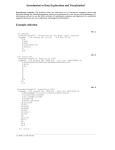
Cmd> chplot(x:run(10),y:run(10)^(.3*run(5)'),ymin:0,\
title:"Sample plot by chplot()") # no plotting symbols provided
Sample plot by chplot()
5
30
5
25
5
20
5
y
4
15
5
4
4
5
4
10
4
5
1
2
3
4
5
5
4
3
2
1
5
4
3
2
1
4
3
2
1
3
2
1
1
2
3
4
5
5
0
3
2
1
6
3
3
3
3
2
1
2
1
2
1
2
1
7
8
9
10
4
x
2.15.4 Equally spaced x values The exception to the requirement that x and y have the
same number of rows is a convention you can use when you want to plot the rows of y
against equally spaced values on the X-axis. When x is a REAL scalar (single number),
y[i,] is plotted against vector(x,x+1,x+2,...), that is they are equally spaced by 1
starting with x. When x is a vector of length 2, say, vector(x0,d), y[i,] is plotted
against vector(x0,x0+d, x0+2*d,...), that is equally spaced starting with x0 and
incrementing by d. For example, plot(1,y) is equivalent to
plot(run(nrows(y)),y) and lineplot(vector(1967,1/12),y) might be used to
plot monthly values for which y[1,] was data for January, 1967.
2.15.5 Graphics keywords See Sec. 8.5 for information on the use of keywords xmin,
ymin, xmax, ymax, xlab, ylab, xaxis, yaxis, title, file, keep, and show, and on
how to add information to previously created graphs.
You can draw lines between points plotted by plot() or chplot() by using keyword
phrase lines:T.
On all three commands, you can use impulses:T add “impulses” to the plot. On
plot() but not on chplot(), this suppresses the plotting symbols.
2.15.6 colplot and rowplot These are pre-defined macros that use chplot() to draw
“interaction plots” of data in a matrix x. colplot(x) draws line plots of each c o l u m n
of x versus the row numbers run(nrows(x)). Data points are labelled with the
column number. Similarly rowplot(x) draws line plots of each row of x versus the
column numbers run(ncols(x)). See Sec. 10.12 for an example of the use of colplot.
2-63