1
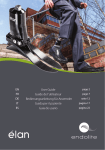
User Guide
Contents:
Introduction . . . . . . . . . . . . . . . . . . . . . . . . . . . . . . . . . . . . . . 3
Safety Information . . . . . . . . . . . . . . . . . . . . . . . . . . . . . . . . . 4
Key points . . . . . . . . . . . . . . . . . . . . . . . . . . . . . . . . . . . . . . . . 5
Transport and storage . . . . . . . . . . . . . . . . . . . . . . . . . . . . . . 5
User Interface . . . . . . . . . . . . . . . . . . . . . . . . . . . . . . . . . . . . 6
Battery Charging . . . . . . . . . . . . . . . . . . . . . . . . . . . . . . . . . . 7
Automatic Reset after charging . . . . . . . . . . . . . . . . . . . . . . 8
Low Battery Charge . . . . . . . . . . . . . . . . . . . . . . . . . . . . . . . . 9
Knee Error Detected . . . . . . . . . . . . . . . . . . . . . . . . . . . . . . . 9
Knee Reset . . . . . . . . . . . . . . . . . . . . . . . . . . . . . . . . . . . . . . 10
Battery Status . . . . . . . . . . . . . . . . . . . . . . . . . . . . . . . . . . . 11
Battery Check . . . . . . . . . . . . . . . . . . . . . . . . . . . . . . . . . . . . 12
User modes . . . . . . . . . . . . . . . . . . . . . . . . . . . . . . . . . . . . . 13
2
938341WEB-GB/1-0413
Introduction
The Orion is a microprocessor controlled swing and stance knee prosthesis
with variable cadence. It has a programmable stance yield setting for secure
stance control on stairs, ramps, standing still and during active gait. The
Smart Technology provides self-calibration and core parameters.
The knee provides a cadence range from slow walking to fast walking and is
ideal for Activity Level 3 users.
Key Product Features:
•
•
•
•
•
•
•
•
•
Suitable for Transfemoral, knee and hip disarticulation amputees
Suitable for users up to 125kg (275lb)
Ideal for activity levels up to Level 3
Support on first step of stairs
Security on slopes
Supportive yield for sitting down
Personalized yield levels customised to user’s needs
Variable cadence for a wide range of walking speeds
Reduction of stance support to initiate swing phase will not be
activated until the toe load passes a programmed level
• Intended for single user only
For further information and updates on instructions and warranty please refer
to www.endolite.co.uk or www.endolite.com Orion knee pages.
3
938341WEB-GB/1-0413
Safety Information:
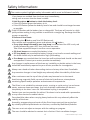
The caution symbol highlights safety information which must be followed carefully.
If any beeps are emitted from the knee stop immediately,
taking care to ensure that the knee is stable.
1 Hold the minus
button to check the battery level.
• If the LED flashes green the battery is ok.
• If the LED flashes yellow the battery level is low and should be recharged as soon
as possible.
If the LED flashes red the battery has no charge left. The knee will remain in a high
yield position making it only possible to walk with a straight leg. Recharge the knee
as soon as possible.
2 Perform a User Reset:
By holding the
button until the LED flashes red,
then release and immediately press and release the
button.
• If one short beep followed by one long beep is emitted and the LED is only red
briefly followed by green LED, then the knee has reset.
Take a few supported steps to confirm correct operation.
• If 8 short beeps are sounded the battery is low.
• If 5 long beeps are sounded the battery charge is too low for normal walking and
the knee should only be walked with a high yield setting.
• If no beeps are sounded then the knee has malfunctioned and should not be used
unsupported. Contact your service provider immediately.
Any changes in performance of the knee eg. instability or double action in the knee,
should be immediately reported to your service provider for investigation.
Always use a hand rail when descending stairs and at any other time if available.
Any excessive changes in heel height may adversely affect the stability of the knee.
After continuous use the top of the cylinder may become hot to the touch.
Avoid strong magnetic fields, sources of electrical interference, atmospheres
containing liquids and/or powders and extremes of temperature.
The Orion is not suitable for extreme sports, running or cycle racing, ice and snow
sports, extreme slopes and steps. Any such activities undertaken are done so
completely at the users’ own risk. Recreational cycling is acceptable.
Contact your service provider for advice if the knee is to be used with a pacemaker
or any other electronic medical device.
Care should be taken when carrying heavy loads as this may adversely affect the
stability of the knee.
Assembly, programming and repair of the Orion knee must only be carried out
by suitably qualified practitioners or clinicians, certified by Blatchford/Endolite.
The user must not adjust or tamper with the settings or program.
The user should be advised to contact their clinician if their condition changes.
4
938341WEB-GB/1-0413
Key points for User:
• Do not attempt stairs descent leg-over-leg on an
Orion knee unless you have been trained for stairs descent.
• Any changes in body weight and/or activity level of the user must
also be reported to the clinical practitioner.
• High flexion resistance settings may induce some noise during stairs descent, this will not affect function.
Any changes in performance of this device must be reported to the
practitioner or clinician.
Changes in performance may include:
•
•
•
•
•
•
Increase in knee stiffness
Knee instability
Knee starting to extend too aggressively
Any unusual noises
Any unrecognized beeps or warning lights
One or more uninitiated beeps from the buzzer that cannot be
attributed to the audible battery low warning
Cleaning:
Use a damp cloth and mild soap to clean the outside surfaces.
DO NOT use aggressive cleansers.
Transport & Storage:
• Ensure that the Orion knee is in a straight (fully extended)
position when not in use.
• If the limb is to be stored upright then it must be secured to prevent
it falling over or flexing.
• If the Orion knee is shipped either on its own or built into a limb it
should be maintained in an extended position and packaged in a
suitable box to allow this.
5
938341WEB-GB/1-0413
User Interface
Key to Symbols:
LED
MODE
Red - reset
Green - function ok
LED flashing red = mode selection
LED flashing red + colour = warning
BUTTON
FUNCTION
Red indicates which button to press.
Press and hold to cycle through LED sequence,
press and release to increase adjustment settings.
Press and hold to exit a mode.
Press and release to select LED mode and to decrease
adjustment settings.
SOUND
SIGNAL
Short Beep
Long Beep
6
938341WEB-GB/1-0413
Battery Charging:
The batteries are not field replaceable and
will be replaced as necessary when serviced.
The Orion knee must be charged daily. Lay the extended limb on a flat surface and plug the
charger into the mini USB port in the top of the knee.
•
•
Only charge the Orion knee using the charger supplied with the product. Do not use this charger for charging any other device.
From fully discharged, it takes typically 2 hours to full charge.
Read the user instructions supplied with the charger before using for the first time.
Do not move, knock, drop or bend the knee immediately after removing the charger connector while the red light is on.
The battery charger can be used with an electrical outlet that is rated between 100
and 240V AC, 50/60Hz.
Never plug the charger into the knee while still wearing the limb.
During charging no power is delivered to the knee control system. The user interface buttons and LED are inoperative.
The front of the knee may become warm during charging but should never be too hot to touch. If this is the case immediately unplug from electrical supply and contact your service provider.
• It is recommended that the knee is charged every night when in regular use.
• Do not refit the knee until the charger has been disconnected.
• Always recharge the knee before use if it has not been used for an extended period of time.
• Use the indicator on the back of the charger to confirm that charging has initiated correctly.
o When the charger is first switched on the indicator is yellow.
o When fast charging commences the indicator changes to orange.
o When close to full charge the indicator flashes green/yellow.
o On reaching full charge the indicator changes to green.
Charger first switched
Fast charging
Close to full charge Fully charged (green)
(yellow)
commences (orange) (flashing green/yellow)
7
938341WEB-GB/1-0413
Automatic Reset after Charging:
From fully discharged it takes
typically 2 hours to full charge.
Only charge the Orion knee with the
charger supplied with the product
and do not use this charger for
charging any other device.
The knee must remain stationary
to allow Automatic Reset to take
place when charger plug is removed.
Unplug the charger and keep the
limb extended for 8 seconds at which
time the motors will reset.
The red LED will remain on for 8
seconds
8 Seconds
Followed by the green LED for 2
seconds.
The Orion knee will now resume
normal operation.
2 Seconds
Note:
If red LED remains on for more than 10 seconds reconnect charger, wait 5
seconds, then disconnect, keeping the knee/ limb straight during reset.
8
938341WEB-GB/1-0413
Low Battery Charge:
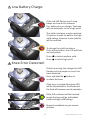
If the red LED flashes and 5 long
beeps are heard this indicates
the battery has no charge. The knee
will automatically set to a high yield.
x5
The yield resistance may be reduced
if it proves unsafe to walk at the high
yield setting, however, knee stability
will be reduced
To change the yield resistance
Press either button, the LED will flash
red and yellow:
Press to select medium yield
Press to select high yield
Knee Error Detected:
If after removing the charger the LED
flashes red and purple an error has
been detected.
Press and hold the button to
re-check the knee
If the error is resolved the green LED
will be illuminated for 2 seconds and
the limb will resume normal operation
Normal Operation
If the LED continues to flash red and
purple the knee will go to disabled
mode and high yield settings
Limb Disabled
Report immediately to your service
provider
9
938341WEB-GB/1-0413
Knee Reset:
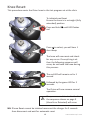
This procedure resets the Orion knee to the last program set at the clinic
To initiate knee Reset
Ensure the knee is in a straight (fully
extended) position
Press and hold
red
until LED flashes
Press to select, you will hear 1
short beep
x1
The knee will now reset and check
for any errors. If everything is ok
then the following sequence will
occur, do not bend the knee during
this process:
The red LED will remain on for 1
second
1 Second
Followed by the green LED for 2
seconds.
2 Seconds
The Orion will now resume normal
operation.
If any errors are detected in the limb
the sequence shown on page 9
(Knee Error Detected) will occur
NB: If knee Reset cannot be initiated reconnect the charger for 5 seconds
then disconnect and wait for automatic reset
10
938341WEB-GB/1-0413
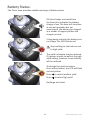
Battery Status:
The Orion knee provides audible warnings of battery status
If 8 short beeps are heard from
the knee this indicates the battery
charge is low. The knee will continue
at normal operation but we
recommend the battery be charged
as a matter of urgency before the
charge runs out.
x8
5 long beeps indicate the battery has
no charge. The LED flashes red.
Stop walking so the limb can set
to high yield.
x5
The yield resistance may be reduced
if it proves unsafe to walk at the high
yield setting, however, knee stability
will be reduced.
To change the yield resistance
Press either button, the LED will flash
red and yellow:
Press to select medium yield
Press to select high yield
Recharge and reset.
11
938341WEB-GB/1-0413
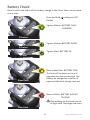
Battery Check:
How to check the status of the battery charge in the Orion knee, can be done
at any time
Press and hold
flashes
until green LED
3 green flashes: BATTERY FULLY
CHARGED
3 Flashes
2 green flashes: BATTERY GOOD
2 Flashes
1 green flash: BATTERY OK
1 Flash
Slow yellow flash: BATTERY LOW
The limb will continue at normal
operation but we recommend the
battery be charged as a matter of
urgency before the charge runs out
Slow Flash
Slow red flash: BATTERY HAS NO
CHARGE
Stop walking so the knee can set
to high yield. Recharge and reset.
Slow Flash
12
938341WEB-GB/1-0413
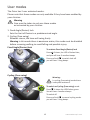
User modes
The Orion has 2 user activated modes.
Please note that these modes are only available if they have been enabled by
your clinician.
Warning
Care must be taken to only use these modes
as instructed by your clinician.
1. Fixed Angle (flexion) lock
Sets the limit of flexion to a predetermined angle.
2. Cycling (Free swing)
Releases stance, the knee will swing freely.
Warning in this mode there is no stance active, this mode must be disabled
before resuming walking to avoid falling and possible injury.
Fixed Angle (flexion) lock
To activate Fixed Angle (flexion) lock
Press
3 times, the LED is flashes blue,
and you will hear 3 medium beeps.
Press and hold
to switch lock off.
you will hear 2 long beeps.
x3
Cycling (Free swing)
Warning:
In cycling (free swing) mode there
is no yield resistance.
To switch on Cycling (Free swing) mode
Press
4 times the LED flashes green.
You will hear 4 medium beeps.
To switch off
Press and hold
to cancel cycling mode.
you will hear 2 long beeps.
x4
13
938341WEB-GB/1-0413
Head Office
Chas A Blatchford & Sons Ltd
Unit D Antura
Kingsland Business Park
Basingstoke
Hampshire, RG24 8PZ
United Kingdom
Tel: +44 (0) 1256 316600
Fax: +44 (0) 1256 316710
Email: [email protected]
www.endolite.co.uk
Customer Services UK
Prosthetic and Orthotic Products
11 Atlas Way
Atlas North
Sheffield
S4 7QQ
United Kingdom
Tel: +44 (0) 114 263 7900
Fax: +44 (0) 114 263 7901
Email: [email protected]
www.endolite.co.uk
endolite North America
1031 Byers Road
Miamisburg
Ohio 45342
USA
Tel: 800.548.3534
Fax: 800.929.3636
Email: [email protected]
www.endolite.com
endolite Germany
Endolite Deutschland GmbH
Holzstr. 5
95336 Mainleus
GERMANY
Tel: +49 9229 9737 001
Fax: +49 9229 9737 006
Email: [email protected]
www.endolite.de
endolite France
Parc d’Activités de l’Aéroport, 125 Impasse
Jean-Baptiste Say
34470 PEROLS
FRANCE
Tel: 00 33 (0) 467 820 820
Fax: 00 33 (0) 467 073 630
Email: [email protected]
www.endolite.fr
endolite India Ltd
A4 Naraina Industrial Area Phase 1
New Delhi
INDIA – 110028
Tel: 91 11 45689955
Fax: 91 11 25891543
Email: [email protected]
www.endoliteindia.com
938341WEB-GB/1-0413