1
PageFlip Cicada
Wireless Bluetooth Pedal
User Guide
PageFlip Cicada User Guide
Legal Notice
c 2013 PageFlip Inc. All rights reserved.
Copyright Information in this document is subject to change without notice. All statements, information, and recommendations in this manual are believed to
be accurate but may include inadvertent technical inaccuracies or typographical errors. PageFlip Inc. provides this information “as is”, without
warranty of any kind, either expressed or implied, including any implied
warranties of merchantability or fitness for a particular purpose. No part
of this manual may be reproduced, stored in a retrieval system, or transmitted in any form or any means electronic or mechanical, including photocopying and recording for any purpose other than the purchaser’s personal use without the consent of PageFlip Inc.
c 2013 PageFlip Inc.
Contents PageFlip Inc.
Woodmere, NY 11598
USA
www.pageflip.com
[email protected]
Version 4.0
March 1, 2013
PageFlip, Inc.
1
www.pageflip.com
PageFlip Cicada User Guide
FCC/CE Notice
This device complies with Part 15 of the FCC Rules. Operation is subject
to the following two conditions:
(1) This device may not cause harmful interference, and
(2) this device must accept any interference received, including interference that may cause undesired operation.
Changes or modifications not expressly approved by the party responsible
for compliance could void the user’s authority to operate the equipment.
PageFlip Cicada
FCC ID: XKEPFCICADA01
This product conforms to the EMC-Directive 89/336/EEC and to the Low
Voltage Regulation 73/23 EEC.
Safety Notice / Warning
Please read the following safety instructions carefully to safely and correctly operate this device. PageFlip assumes no responsibility for property
damage or personal injury.
1.
2.
3.
4.
5.
6.
7.
Do not place any container filled with liquid on the device.
Do not use a voltage other than the specified one.
Do not plug AC adapter into socket with wet hands.
Always hold case before removing AC adapter plug.
Safely install and apply power before operating device.
Never insert your hand into device while operating it.
Do not disassemble or modify the device.
PageFlip, Inc.
2
www.pageflip.com
PageFlip Cicada User Guide
CONTENTS
Contents
1 WELCOME
4
2 FEATURES
5
3 PACKAGE CONTENTS
7
4 BASIC OPERATION
4.1 Battery Installation . . . . . . . . .
4.2 AC Adapter . . . . . . . . . . . . .
4.3 Powering On the Pedal . . . . . .
4.4 Bluetooth Pairing (versions V3/V4)
4.5 Bluetooth Pairing (versions V1/V2)
4.6 Pedal Mode Selection . . . . . . .
4.7 Triggering the Pedal . . . . . . . .
4.8 Autorepeat Function . . . . . . . .
.
.
.
.
.
.
.
.
.
.
.
.
.
.
.
.
.
.
.
.
.
.
.
.
.
.
.
.
.
.
.
.
.
.
.
.
.
.
.
.
.
.
.
.
.
.
.
.
.
.
.
.
.
.
.
.
.
.
.
.
.
.
.
.
.
.
.
.
.
.
.
.
.
.
.
.
.
.
.
.
.
.
.
.
.
.
.
.
.
.
.
.
.
.
.
.
.
.
.
.
.
.
.
.
8
8
9
10
11
12
13
14
15
5 PRODUCT SPECIFICATION
16
6 MAINTENANCE
17
7 WARRANTY
18
8 GUARANTEE
19
9 FREQUENTLY ASKED QUESTIONS
20
PageFlip, Inc.
3
www.pageflip.com
PageFlip Cicada User Guide
1
1. WELCOME
WELCOME
Congratulations on your purchase of the PageFlip Cicada Bluetooth pedal!
This product was designed to meet the needs of people with disabilities,
musicians, and avid readers who struggle with the challenge and inconvenience of page turning. PageFlip Cicada works exclusively with digital
documents, web pages, and image collections on any Windows, Mac, or
Linux computer. By simply tapping the dual pedal of the PageFlip Cicada,
the digital content can now be flipped or scrolled in either the forward or
reverse directions for convenient hands-free reading.
The PageFlip Cicada emulates a standard keyboard and works with
any software that uses keyboard strokes to navigate through digital files.
For added versatility, the user may select among five modes for the dual
pedals: PageUp/PageDown, Left/Right arrow, Up/Down arrow, Left/Right
mouse click, and Space / Enter. Changing modes is as simple as pressing
a button. No software installation or programming is required.
The PageFlip Cicada is ideal for musicians who can now keep their
hands, and their focus, on their instruments rather than struggle with turning sheet music. It is also ideal for people with disabilities who can more
easily tap a pedal than attempt to manipulate pages of a standard book or
magazine. The convenient mode buttons maximize versatility for use with
a wide variety of software to scroll, browse, and navigate through eBooks,
PDF files, Word, Powerpoint, web pages, and images.
PageFlip Cicada is compact, silent, reliable, and easy to use. Since
it works with digital content, it guarantees 100% reliability in turning one
page at a time without moving parts or noise. Just pair the pedal with a
Bluetooth-enabled computer, open up any digital file, and tap the pedal to
begin enjoying hands-free reading. Be prepared to enjoy the benefits of
the PageFlip Cicada Bluetooth pedal for automatic page turning!
PageFlip, Inc.
4
www.pageflip.com
PageFlip Cicada User Guide
2
2. FEATURES
FEATURES
• Ease of Use
Simply open a digital file and press either pedal of the PageFlip
Cicada to turn a page forwards or backwards.
• Convenience
Permits hands-free reading of vast libraries of scanned, purchased,
or freely downloaded digital content. There is no need to stop playing your musical instrument or wait for a care-giver to turn the page.
• Reliability
Turns one page at a time with 100% accuracy. Navigation of digital
content eliminates the risk of turning multiple pages at once, which
is a problem typically associated with physical books.
• Versatility
Press a mode button to select pedal functions for enhanced software compatibility: PageUp/PageDown, Left/Right arrow, Up/Down
arrow, Left/Right mouse click, and Space / Enter.
• Robust Operation
A Repeat switch enables continuous scrolling while the pedal is
pressed down. Disable this feature for musical performances to
prevent inadvertent page turns in case of a slow pedal release.
• Wireless Connectivity
The PageFlip Cicada communicates wirelessly with the computer
up to a range of 10 meters using standard Bluetooth 3.0 technology.
• Compatibility
Works with any Windows, Mac, or Linux computer. Even works with
the Apple iPad on apps that accept keyboard commands. Includes
a Bluetooth USB micro adapter (dongle) to bring the full benefits of
this wireless pedal to any computer that is not Bluetooth compliant.
PageFlip, Inc.
5
www.pageflip.com
PageFlip Cicada User Guide
2. FEATURES
• Unique Pairing
Multiple pedals can be operated in the same room without interference. The Bluetooth pairing process uniquely establishes wireless
connectivity between the PageFlip Cicada and one computer. On
all current pedals (versions V3 or V4), Bluetooth pairing is automatically achieved without a passkey once the pedal is selected
among a list of discovered Bluetooth devices on the tablet/PC. On
older versions of the pedal, the computer requires the user to enter
a numerical code on the PageFlip Cicada. In those cases, simply
press one of the five mode buttons and, if necessary, the left pedal
(Shift) to enter each code digit. The right pedal (Enter) must be
pressed to complete the pairing process. The label on the bottom
of the pedal identifies the version number by using a V2, V3, or V4
marking.
• External Switches
The PageFlip Cicada is compatible with a wide array of external
switches. Commonly used sip-and-puff and Jelly Bean pushbutton
switches may be plugged into the auxiliary switch outlet(s) via two
1/8" mono plugs.
• Auto Power-Off Function
PageFlip Cicada automatically turns itself off 10 minutes after the
last operation is performed. The pedal has a battery life of 200
hours of continuous page turning, or about 200,000 page turns.
• Portability
Small lightweight pedal operates on AC power or two AA batteries.
• Technical Support
Additional information and video tutorials can be found at
www.pageflip.com
PageFlip, Inc.
6
www.pageflip.com
PageFlip Cicada User Guide
3
3. PACKAGE CONTENTS
PACKAGE CONTENTS
This package contains the following items. If any items are missing, please
contact the dealer where you purchased the product.
1.
2.
3.
4.
PageFlip Cicada Bluetooth Pedal
Bluetooth USB Micro Adapter (Dongle)
USB power cable (6 feet)
Quickstart Guide (English/German/French/Spanish)
Figure 1: Package contents: PageFlip Cicada, Bluetooth USB micro
adapter, and USB power cable.
PageFlip, Inc.
7
www.pageflip.com
PageFlip Cicada User Guide
4
4. BASIC OPERATION
BASIC OPERATION
Please read the operating instructions carefully before first use. PageFlip
Cicada is designed to work with a wide variety of software to display electronic documents. It is important that the user closely follow the directions
below in order to maximize performance, reliability, and reading pleasure.
4.1
1.
2.
3.
4.
Battery Installation
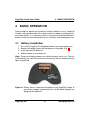
Turn off the PageFlip Cicada pedal before inserting the batteries.
Remove the battery cover on the bottom of the pedal (Fig. 2).
Install two new AA batteries.
Slide the battery cover back on.
Note: To conserve battery power, turn off device when not in use. The unit
automatically turns off after two hours of inactivity, but can awake instantly
upon a pedal tap.
Figure 2: Battery cover is located at the bottom of the PageFlip Cicada. A
convenient storage compartment for the Bluetooth dongle lies
alongside the batteries.
PageFlip, Inc.
8
www.pageflip.com
PageFlip Cicada User Guide
4.2
4.2
AC Adapter
AC Adapter
In addition to being battery-operated, PageFlip Cicada may also be plugged
into the wall via a USB AC adapter. For added versatility, the pedal may be
powered by connecting it directly to the USB port of a computer. A USB
power cable (Fig. 1) is included for use with any USB AC adapter, such as
those included with iPads and iPhones (Fig. 3(b)). Simply plug one end
of the power cable into the mini-USB outlet on the rear of the PageFlip
Cicada (Fig. 3(a)) and plug the other end into the USB AC adapter.
(a)
(b)
Figure 3: (a) Rear view of PageFlip Cicada. Attach the mini-USB end of
the 6’ USB power cable into the rear POWER outlet and connect the other end into (b) any USB AC adapter, such as those
found on iPads and iPhones.
PageFlip, Inc.
9
www.pageflip.com
PageFlip Cicada User Guide
4.3
4.3
Powering On the Pedal
Powering On the Pedal
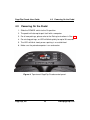
1. Slide the POWER switch to the On position.
2. The pedal will attempt to pair itself with a computer.
3. For all new pairings, please refer to the Pairing instructions in Sec. 4.4.
4. For existing pairings, an LED will blink quickly for up to 30 seconds.
5. The LED will blink slowly once a pairing is re-established.
6. Make sure the paired computer is on and awake.
Figure 4: Top view of PageFlip Cicada control panel.
PageFlip, Inc.
10
www.pageflip.com
PageFlip Cicada User Guide 4.4
4.4
Bluetooth Pairing (versions V3/V4)
Bluetooth Pairing (versions V3/V4)
The following instructions apply to all PageFlip Cicada pedals that have a
V4 or V3 marking above the IC/FCC text on the label under the pedal. A
V4 marking indicates that the unit is Version 4, which first became available in February 2013. Units with V3 markings (version 3) first became
available in July 2012. If the pedal has a V2 marking (version 2) or no such
marking (version 1), then please refer to "Bluetooth Pairing (versions V1
and V2)" in Sec. 4.5 for instructions on Bluetooth pairing.
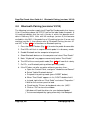
1. Press the RESET button (Fig. 3(a)) to make the pedal discoverable.
2. Five LEDs will flash in sequence while pedal is in discovery mode.
3. Enable Bluetooth on the computer to be paired.
4. Show Bluetooth devices on the computer and select "Dual Pedal."
5. Note: "Keyboard" may appear momentarily before "Dual Pedal."
6. The LED of the current pedal mode (Sec. 4.6) will now flash slowly.
7. On PCs, use Bluetooth pairing without passkey (code).
8. If the PC does not offer an option without a passkey, then:
a. Open the Control Panel, and go to "Hardware and Sound."
b. Select "Add a Bluetooth device."
c. Put pedal into pairing mode (press RESET button).
d. When "Dual Pedal" appears in list, DON’T double click it!
e. Instead, right-click on "Dual Pedal" and select "Properties."
f. Wait for the services panel to load.
g. Check box for "Drivers for keyboard, mice, etc. (HID)".
h. Click on "OK" to close the window.
i. Windows will load the drivers for your keyboard/pedal.
j. Test connected pedal by typing arrow keys into Notepad.
PageFlip, Inc.
11
www.pageflip.com
PageFlip Cicada User Guide 4.5
4.5
Bluetooth Pairing (versions V1/V2)
Bluetooth Pairing (versions V1/V2)
1. Press the RESET button (Fig. 3(a)) to make the pedal discoverable.
2. Five LEDs will flash in sequence while pedal is in discovery mode.
3. Enable Bluetooth on the computer to be paired.
4. Show Bluetooth devices on the computer and select "Dual Pedal."
5. Note: "Keyboard" may appear momentarily before "Dual Pedal."
6. Wait for the computer to generate a random number.
7. Use the five mode buttons (Fig. 4) to enter digits 1, 2, 3, 4, 5.
8. Hold down left pedal (Shift) and press buttons to enter 6, 7, 8, 9, 0.
9. Hold down left pedal and press right pedal for backspace.
10. Press right pedal (Enter) after all digits have been entered.
11. The LED of the current pedal mode (Sec. 4.6) will now flash slowly.
Digit/Function
1
2
3
4
5
6
7
8
9
0
Enter
Backspace
Button/Pedal Combination
1/6
2/7
3/8
4/9
5/0
L Pedal + 1/6
L Pedal + 2/7
L Pedal + 3/8
L Pedal + 4/9
L Pedal + 5/0
R Pedal
L Pedal + R Pedal
Figure 5: Use mode buttons and pedals to enter numeric Bluetooth code.
PageFlip, Inc.
12
www.pageflip.com
PageFlip Cicada User Guide
4.6
4.6
Pedal Mode Selection
Pedal Mode Selection
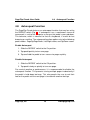
The PageFlip Cicada emulates a standard keyboard and works with any
software that uses keyboard strokes to navigate through digital files. For
added versatility, the user may select among five pedal modes, as shown
in Table 1. Simply press a button (Fig. 4) to change the mode. A flashing
LED confirms the mode selection.
Pedal Mode
PageUp/PageDown
Left/Right Arrow
Up/Down Arrow
Left/Right Mouse click
Space/Enter
Function
Turn page
Turn page or move cursor
Turn page or move cursor
Click left or right mouse button
Press Space bar or Return key
Table 1: Five pedal modes and their functions.
Select the mode that achieves your intended goals. Results may
vary based on the software. For instance, some software applications
use PageUp/PageDown to advance between pages/screens, and use the
arrow keys to move the cursor between characters or rows. Other programs accept the PageUp/PageDown or arrow keys interchangeably. Image viewers typically respond to Left/Right arrow but not Up/Down arrow.
Experiment with the different modes and see which works best for your
application. These options are made available to enhance pedal versatility by making it responsive to the widest array of software.
PageFlip, Inc.
13
www.pageflip.com
PageFlip Cicada User Guide
4.7
4.7
Triggering the Pedal
Triggering the Pedal
The PageFlip Cicada Bluetooth pedal can be triggered by:
1. tapping the left or right pedal of the PageFlip Cicada
2. activating an external (auxiliary) switch
PageFlip Cicada works with sip-and-puff switches, AbleNet Jelly Bean
pushbuttons, or any external switch that can be plugged into the two 1/8"
mono outlets shown in Fig. 3. Use a plug adapter, if necessary, to convert
other plugs for use with the unit. PageFlip does not supply plug adapters
or external switches. Consult assistive technology vendors for more information about switches.
(a)
(b)
(c)
Figure 6: (a) A sip-and-puff switch can connect to the PageFlip Cicada
auxiliary outlet via two 1/8" (3.5mm) mono plugs. (b) A Jelly
Bean is a large pushbutton switch. Two such switches can be
connected to the PageFlip Cicada to turn pages in either direction by using the two outlets for 1/8" mono plugs. Plug one
switch into the R outlet to turn pages forward or plug both into
the L and R outlets for bidirectional operation. (c) Use a 1/8"
stereo to dual 1/8" mono plug adapter for converting stereo
plugs into two mono plugs.
PageFlip, Inc.
14
www.pageflip.com
PageFlip Cicada User Guide
4.8
4.8
Autorepeat Function
Autorepeat Function
The PageFlip Cicada features an autorepeat function that may be set by
the REPEAT switch (Fig. 4). If autorepeat is on, a continuous stream of
commands is sent to the computer as long as the pedal is pressed down.
This behavior, which is identical to that of a keyboard, is useful for fast
browsing or scrolling. The autorepeat function applies only to the following
pedal modes: PageUp/PageDown, Left/Right arrow, and Up/Down arrow.
Enable Autorepeat
1. Slide the REPEAT switch to the On position.
2. Tap pedal quickly to turn one page.
3. Tap and hold the pedal to turn successive pages quickly.
Disable Autorepeat
1. Slide the REPEAT switch to the Off position.
2. Tap pedal slowly or quickly to turn one page.
For musical practice or performance, it is recommended to disable the
autorepeat function. This prevents turning multiple pages inadvertently if
the pedal is held down too long. This also permits the user to rest their
foot on the pedal until the next page is turned with another foot tap.
PageFlip, Inc.
15
www.pageflip.com
PageFlip Cicada User Guide
5
5. PRODUCT SPECIFICATION
PRODUCT SPECIFICATION
Item
Model Name
Model Number
Dimensions
Weight (w/o batteries)
Power Requirements
Power Consumption:
Operating Mode
Bluetooth Pairing
Standby
Sleep
Battery Life
(2 AA batteries)
Output Power
Operating Distance
Operating Frequency
Operating Temperature
Storage Temperature
Relative Humidity
Warranty
LED
Off
Solid
All LEDs flash
Quick flash (1 sec)
Slow flash (4 sec)
Three quick flashes
PageFlip, Inc.
Specifications
PageFlip Cicada
PFCICADA-01
6.7 x 4.6 x 1.3 inches (171 x 118 x 34 mm)
4.8 ounces (135 grams)
DC 5V, 500mA (2 AA batteries)
4 mA
30-40 mA
1 mA
0.05 mA
200 hours of continuous turning
approx. 200,000 page turns
-2 dBm to 4 dBm
10 meters
2402-2480 MHz
32◦ − 140◦ F (0◦ C - 60◦ C)
−4◦ − 140◦ F (−20◦ - 60◦ C)
15% - 90%
90 days
Operating Condition
Pedal powered off or asleep
Connected to external power source
Bluetooth discovery mode (RESET)
Attempting to pair with computer
Paired with computer
Low-battery condition
16
www.pageflip.com
PageFlip Cicada User Guide
6
6. MAINTENANCE
MAINTENANCE
Before cleaning the PageFlip Cicada, the following is recommended:
1. Turn off the power
2. Unplug the power cord
3. Take out the batteries
Gently wipe the PageFlip Cicada surface with a soft, dry, lint-free cloth.
Caution:
Do not use water, liquid detergent or solvents for cleaning. Liquids might
drip into the device’s mechanical or electronic parts and cause damage.
PageFlip, Inc.
17
www.pageflip.com
PageFlip Cicada User Guide
7
7. WARRANTY
WARRANTY
PageFlip offers a 90-day warranty on the PageFlip Cicada Bluetooth pedal.
The warranty commences on the date of purchase. Should a unit fail during the warranty period, PageFlip will, at its option, repair or replace the
damaged unit. Repaired or replaced units will be covered for the remainder of the original warranty period. This warranty does not apply to units
that, after being examined by PageFlip, have been found to have failed
due to customer abuse, mishandling, alteration, improper installation, or
negligence. Furthermore, the warranty does not apply to defects that have
negligible effect on the value or operation of the unit.
Defective units must be returned postage paid as a complete unit to
PageFlip or its authorized distributor. Proof of purchase and a letter explaining the problem must accompany the returned unit. The warranty
becomes void if repairs are undertaken by unauthorized persons and if
original PageFlip parts are not used.
Products no longer covered by a warranty may be repaired for a nominal fee. All repairs are warranted for 90 days. Before returning a product
for refund or repair, please send email to [email protected] with a
description of the problem. PageFlip will respond with instructions on how
to expediently resolve the matter. Repair charges must first be approved
for products no longer covered by the warranty.
PageFlip, Inc.
18
www.pageflip.com
PageFlip Cicada User Guide
8
8. GUARANTEE
GUARANTEE
PageFlip offers a 30-day money back guarantee if our products do not
meet your needs or expectations. Products must be returned postage paid
in new condition in the original packaging to honor this service. A 20%
restocking fee applies. Contact [email protected] for instructions.
Contact us at:
PageFlip, Inc.
Woodmere, NY
USA
[email protected]
www.pageflip.com
PageFlip, Inc.
19
www.pageflip.com
PageFlip Cicada User Guide 9. FREQUENTLY ASKED QUESTIONS
9
FREQUENTLY ASKED QUESTIONS
Does the PageFlip Cicada work with the Apple iPad?
Yes. However, the pedal only works with software that accepts keyboard
commands. The most popular compatible apps are Forscore, unrealBook,
and Deepdish Gigbook. Other compatible apps include DrumSetlist Manager, Hymnals, iCue, iGigBook, iReal b, Loopy, Loopy HD, MuseScore
Sheet Music Viewer, Music Binder, MusicReader, MusicPodium, My Lyric
Book, NextPage, NextSong, OnSong, PiaScore HD, Play On Cue, Pocket
Jamz Guitar Tabs, Pocket Jamz Piano Notes, PrompterPal, SampleWiz,
Avid Scorch, Scorio Music Case, SeeScore, Finale SongBook, Sheet Music Direct, Scorecerer, Set List Maker, Setlists, Steinway Etude, TheGigEasy,
Virtual Sheet Music, Teleprompt+, and Planning Center Music Stand.
Please check www.pageflip.com for updated information.
Does the PageFlip Cicada work with all Android tablets?
The PageFlip Cicada works with Android tablets that support Bluetooth
2.1 + EDR (or later). This includes virtually all Android tablets. However,
the pedal only works with Android apps that accept keyboard commands.
Currently, this is limited to MobileSheets, MusicNotes, SongBook, Moon+
Reader, EBookDroid, Cool Reader, and ezPDF Reader. Please check
www.pageflip.com for updated information.
Does the PageFlip Cicada work with all Windows and Mac software?
The PageFlip Cicada dual pedal emulates a keyboard that emits two key
presses. The function of those keys is determined by the five mode buttons. Any software on a PC or Mac will be able to interpret these key
presses, whether they were triggered by tapping the pedal or any computer keyboard.
PageFlip, Inc.
20
www.pageflip.com
PageFlip Cicada User Guide 9. FREQUENTLY ASKED QUESTIONS
How do I perform Bluetooth pairing when my PC demands a passkey?
Open up the Control Panel, and go to "Hardware and Sound". Select
"Add a Bluetooth device". When Windows is searching for your Bluetooth devices, put your pedal into pairing mode (press the white RESET
button). When "Dual Pedal" shows up in the list, DON’T double click it! Instead, right-click on the "Dual Pedal" and select "Properties". In the "Keyboard Properties" window that opens, wait a few seconds for the services
panel to load. Once it has loaded, check the box for "Drivers for keyboard,
mice, etc. (HID)". Click on "OK" to close the window. Windows will load
the drivers for your keyboard/pedal. After everything settles down, your
pedal should be working with Windows. Try typing characters (such as
the up/down arrow) into Notepad, to make sure it’s working properly.
Does the PageFlip Cicada work with the Amazon Kindle?
The PageFlip Cicada works with Kindle Fire HD. The older Kindle hardware does not support Bluetooth or include a USB port. However, Kindle
software for the PC and Mac works with the pedal.
Which software is known to work with the PageFlip Cicada?
The PageFlip Cicada works with any software that uses PageUp/PageDown,
arrow keys, or mouse clicks to advance through the electronic document.
This includes any PDF reader, Microsoft Word, Powerpoint, web browsers,
image viewers, and more.
Where can I find digital sheet music to download?
The best source for free classical music is the International Music Score
Library Project (IMSLP) at imslp.org. Extensive collections of popular
music can be found at freehandmusic.com, sheetmusicdirect.com,
musicnotes.com, sheetmusicscore.com, or everynote.com. CD Sheet
Music from Hal Leonard (halleonard.com) is a great source of scanned
classical music conveniently available on CDs. Search the internet for
PageFlip, Inc.
21
www.pageflip.com
PageFlip Cicada User Guide 9. FREQUENTLY ASKED QUESTIONS
“sheet music download” to get updated results.
How do I import my books or sheet music into my computer?
You must scan the physical pages. For best results, try to avoid the shadows near the book spine by using a flatbed book scanner such as the
Plustek OpticBook 3600. Visit www.plustek.com for more details.
Can I connect other foot pedals to the PageFlip Cicada to trigger
page turns?
Yes, you can plug other foot pedals to the L/R jacks on the rear of the
PageFlip Cicada. The L/R jacks accept 1/8" mono plugs. We deliberately
designed this capability to accommodate the preferences of our diverse
users. Therefore, if you have any particular switch that you prefer over the
PageFlip Cicada’s integrated pedal, then by all means plug it in!
Why are the LEDs not lit when I turn on the PageFlip Cicada?
Make sure to install two fresh AA batteries in the pedal. The PageFlip Cicada may be plugged into the wall using the supplied USB power
cable and any USB AC adapter, such as those already included with
iPads/iPhones. You can also power the pedal by using the supplied cable
to plug into a computer’s USB port.
What is the current pedal mode?
An LED is lit next to the current mode setting of the pedal. Simply press
a different mode button to change the setting. The LED will turn off once
the PageFlip Cicada enters sleep mode after 10 minutes of inactivity.
Why is the pedal not turning pages?
Confirm that the device “Dual Pedal” is paired to your computer and that
the correct pedal mode is selected. Some software may require arrow
keys while others may require PageUp/PageDown or other keystrokes.
PageFlip, Inc.
22
www.pageflip.com
PageFlip Cicada User Guide 9. FREQUENTLY ASKED QUESTIONS
Try several modes until you find one that works. Note that if you use unrealBook on the iPad, you must go to the app’s settings (tap the gear icon)
and set Network->BT Keyboard Connected to ON. NextSong switches can
be left OFF. The app will then respond to the Up/Down Arrow keys.
Why is the pedal not turning pages on the unrealbook app?
Confirm that the device "Dual Pedal" is paired to your computer and that
the Up/Down arrow mode is set on the pedal. This is indicated by a blinking light next to the middle (third) mode button. Then, make sure you go
to the app’s settings (tap the gear icon) and set Network->BT Keyboard
Connected to ON. The app will then respond to the Up/Down Arrow keys.
What are the different operating conditions signified by the LED?
A solid LED means that the pedal is plugged into a power source. If the
RESET button is pressed, the pedal enters Bluetooth discovery mode and
all the LEDs flash in sequence. The LED flashes once per second after
the pedal is turned on and is attempting to establish a Bluetooth connection with a paired device. The LED flashes once every four seconds to
signal that the pedal is already paired. Repeated bursts of three quick
flashes signal a low-battery condition.
Why did PageFlip Cicada automatically shut down?
Automatic shutdown occurs after 10 minutes of inactivity. Tapping a pedal
will make the PageFlip Cicada attempt to re-establish the Bluetooth connection. This may take a few seconds. If the computer continues to be
unresponsive to the pedal, press the RESET button.
What do I do if Bluetooth pairing is unsuccessful?
Delete the device displayed in the host and press the RESET button on
the pedal. Initial discovery mode may take up to 30 seconds. Follow your
computer’s instructions on how to pair Bluetooth devices.
PageFlip, Inc.
23
www.pageflip.com
PageFlip Cicada User Guide 9. FREQUENTLY ASKED QUESTIONS
Must the the pedal be paired each time I use it with the same device?
No, you must only pair the pedal once to a device (e.g., iPad/Mac/Windows
computer). There is no need to pair it again once you turn on the pedal
or device again. If you find that the pedal loses its pairing, then contact
customer support. The only time you need to pair the pedal again with
a device is if you paired the pedal to another device in the interim. The
pedal only remembers one pairing at a time.
Does PageFlip Cicada work with computers that have no Bluetooth?
Yes, only after you plug in the included USB Bluetooth micro adapter (dongle) into the computer’s USB port. Follow your computer’s instructions for
adding Bluetooth devices.
Where is the Bluetooth dongle?
You can find the Bluetooth dongle in a convenient storage compartment
within the battery well on the bottom of the PageFlip Cicada. Simply pull
the red ribbon to eject the dongle. For safe storage, make sure to place
the dongle back in the compartment when not in use. Note that the dongle is never needed for computers such as iPads and Macs since they all
have Bluetooth support. Windows and Linux computers may come without integrated Bluetooth support so they are the only candidates for using
the dongle.
Does PageFlip Cicada turn pages at timed intervals?
No. PageFlip Cicada turns a page only when the user triggers it by tapping a pedal or activating an external switch.
When is the Autorepeat mode appropriate?
Turn on autorepeat if you are interested in fast browsing or scrolling. Turn
off autorepeat to avoid multiple pages from turning at once if you inadver-
PageFlip, Inc.
24
www.pageflip.com
PageFlip Cicada User Guide 9. FREQUENTLY ASKED QUESTIONS
tently press the pedal too long. It is therefore best to turn off autorepeat
during a performance.
How can I use the virtual keyboard and the pedal at the same time
on the iPad?
Only the forScore app allows the virtual keyboard to appear on the iPad
screen when the pedal is on. To allow this mode in forScore, go to the
forScore settings by tapping on the "..." upper right icon. Then, select
"Settings" and scroll down to "Force virtual keyboard" and set it to "On".
You will now be able to access the virtual keyboard to enter text without
having to turn off the pedal. In any other compatible app, you will have to
turn off the pedal to access the virtual keyboard and then turn the pedal
back on to resume hands-free page turning.
Can the PageFlip Cicada withstand rugged abuse?
Don’t let the compact and lightweight PageFlip Cicada fool you. It is made
of highly durable plastic that can withstand stomping and rugged use. The
pedal was designed to meet these critical requirements.
What can I do to see the pedal more clearly in low-light situations?
The black pedal may be hard to see when using it in dim lighting. Contact
[email protected] for info on how to get fluorescent self-adhesive labels
for the pedals to make it glow in the dark.
Why the name "Cicada"?
The pedal derives its name from the cicada insect. The sleek design of
the dual pedal is inspired by the graceful shape of the cicada wings.
Please visit us at www.pageflip.com for additional information, including
manuals and videos. Please send email to [email protected] with
any technical questions or comments.
PageFlip, Inc.
25
www.pageflip.com