1
RECOVERY AFTER A FAILURE
Recovery after a Failure
Recovery with Commitment Control
When the system is restarted after a failure, files under commitment control are
automatically restored to their status at the last commitment boundary. For additional information about commitment control see “Commitment Control
Considerations” on page 247.
For a job failure (either because of user or system error), files under commitment
control are restored as part of job termination to the files’ status at the previous
commitment boundary.
Because files under commitment control are rolled back after system or process
failure, this feature may be used to aid in restarting. You can create a separate
record to store data which may be useful should it become necessary to restart a
job. This restart data can include items such as totals, counters, record key values,
relative key values, and other relevant processing information from an application.
By having the above restart data in a file under commitment control, that data too
will be permanently stored in the data base when a COMMIT statement is issued.
When a ROLLBACK occurs after job or process failure, you may retrieve a record of
the extent of processing successfully processed before failure. Note that the above
method is only a suggested programming technique and will not always be suitable,
depending on the application.
Transaction File Recovery
In some cases, you can recover from I-O errors on TRANSACTION files without intervention by the operator, or the varying off/varying on of work stations or communications devices.
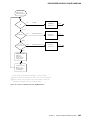
For potentially recoverable I-O errors on TRANSACTION files, the system initiates
action in addition to the steps that must be taken in the application program to
attempt error recovery.
By examining the file status after an I-O operation, the application program can
determine whether a recovery from an I-O error on the TRANSACTION file may be
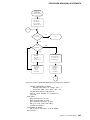
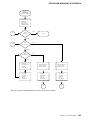
possible. If the File Status Key has a value of 9N, the application program may be
able to recover from the I-O error. A recovery procedure must be coded as part of
the application program and varies depending on whether a single device was
acquired by the TRANSACTION file or whether there were multiple devices attached.
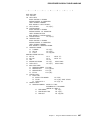
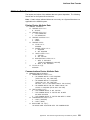
For a file with one acquired device:
1. Close the TRANSACTION file with the I-O error.
2. Reopen the file.
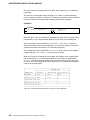
3. Process the steps necessary to retry the failing I-O operation. This may involve
a number of steps, depending on the type of program device used. (For
example, if the last I-O operation was a READ, you may have to repeat one or
more WRITE statements, which were processed prior to the READ statement.)
For more information on recovery procedures, see the Communications Management Guide and the System/38 Data Communications Programmer's Guide.
Chapter 7. System/38-Compatible COBOL Programming Considerations
257