1
Using the headset
If the headset is connected, the phone switches from open conversation
to headset mode. Open conversation is therefore not possible with the
headset. If you turn on the ExResistTel MB phone with the
button, it
starts up in headset mode. If you lift the handset in the headset mode,
the handset is given priority. This means that you can listen and speak
using the handset, and you can only listen with the headset.
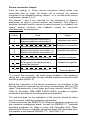
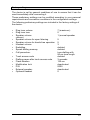
Compare the operation without and with the headset connected:
Operation without the headset
Operation with the headset
Handset operation
Handset operation with the
headset
- Handset is used for speaking and
listening
- headset is used for listening only
- Speaker is turned off
Open listening with the headset
- Handset is used for speaking and
listening
- headset is used for listening only
- Speaker is turned on
Headset mode
- Handset is placed back
- headset is used for speaking
and listening
- Speaker is turned off
Open listening
Hands-free mode
You can modify the headset volume of the conversation using the
and
buttons. For a permanent modification of the headset volume,
please access the configuration of the phone (see page 24). You can
end the conversation with the
button.
You can specify the operation of the ExResistTel MB phone after
disconnecting the headset in the configuration.
20