1
ECOLINE Staredition
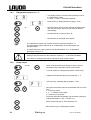
7.4.1
Refrigeration system (level 1)
or
7.4.2
−
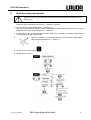
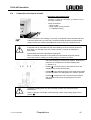
The display shows C and the actual operating mode of
the refrigeration system
0 = OFF, 1 = ON, A = automatic operation
−
Press the key Æ display flashes for approx. 4 sec.
−
During this time start to set the required operating mode
with one of the keys. After 4 sec the value is entered
automatically
−
Forward with key to "pump output" or
−
back with key to the actual value display.
−
The refrigeration system can normally work with automatic operation = A.
The refrigeration system switches on or off depending on the temperature and
operation status.
−
In special cases the cooling machine can be switched off Æ ”0” or adjusted at
permanent running Æ ”I”.
−
The refrigerating machine cannot be added manually while running at maxiumum
heating output, because then the maximum currents (Ì 7.1) would be exceeded.
−
The maximum heating output will be required for great set-point leaps.
Pump output
and 1x
or
−
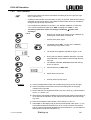
Switch from the actual value display to pump output by
pressing the key combination shown on the left or
−
move forward from "Refrigeration system" with this key
−
Display shows P and actual pump output step 1...5.
−
Press the key Æ display flashes (approx. 4 sec).
− During this time start to set the required step with one of the
keys.
1 = low pump output
2 , 3 , 4 = medium pump output
5 = maximum pump output
− The pump responds immediately (can be heard). (Setting is
entered after approx. 4 sec Ì Section 7.4).
− Move forward with key to "User calibration" or
− Back with the key to "Refrigeration system".
20
Starting up
11.06.04/ YACE0059