Transcript
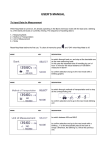
LCD-TIMER- Operating Instructions Art.no. 38.2005 Setting the time Push the "MIN"- and "SEC" button at the same time to reset the timer. Push the "MIN"- button to set the minutes (beeping sounds). For a rapid advancement function keep the "MIN"- button pressed. Push the "SEC" button to set the seconds (beeping sounds). For a rapid advancement function keep "SEC" button pressed. Time measurement If the time setting is finished, push the "START/STOP" button to begin the countdown. The letters "M" and "S" are flashing during the timing. To stop the countdown process, press the "START/STOP" button. The letters "M" and "S" will stop flashing and remain steady. Push the "START/STOP" button again to continue the countdown process. Alarm When the timer counts down to "OOM OOS", a beeping alarm will sound for 30 seconds. To turn off the alarm, press the "START/STOP" button. Memory function After the alarm has stopped the timer will recall the last selected time automatically. Press the "START/STOP" button to repeat the countdown. Battery replacement Open the battery cover with a coin. Insert a new button cell battery into the opening. Make sure the positive (+) side is facing up. Close the battery cover again. Attention: Used batteries have to be put in the specially reserved collecting receptacles. Source of error: Please change the battery before complaining. No guarantee if the instrument is handled or opened improperly. Keep away from the reach of children!