1
PALIOS-IPM2
Part No: 5105.01
8 pole IP-/ ASI-TV Modulator
IP/ SFP/ ASI (MPEG2) → ATV (8x AM)
SBL
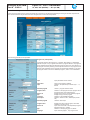
Output
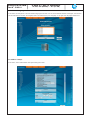
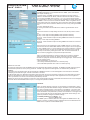
output parameters of the channel
Frequency input
Output frequency
Output level offset
RF signal
Sound deviation
Sound carrier 2
selection: channel, frequency *
selection from channel table/ input in kHz *
display of the level offset **
selection: On, Off
selection: 30, 50 kHz ***
selection: On, Off
If selected at the frequency input “channel“, so you can select the output frequency in the
pre-selected channel spacing (see chapter 7.2.5). If, however, at the frequency input “fre-
quency“, then the output frequency is selectable in kHz steps.
**
Adjustment of the offset of each channel to the basic level, see chapter 7.2.5
***
Only selectable, if sound carrier 2 is set “Off“. If sound carrier 2 is set “On“, the sound
deviation is permanently 30 kHz
*
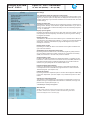
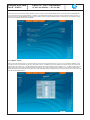
PCR for current service*
Use PCR PID
adjustment range: 0..8190
Manual PID settings*
PCR PID Video PID Audio PID Teletext PID VBI PID Subtitle PID Composition page ID Ancillary page ID adjustment range: 0..8190
adjustment range: 0..8190
adjustment range: 0..8190
adjustment range: 0..8190
adjustment range: 0..8190
adjustment range: 0..8190
adjustment range: 0...65535
adjustment range: 0...65535
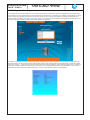
The menu of the manual PID setting only appears, if the respective box is clicked on in the
“Setup“ menu, chapter “GUI settings“ (see also chapter 7.2.5). The functionality is cur- rently not supported.
*
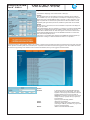
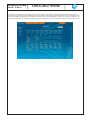
Video setting of the video parameters
Video output selection: On, auto Off, auto colour palette bar
Color bar selection: On, Off
Color system selection: PAL, SECAM, NTSC
Video format selection: letterbox, center cut, 1:1, pillarbox,
4:3 vertical cut, 20:9 letterbox
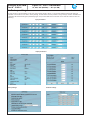
Audio
setting of the audio parameters
Audio gain adjustment range: +6...-20 dB
Audio mode selection 1: mono L, mono R, dual, dual invers,
stereo, auto **
selection 2: mono L, mono R, mono L+R, auto ***
**
if sound carrier 2 “On“
***
if sound carrier 2 “Off“
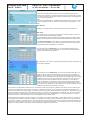
VPS
setting of the VPS parameters
CNI code Source audio mode Source PIL adjustment range: 0x000…0xFFF (hexadec.)
selection: MPEG, A056(MPEG)
selection: A056(PDC), A056, PDC,
TimerControlCode
Complementary data
Teletext WSS insertion selection: On, Off
selection: On, Off
Black bar settings *
Mode
selection: On, Off
The width of the bar can be selected in % related to standard 4:3 format. Different
values for 16:9- and special 16:9 format can be adjusted.
Note:
In certain settings it can occur in picture distortion. The adjustment values ( in %)
in these cases are slightly to change up or down until there are no disturbances
occur more.
*
only available, if “Black bar“ option is enabled (see chapter 7.2.5)
11