1
SSI Technologies - Application Note DT-AN2
Digital Fluid-Trac™ (DFT-100) Ultrasonic Drum Level Gauge
Troubleshooting
For correct operation, the Digital Fluid-Trac™
DFT-100 must be mounted properly with no
obstructions between the sensor and media being
monitored.
1) If using the ¾” adapter, verify the yellow
acoustic absorber disc (see photo below) is
properly installed inside the adapter.
Press On/Off and Hold
until Back-light turns
on.
Level sensor mounting that is not perpendicular to
the fluid causes a reduction in level sensor
performance. As shown in the figure below, the
amount of returned sound energy is dependent on
mounting cone angle.
Measurement Technology
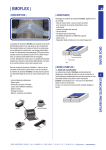
The Digital Fluid-Trac™ DFT-100 drum level
gauge uses ultrasonic technology to generate a
high-frequency sound wave and measures the time
for the echo to reflect off the target fluid’s surface
and return. The distance from the Digital FluidTrac’s sensor to the liquid is calculated based on
the speed of sound.
The Digital Fluid-Trac™ DFT-100 is designed to
work on ANSI MH2 standard 55 gallon drums
(height of 32” for 55 gallon volumes).
Distance
Sensor
Full Scale
Range
Target
Stand
Angle
SSI Technologies - Application Note DT-AN2
Digital Fluid-Trac™ (DFT-100) Ultrasonic Drum Level Gauge
Troubleshooting
If the previous three conditions are met, perform
the following bench test.
2) Verify the Digital Fluid-Trac™ DFT-100
mounting is perpendicular to the liquid. The drum
must be stored in an upright position.
4) Simulate a Full (55 gallons) Reading
a. Place the Digital Fluid-Trac™ flat on
a table top.
b. Press the On/Off button.
Distance Reading
c. The display should read 55 gallons (±2
gallons)
5) Simulate a 35 Gallon Reading
a. Place the Digital Fluid-Trac™
12 inches above the table top. Make
sure the bottom of the sensor is
perpendicular to the table top.
b. Press the On/Off button.
3) Verify there are no obstructions between the
sensor head and the media being measured.
If something is between the sensor and the
media being tested, the sound wave will be
reflected off the object and not the media
resulting in incorrect level readings.
c. The display should read 35 gallons
6) Simulate an Empty (0 Gallon) Reading
a. Place the Digital Fluid-Trac™
32 inches above the table top. Make
sure the bottom of the sensor is
perpendicular to the table top.
b. Press the On/Off button.
c. The display should read 0 gallons
Copyright March 17, 2009
SSI Technologies, Inc.
All Rights Reserved
Revision 1
2