1
Status 24.06.09
We reserve the right to make
changes favouring technical
progress.
Operating Instructions
multi 100/150 DC
manual operation
1. Manual operation
1.1
•
•
•
•
•
•
•
•
•
•
Ease of use
7-point speed setting for ventilators and OFF function
Possibility of draught ventilation
Possibility of connecting additional, external, draught ventilation key
External contact for OFF
Clock timer (Option)
Adjustable balance between exhaust air and incoming air ventilator
„only incoming air“ or „only exhaust air“ (operation during summer)
In the case of suitability for chimneys „only exhaust air“ is closed
Monitoring of filter duration
Anti-freeze a) Immediate reduction in the speed of the ventilation fan (not in the case of suitability for
chimneys) from a temperature for escaping air < 2°C onwards
b) Defroster heating with independent operation (Option)
c) Soil heat exchanger (Option)
1.2
Description of operating possibilities
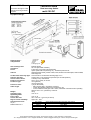
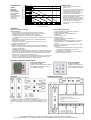
The plastic film keyboard enables a 7-point speed setting for the ventilators with an OFF function. The 7point fan speed control can be implemented both in incoming air and exhaust air operation as well as in
the operational settings „only incoming air“ or „only exhaust air“ (closed in the case of suitability for
chimneys – e.g. when being operated in the summer). The unit can be switched on and off parallel to the
operating element with an external, potential free opener (provided by the customer). A free switch
contact can be used for operating a fan speeds dependent on time. The balance between incoming air
and exhaust air takes place by balancing out using a potentiometer P1.
1.3
Fan speeds
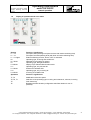
7 fan speeds can be selected using the + / - buttons. The current fan speed is displayed on an LED light
display screen including the selected speed. The fans can be turned off with the (-)- button at speed level
1, the fan speed LEDs are switched off, only the operating type LED remains on. The incoming air fan or
the exhaust air fan can be reduced in the control unit with a balance potentiometer P1 using a corrective
factor. Turning in the –L1 direction means reduction in the speed of the incoming air fan, in the –L2
direction means reduction in the speed of the exhaust air fan. The corrective factor K can amount to a
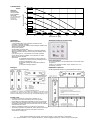
maximum of 50%. (see Appendix 1 „Terminal connection plan for manual operation multi 100/150 DC“).
1.4
Speed monitoring
If there has been an error, the defective fan is displayed on the operating panel through a blinking LED
(the symbol for incoming or exhaust air blinks). When one fan stops working, the other fan is switched off.
No error message is generated through operation dependent switching off of the fan (anti-freeze).
1.5
Draught ventilation
It is possible to activate the draught ventilation either on the plastic film keyboard or through one or
several external keys attached to the control panel (see Appendix 1 „ Terminal connection plan for manual
operation atmos 175 DC).
Function: When the function „draught ventilation“ has been activated, point 7 is selected for 15 minutes
and the corresponding LED fan speed 7 is displayed. The operation type is set to incoming and exhaust
air. After the draught ventilation time is over the control unit activates the previously set state. If a key is
pressed during the draught ventilation period, the corresponding operation type is stopped and the
draught ventilation ends. If key for draught ventilation is pressed again during the draught ventilation time
the draught ventilation is deactivated and the control unit sets the previous operating state again. The
draught ventilation function is shown visually by lighting up of the fan speeds LED 7 and the LED key for
draught ventilation.
© Paul Wärmerückgewinnung GmbH • August-Horch-Straße 7 • 08141 Reinsdorf • Deutschland
Tel: +49(0)375-303505-0 • Fax: +49(0)375-303505-55 • E-Mail: [email protected] • Internet: www.paul-lueftung.de
1