1
30/04/09 6:33 PM
FAULT CODE 132 (SSS)
Accelerator Position Sensor Circuit
Overview
CODE
Fault Code: 132
PID: P091
SPN: 91
FMI: 4
LAMP: Red
SRT: 00-084
REASON
EFFECT
Low voltage detected at the accelerator position signal
pin 11 of the OEM harness connector.
Severe derate
(power and speed).
Accelerator Position Sensor Circuit
SMALL | MEDIUM | LARGE
Circuit Description
The accelerator position sensor signals the Electronic Control Module (ECM) when the accelerator
is depressed. The circuit contains three wires: +5 VDC supply (wire 18), return (wire 19), and signal
(wire 11).
Component Location
Page 1 of 15
30/04/09 6:33 PM
The accelerator position sensor (APS) is located on the accelerator pedal.
Shop Talk
If all wiring and sensors check good, replace the APS circuit wires between the accelerator pedal
and the ECM with new wires. Run them through, or around, the bulkhead without using the
bulkhead connector. Test with these wires. If fault clears, replace the OEM harness. Seal the
bulkhead openings around the wires to prevent toxic, noxious fumes from seeping into the cab.
Test voltage levels of the SSS with breakout cable, Part Number 3824892. The ECM and
accelerator pedal must be calibrated to each other for proper engine response. Required when a
new accelerator pedal is installed, replaced, an ECM is replaced, a new calibration is downloaded to
the ECM, or the accelerator pedal wiring is disconnected while keyswitch “ON”. With keyswitch
“ON”, slowly push the accelerator to the floor and release; do this three times. This recalibrates the
ECM and accelerator pedal.
Note: The three wires in the accelerator position sensor circuit must be twisted together.
Cautions and Warnings
CAUTION
To avoid pin and harness damage, use the following test leads when taking
a measurement:
Part Number 3822758 - male Deutsch/AMP/Metri-Pack test lead
Part Number 3822917 - female Deutsch/AMP/Metri-Pack test lead
Part Number 3824892 - accelerator position sensor breakout cable.
CAUTION
To avoid pin and harness damage, use the following test lead when taking a
measurement:
Part Number 3824892 - accelerator position sensor breakout cable.
CAUTION
To avoid damaging a new ECM, all other active fault codes must be
investigated prior to replacing the ECM.
Page 2 of 15
30/04/09 6:33 PM
CAUTION
To avoid pin and harness damage, use the following test lead when taking a
measurement:
Part Number 3822758 - male Deustch/AMP/Metri-Pack test lead.
CAUTION
To avoid pin and harness damage, use the following test lead when taking a
measurement:
Part Number 3822758 - male Deutsch/AMP/Metri-Pack test lead.
CAUTION
To avoid pin and harness damage, use the following test lead when
performing this procedure:
Part Number 3822917 - female Deutsch/AMP/Metri-Pack test lead.
CAUTION
To avoid pin and harness damage, use the following test lead when taking a
measurement:
Part Number 3822917 - female Deutsch/AMP/Metri-Pack test lead.
Troubleshooting Steps
STEPS
STEP 1.
SPECIFICATIONS
Check the accelerator pedal.
STEP 1A. Verify the accelerator
position sensor is connected to the
OEM harness.
Sensor connected
Page 3 of 15
30/04/09 6:33 PM
STEP 1B. Inspect the harness and
the accelerator position sensor
connector pins.
No damaged pins
STEP 1C. Measure the idle resistance Correct resistance value
value.
STEP 2.
STEP 3.
STEP 4.
Check the OEM harness.
STEP 2A. Inspect the harness and
the ECM connector pins.
No damaged pins
STEP 2B. Check for continuity in
circuit.
Less than 10 ohms
STEP 2C. Check for a short circuit to
ground.
More than 100k ohms
STEP 2D. Check for a short circuit.
More than 100k ohms
Check the ECM.
STEP 3A. Check the accelerator
position supply for proper voltage.
4.75 to 5.25 VDC
STEP 3B. Check for the appropriate
ECM response.
Fault Code 132 inactive ; Fault Code 131
active
STEP 3C. Check ECM signal pin
resistance.
Less than 100k ohms
Clear the fault code.
STEP 4A. Disable the fault code.
Fault Code 132 inactive
STEP 4B. Clear the inactive fault
codes.
All faults cleared
Guided Step 1 - Check the accelerator pedal.
Guided Step 1A - Verify the accelerator position sensor is connected to the
OEM harness.
Conditions
Turn keyswitch “OFF".
Page 4 of 15
30/04/09 6:33 PM
Action
Verify that the accelerator position sensor
is connected to the OEM harness.
OK
NOT OK
Sensor connected
Connect the OEM harness
Go to 1B
Go to 4A
Guided Step 1B - Inspect the harness and the accelerator position sensor
connector pins.
Conditions
Turn keyswitch "OFF".
Disconnect the OEM harness from the
accelerator position sensor.
Flush and clean the connector pins using
electronic contact cleaner, Part Number
3824510.
Action
bent or broken pins
pushed back or expanded pins
corroded pins
moisture in or on the connector
missing or damaged seals
dirt or debris in or on the connector pins.
OK
No damaged pins
NOT OK
Repair the damaged pins. Repair or replace the
OEM harness or sensor, whichever has the
damaged pins.
Flush the dirt, debris, or moisture from the
Page 5 of 15
30/04/09 6:33 PM
connector pins using electronic contact
cleaner, Part Number 3824510.
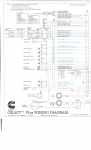
Repair the engine harness. Refer to
Procedure 019-201 and 019-202 in the
Troubleshooting and Repair Manual,
Industrial CELECT™ Plus System, Bulletin
3666130.
Replace the OEM harness. Refer to the
OEM Troubleshooting and Repair Manual.
Replace the accelerator position sensor.
Refer to the OEM Troubleshooting and
Repair Manual.
Go to 1C
Go to 4A
Guided Step 1B - Measure the idle resistance value.
CAUTION
To avoid pin and harness damage, use the following test lead when taking a
measurement:
Part Number 3824892 - accelerator position sensor breakout cable.
Conditions
Turn keyswitch "OFF".
Install the breakout cable, Part Number
3824892, to the SSS.
Do not connect the breakout cable to the
OEM harness.
SMALL | MEDIUM | LARGE
Action
With the accelerator pedal released (onidle), measure the resistance from pin 3
(APS signal) to pin 4 (APS return) on the
breakout cable.
Page 6 of 15
30/04/09 6:33 PM
Note: Resistance value should be the same as
the Idle Resistance Value stamped on the SSS
cover, ±20 ohms.
OK
NOT OK
Correct resistance value
Replace the SSS. Refer to the OEM
Troubleshooting and Repair Manual.
Go to 2A
Go to 4A
Guided Step 2 - Check the OEM harness.
Guided Step 2A - Inspect the harness and the ECM connector pins.
CAUTION
To avoid damaging a new ECM, all other active fault codes must be
investigated prior to replacing the ECM.
Conditions
Turn keyswitch "OFF".
Disconnect the OEM harness connector
from the ECM.
Disconnect the OEM harness from the
bulkhead connector.
Disconnect the OEM harness from the
accelerator position sensor.
Flush and clean the connector pins using
electronic contact cleaner, Part Number
3824510.
Page 7 of 15
30/04/09 6:33 PM
Action
bent or broken pins
pushed back or expanded pins
corroded pins
moisture in or on the connector
missing or damaged seals
dirt or debris in or on the connector pins.
OK
NOT OK
No damaged pins
Repair the damaged pins. Repair or replace the
OEM harness or ECM, whichever has the
damaged pins.
Flush the dirt, debris, or moisture from the
connector pins using electronic contact
cleaner, Part Number 3824510. Refer to
Procedure 019-203 in the Troubleshooting
and Repair Manual, Industrial CELECT™
Plus System, Bulletin 3666130.
Repair the OEM harness. Refer to
Procedure 019-203 in the Troubleshooting
and Repair Manual, Industrial CELECT™
Plus System, Bulletin Number 3666130023666130.
Replace the OEM harness. Refer to the
OEM Troubleshooting and Repair Manual.
Replace the ECM. Refer to Procedure
019-031 in the Troubleshooting and
Repair Manual, Industrial CELECT™ Plus
System, Bulletin 3666130.
Replace the o-ring on the 28-pin
connector if it is damaged or missing.
Refer to Procedure 019-203 in the
Troubleshooting and Repair Manual,
Industrial CELECT™ Plus System, Bulletin
3666130.
Go to 2B
Go to 4A
Guided Step 2B - Check for continuity in circuit.
Page 8 of 15
30/04/09 6:33 PM
Conditions
Turn keyswitch “OFF”.
Connect bulkhead connector.
Disconnect the Accelerator Position
Sensor.
Disconnect the OEM harness connector
from the ECM.
Action
Inspect wiring to APS, check wiring
diagram for color code.
Measure the resistance from pin 18 of the
OEM harness connector to +5 VDC
supply pin at the APS connector.
Measure the resistance from pin 11 of the
OEM harness connector to the signal pin
of the APS connector.
Measure the resistance from pin 19 of the
OEM harness connector to the return pin
of the APS connector.
OK
NOT OK
Less than 10 ohms
Repair or replace the APS wiring. Refer to the
OEM Troubleshooting and Repair Manual.
Go to 2C
Go to 4A
Guided Step 2C - Check for a short circuit to ground.
CAUTION
To avoid pin and harness damage, use the following test lead when taking a
measurement:
Part Number 3822758 - male Deustch/AMP/Metri-Pack test lead.
Page 9 of 15
30/04/09 6:33 PM
Conditions
Turn keyswitch "OFF".
Disconnect the OEM harness connector
from the ECM.
Disconnect the OEM harness from the
accelerator position sensor.
SMALL | MEDIUM | LARGE
Action
Measure the resistance from pin 18 of the
OEM harness to engine block ground.
Measure the resistance from pin 11 of the
OEM harness to engine block ground.
OK
NOT OK
More than 100k ohms
Repair or replace the OEM harness. Refer to
the OEM Troubleshooting and Repair Manual.
Go to 2D
Go to 4A
Guided Step 2D - Check for a short circuit.
CAUTION
To avoid pin and harness damage, use the following test lead when taking a
measurement:
Part Number 3822758 - male Deutsch/AMP/Metri-Pack test lead.
Conditions
Turn keyswitch "OFF".
Disconnect the OEM harness connector
from the ECM.
Disconnect the OEM harness from the
SMALL | MEDIUM | LARGE
Page 10 of 15
30/04/09 6:33 PM
accelerator position sensor.
Action
Measure resistance from pin 18 of the
OEM harness connector to all other pins
in the connector.
Measure the resistance from pin 11 of the
OEM harness connector to all other pins
in the connector.
OK
NOT OK
More than 100k ohms
Repair or replace the OEM harness. Refer to
the OEM Troubleshooting and Repair Manual.
Go to 3A
Go to 4A
Guided Step 3 - Check the ECM.
Guided Step 3A - Check the accelerator position supply for proper voltage.
Conditions
Connect the OEM harness to the
accelerator position sensor.
Disconnect the OEM harness connector
from the ECM.
Turn keyswitch “ON”.
SMALL | MEDIUM | LARGE
Action
Measure the voltage from pin 18 to pin 19
in the OEM port of the ECM.
Page 11 of 15
30/04/09 6:33 PM
OK
NOT OK
4.75 to 5.25 VDC
Replace the ECM. Refer to Procedure 019-031
in the Troubleshooting and Repair Manual,
Industrial CELECT™ Plus System, Bulletin
3666130.
Go to 3B
Go to 4A
Guided Step 3B - Check for the appropriate ECM response.
CAUTION
To avoid pin and harness damage, use the following test lead when
performing this procedure:
Part Number 3822917 - female Deutsch/AMP/Metri-Pack test lead.
Conditions
Disconnect the OEM harness connector
from the ECM.
Install Part Number 3822917, as a jumper
wire, between pin 11 and pin 18 of the
OEM ECM port.
Turn keyswitch “ON”.
SMALL | MEDIUM | LARGE
Action
Read the fault codes using Compulink™,
Part Number 3823549, Echek™, Part
Number 3824437, or INSITE™, Part
Number 3824638.
OK
Fault Code 132 inactive; Fault Code 131 active
NOT OK
Replace the ECM. Refer to Procedure 019-031
in the Troubleshooting and Repair Manual,
Page 12 of 15
30/04/09 6:33 PM
Industrial CELECT™ Plus System, Bulletin
3666130.
Go to 3C
Go to 4A
Guided Step 3C - Check ECM signal pin resistance.
CAUTION
To avoid pin and harness damage, use the following test lead when taking a
measurement:
Part Number 3822917 - female Deutsch/AMP/Metri-Pack test lead.
Conditions
Turn keyswitch “OFF”.
Disconnect the OEM harness connector
from the ECM.
Action
Measure the resistance from pin 11 of the
ECM OEM port to pin 19 in the ECM
OEM port; use test lead, Part Number
3822917.
OK
NOT OK
Less than 100k ohms
Replace the ECM. Refer to Procedure 019-031.
Go to 4A
Go to 4A
Page 13 of 15
30/04/09 6:33 PM
Guided Step 4 - Clear the fault code.
Guided Step 4A - Disable the fault code.
Conditions
Connect all the components.
Action
Start the engine and let it idle for one (1)
minute.
Verify Fault Code 132 is inactive.
OK
NOT OK
Fault Code 132 inactive
Return to the troubleshooting steps or contact
your local Cummins Authorized Repair Location
if all the steps have been completed and
checked again.
Go to 4B
Go to 1A
Guided Step 4B - Clear the inactive fault codes.
Conditions
Connect all the components.
Action
Page 14 of 15
30/04/09 6:33 PM
Erase the inactive fault codes using
Compulink™, Part Number 3823549,
Echek™, Part Number 3824437, or
INSITE™, Part Number 3824638.
OK
NOT OK
All faults cleared
Troubleshoot any remaining active fault codes.
Repair complete
Appropriate troubleshooting chart
Last Modified: 27-Oct-2003
Page 15 of 15