1
03
Functions
Controlbox 5000
STÖBER ANTRIEBSTECHNIK
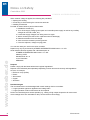
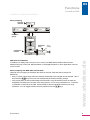
Menu prompting
Operator
indicator
A..
Inverter
3000 rpm 1.3 A
4: Enabled
B..
Motor
C..
Machine
Parameter
groups
B20 Contr. mode
0: V/f control
Parameters
election
B26 Motor enc.
3: X140
Parameter
entry
Value
flashing
B26 Motor enc.
3: X140
Äccept change
Reject change
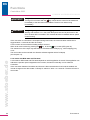
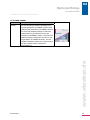
In addition to a display and six keys for menu control, the MDS 5000 and FDS 5000 offers two
additional keys for local mode. Representation on the display depends on which application is stored
on the inverter.
Menu prompting with MDS 5000 and FDS 5000
Although menu prompting is essentially the same for the FDS, FAS and SDS, there are two
differences:
• Entry of values: When large values are entered, the decade to be changed can be selected. This is
done with the
keys if the user has activated the parameter permitting change.
• Array parameters are used in MDS 5000 and FDS 5000. Array parameters have a dot after the
designation followed by the number of the array element: A10.3: Array-Parameter A10, 3. Element.
A parameter is called as in the FDS, FAS and SDS to edit the individual elements of an array
parameter. You can toggle between the array elements with the
keys.
ID 441479.01
www.stoeber.de
MDS 5000 and FDS 5000
9