1
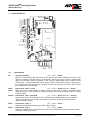
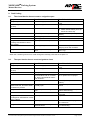
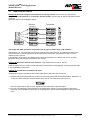
MODPARK Parking System Manual Barriers 9. Fault finding 9.1. The closed barrier doesn’t react to a signal to open Symptom Possible cause Possible solution The yellow power LED is out. No mains supply. The red diagnostic LED flashes non-stop. The green LED BTS1 is lit. Programming is started. Check the mains lead and the fuses. Carry it out to the end. The green LED BTS2 is out. a) The stop button is pressed. The controller is switched off. b) Emergency release in use. c) Wiring fault. The green LED SEA is out and the a) Faulty limit switch ’open‘. red Diag.-LED flashes 4 times – then a break. b) Wiring faulty The green LED BTZ1 is lit. There is a permanent signal to close. a) Operating mode switch 1 off. b) Switch On/Off switch (X1/4 top and X1/4 bottom off). Release the button (X1/8 top and bottom). Lock the shaft. Check the wiring. Replace the limit switch. Check the wiring to the limit switch and plug V6 on the controller. Check the button (X1/2 bottom/top and 7 top). When the controller gives an error code through the red Diag.-LED see the chapter 9.4. 9.2. The open barrier doesn’t react to signals to close Symptom Possible cause Possible solution The yellow power LED is out. No mains supply. The red diagnostic LED flashes non-stop The green LED LS is lit. Programming is started. Check the mains lead and the fuses. Carry it out to the end. The green LED LS is lit when the photo-cell is free, and not lit when an obstacle is present The green LED BTA is lit. a) Loop detector is activated. b) The red jumper is removed from the terminals 6 and 10 in socket B3, but the loop detector hasn’t been inserted. c) The photo-cell is activated. The photo-cell is connected as normally open. There is a permanent signal to open. The green LED SEZ is out and the a) Faulty limit switch ’closed‘. red diagnostic LED flashes 4 times – then a break. b) Wiring fault. The green LED BTZ2 is lit. Check the detector in socket B3. Plug the detector into the socket B3 or replace the red jumper. Check it (X1/9 top and X1/9 bottom). Connect the photo-cell as normally closed. a) Check the ’open‘ button (X1/2 bottom and X1/6 top) b) Check the loop detector in socket B2 Replace the limit switch. Check the wiring and plug V6 in the control box. There is a permanent signal to the Check the button (X1/7 bottom and terminals BTZ2. X1/2 bottom/top) We reserve the right to make technical improvements without prior notice. T:\Dokumentation\Modpark\Peripherie\Schranken\Englisch\AB25-80(MO63)-En2002V11.DOC Page 13 of 22