1
Troubleshooting
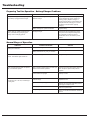
Preparing Tool for Operation - Battery/Charger Problems
SYMPTOM
Battery does not appear to accept charge
when battery is plugged into the charger.
Charger gets hot, makes excessively loud
noise, or smokes during charging cycle.
Charger cord or wall plug gets hot.
POSSIBLE PROBLEMS
SERVICE
Inoperative indicator lights on charger, or
defective charger.
Try battery in tool after a full charge cycle.
If tools indicator light is red, charger not
working properly. Replace charger, or
monitor charging time to ensure battery has
adequate time for recharging. It is normal
for battery to feel warm after properly
charging.
Battery damaged or cycle life exhausted.
Replace battery.
Damaged charger.
Discontinue use immediately and unplug
from power source. Replace charger and
tag or dispose of charger to prevent
accidental re-use or connection to power
source.
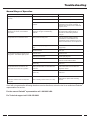
Normal Stage of Operation
SYMPTOM
Fan does not run - tool indicator light is
blinking red or solid red.
POSSIBLE PROBLEMS
Battery is not charged.
Battery terminals are oily, dirty, or corroded.
SERVICE
Charge battery.
Clean battery terminals with soft cloth.
Fan does not run, or runs slower than
normal - tool indicator light is solid red.
Battery is discharged.
Charge battery.
Work-contacting element does not depress
fully - tool does not operate.
Work-contacting element is bent, or build-up of
debris in track restricts operation.
Remove and inspect lower probe. Clean the
track. Repair or replace lower probe as
required.
Lockout feature is engaged.
Add strip of nails.
Fuel Cell empty.
Replace fuel cell.
Tool will not cycle - fan runs, indicator light
is solid green.
Spark wire out of spark plug.
Spark plug is dirty.
No spark is generated.
18
Remove cap and check spark lead, insert in
spark plug and replace cover.
Clean tool cylinder head.
Return tool to authorized Paslode® dealer for
service.