1
CONGRATULATIONS!
F
W
HO TEN
OF
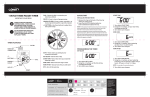
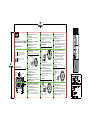
1.With the dial on AUTO, press the button.
2. Using the +/- buttons select a delay of
1 to 7 days.
3. Screen will flash between clock and hours
remaining before programmed cycle
resumes.
4. To remove rain delay, turn dial to OFF and
then back to AUTO.
MANUAL/HAND WATERING
STATION
MANUAL
MANUAL
1 2
1 2
AUTO
MINUTES
ST
TIMART
E
STATION
T
SE CK
O
CL
• Using the ARROW button move to INT.
• Press the + / - buttons to cycle through each
interval. You may choose to interval water
every 1 hour, 2 hours, 4 hours, 6 hours, 12
hours, or 1 to 7 days.
5. Repeat steps 2 and 4 to program watering
frequency for additional start times.
6. Turn dial to save changes.
Rain delay allows you to postpone watering for
a set period of time. To access the rain delay,
follow the steps below.
OF
F
INTERVAL - SELECT AN INTERVAL PERIOD
YOU WANT TO WATER:
AUTO
W
HO TEN
OF
• Using the ARROW button move to the
desired day.
• Press the + / - buttons to toggle the day
of the week on/off.
• Select any combination of days.
DAYS
ST
TIMART
E
DAYS OF THE WEEK - SELECT SPECIFIC
DAYS YOU WANT TO WATER:
T
SE CK
O
CL
1.Turn dial to HOW OFTEN.
2. Press the ARROW button to move through and
select a start time A, B, and/or C.
3. Press + or – button to move the cursor down to
select Days of the Week or Interval watering
frequency.
4. There are two ways to set your watering
frequency for each start time; Days of the
Week or Interval.
ADDITIONAL FEATURES
RAIN DELAY
OF
T
AR
ST IME
T
H
LO OW
NG
SET
CLOCK
F
AU
TO
OF
HOW
OFTEN
HOW
LONG
A B C
Your timer is now programmed. Turn your dial
to AUTO to allow your timer to water according
to programmed time, station, duration, and
frequency.
HOW
LONG
HOW OFTEN
This feature allows you to manual water without
interrupting your set schedule. To access this
feature, follow the steps below.
1. There are two ways to manual water: all stations
as programmed or selected stations.
To manual water all stations as programmed:
• With the dial on AUTO, press the
MANUAL button.
• “ALL” will be displayed and the timer will
water all stations as programmed.
To manual water specific stations or durations:
• With the dial on AUTO, press the
MANUAL button.
• Press the STATION button to select
desired station.
• Using the +/- buttons, select watering
duration from 1 to 360 minutes.
NOTE: There may be a slight delay between the
time the manual button is pressed and when
watering begins.
2. Screen will flash between clock and time
remaining before automatic programming
resumes.
3. To stop manual watering, turn the dial to OFF.
4. Turn the dial back to AUTO to resume your
programmed watering schedule.
TIMER DOES NOT WATER.
Check if:
• Timer is set to AUTO.
• Hose faucet is on.
• Batteries are low.
• Clock is set to correct time,
including AM and PM.
• Rain Delay is on.
WATER WON’T TURN OFF.
Check if:
• HOW LONG is set to desired time.
• HOW OFTEN is set to desired
interval hour or day.
WORKING WATER PRESSURE:
• Minimum: 10 psi
• Maximum: 100 psi
WORKING TEMPERATURE:
• Maximum: Do not exceed 120°F
• Minimum: Keep from freezing
WARNINGS:
For outdoor use with cold water only.
Not for use with appliances.
TROUBLESHOOTING
WATER DOES NOT COME ON AT DESIRED TIME.
Check if:
• Clock is set to correct time, including
AM and PM.
• Dial is set to “Auto”
• Start time is set to desired time, including
AM and PM.
• Rain Delay is on.
Customer Service
1-800-488-6156
orbitonline.com
Orbit® Irrigation Products, Inc.
North Salt Lake, UT 84054
© 2015 Orbit Irrigation Products, Inc.
All rights reserved. All trade names are registered
trademarks of respective manufacturers listed.
PN 56544-24 rC