1
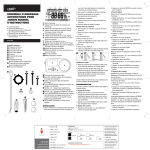
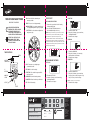
Congratulations! Your timer is now programmed.
Turn your dial to AUTO to allow your timer to
water according to programmed time, station,
duration, and frequency.
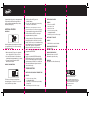
1.With the dial on AUTO, press the
MANUAL button.
2. Use the + and – buttons to select watering
time, from 1 to 240 minutes.
Additional Features
Note: There may be a slight delay between the time
the manual button is pressed and when watering begins.
Rain Delay
To stop manual watering, turn the dial to OFF.
Turn the dial back to AUTO to resume your
programmed watering schedule.
HRS
Rain delay allows you to postpone watering for
a set period of time. To access the rain delay,
follow the steps below.
1.With the dial on AUTO, press the + button to
select a delay of 24 hrs, 48 hrs, or 72 hrs.
2.Screen will flash between clock and hours
remaining before programmed cycle resumes.
3.To remove rain delay, turn dial to OFF
and then back to AUTO.
Manual/Hand Watering
MANUAL
Turning the dial to the OFF position at any time
during the day will reset the timer’s internal
timing. This will cancel all scheduled watering
times for the day until the next programmed
START TIME. This means if you turn the
dial back to AUTO the timer will not water
until the next day; beginning at your desired
programmed START TIME.
Example:
You have a 6:00 AM START TIME with HOW
OFTEN 6 hour intervals. If you turn the dial to
OFF at 10:00 AM today the timer will not water
until tomorrow at 6:00 AM. The 12:00 PM, 6:00
PM, and 12:00 AM watering times have been
cancelled for the day.
Timer does not water.
Check if:
•
•
•
•
Timer is set to AUTO.
Hose faucet is on.
Batteries are low.
Clock is set to correct time,
including AM and PM.
• Rain Delay is on. Clear if necessary.
Water won’t turn off.
Check if:
• HOW LONG is set to desired time.
Working Water Pressure
Minimum: 25 psi
Maximum: 100 psi
Working Temperature
Maximum: Do not exceed 120°F
Minimum: Keep from freezing
Warnings
For outdoor use with cold water only.
TROUBLESHOOTING
Water does not come on at desired time.
MINUTES
This feature allows you to water without
interrupting your set schedule. To access this
feature, follow the steps below.
Check if:
• Clock is set to correct time,
including AM and PM.
• Start time is set to desired time, including
AM and PM.
• Rain Delay is on. Clear if necessary.
Orbit® Irrigation Products, Inc.
North Salt Lake, UT 84054
© 2014 Orbit Irrigation Products, Inc.
All rights reserved. All trade names are
registered trademarks of respective
manufacturers listed.
62061-24E rA