1
Operation
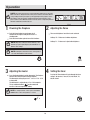
NOTE: The control panel can be accessed at the upper-right corner of the insert.
When a function is changed from the control panel or remote control there will be a
corresponding indicator (see Figure 1) on the upper-right of the projection screen.
The indicator shows the function changed and the level selected by the control
panel or remote control. When the function is turned off, the corresponding indicator
will flash several times and then fade off.
Fig . 1
1 Powering the fireplace
2
Push the Power button to supply power to all
functions of the fireplace and put the insert in a
standby mode.
Push the Power button again to turn off all functions.
Adjusting the flame
There are 6 brightness levels that can be selected:
Settings F6 - F4 decrease in Amber brightness
Settings F3 - F1 decrease in Spectrafire brightness
NOTE: All previous settings are held in memory, so the
next time you power up the fireplace, the unit will turn on
with the same settings.
NOTE: Holding the Power button on the control panel for
3 seconds will disable the heater function.
3 Adjusting the heater
4
Press the Heater button to set the thermostat. The fireplace
contains three infrared quartz heating elements.
The thermostat setting range is 62°F - 82°F or 17°C - 27°C
or always ON.
The thermostat is adjustable by 2°F or 1°C increments.
The up and down buttons“
”on the remote will
increase / decrase temperature setting.
NOTE: To change between °F and °C press and hold the
HEATER button on the control panel for 3 seconds.
/
16
Setting the timer
Pressing the Timer button will cycle through the timer
settings; 30 minutes, 1 Hour, 2H, 3H, 4H, 5H, 6H, 7H,
8H, 9H and off.