1
REMOTE CONTROL
FOR PCSD25RT
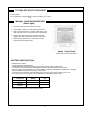
MATCHING SECURITY CODES
When matching security codes, be sure slide button on the receiver is in the REMOTE position. To
program the remote receiver to LEARN a new security code, press and release the LEARN button on
the top of the remote receiver, and then press ON or OFF button on the transmitter. A change in the
beeping pattern at the receiver, indicates the transmitter's code has been programmed into the receiver.
REMOTE CONTROL OPERATION
This appliance must not be used with glass doors in the closed position.
This can lead to pilot outages and severe sooting outside the fireplace.
The transmitter operates on two AAA batteries.
Figure 17
KEY SETINGS
ON - Operates unit to on position, manually operated solenoid ON.
OFF - Operates unit to off position, manually operated solenoid OFF.
MODE - Changes unit from manual mode to thermo mode.
SET - Sets temperature in thermo mode.
LCD Liquid Crystal Display
Figure 18
1. DISPLAY Indicates CURRENT room temperature.
2. °F OR °C Indicates degrees Fahrenheit or Ceisius.
3. FLAME Indicates bumer/valve in operation.
4. ROOM Indicates remote is in THERMO operation.
5. TEMP Appears during manual operation.
6. SET Appears during time the of setting the desired
temperature in the thermo operation.
Figure 19
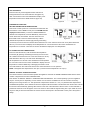
SETTING°F/°C SCALE
The factory setting for temperature is °F. To change this
setting to°C .
First Press the ON key and the OFF key on the transmitter at
the same time this will change from°F to °C. Follow this
same procedure to change from°C back to°F.
Figure 20
MANUAL FUNCTION
To operate the system in the manual “MODE” does the following.
ON OPERATION
Press the ON key and the appliance flame will come on.
During this time the LCD screen will show ON (Figure 21).
After 3 seconds the LCD screen will default to display room
temperature and the word TEMP will show (Figure 22).
(Flame icon will appear on LCD screen in manual on mode).
21
Figure 21
Figure 22