1
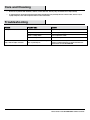
Care and Cleaning
□
Do not use any cleaners with chemicals, solvents, or harsh abrasives. Use only a dry, soft cloth to dust or wipe carefully.
□
To clean the fixture, disconnect power by turning off the circuit breaker or by removing the fuse at the fuse box, and use a dry or
slightly dampened, clean cloth to wipe the exterior surface of the fixture.
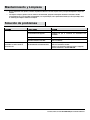
Troubleshooting
Problem
Possible Cause
Solution
The lights will not turn on.
The bulb is burned out.
Replace the light bulb.
The power is off.
Ensure the power supply is turned on.
There is a faulty switch.
Test or replace the switch.
There is a faulty wire connection.
Check the wiring.
There are crossed wires, or the power
wire is grounding out.
Discontinue use of the lamp. Check the wire connections.
Contact a qualified electrician or call the Customer Care
Service Team at 1-855-HD-HAMPTON.
The fuse blows, or the circuit breaker
trips, when the light is turned on.
7
HAMPTONBAY.COM
Please contact 1-855-HD-HAMPTON for further assistance.