Transcript
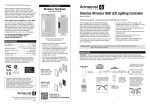
Wireless Touchpad for 30 Color RGB LED Controller
WIRELESS TOUCHPAD TRANSMITTER INSTALLATION
TROUBLESHOOTING
Designer-style wireless touchpad transmitter can easily be surface
mounted or installed in-wall. It comes with a switch plate, mounting
screws and drywall anchors. Also included is one 12V alkaline battery
(27A). The touchpad design will blend with existing residential and
commercial switches and dimming décor.
LED tape light strip does not light, flickers, or there is limited or
inconsistent colors.
Model # RGB14REM
■
■
■
Press the reset key. If any other color appears other than a warm/yellow
white, then you have a bad connection or polarity is not correct. Check
to be sure all connections are secure. If you have a failed connector, you
can easily solder wires to the LED tape and solder splice connections.
Soldering is the surest method for making extra reliable electrical
connections. Never use connectors in RV or boat applications due to
possible vehicle vibrations. To learn about best soldering practices visit
armacostlighting.com/installation.
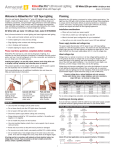
3. Restore power to the RGB receiver unit,
within 2 seconds after restoring power, press
and hold the power and brightness down keys
simultaneously for about 2 seconds. This
action will pair the two devices.
The Armacost Lighting Wireless Touchpad
is for use only with Armacost Lighting’s
professional grade 30 Color RGB LED
Controller (Model RGB8KEY-RF-WR) and
30 Color RGB Slimline Controller with Hand
Held Remote (HHRGB14). It provides remote
control of low voltage RGB LED lighting and
works through walls and doors up to 100 ft.
away. Using radio frequency (RF) technology,
it eliminates the need to run wires from the
RGB LED lighting to the wireless touchpad
and is useful in projects where installing new
cabling can be difficult.
For model RGB8KEY-RF-WR the green signal
light on the receiver will flash once to confirm
successful pairing. For model HHRGB14, the LED
tape light will quickly flash once when paired.
Designer-style wall plate
and screws included.
Common Code Pairing
Features RF pairing technology for
expandability and multi-zone lighting
control. The wireless touchpad can
be paired to control and synchronize
multiple Armacost Lighting RGB controller receivers in the same
area, or multiple touchpad/receiver sets can control different zones
of lighting in the same area without cross interference.
Includes designer-style wireless touchpad and all necessary
mounting screws and drywall anchors. Also includes one 12V
alkaline battery (27A).
Units are for dry location only. If used outdoors, keep in a dry
location. Wireless function may cease to operate properly in closeto-freezing temperatures.
It is possible to pair multiple receivers to the same
single transmitter by simply repeating the steps above with additional
receiver units.
Please note that only static colors will synchronize; color-changing
effects will not synchronize due to the various cycling speeds of each
unit. In addition, if you repeatedly press any of the touchpad keys too
fast, the RGB controllers will lose their synchronization.
To re-synchronize, press the reset key on the touchpad
transmitter. All receivers and RGB LED lighting will reset to
the same warm white color. For effective synchronization, all
receivers must be within range of the single wireless touchpad.
Note: you can also “un-pair” the RGB controllers by following the
process above but press the brightness up and brightness down keys.
Common Code Pairing
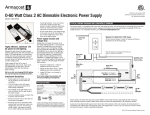
Easily mount to any
wall or flat surface
(screws and anchors
included).
Can be installed in wall in
some electrical boxes.
Touchpad may not fit some smaller
electrical boxes. See minimum
size dimensions
and choose an
appropriate
electrical box or
mounting bracket.
Tabs are
break-away
removable
for some
installations
Some installations
may require the
removal of tabs
as shown, simply
break away with
wire cutters.
Minimum
unobstructed
box or bracket
opening:
17/8" (47mm) X
27/8" (72mm)
Typical Low
Voltage Wall Plate
Mounting Bracket
Note: Compatible with some, but
not all, switch plates made by other
manufacturers.
Unique Code Pairing
SET UP AND PAIRING
Your RGB color controller contains a radio frequency (RF) receiver that
will need to be programmed or paired to recognize the frequency code of
the wireless touchpad.
SPECIAL FEATURES, COLORS AND EFFECTS
Pairing and RF code technology can greatly reduce the need for extra wiring.
Model RGB8KEY-RF-WR
Model HHRGB14
The wireless touchpad only works with Armacost Lighting’s
30 Color RGB LED controllers, models RGB8KEY-RF-WR and HHRGB14.
Be sure the battery in the transmitter is strong. In a darkened room, you
should see a visible red LED light glowing through the front touchpad
when you press any function key. If this glow is diminished or not visible,
replace battery with a 12V 27A alkaline battery.
1. Following the instructions that came with your color controller,
connect the RGB color controller receiver to your power supply and
RGB LED lights. Be sure your power supply is turned on. The red
power indicator light will illuminate on model RGB8KEY. Model
HHRGB14 does not have a power indicator light. Turn your LED
lighting on and select any a static color using the mode key on the
receiver. Model HHRGB14 will already be on a static color or use
the hand held remote that was supplied with the unit.
2. Shut off power to the receiver unit by unplugging the power
supply – do not use the power OFF key on model RGB8KEY.
Wait at least 5 seconds.
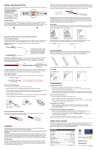
WIRELESS TOUCHPAD OPERATION
Power ON/OFF
BRIGHTNESS
Controls the light
level for static colors
and jump and strobe
effects. Brightness is
not adjustable in any
color fade effects.
EFFECT SPEED
Controls the speed
of all color-changing
effects. Arrow up for
faster, down for slower.
Make sure the power supply and RGB color controller are turned on and
receiving power. Confirm you have maintained correct polarity on all wire
connections (V+, red to red, green to green, blue to blue) when joining
RGB LED strips as well as when connecting wires to the RGB color
controller and to the power supply.
RESET key will take
unit to the #1 sequence
warm white color.
At the same time, it
will return brightness
settings on all colors to
100%. Effect speeds
will return to the
medium speed setting.
COLOR/MODE
Press forward arrow to
advance to next static
color or color-changing
effect. Press back
arrow to return to
previous color or effect
displayed.
The wireless touchpad is not working.
Be sure the touchpad is in range of your receiver. Try moving the touchpad
closer to the receiver. The transmitter is a radio frequency (RF) device and,
as such, the range of the wireless remote control is dependent on many
factors. Actual operational distance will vary based on walls and line of
sight obstructions, and other nearby electronic devices.
Be sure your battery is good. To check battery, press the on/off key in a
dark room/location. When pressed, you should see a red LED indicator
light glowing from behind the surface of the touchpad. If you do not see
this glowing red light, replace the battery (Alkaline 27A 12V). A battery
will last from 6 months up to 2 years, depending on usage.
The receiver may need to be paired again with your transmitter. If your
dimmer receiver is functioning properly, and you know your transmitter
battery is fresh, yet the transmitter will not control your lighting, please
revisit the pairing instructions.
Static colors display uneven brightness or a color shift.
This may be due to voltage drop. Shorten the length of your RGB lighting
installation or reduce the length of RGB power wire and/or use thicker wires.
Refer to your RibbonFlex Pro specific model’s Installation Guidelines for
options on other installation configurations that may reduce voltage drop.
For help with larger LED lighting installations, email [email protected].
Memory and Reset Function Key
SPECIFICATIONS
The unit will remember the settings for brightness and speed for each color
and each effect. For instance, if one color is dimmed, the unit will maintain
that setting for that color until changed, even if the power is turned off.
If your power goes out, when it is restored, the unit will go to your last
color or effects setting.
Working temperature ...............................................40 to 130°F (4 to 55°C)
Wireless working frequency ........................................................433.92Mhz
Transmitter battery........................................................... Alkaline 27A 12V
FCC ID ............................................................................... NWKHF10008
Country of origin ............................................................................... China
The wireless touchpad is designed with a unique reset function key.
Pressing the reset key will take the RGB controller to the #1 sequence
position which is a very warm white color. At the same time, it will
automatically return the brightness settings on all colors to 100% full
brightness and any programmed effect speeds will return to the medium
speed setting.
Limited 1-year warranty. This product is for dry
location use only. Improper installation, improper
powering, abuse, or failure to use this device for
its intended purpose will void warranty. Proof of
purchase is required for all returns. Questions?
Email [email protected].
Colors and effects
Pressing the reset key will take you to the #1 static color position which
is a very warm white color. All colors are arranged in common color
groupings for easy navigation, colors are fully dimmable.
1-5
Shades of white
31
White strobe
6-12
Shades of blue
32
Full color cross fade
13-17
Shades of green
33
Red, white and green cross fade
18-21
Shades of yellow
34
Red, white and blue cross fade
22-26
Shades of red
35
Red and white cross fade
27-30
Shades of purple
36
Red, gold and green cross fade
This item is a Radio Frequency Device (RF), and as such the range of the
remote control is dependent on many factors. Actual operational distance
will vary based on walls and line of sight obstructions, and other nearby
electronic devices.
This device complies with Part 15 of the FCC Rules. Operation is subject
to the following two conditions: (1) this device may not cause harmful
interference, and (2) this device must accept any interference received,
including interference that may cause undesired operation. Changes or
modifications to this unit not expressly approved by the party responsible
for compliance could void the user authority to operate the equipment.
© 2012-15 Armacost Lighting. All rights reserved.
140 Baltic Avenue, Baltimore, MD 21225
141202