1
1.
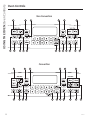
Convection Cooking Modes: Convection cooking
modes use increased air circulation to improve
performance. The type of benefit depends on the
mode. Your oven has the following convection cooking
modes: Bake Multi Rack and Roast. See the Cooking
Modes section for more information.
2.
Traditional Cooking Modes: Your oven has the
following traditional cooking modes: Bake, Broil Hi,
Broil Lo and Warm. See the Cooking Modes section for
more information.
3.
Clean: Your oven has a Self Clean mode. See the
Cleaning the Oven section for important information
about using this mode.
4.
Start: Must be pressed to start any cooking, cleaning,
or timed function.
5.
Cancel/Off: Cancels ALL oven operations except the
clock and timer.
6.
Cook Time: Counts down cooking time and turns
off the oven when the cooking time is complete.
Press the Cook Time pad, use the number pads to
program a cooking time in hours and minutes, then
press Start. This can only be used with Traditional
Bake, Convection Bake, Convection Bake Multi, and
Convection Roast.
7.
Clock: Sets the oven clock time. Press the 9 and 0 pads
and hold for 3 seconds or press Set Clock pad (on
some models). Use the number pads to program the
clock. Press Start to save the time.
8.
Timer: Works as a countdown timer. Press the Timer
pad and the number pads to program the time in
hours and minutes. Press the Start pad. The oven will
continue to operate when the timer countdown is
complete. To turn the timer off press the Timer pad.
9.
Delay Time: Delays when the oven will turn on. Use
this to set a time when you want the oven to start.
Press the Delay Time pad and use the number pads
to program the time of day for the oven to turn on.
Press the desired cooking mode and temperature then
press Start. A cook time may also be programmed if
desired. This can only be used with Traditional Bake,
Convection Bake Multi Rack, Convection Roast and
Self-Clean.
NOTE: When using the delay time feature, foods that
VSRLOHDVLO\³VXFKDVPLONHJJVILVKVWXIILQJVSRXOWU\
DQGSRUN³VKRXOGQRWEHDOORZHGWRVLWIRUPRUHWKDQ
1 hour before or after cooking. Room temperature
promotes the growth of harmful bacteria. Be sure that
the oven light is off because heat from the bulb will
speed harmful bacteria growth.
10. Oven Light(s): Turns the oven light(s) on or off.
11. Lock Controls: Locks out the control so that pressing
the pads does not activate the controls. Press and hold
the Lock Controls pad for three seconds to lock or
unlock the control. Cancel/Off is always active, even
when the control is locked.
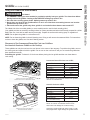
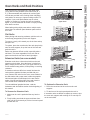
Oven Air Vents
Never block the vents (air openings) of the range. They
provide the air inlet and outlet that are necessary for the
range to keep cool and operate properly with correct
combustion.
USING THE OVEN: Oven Controls / Oven Air Vents
Oven Controls (Cont.)
Air openings are located at the rear of the cooktop, at
the top and bottom of the oven door, and at the bottom
of the range.
Vent appearance and location vary.
49-85213-1
13