Transcript
Xerox® Phaser® 6022
Color Printer
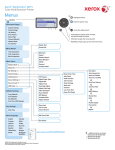
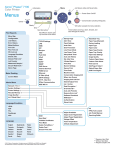
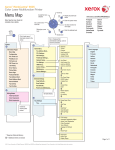
Menus
Power Saver On/Off
Information Pages
Configuration
Panel Settings
Job History
Error History
Demo Page
PCL Fonts List
PS Fonts List
Enter the system menu
Arrow buttons scroll up, down, forward, and back through the menus
OK button accepts the menu selection
Cancel
Back/Return button goes up one level in the menu
Billing Meters
Total Impression
Color Impression
Black Impression
Admin Menu
Network
Wi-Fi Status
Wi-Fi Setup
WPS Setup
Wi-Fi Direct Setup
Reset Wi-Fi
TCP/IP
Protocol
Host Access List
Initialize NVM
PS Data Format
Wi-Fi
Power Saver Timer
Auto Reset
Fault Timeout
Job Timeout
mm / inch
Low Toner Alert Msg
Paper Size Mismatch
F/W Version
Adjust Paper Type
Adjust BTR
Adjust Fusing Unit
Auto Regi Adjust
Adjust Color Regi
Clean Developer
Toner Refresh
BTR Refresh
Initialize NVM
Adjust Altitude
Machine Life
System Setup
Maintenance
Secure Setup
USB Setup
Port Status
PS Data Format
PCL Setup
Panel Lock
Software Download
Show Network Info
PS Setup
PDF Setup
Panel Language
English
Français
Italiano
Deutsch
Español
Nederlands
Dansk
Norsk
Svenska
Suomi
Polski
Türkçe
Ελληνικά
Русский
Čeština
Magyar
Português
Quantity
Print Mode
PDF Password
Paper Size
Layout
Output Color
PS Error Report
PS Job Timeout
Output Color
Image Depth
www.xerox.com/office/6022docs
© 2014 Xerox Corporation. All rights reserved. Xerox® and Xerox and Design®
are trademarks of Xerox Corporation in the United States and/or other countries.
Paper Size
Orientation
Font
Symbol Set
Font Size
Font Pitch
Form Line
Quantity
Draft Mode
Line Termination
Output Color