1
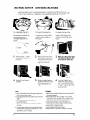
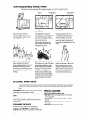
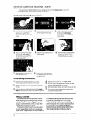
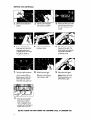
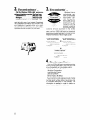
BAKING OR ROASTING
1 I’
Lift ra ck at front and pull out
Set the Oven Selector
BAKE.
on
Put the rack(s) where you
want them before turning on
the oven.
Rack(s) should be placed
so food can be centered
in
the oven. Always leave at
least 1’ 2 to 2 inches (4-5 cm)
between the sides of the pan
2nd the oven walls and pans.
For more information,
see the
“Cooking
Guide.”
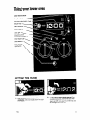
Let the oven preheat until the
Signal Light goes off
Set the Oven Temperature
Control to the baking
temperature
you want.
6
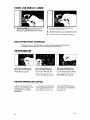
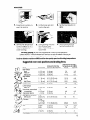
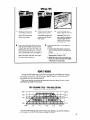
During baking, the elements
will turn on and off to help
keep the oven temperature
at the setting. The Signal Light
will turn on and off with the
elements.
The top element helps heat
during baking, but does not
turn red.
Put food in the oven. Oven
rock,
walls ond door
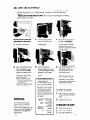
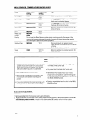
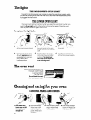
ADJUSTING
When baking is done, turn
both knobs to OFF.
will be hot.
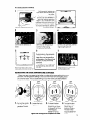
THE OVEN TEMPERATURE CONTROL
Does your new oven seem to be hotter or colder at the same
old oven? The temperature
setting in your old oven may have
ally over the years. The accurate
setting of your new oven can
If you think the oven temperature
needs adjusting,
follow these
OFF
1.
Pull out the center
of the Oven Temperature Control.
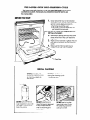
2.
Locking Screw
Loosen the locking screw.
Tighten
the locking
Tooth
settings than your
changed
graduseem different.
steps:
Notches
3. To lower the tem-
screw.
OFF
perature, move
black ring so tooth
is closer to LO, Each
notch equals
about AOF [SC).
Replace
the knob.
4.
Tooth
Notches
To raise the temperature, move
black ring so
tooth is closerto
HI. Each notch
equals about 10°F
(5°C).
13