1
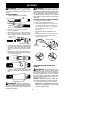
Edge Guide
CAUTION: Sharp line limiter blade
Shield
Holes
Bolt
2. Insert the shield onto the motor housing.
Ensure the cutting head remains free to
rotate and the line is not caught between
the shield and the motor housing (see
following illustration).
3. Twist the shield as illustrated until the hole
in the shield aligns with the hole in the
housings. Make sure the shield is
assembled to the unit as shown in the
following illustration and in the KNOW
YOUR UNIT section of this manual.
4. Install bolt into shield and motor housing as shown. Tighten securely.
Twist shield in this
direction to assemble
OPERATION
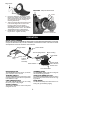
KNOW YOUR TRIMMER
READ THIS INSTRUCTION MANUAL AND SAFETY RULES BEFORE OPERATING YOUR UNIT.
Compare the illustrations with your unit to familiarize yourself with the location of the various controls
and adjustments. Save this manual for future reference.
Trigger Switch
Assist Handle
Twist and Edge Button
Motor Housing
Edge Guide
Cord
Clamp
Retainer Recessed
Plug
Locking
Sleeve
Assembly
Air
Vents
Trimmer Head
with 0.065 inch
Trimmer Line
Debris Shield
Line Limiter Blade
RECESSED PLUG
TRIMMER HEAD
The RECESSED PLUG is where you attach
your extension cord to the unit.
The TRIMMER HEAD holds the cutting line
and rotates during operation.
The TRIGGER SWITCH is used to turn on the
unit. Squeeze the trigger switch to operate the
unit. Release to stop.
The TWIST AND EDGE BUTTON is used to
twist the lower portion of the unit into an edging position.
TWIST AND EDGE BUTTON
TRIGGER SWITCH
LINE LIMITER BLADE
EDGE GUIDE
The LINE LIMITER BLADE cuts the cutting
line to the proper cutting length.
The EDGE GUIDE protects the unit from contacting the ground during edging.
ASSIST HANDLE
The ASSIST HANDLE is used to help hold
and guide the unit.
5