1
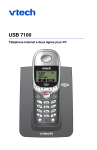
USB 7100
Dual Line PC Internet Phone
05:00PM
VTECH
8883472005
EDIT
1/19
DELETE
USB 7100
Dual Line PC Internet Phone
Important!
Before using this telephone, you must:
Install and charge batteries ......................................................................See page 5
Install software ..........................................................................................See page 9
Read important safety instructions ........................................................See page 32
System requirements:
•
•
•
•
•
•
•
PC with Windows® 2000 or XP
400 MHz processor
128 MB RAM
30 MB free disk space on your hard drive
Working CD-ROM drive
Available USB port
Internet connection (at least 33.6 Kbps)
Note: Cable or DSL connection is highly recommended. Some telephone
features are not supported if you share a single line for standard telephone
calls and a dial-up connection.
Table of contents
Getting Started
Caller ID Logs
Quick reference guide ..................2
Parts checklist ...............................3
Before you begin...........................4
Battery installation & charging......5
Wall mounting ..............................6
Telephone base installation ..........7
Belt clip & optional headset..........8
Software installation & use ...........9
How Caller ID works ..................22
To review your call log ...............23
Appendix
Screen icons & indicator lights ...24
Adding new handsets..................25
In case of difficulty .....................26
Care and maintenance ................30
Dial pad text entry ......................31
Important safety instructions......32
Warranty .....................................34
FCC, ACTA & IC regulations .......36
Technical specifications .............39
Index...........................................40
Telephone Operation
Add new handsets to make your phone more versatile
Your telephone can accommodate up to 4 cordless handsets, using a single phone
jack. You can add new handsets (sold separately) at any time (see page 25).
Basic operation ...........................12
Options while on calls ................13
Intercom & call transfers ............14
Handset settings..........................15
Phonebook
About the phonebook.................18
New phonebook entries .............19
Phonebook search ......................20
To dial, change or delete entries ..21
Handset 2
Handset 3
Handset 4
© 2005 VTech Telecommunications Ltd. All rights reserved.
VTech brand and logo are registered trademarks of VTech Telecommunications Ltd.
Skype and the Skype logo are trademarks of Skype Technologies, S.A.
1
Getting Started
Getting Started
Quick reference guide
Parts checklist
Handset
Remember to save your sales receipt and original packaging in case you ever need
to ship your telephone for warranty service. Check to make sure the telephone
package includes the following:
V
^
Press to scroll up in menus.
While entering names or numbers, press
to move the cursor to the right.
Press to scroll down in menus.
While entering names or numbers, press
to move the cursor to the left.
SOFTKEY
SOFTKEY
Press a softkey to select an option
displayed just above the key.
SOFTKEY
SOFTKEY
Press a softkey to select an option
displayed just above the key.
Battery compartment cover
CID
CD-ROM
Press to display Caller ID log.
Press to display Phonebook entries.
Call/Flash
List/Call
Telephone base
Telephone handset
Batteries (2)
Press to make or answer a telephone
call. During a call, press to answer an
incoming call, if Call Waiting is activated.
Press to make or answer an Internet call.
Press to see Skype contact list. Press
again to call highlighted contact.
Redial
Volume
Press to view redial memory.
USB cable
Press to adjust listening volume.
AC adapter
Off/Clear
Telephone line cord
Belt clip
Quick Start Guide
During a call, press to hang up. While using menus, press to cancel an
operation, back up to the previous menu, or exit the menu display.
Feature menu
> shows highlighted item
Feature Menu
1 > TONES
2 HANDSET NAME
OK
1 TONES ......................See page 15
2 HANDSET NAME ......See page 15
3 AUTO ANSWER ........See page 16
4 LANGUAGE ..............See page 16
5 REGISTRATION ........See page 16
6 TIME & DATE ............See page 16
7 NET STATUS ............See page 17
* KEY LOCK ..................See page 17
V ^
Press
or
to scroll
through menu items.
Select OK to choose or modify
a highlighted item.
Press the OFF button to cancel
an operation, back up to the
previous menu, or exit the menu
display.
Menu
2
3
Getting Started
Getting Started
Battery installation & charging
Before you begin
Internet calling
About Caller Identification
To make and receive Internet calls,
you must use the enclosed CD-ROM
to install the required software on to
your computer (see page 9). You
may also be required to establish a
Skype Out account to make Internet
calls to standard telephones. There
may be fees for this service. For
more information, please visit
www.skype.com.
Caller ID with Call Waiting features
let you see who’s calling before you
answer the phone, even when
you’re on another call. (This feature
works only with standard calls, not
Internet calls, and requires services
provided by your local telephone
company.)
After installation, place the handset in the base and allow to charge for 15 hours
before use. Note: The screen will be blank until the batteries are charged enough to
activate it. You can keep batteries charged by placing the handset in the base after
each use. When batteries are fully depleted, a full recharge takes 15 hours.
BATTERY LOW
PLACE IN CHARGER
Low battery indicator
Return handset to base or charger
when this symbol appears. (Handset
will beep when battery is low.)
Contact your telephone service
provider if:
• You have both Caller ID and Call
Waiting, but as separate services
(you may need combined service)
Telephone operating range
This cordless telephone operates
with the maximum power allowed
by the Federal Communications
Commission (FCC). Even so, this
handset and base can communicate
over only a certain distance —
which can vary with the locations of
the base and handset, the weather,
and the construction of your home
or office.
Press here and pull down
to remove cover
Insert supplied
batteries
• You have only Caller ID service,
or only Call Waiting service
Caution: Do not use alkaline
batteries. Use only the
batteries that came with your
phone, or contact our Customer
Support Center to order
additional batteries.
• You don’t subscribe to any Caller
ID or Call Waiting services.
You can use this phone with regular
Caller ID service, and you can use its
other features without subscribing to
either Caller ID or combined Caller
ID with Call Waiting service. There
may be fees for these services, and
they may not be available in all areas.
If you receive a call while you are
out of range, the handset might not
ring — or if it does ring, the call
might not connect when you press
CALL. Move closer to the base, then
press CALL to answer the call.
Place handset in base to charge
for 15 hours before first use.
Caller ID features will work only if
both you and the caller are in areas
offering Caller ID service, and if both
telephone companies use compatible equipment.
If you move out of range during a
phone conversation, you might hear
noise or interference. To improve
reception, move closer to the base.
See Caller ID Operation, beginning
on page 22, for more details about
how these features work.
If you move out of range without
pressing OFF, your phone will be left
“off the hook.” To hang up properly,
walk back toward the telephone
base, periodically pressing OFF until
the call is disconnected.
4
Replace cover
5
Getting Started
Getting Started
Wall mounting
Telephone base installation
The telephone base can be installed on any standard wall-phone outlet as shown
below. Choose a location away from electronic equipment, such as television sets
or microwave ovens. Avoid excessive heat, cold, dust or moisture.
Install the base as shown below. Choose a location away from electronic
equipment, such as television sets or microwave ovens. Avoid excessive heat,
cold, dust or moisture.
Connect cords as shown on page 5, then press and slide
down firmly so base is held securely on outlet mounting pegs
NOTE: It is recommended that you keep the base connected to a single computer. Moving the base from one
computer to another could corrupt the Caller ID List and Redial functionality of your handsets.
After charging the handset batteries
for at least 15 hours, plug line cord
into telephone jack.
Computer
Plug base power cord
transformer into
electrical outlet not
controlled by a wall
switch
Plug USB cable into a
USB port in your computer
Route wires under strainrelief tabs as shown
Plug line cord into
telephone jack
Connect AC adapter and USB
cable as shown on page 5
Underside of telephone base
NOTE: Use only the power cord supplied with this product. If you need a replacement, call 1-888-347-2005.
6
7
Getting Started
Getting Started
Belt clip & optional headset
Software installation & use
Install belt clip as shown below if desired.
To make and receive Internet calls, you must install onto your computer Vtech™
and Skype™ software. Use the CD-ROM included with your telephone to download and install the latest version of software.
For hands-free telephone conversations, you can use any industry standard 2.5 mm
headset (purchased separately).
Insert CD-ROM and wait for opening screen to be
displayed.
Insert belt clip tabs into
notches on back of handset,
then rotate to snap in place.
Click to begin, then follow the instructions on screen to complete the software installation.
Plug 2.5 mm headset
(purchased separately) into
jack on side of handset,
beneath small rubber cap.
NOTE: At the pop-up screen after
software installation, click “Allow
this program to use Skype,” then
click OK.
8
9
Getting Started
Getting Started
Software installation & use
Software installation & use
Status screen
Options screen
Shows whether the software is running properly.
Shows whether the USB cable to the PC is
connected and running properly.
Shows whether the audio connection to the PC is running properly.
Help & support (see below)
Shows whether the Skype™ software is running (must be installed and
configured to allow access by the Phone Suite software).
Select the country code to be prefixed when
making a SkypeOut call.
Dialing options (do not change unless directed to do so
by a Vtech Customer Care representative).
About screen
Phone Suite software version
Skype™ software version
Telephone firmware version
Click to open User Manual
Click to check for software upgrades **
Click to view Skype's User Manual
Click to view the SkypeOut User Manual
Click to visit the Vtech® web site for
product support
** NOTE: Make sure telephone batteries are fully
charged before checking for software upgrades.
10
NOTE: The telephone will be reprogrammed automatically if the firmware does not match the Phone Suite
software version. Keep the handset in the telephone base until programming is completed.
11
Telephone Operation
Type of call
Elapsed time
Basic operation
IN USE
INTERCM
01:23
MUTE
Press to make Press to make
or answer
or answer
Internet call
standard call
Note: To make or receive
Internet calls, you must establish
a Skype™ account (see page 9),
and your computer must be on
and connected to the Internet.
Note: You cannot use this
telephone to start a Skype™
conference call.
Note: Calls will be placed on
hold if you press the Phonebook,
Redial or CID buttons. Press the
flashing CALL button to resume
your call.
PAT WILLIAMS
02/14
12:34
STORE
DELETE
Status symbols for
Internet calls
Options while on calls
VOLUME
**__
Making and answering calls
Volume controls
To answer a call, press the flashing CALL button. If
Auto Answer is activated, the call will be answered
when you lift the handset from the base (see page 16).
Listening volume: Press VOLUME repeatedly to adjust
volume. You’ll hear 3 beeps at maximum volume;
the next button press returns to minimum volume.
To make calls:
Ringing volume (temporary): While the phone is
ringing, press VOLUME to adjust ringer volume, or
press OFF to silence the ringer. (See page 15 to change
this setting permanently.)
• Press LIST/CALL to see your Skype contact list.
Press Vor ^to highlight a name, then press
LIST/CALL to dial. To narrow the list, select
SKYPE to see only a list of Skype contacts, or
SKYPEOUT to see only a list of SkypeOut contacts. Refer to page 20 for instructions on searching by name.
Note:You cannot add, edit, or modify your Skype
contact list using the handset. You must update
your contact list from your computer.
Mute
MICROPHONE MUTED
INTERCM
MUTE
Select MUTE to silence the microphone during a call.
Your caller will not be able to hear you until you
select MUTE again and resume speaking.
Call waiting (standard calls only)
• To make a SkypeOut call to a standard phone,
enter (“pre-dial”) the number, then press
LIST/CALL to dial. The phone will add a “+”
necessary to make a SkypeOut call. (After a few
calls to the same number, you may be prompted
to add the number to your contact list.)
If you have Call Waiting service, you’ll hear a beep if
someone calls while you are already on a call. Press
FLASH to put your current call on hold and take the
new call. You can press FLASH at any time to switch
back and forth between standard calls.
• To make a standard telephone call, press
CALL/FLASH, then dial a number (or pre-dial the
number first, then press CALL/FLASH to dial).
Switching between Internet & standard calls
• While pre-dialing, press CLEAR to erase digits one
by one, or press and hold CLEAR to delete all and
begin again.
3335559876
PAT JONES >
INTERCM
ON
HELD
During a call you can press the non-active CALL button to put your existing call on hold and make or
answer a call on the other line. Press the non-active
CALL button to switch back and forth between calls.
MUTE
• To hang up after your call, press OFF (or return
the handset to the base).
Select OFF to terminate the active call. This will automatically switch you to the call on the other line.
Last number redial
Intercom page during a call
Press REDIAL to display the most recently called
number. You can use the V^ buttons to view the
10 most recently called numbers.
If you receive an intercom page during a call, you
can ignore it, or press INTERCM to take the intercom
call and put your outside call on hold. Press the
flashing CALL button to resume your external call.
• Press either CALL button to redial any number.
Away/Status Unknown
• Select STORE to add the displayed number to your
phonebook (see page 17 to edit).
Not Available/Do Not
Disturb/Invisible/Offline
• Select DELETE to delete the displayed number from
the redial memory.
Online/SkypeMe
?
X
Telephone Operation
Volume level (1-4)
12
Press to
switch to
Internet call
Press to
switch to
standard call
Using other functions during a call
Your call is automatically put on hold if you use the
Phonebook, Call Log or Redial functions. Press the
flashing CALL button to resume your call.
13
Telephone Operation
Telephone Operation
Press MENU to begin
Intercom and call transfers
VTECH
INTERCM
MENU
Handset settings
VTECH
Some features described on this page are available
only if you have purchased and registered optional
expansion handsets (see page 25).
INTERCM
MENU
Paging and intercom calls
2 > LIVING ROOM
3 BEDROOM
OK
Shortcut:
Press Intercom, enter number
of handset (or * to select all),
then press OK to page.
The intercom allows you to communicate with
expansion handsets without using an outside line.
Select INTERCM to see a list of active handsets. Press
the V^ buttons to highlight the set you want (or
choose CALL ALL to page all handsets). Select OK to
page the highlighted handset(s).
To answer a page, select INTERCM. Press OFF to end
the call. If you receive an outside call while using the
intercom, press the flashing CALL button to answer
the outside call (this will end your intercom call).
Call forward and call transfer
Note:
Intercom and call transfer
features cannot be used when
both Internet and standard
telephone lines are in use .
During a conversation you can select INTERCM (this
places your call on hold) to page another handset
and send the call to it.
Call Forward (stardard calls only): Press OFF before
your intercom page is answered. If the paged handset
is not answered in about 30 seconds, the external call
will be returned to your handset. If you do not press
CALL to answer within 30 seconds, the external call
will be terminated.
Call Transfer (standard or Internet calls): After your
page is answered you can speak to the person at the
remote handset. Either person can press OFF to
release the external call to the other person. If no one
answers the paged handset, press the flashing CALL
button to retrieve the call.
Highlighted menu item
1> TONES
2 HANDSET NAME
OK
RINGER LEVEL
***___
OK
1>
2
OK
3 > KEY BEEP
4 CONTACT ALRT
OK
4 > CONTACT ALRT
1 RING LEVEL
OK
HANDSET NAME
PAT _
OK
Handset locator
If you misplace a handset, press LOCATE HANDSET at
the base. All registered handsets will ring for 60 seconds to help you locate them. To stop the ringing,
press OFF at the handset, or press LOCATE HANDSET at
the base.
14
At the feature menu you can change settings to
customize how your handset works.
Select MENU, then use the V^ buttons to scroll to
the feature you want to change. As you scroll, the
top menu item is always highlighted with a > character. Select OK to choose the highlighted item, then
use the V^ buttons to scroll to the next feature
you want to change.
Press OFF at any time to cancel an operation, go back
to the previous menu, or exit the menu display. (The
menu will time out after 30 seconds of inactivity.)
1 Tones
1 Ring level: Press V^ repeatedly to hear sample
volume levels, then select OK to save the current
level. If you turn the ringer off, the warning message
“Ringer Off” will be displayed when the phone is idle.
2 Ring pattern: Select type of call (1-Internet or 2Standard), select OK, then press V^ repeatedly to
hear sample ring patterns. You can choose a different ring pattern for each type of call. Select OK, to
save the current ring pattern.
3 Key beep: The handset is factory programmed to
beep at each keypress. Select OK to toggle key beeps
on or off (a checkmark appears when on). Press OFF
to save & exit.
4 Contact alert: This tone alerts you when someone
on your Internet contact list is online. Select OK to
toggle this alert on or off (a checkmark appears
when on). Press OFF to save & exit.
2 Handset name
At this menu you can customize the name that
appears on the handset screen when the phone is
idle. If you have multiple handsets, the name will
also appear in their intercom call lists.
See page 19 to learn how to enter letters. If you
make a mistake, press CLEAR to erase letters. Select
OK to save the name and exit.
15
Telephone Operation
Telephone Operation
Handset settings
3 Auto answer
3 > AUTO ANSWER
4 LANGUAGE
OK
When on, incoming calls will be answered automatically when you lift the handset from the base. Select
OK to toggle Auto Answer on or off (a checkmark
appears when on). Press OFF to save & exit.
4 Language
1 > ENGLISH
2 SPANISH
Handset settings
> shows current net status when
you first enter the menu (before
scrolling)
1 > OFFLINE
2 ONLINE
OK
1 Offline: You cannot make or receive Skype™ calls.
2 Online: You are logged in and available for calls.
3 Skype Me: Temporarily disables your privacy settings
so you can be contacted by anyone on the global
Skype™ network.
5 Registration
1 > REGISTER
2 DEREGISTER
4 Away: Your status is changed to Away when you
are logged in, but have not used your computer for a
short while (5 minutes by default; can be changed in
Skype™ Options).
Use this feature to add a new handset, de-register or
re-register your original handset if necessary. (You
may need to do this if the handset displays “Search
Base” after it has been in the base for more than 60
seconds.)
OK
At this menu you can log on, log off, or change how
you are identified to the network of other Skype™
users when you are online.
Use the V^ buttons to highlight one of the status
options listed below, then select OK to save your
preference.
At this menu you can select the language used in all
menus and screen displays. Use the V^ buttons to
highlight English, Spanish or French, then select OK
to save your preference.
OK
7 Net status
5 Not available: Your status is changed to Not
Available when you are logged in, but have not used
your computer for a longer time (20 minutes by
default; can be changed in Skype™ Options).
Use the V^ buttons to highlight Register or
Deregister, then select OK. See page 25 for further
information.
6 Do not disturb: You can activate this status if you
are busy and do not want to receive incoming calls.
6 Time & date
1 > AUTOMATIC
2 MANUAL
OK
MM / DD / YY HH : MM
AM
7 Invisible: You can activate this status if you want to
make but not receive Internet calls. Other users will
see you listed as “Offline.”
You can choose to set the time and date manually, or
have it updated automatically to match your PC time
and date settings (if the USB cable is connected to an
operating computer).
PM
For manual entry, use the dial
pad to enter month, day, year,
hour and minute, then select AM
or PM.
Use the V^ buttons to highlight Automatic or
Manual, then select OK to save your preference.
If you select Manual, you will be prompted to enter
the date and time (see directions at left).
Note: Visit www.skype.com for more information on
using and configuring these options.
* > KEY LOCK
1 TONES
* Key lock
OK
Appears when dial pad is locked
KEYS LOCKED
INTERCM
16
MENU
This feature locks your telephone dial pad to prevent
accidental button-presses. Select OK to lock the dial
pad. To unlock, select MENU, then quickly press *.
If you attempt to use the dial pad while it is locked,
the directions for unlocking the dial pad will be
displayed on screen.
17
Phonebook
Phonebook
PAT WILLIAMS
5551234
EDIT
DELETE
INTERCM
MENU
New phonebook entries
Shared phonebook directory
To create a new phonebook entry
The phonebook directory is stored in the base, and is
shared by all handsets. Changes made at any handset
will be reflected in all handsets.
Press the PHONEBOOK button, then select NEW to
add a new entry. Use the dial pad to enter up to 24
digits, then select OK. (Numbers must be entered as
they will be dialed, including the area code and “1”
prefix if required.)
If you have multiple handsets, only one person at a
time can use the phonebook. If a person using another
handset attempts to use the phonebook, an error
tone will be heard.
The phonebook can store up to 160 entries. Each
entry can contain a number up to 24 digits, and a
name up to 16 letters long. A convenient search feature can help you find and dial numbers quickly (see
page 20).
Internet and standard calls
160 entries shared by all
handsets
VTECH
You can use SkypeOut or your standard telephone
line to call numbers entered in your phonebook. Just
make sure each number is entered as it will be dialed
(that is, include the area code and “1” prefix if
required). The telephone will insert a “+” prefix to
the number if you use SkpeOut to call a standard
phone number.
Note: To make Internet calls to standard telephone
numbers, you must establish a Skype Out account
(see page 4). For information on placing SkypeOut
calls to international numbers, see page 27.
Timeouts and error messages
If you pause for too long while making an entry, the
procedure will time out and you will have to begin
again.
If all memory locations are in use, an error message
will be displayed. You will not be able to store a new
number until you delete an existing one.
Phonebook button
PHONEBOOK
NEW
PREVIEW
See page 12 to add a number from your redial list.
See page 23 to add a number from your call log.
• Press CLEAR to erase numbers if you make a mistake
(or press and hold to erase all numbers).
EDIT NUMBER
• Select PAUSE to enter a 3-second dialing pause.
5551234_
OK
PAUSE
EDIT NAME
PAT WILLIAMS_
OK
To enter a name
Press dial pad buttons once for the first letter, twice
for the second, three times for the third. Continue
for lower-case letters or numerals. (See page 31 for
full character set.)
Press once to enter “A” (5 times for “a”)
2
Press twice to enter “B” (6 times for “b”)
Press 3 times to enter “C” (7 times for “c”)
Press 4 times to enter “2”
The cursor moves to the right when you press
another dial pad button or the ^ button. Press the
V button to move the cursor to the left.
• Press 1 to enter a space. Press repeatedly to
enter an ampersand (&), apostrophe ('), comma
(,), period (.) or the digit “1”.
• Press CLEAR to erase letters if you make a mistake.
• Press and hold CLEAR to erase all letters.
Storing the entry
Select OK to store your new phonebook entry. To
change it later, see page 20.
18
19
Phonebook
VTECH
INTERCM
MENU
Phonebook button
Phonebook
Phonebook search
Press the PHONEBOOK button, then select REVIEW to
display the first entry in the phonebook. You can
then press V or ^ to browse through the phonebook (see below to search by name). Press OFF at
any time to exit the directory.
VTECH
INTERCM
MENU
See page 20 to find and display an entry you want to
dial, edit or delete.
To dial a number
Phonebook button
To browse through the directory
PHONEBOOK
NEW
REVIEW
ANDREW
5556789
EDIT
DELETE
To browse, press V or ^ to scroll through all
entries one by one. Entries will be displayed alphabetically by the first letter in the name.
Only the last 15 characters of an entry can be
displayed. To view longer names or numbers, select
EDIT, then press V to move the cursor to the left.
PHONEBOOK
NEW
REVIEW
ANDREW
5556789
EDIT
To search by name
EDIT
DELETE
5
JENNIFER
5554321
EDIT
DELETE
Press dial pad buttons once for the first letter, twice
for the second, three times for the third, as shown
on the previous page.
EDIT NUMBER
5556789_
OK
PAT
5551234
DELETE
The phonebook will cycle through 3 or 4 entries,
depending on the number of letters on the key. If
there aren't any names associated with one of the letters, the next alphabetically listed entry will be displayed.
If you have established a Skype Out account, you can
press LIST/CALL to make an Internet call to the number
(a “+” prefix will be added to the number).
When any phonebook entry is displayed, select
DELETE to delete the displayed entry from the
phonebook. Once deleted, an entry cannot be
recovered.
PAUSE
To edit an entry
EDIT NAME
ANDREW & JANE_
OK
For example, press 5 (jkl) once to find Jennifer, twice
to find Kevin, or three times to find Linda.
7
EDIT
When any entry is displayed, you can press a dial pad
button to display the first name beginning with a letter associated with that button.
When any phonebook entry is displayed, press
CALL/FLASH to dial the displayed number.
To delete an entry
DELETE
V
BARBARA
5559876
To dial, edit or delete entries
ANDREW & JANE
5556789
EDIT
When any phonebook entry is displayed, select EDIT
to modify the entry. (See page 19 for help in editing
the name or number.)
Change the number as needed, then select OK.
Change the name as needed, then select OK to save
the entry. The modified entry will be displayed for
your review.
DELETE
To call a displayed number
When you find the entry you want, press CALL to
dial. Or select EDIT (before dialing) to modify the
entry (see next page).
Note: If you press the Call/Flash button and go offhook before pressing the PHONEBOOK button, you
will not be able to call the displayed number.
20
21
Caller ID Logs
Caller ID Logs
VTECH
INTERCM
NEW
MENU
How Caller ID works
To review your call log
08:15AM 02/14
If you subscribe to Caller ID service provided by
your local phone company, information about each
caller will be displayed after the first or second ring.
PAT WILLIAMS
5551234
To review your call log
Press CID to review your call log. The most recent
call is displayed first. Use the arrow buttons to scroll
through the list as shown at left.
Call log button
Time & date of call
Entry number
Screen shows number
of calls after a new call
is received
NEW
VTECH
34 CALLS / 1 NEW
INTERCM
New or old call
NEW
08:15AM
34 OF 34
PAT WILLIAMS
5551234
02/14
Caller’s name
STORE
Caller’s number
Calls received by all handsets are stored in a shared
call log that can store 50 entries. You can review the
log to find out who has called, return the call without dialing, or copy the caller’s name and number
into your phonebook.
MENU
After the call log is full, the oldest entry is deleted to
make room for new entries.
Status symbols for
Internet calls
If you answer a call before the information appears
on the screen, it will not be saved in your call log.
Online/SkypeMe
?
X
Away/Status Unknown
About names
Not Available/Do Not
Disturb/Invisible/Offline
Names of callers will be displayed only if this information is provided by your local telephone company.
If the telephone number of the person calling matches a number in your phonebook, the name that
appears on screen will match the name as you
entered it into your phonebook.
(Example: If “Christine Smith” calls, her name will
appear as “Chris” if this is how you entered it into
your phonebook.)
If someone in your Internet contact list is currently
online, a checkmark will be displayed after the name
in your call log.
22
NEW
08:15AM 02/14
34 OF 34
PAT WILLIAMS
5551234
DELETE
V
08:09AM 02/14
33 OF 34
CHRIS THOMPSON
5554321
STORE
DELETE
To return a call
When any call log entry is displayed, press
CALL/FLASH to dial the displayed number, or press #
repeatedly to see alternate dialing formats (you can
choose to dial with or without the area code or “1”
prefix).
If you have established a Skype Out account, you can
press LIST/CALL to make an Internet call to the number
(a “+” prefix will be added to the number).
V
Other options
05:22PM 02/13
32 OF 34
JEFFREY ADAMS
5556789
STORE
DELETE
• Select DELETE to delete the displayed entry from
your call log.
• Press and hold DELETE to delete all entries from
your call log. When asked to confirm, select YES
to clear your call log of all entries, or NO to exit
and leave all call log entries intact.
• Select STORE to copy this entry into your phonebook. If you want to change the name or number
before storing it in your phonebook, press #
repeatedly to choose the correct dialing format, or
select EDIT to change the name. If the name or
number are not provided, you will be prompted
to enter them. Select OK to store the new entry in
your phonebook.
Note: Only call records received on your standard
telephone line can be copied into the phonebook.
You cannot copy numbers received on your
Internet line.
23
Appendix
Appendix
Screen icons and indicator lights
Adding new handsets
Handset screen icons
NOT REGISTERED
Telephone line
MENU
Internet line
MUTE NEW
Low battery (place handset in base or charger to recharge)
Dial pad locked (to unlock, select MENU then press
*)
Press MENU to begin
1 > REGISTER
2 DEREGISTER
OK
MUTE
Microphone is muted (select MUTE to resume conversation)
NEW
New calls (press CID to review call log)
Online/SkypeMe
Away/Status Unknown
Not Available/Do Not Disturb/Invisible/Offline
HANDSET NAME
PAT_
OK
Indicator lights
2 Highlight "Register," then select OK. The screen
will display, "Search Base".
4 The handset should beep to indicate the registration has completed. You will be prompted to
enter a name for the new handset (see page 17 for
help in entering names). We strongly recommend
that you give each handset a distinctive name, to
simplify paging and intercom use.
5 Select OK to save the new handset name. The
name you enter will be displayed on screen when
the handset is idle, and in intercom paging lists.
If the above procedure does not work, see page 29
for further suggestions.
PAT
INTERCM
1 Select MENU.
3 Press and hold the LOCATE HANDSET button on
the base for at least 30 seconds.
SEARCH BASE
Status symbols for Internet calls
INTERNET LINE
On when Internet line is in use.
Flashes slowly when call is on hold.
Flashes quickly when line is ringing.
Before using a new handset, you must first install and
charge the batteries for 15 hours (see page 7).
After the batteries are fully charged, follow the procedure below to register the handset to the base.
Intercom
?
X
Your telephone can accommodate up to 4 cordless
handsets. You can add new handsets (sold separately)
at any time.
MENU
TELEPHONE LINE
On when telephone line is in use.
Flashes slowly when call is on hold.
Flashes quickly when line is ringing.
24
25
Appendix
Appendix
In case of difficulty
In case of difficulty
If you have difficulty with your phone, please try the suggestions below. For
customer service, please visit our Web site at www.vtechphones.com, or call
1-888-347-2005 (USA) or 1-800-267-7377 (Canada).
Problems making
or receiving
calls
Problems with
Internet line
•
Make sure batteries are installed and charged correctly (see page 7).
•
Make sure the AC adapter is firmly plugged into an outlet not
controlled by a wall switch.
•
Make sure the telephone line cord and USB cable are properly
connected (see page 5).
•
If these suggestions do not work, unplug the base, remove and
re-insert the batteries, then follow the steps on page 25 to re-register
the handset.
•
Call transfer
immediately
displays “Ring
Back’’
No audio on
Internet calls
Make sure the USB cable is plugged firmly into the telephone base
and a working USB port in your computer (see page 5).
•
Make sure your PC is powered on, and not in a standby or hibernating state. If the USB cable is plugged into a router or hub, try
connecting it directly to the PC.
•
Make sure your computer meets the minimum requirements and all
software has been properly installed (see page 9). You must
establish a Skype™ account before using the Internet line.
•
Handset displays Launch your Skype™ software and follow the steps below:
“No VoIP Clients • Click Tools > Options > Privacy Menu > Related Tasks.
Running”
Problems using
SkypeOut
Launch your browser and check to see if you can connect to the
Internet. You must establish an Internet connection to make calls.
•
Activate your Vtech Cordless Phone Suite software, click on the
Status tab, and make sure all four boxes are checked. Unchecked
boxes may help you identify the source of the problem.
•
Check your Net Status to make sure you are online with the Skype™
network (see page 17).
•
Unplug the base, remove and re-insert the batteries, then follow the
steps on page 25 to re-register the handset.
•
Make sure batteries are installed and charged correctly (see page 7).
•
Make sure the AC adapter is firmly plugged into an outlet not
controlled by a wall switch.
•
If these suggestions do not work, visit www.skype.com/help to check
for other solutions. Or call VTech Customer Service at the numbers
listed above.
•
Click Manage other programs’ access to Skype.
•
Select Vtech, then click the Change button.
•
Click Allow this program to access Skype, then click OK.
Launch your Skype™ software and follow the steps below:
•
Click Tools > Options > Sound Devices Menu.
•
Set “Audio In” to Cordless USB Phone.
•
Set “Audio Out” to Cordless USB Phone.
•
Set “Ringing” to Cordless USB Phone, then click OK.
You may enter numbers at the computer or the handset. To use the
handset, choose one of the methods listed below:
•
Enter “00” + “Country code” + “National prefix (if needed)” + (number)
•
Enter “011” + “Country code” + “National prefix (if needed)” + (number)
•
Launch the Vtech Cordless Phone Suite software, click the Options
tab, then check the box marked Add international prefix and
country code. Then enter “National prefix (if needed)” + (number).
Problems check- Check your Net Status when you first enter the menu (before scrolling).
When you scroll, the highlight character (>) will follow your selection, no
ing Net Status
longer indicating your current Net Status.
on handset
You can also launch the Skype™ software to review or change your Net
Status (click on the icon in the bottom left corner of the screen).
Problems with
conference calls
using the handset
You must use Skype™ to start the conference call, then quickly press the
LIST/CALL button to join the call using the cordless handset.
You must wait until you hear the other handset ring before pressing
Off/Clear to complete the call transfer. If you press Off/Clear to send the
call to the other handset too quickly, you may cause the original handset
to generate the “Ring Back’’ message.
NOTE: The term “base” above refers to the telephone base, not the charger provided with expansion handsets.
26
NOTE: The term “base” above refers to the telephone base, not the charger provided with expansion handsets.
27
Appendix
Appendix
In case of difficulty
If you hear
noise or
interference
during a call
Phone does
not ring
•
You may be out of range. Move the handset closer to the base.
•
Appliances plugged into the same circuit as the base can cause
interference. Try moving the appliance or base to another outlet.
•
The layout of your home or office might be limiting the operating
range. Try moving the base to another location, preferably on an
upper floor.
•
If the buttons don’t work, try placing the handset in the base for at
least 15 seconds.
•
Disconnect the base from the modular jack and plug in a corded telephone. If calls are still not clear, the problem is probably in your
wiring or local service. Call your local telephone service company.
•
If only Internet calls do not ring, make sure your computer is on,
connected to the Internet, and all required software is running.
•
Make sure the ringer for the non-ringing line is on (see page 15).
•
Handset does
not work
In case of difficulty
Move the handset closer to the base.
•
You might have too many extension phones on your telephone line to
allow all of them to ring. Try unplugging some of them.
If the error message “Not Registered” is displayed, return the handset
to the base. If the error message remains after 60 seconds, you will
have to manually re-register the handset (see next page).
If the error message “Not Registered” is displayed, return the handset to
the base. After 60 seconds the handset should beep to indicate that
registration is completed.
If registration fails, follow the steps below to deregister and reregister
your handset:
1 Select MENU.
V until “Registration” is displayed, then select OK.
Press V until “Deregister” is highlighted, then select OK.
Press V until affected handset is highlighted, then select OK.
2 Press
3
4
5 At the “Deregister?” confirmation prompt, select OK.
6 Press and hold the LOCATE HANDSET button on the base for at
least 5 seconds.
7 Select MENU.
8 Press
Make sure the telephone line cord and AC adapter are plugged in
properly (see page 5).
•
•
Manual handset
registration
V until “Registration” is highlighted, then select OK.
9 Select OK to display “Search Base,” then wait a few seconds. If registration is successful, you will be prompted to enter a handset name.
If the “Not Registered” message is still displayed, call VTech Customer
Support at the numbers listed on page 26.
Lost or broken
handsets
If you have lost or broken a handset, you should de-register it from the
base. Using a handset that is registered to the base, follow the steps
below to de-register the lost or broken handset:
1 Select MENU.
V until “Registration” is displayed, then select OK.
V until “Deregister” is highlighted, then select OK.
Press V until affected handset is highlighted, then select OK.
2 Press
3 Press
Intercom or call
transfer does
not work
•
Intercom and call transfer features cannot be used when both
Internet and standard telephone lines are in use. Try again when one
line is free.
4
5 At the “Deregister?” confirmation prompt, select OK.
Once that handset has been de-registered, you may attempt to register
the new handset.
Wrong date
or time
•
The telephone’s date and time are taken from your PC. Make sure
your PC is set to the correct time and date.
Only one call will The USB7100 can only ring for one incoming call at a time (Skype, standard, or intercom). If you receive a second call before answering the first
ring at a time
call, you will not be notified of the second call until after the first call is
answered. However, if you receive an incoming call while calling ALL
handsets (select * from the INTERCM menu), the incoming call will take
priority over the intercom call.
NOTE: The term “base” above refers to the telephone base, not the charger provided with expansion handsets.
28
NOTE: The term “base” above refers to the telephone base, not the charger provided with expansion handsets.
29
Appendix
Appendix
Care and maintenance
Dial pad text entry
Your cordless telephone contains sensitive electronic parts, so it must be treated with care.
Avoid rough treatment: Place the handset down gently. Save the original packing materials to
protect your telephone if you ever need to ship it.
To enter text, press dial pad buttons once for the first letter, twice for the second,
three times for the third, etc. See chart below for full character set.
Avoid water: Your telephone can be damaged if it gets wet. Do not use the handset outdoors
in the rain, or handle it with wet hands. Do not install your base unit near a sink, bathtub or
shower.
Example:
Press once to enter “A” (5 times for “a”)
2
Electrical storms: Electrical storms can sometimes cause power surges harmful to electronic
equipment. For your own safety, use caution when using electric appliances during storms.
Cleaning your telephone: Your telephone has a durable plastic casing that should retain its
luster for many years. Clean it only with a soft cloth slightly dampened with water or a mild
soap. Do not use excess water or cleaning solvents.
Press twice to enter “B” (6 times for “b”)
Press 3 times to enter “C” (7 times for “c”)
Press 4 times to enter “2”
Number of button presses
1
2
3
4
5
6
7
1
space
&
‘
,
.
1
2
A
B
C
2
a
b
c
3
D
E
F
3
d
e
f
4
G
H
I
4
g
h
i
5
J
K
L
5
j
k
l
6
M
N
O
6
m
n
o
7
P
Q
R
S
7
p
q
8
T
U
V
8
t
u
v
9
W
X
Y
Z
9
w
x
0
0
8
9
r
s
y
z
• Press CLEAR to delete letters if you make a mistake.
• Press and hold CLEAR to delete all letters and start over.
30
31
Appendix
Appendix
Important safety instructions
When using your telephone equipment, basic safety precautions should always be
followed to reduce the risk of fire, electric shock and injury, including the
following:
1
Read and understand all instructions.
2
Follow all warnings and instructions marked on the product.
3
Unplug this product from the wall outlet before cleaning. Do not use liquid or
aerosol cleaners. Use a damp cloth for cleaning.
4
Do not use this product near water (for example, near a bath tub, kitchen sink
or swimming pool).
5
Do not place this product on an unstable surface, such as a table, shelf, or
stand. The product may fall, causing serious damage.
6
7
Slots and openings in the back or bottom of the base unit and handset are
provided for ventilation. To help prevent overheating, do not place the
product on a soft surface such as a bed, sofa or rug. This product should
never be placed near or over a radiator or heat register. This product should
not be placed in any area where proper ventilation is not provided.
This product should be operated only from the type of power source
indicated on the marking label. If you are not sure of the type of power supply
in your home, consult your dealer or local power company.
8
Do not allow anything to rest on the power cord. Do not install this product
where the cord may be stepped on or tripped over.
9
Never push objects of any kind into this product through slots in the base or
handset as they may touch dangerous voltage points or short out parts that
could result in a risk of fire or electric shock. Never spill liquid of any kind on
the product.
10 To reduce the risk of electric shock, do not disassemble this product. It should
be opened only by technicians at an authorized service facility. Opening or
removing parts of the base or handset other than specified access doors may
expose you to dangerous voltages or other risks. Improper reassembly can
cause electric shock when the product is subsequently used.
Important safety instructions
12 Unplug this product from the wall outlet and refer servicing to an authorized
service facility under the following conditions:
• When the power supply cord or plug is damaged or frayed.
• If liquid has been spilled onto the product.
• If the product has been exposed to rain or water.
• If the product does not operate normally by following the operating instructions. Adjust only those controls that are covered by the operating instructions, as improper adjustment of other controls may result in damage and
often requires extensive work by an authorized technician to restore the product to normal operation.
• If the product has been dropped and the base and/or handset has been
damaged.
• If the product exhibits a distinct change in performance.
13 Avoid using a telephone (other than cordless) during an electrical storm.
There may be a remote risk of electric shock from lightning.
14 Do not use the telephone to report a gas leak in the vicinity of the leak.
WARNING: Put the handset of your telephone next to your ear only when it
is in normal talk mode (off-hook). There is a potential risk of hearing damage
or loss if the telephone were to ring while the handset is next to your ear.
WARNING: Remember that electrical appliances can cause serious injury if
used when you are wet or standing in water. If your base unit should fall into
water, DO NOT RETRIEVE IT UNTIL YOU UNPLUG THE POWER CORD AND
TELEPHONE LINE CORDS FROM THE WALL. Then pull the unit out by the
unplugged cords.
11 Do not overload wall outlets and extension cords as this can result in the risk
of fire or electric shock.
32
33
Appendix
Appendix
Warranty
Warranty
What does this limited warranty
cover?
What is not covered by this limited
warranty?
The manufacturer of this VTech product,
VTech Communications, warrants to the holder of a valid proof of purchase (“Consumer” or
“you”) that the product and all accessories
provided by VTech in the sales package
(“Product”) are free from material defects in
material and workmanship, pursuant to the
following terms and conditions, when
installed and used normally and in accordance with operation instructions, This limited
warranty extends only to the Consumer for
Products purchased and used in the United
States of America.
This limited warranty does not cover:
1 Product that has been subjected to misuse, accident, shipping or other physical
damage, improper installation, abnormal
operation or handling, neglect, inundation,
fire, water or other liquid intrusion; or
•
2 Product that has been damaged due to
repair, alteration or modification by anyone
other than an authorized service representative of VTech; or
3 Product to the extent that the problem
experienced is caused by signal conditions, network reliability or cable or antenna systems; or
What will VTECH Communications do
if the Product is not free from material defects in materials and workmanship during the limited warranty period (“Materially Defective Product”)?
4 Product to the extent that the problem is
caused by use with non-VTech electrical
accessories; or
5 Product whose warranty/quality stickers,
Product serial numbers plates or electronic serial numbers have been removed,
altered or rendered illegible; or
During the limited warranty period, VTech’s
authorized service representative will repair or
replace at VTech’s option, without charge, a
Materially Defective Product. If we repair this
product, we may use new or refurbished
replacement parts. If we choose to replace
this product, we may replace it with a new or
refurbished product of the same or similar
design. VTech will return repaired or replacement products to you in working condition.
VTech will retain defective parts, modules, or
equipment. Repair or replacement of Product,
at VTech’s option, is your exclusive remedy.
You should expect the repair or replacement
to take approximately 30 days.
6 Product purchased, used, serviced, or
shipped for repair from outside the United
States, or used for commercial or institutional purposes (including but not limited
to Products used for rental purposes); or
7 Product returned without valid proof of
purchase (see 2 below); or
8 Charges for installation or set up, adjustment of customer controls, and installation
or repair of systems outside the unit.
How long is the limited warranty period?
How do you get warranty service?
The limited warranty period for the product
extends for ONE (1) YEAR from the date of
purchase if we repair or replace a Materially
Defective Product under the terms of this limited warranty. This limited warranty also
applies to repaired or replacement Products
for a period of either (a) 90 days from the date
the repaired or replacement Product is
shipped to you or (b) the time remaining on
the original one-year warranty, whichever is
longer.
•
To obtain warranty service in the United
States of America, call 1- 888- 347- 2005
for instructions regarding where to return
the Product. Before calling for service,
please check the user’s manual. A check
of the Product controls and features may
save you a service call.
•
Except as provided by applicable law, you
assume the risk of loss or damage during
transit and transportation and are responsible for delivery or handling charges
incurred in the transport of Product(s) to
34
There are no other express warranties. No
one is authorized to make modifications to
this limited warranty and you should not
rely on any such modification.
the service location. VTech will return
repaired or replaced product under this
limited warranty to you, transportation,
delivery or handling charges prepaid.
VTech assumes no risk for damage or loss
of the Product in transit.
State Law Rights: This warranty gives
you specific legal rights, and you may also
have other rights which vary from state to
state.
If the Product failure is not covered by this
limited warranty, or proof of purchase
does not meet the terms of this limited
warranty, VTech will notify you and will
request that you authorize the cost of
repair and return shipping costs for the
repair of Products that are not covered by
this limited warranty.
Limitations: Implied warranties, including
those of fitness for a particular purpose
and merchantability (an unwritten warranty
that the product is fit for ordinary use) are
limited to one year from date of purchase.
Some states do not allow limitations on
how long an implied warranty lasts, so the
above limitation may not apply to you.
What must you return with the
Product to get warranty service?
•
1 Return the entire original package and
contents including the Product to the
VTech service location along with a
description of the malfunction or difficulty;
2 Include “valid proof of purchase” (sales
receipt) identifying the Product purchased
(Product model) and the date of purchase
or receipt; and
3 Provide your name, complete and correct
mailing address, and telephone number.
Other Limitations
•
This warranty is the complete and exclusive agreement between you and VTech. It
supersedes all other written or oral communications related to this Product. VTech
provides no other warranties for this product. The warranty exclusively describes all
of VTech’s responsibilities regarding the
product.
35
In no event shall VTECH be liable for any
indirect, special, incidental, consequential,
or similar damages (including, but not limited to lost profits or revenue, inability to
use the product, or other associated
equipment, the cost of substitute equipment, and claims by third parties) resulting
from the use of this product, some states
do not allow the exclusion or limitation of
incidental or consequential damages, so
the above limitation or exclusion may not
apply to you.
Appendix
Appendix
FCC, ACTA and IC regulations
This equipment complies with Parts 15 of the
Federal Communications Commission (FCC)
rules for the United States. It also complies
with regulations RSS210 and CS-03 of
Industry and Science Canada. Operation is
subject to the following two conditions: (1)
this device may not cause interference, and
(2) this device must accept any interference,
including interference that may cause undesired operation of the device.
A label is located on the underside of the
Base Unit containing either the FCC registration number and Ringer Equivalence Number
(REN) or the IC registration number and Load
Number. You must, upon request, provide this
information to your local telephone company.
•
Reorient or relocate the receiving antenna.
•
Increase the separation between the
equipment and receiver.
•
Connect the equipment into an outlet or on
a circuit different from that to which the
receiver is connected.
•
Consult the dealer or an experienced
radio/TV technician for help.
FCC and ACTA Information
If this equipment was approved for connection to the telephone network prior to July 23,
2001, it complies with Part 68 of the Federal
Communications Commission (FCC) rules. If
the equipment was approved after that date,
it complies with the Part 68 rules and with
Technical Requirements for Connection of
Equipment to the Telephone Network adopted
by the Administrative Council for Terminal
Attachments (ACTA). We are required to provide you with the following information.
This equipment is compatible with inductively
coupled hearing aids.
Should you experience trouble with this telephone equipment, please contact:
VTech Communications Inc. CUSTOMER
SERVICE at 1-888-347-2005. In Canada, call
VTech Telecommunications Canada Ltd. at 1800-267-7377 for repair/warranty information.
The telephone company may ask you to disconnect this equipment from the line network
until the problem has been corrected.
1. Product identifier and REN information
The label on the back or bottom of this equipment contains, among other things, an identifier indicating product approval and the
Ringer Equivalence Number (REN). This information must be provided to your local telephone company upon request. For equipment
approved prior to July 23, 2001, the product
identifier is preceded by the phrase “FCC Reg
No.” and the REN is listed separately. For
equipment approved after that date, the product identifier is preceded by “US” and a colon
(:), and the REN is encoded in the product
identifier without a decimal point as the sixth
and seventh characters following the colon.
For example, the product identifier
US:AAAEQ03T123XYZ would indicate a REN
of 0.3.
FCC Part 15
Warning: Changes or modifications to this unit
not expressly approved by the party responsible for compliance could void the user's
authority to operate the equipment.
The equipment has been tested and found to
comply with part 15 of the FCC rules. These
limits are designed to provide reasonable protection against harmful interference in a residential installation. This equipment generates,
uses and can radiate radio frequency energy
and, if not installed and used in accordance
with the instructions, may cause harmful interference to radio communications. However,
there is no guarantee that interference will not
occur in a particular installation. If this equipment does cause harmful interference to radio
or television reception, which can be determined by turning the equipment off and on,
the user is encouraged to try and correct the
interference by one or more of the following
measures:
The REN is used to determine how many
devices you may connect to your telephone
line and still have them ring when you are
called. In most, but not all areas, the sum of
all RENs should be five (5.0) or less. For more
information, please contact your local telephone company.
36
FCC, ACTA and IC regulations
2. Connection and use with the nationwide telephone network
5. Hearing aid compatibility
If this product is equipped with a corded or
cordless handset, it is hearing aid compatible.
The plug and jack used to connect this equipment to the premises wiring and the telephone network must comply with the applicable Part 68 rules and technical requirements
adopted by ACTA. A compliant telephone
cord and modular plug is provided with this
product. It is designed to be connected to a
compatible modular jack that is also compliant. An RJ11 jack should normally be used for
connecting to a single line and an RJ14 jack
for two lines. See Installation Instructions in
this user’s manual. This equipment may not
be used with Coin Telephone Lines or with
Party Lines. [Connection to Party Line service
is subject to state tariffs. Contact the state
public utility commission, public service commission or corporation commission for information.] If you have specially wired alarm dialing equipment connected to your telephone
line, ensure the connection of this equipment
does not disable your alarm equipment. If you
have questions about what will disable alarm
equipment, consult your telephone company
or a qualified installer.
6. Programming/testing of emergency
numbers
If this product has memory dialing locations,
you may choose to store police, fire department and emergency medical service telephone numbers in these locations. If you do,
please keep three things in mind:
a. We recommend that you also write the telephone number on the directory card, so that
you can still dial the emergency number manually if the memory dialing feature doesn’t
work.
b. This feature is provided only as a convenience, and the manufacturer assumes no
responsibility for customer reliance upon the
memory feature.
c. Testing the emergency telephone numbers
you have stored is not recommended.
However, if you do make a call to an emergency number:
• You must remain on the line and briefly
explain the reason for the call before hanging
up.
3. Repair instructions
If this equipment is malfunctioning, it must be
unplugged from the modular jack until the
problem has been corrected. Repairs to this
telephone equipment can only be made by
the manufacturer or its authorized agents. For
repair procedures, follow the instructions outlined under the Limited Warranty.
• Programming/testing of emergency numbers should be performed during off-peak
hours, such as in the early morning or late
evening, when the emergency services tend
to be less busy.
4. Rights of the telephone company
7. Electrical safety advisory
If this equipment is causing harm to the telephone network, the telephone company may
temporarily discontinue your telephone service. The telephone company is required to
notify you before interrupting service. If
advance notice is not practical, you will be
notified as soon as possible. You will be given
the opportunity to correct the problem and
the telephone company is required to inform
you of your right to file a complaint with the
FCC. Your telephone company may make
changes in its facilities, equipment, operation,
or procedures that could affect the proper
functioning of this product. The telephone
company is required to notify you if such
changes are planned.
It is advisable to install a safety approved AC
surge arrester in the AC outlet to which this
device is connected. This is to avoid equipment damage by local lightning strikes or
other electrical surges.
37
Appendix
Appendix
FCC, ACTA and IC regulations
IC (Industry Canada)
Repairs to certified equipment should be
made by an authorized Canadian maintenance facility designated by the Supplier. Any
repairs or alterations made by the user to this
equipment, or equipment malfunctions, may
give the telecommunications company cause
to request the user to disconnect the equipment.
This telephone is registered for use in
Canada.
The term “IC:” before the radio certification
number only signifies that Industry Canada
technical specifications were met.
Notice: This equipment meets the applicable
Industry Canada Terminal Equipment
Technical Specifications. This is confirmed by
the registration number. The abbreviation, IC,
before the registration number signifies that
registration was performed based on a
Declaration of Conformity indicating that
Industry Canada technical specifications were
met. It does not imply that Industry Canada
approved the equipment.
Users should ensure for their own protection
that the electrical ground connections of the
power utility, telephone lines and internal
metallic water pipe system, if present, are
connected together. This precaution may be
particularly important in rural areas.
Caution:
Users should not attempt to make such connections themselves, but should contact the
appropriate electrical inspection authority or
electrician as appropriate.
Notice: The Ringer Equivalence Number
(REN) for this terminal equipment is 0.7. The
REN assigned to each terminal equipment
provides an indication of the maximum number of terminals allowed to be connected to a
telephone interface. The termination on an
interface may consist of any combination of
devices subject only to the requirement that
the sum of the Ringer Equivalence Numbers
of all the devices does not exceed five.
Your Cordless Phone is designed to operate
at the maximum power allowed by the FCC
and IC. This means your Handset and Base
Unit can communicate only over a certain distance — which will depend on the location of
the base unit and handset, weather, and the
construction and layout of your home or
office.
Before installing this equipment, users should
ensure that it is permissible to be connected
to the facilities of the local telecommunications company. The equipment must also be
installed using an acceptable method of connection. The customer should be aware that
compliance with the above conditions may
not prevent degradation of services in some
situations.
38
Technical specifications
RF Frequency Band
(Handset to Base)
2400 MHz — 2483 MHz
RF Frequency Band
(Base to Handset)
2400 MHz — 2483 MHz
Channels
95
Channel Spacing
864 KHz
Output Power
23 dBm
Sensitivity
-93 dBm
Modulation
GFSK (20dB BW < 864 KHz)
Operating Temperature
32°F — 122°F
0°C — 50°C
Base Unit Voltage
(AC Voltage, 60Hz)
96 — 144 Vrms
Base Unit Voltage
(AC Adapter Output)
7 Vdc @500 mA (nominal)
Handset Voltage
2.4 Vdc @750 mAh (nominal)
Approximate Talk Time
8 hours
Approximate Standby Time
4 days
39
Appendix
Index
A
AC adapter, 5
Adding new handsets, 25
Answering calls, 12
Auto answer, 16
Low battery, 7
M
Making calls, 12, 21
Mute, 13
N
Names,
enter into phonebook, 19
search for, 20
Net status, 17
B
Battery charging, 7
Battery installation, 7
Belt clip, 8
C
Call logs, 22
Caller ID, 22
add entries to phone directory, 23
delete entries, 23
dial entries, 23
CID, 22
O
Operating range, 39
P
Paging, 14
Phonebook,
dial number, 21
edit entries, 21
name search, 20
new entries, 19
Problems, 26
D
Delete Call Log entries, 23
Delete redial entries, 12
Dialing,
manual dialing, 12
phonebook dialing, 18
Q
Quick reference guide, 2
E
Elapsed time, 12
Ending calls, 12
R
Receiving calls, 12
Recharging, 7
Redial, 12
Registration, 16, 25
Ring silencing, 13
Ring tone options, 15
F
Flash (switchhook flash), 13
H
Handset settings, 15
Headphone, 8
S
Search for name, 20
Software, 9
I
Incoming call log, 22
Incoming calls, answering, 12
Indicator lights, 24
Intercom, 14
T
Technical specifications, 39
Time, 16
Troubleshooting, 26
L
Language, 16
Last number redial, 12
V
Volume controls, 13, 15
40
www. vtechphones .com
Distributed in the U.S.A. by
VTech Communications, Inc.
Beaverton, Oregon, 97008
1-888-347-2005
Distributed in Canada by
VTech Telecommunications Canada Ltd.
200-7671 Alderbridge Way, Richmond, B.C. V6X 1Z9
1-800-267-7377
© 2005 VTech Telecommunications Ltd. All rights reserved.
VTech brand and logo are trademarks of VTech Telecommunications Ltd.
Issue 1.5 VTech 06/06/05.