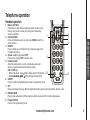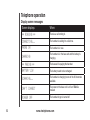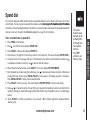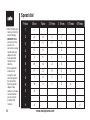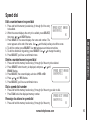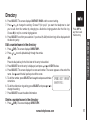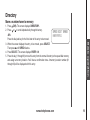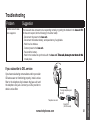
1
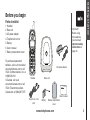
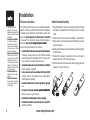
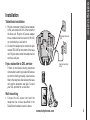
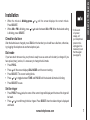
Table of contents Before you begin . . . . . . . . . . . . . . . . . . . . . . . . . 3 Parts checklist . . . . . . . . . . . . . . . . . . . . . . . . . 3 Getting started . . . . . . . . . . . . . . . . . . . . . . . . . . 3 Installation . . . . . . . . . . . . . . . . . . . . . . . . . . . . . 4 Choose a location . . . . . . . . . . . . . . . . . . . . . . . 4 Install handset battery . . . . . . . . . . . . . . . . . . . . . 4 Table/desk installation . . . . . . . . . . . . . . . . . . . . . 5 If you subscribe to DSL service . . . . . . . . . . . . . . . . 5 Wall mounting . . . . . . . . . . . . . . . . . . . . . . . . . 5 Charge the handset battery . . . . . . . . . . . . . . . . . . 6 Language . . . . . . . . . . . . . . . . . . . . . . . . . . . 6 Set handset date and time . . . . . . . . . . . . . . . . . . . 6 Check for dial tone . . . . . . . . . . . . . . . . . . . . . . . 7 Dial mode . . . . . . . . . . . . . . . . . . . . . . . . . . . . 7 Set the ringer . . . . . . . . . . . . . . . . . . . . . . . . . . 7 Message waiting . . . . . . . . . . . . . . . . . . . . . . . . 8 Basic operation . . . . . . . . . . . . . . . . . . . . . . . . . 9 Telephone operation . . . . . . . . . . . . . . . . . . . . . . . 9 Handset operation . . . . . . . . . . . . . . . . . . . . . . . 9 Base unit operation . . . . . . . . . . . . . . . . . . . . . 10 Temporary tone dialing . . . . . . . . . . . . . . . . . . . . 11 Operating range . . . . . . . . . . . . . . . . . . . . . . . 11 Speed dial . . . . . . . . . . . . . . . . . . . . . . . . . . . . 13 Store a number/name in speed dial . . . . . . . . . . . . . 13 Edit a number/name in speed dial . . . . . . . . . . . . . . 15 Delete a number/name in speed dial . . . . . . . . . . . . 15 Dial a speed dial number . . . . . . . . . . . . . . . . . . 15 Reassign locations in speed dial . . . . . . . . . . . . . . 15 Directory . . . . . . . . . . . . . . . . . . . . . . . . . . . . . 16 Store a number/name in the directory . . . . . . . . . . . . 16 Edit a number/name in the directory . . . . . . . . . . . . . 17 Delete a number/name in the directory . . . . . . . . . . . 17 Dial from the directory . . . . . . . . . . . . . . . . . . . . 18 Move a number/name to memory . . . . . . . . . . . . . . 19 Caller ID . . . . . . . . . . . . . . . . . . . . . . . . . . . . . 20 About call history (caller ID) . . . . . . . . . . . . . . . . . 21 Review call history . . . . . . . . . . . . . . . . . . . . . . 21 Delete records from call history . . . . . . . . . . . . . . . 21 Dial a displayed number . . . . . . . . . . . . . . . . . . . 22 Store a call history entry to the directory . . . . . . . . . . 22 Batteries . . . . . . . . . . . . . . . . . . . . . . . . . . . . 24 Battery care and maintenance . . . . . . . . . . . . . . . . 24 Replace the handset battery . . . . . . . . . . . . . . . . . 24 Additional information . . . . . . . . . . . . . . . . . . . . 25 Troubleshooting . . . . . . . . . . . . . . . . . . . . . . . . . 25 If you subscribe to DSL service . . . . . . . . . . . . . . . . . 31 Maintenance . . . . . . . . . . . . . . . . . . . . . . . . . . 32 Warranty . . . . . . . . . . . . . . . . . . . . . . . . . . . . . 32 Important safety instructions . . . . . . . . . . . . . . . . . . 34 FCC, ACTA and IC regulations . . . . . . . . . . . . . . . . . 35 The RBRC ® seal . . . . . . . . . . . . . . . . . . . . . . . . 37 Technical specifications . . . . . . . . . . . . . . . . . . . . .38 www.vtechphones.com NEED HELP? This book has all the feature operations and troubleshooting you need to install and operate your new VTech innovative and feature-rich telephone. Please take the time to review it thoroughly to ensure proper installation. You can also visit our website at www.vtechphones.com for support, shopping, and everything new at VTech. In Canada, please visit www.vtechcanada.com VTech toll free 1(800)595-9511 In Canada, dial 1(800)267-7377 Parts checklist: 1.Handset 2.Base unit 3.AC power adapter 4.Telephone line cord 5.Battery 6.User’s manual 7. Battery compartment cover To purchase replacement batteries, visit us on the web at www.vtechphones.com or call VTech Communications, Inc. at 1(800)595-9511. In Canada, visit us at www.vtechcanada.com or call VTech Telecommunications Canada Ltd. at 1(800)267-7377. • Important! Before using this telephone, you must read Important safety instructions on page 34. AC power adapter Handset Base unit Telephone line cord User’s manual Battery Battery compartment cover www.vtechphones.com Getting started Before you begin Installation • Use only the VTech battery and AC power adapter supplied with this unit or the recommended equivalent. •������������������������� Do not open or mutilate the battery. Released electrolyte is corrosive and may cause damage to the eyes or skin. It may be toxic if swallowed. •��������������������������� Exercise care in handling batteries in order not to create a short circuit with conducting materials such as rings, bracelets, and keys. The battery or conductor may overheat and cause burns. •����������������������� Do not dispose of the battery in a fire; it might explode. •����������������������� Return the handset to the base unit when not in use to ensure optimum performance. Choose a location Install handset battery For optimum performance of your cordless telephone system, choose a central location close to a telephone jack and a power outlet not connected to a switch. The base unit��������������� can be placed ����� on a ���������������� flat surface or �������� mounted on the wall. For maximum range and best reception, place the �������������������������������������� base unit����������������������������� in a high and open location. Avoid putting the base unit too close to: •�������������������������������������������������� communication devices such as personal computers, computer routers, television sets, VCRs, wireless routers (wireless broadband, 802.1.1 routers, wi-fi, etc.) and other cordless telephones, etc. •������������������������������������������������������ excessive heat sources such as radiators, ventilation ducts, and direct sunlight. •������������������������������������������ noise sources such as a window with heavy traffic �������� outside, motors, microwave ovens, refrigerators, and fluorescent lighting. •�������������������������������������������������� excessive dust sources such as: workshop, garage, etc. •��������������������������������������������� excessive moisture sources������������������� �������������������������� such as bathroom, kitchen, sauna, or greenhouse. •����������������������������������������� extremely low temperature such as garage. •���������������������������������������������������� mechanical vibration or shock such as on top of the washing machine. 1. Plug the battery connector securely into the jack inside the battery compartment according to the color-coded label. 2.Insert battery in the center of the battery compartment. 3.Press down on the wired side until the battery securely snaps into place. 4.Neatly tuck the wires next to the battery inside the battery compartment. 5.Position the battery compartment cover and slide it towards the unit until it clicks into place. 6.Put the handset in the base unit to start charging the new battery for at least 16 hours. Black wire Red wire www.vtechphones.com 2 Red Black wire wire 1 Getting started Installation Table/desk installation 1. Plug the connector of the AC power adapter to the jack marked AC 9V at the bottom of the base unit. Plug the AC power adapter into a standard electrical outlet (110V AC) not controlled by a wall switch. 2. Connect the telephone line cord to the jack marked TEL LINE at the bottom of the base unit. Plug the other end of the telephone line cord to a wall jack. ����������������� ���� If you subscribe to DSL service ������������������� ������ If there is interference during telephone conversations and/or your caller ID features are not functioning properly, install a noise filter to the telephone line between the base unit and the telephone wall jack. Contact your DSL provider for a noise filter. Wall mounting 1. Connect the AC power cord and the telephone line cord as described in the Table/Desk Installation section above. www.vtechphones.com Installation •If you are not going to use the telephone for a long period of time, remove the battery to prevent possible leakage. •If you have any trouble installing your telephone, please refer to the Troubleshooting section on pages 25-31 of this manual. 2.Mount the base unit on the wall. Position the ����������������� base unit so ������� the ���������������������������� mounting studs fit into the holes on the wall mount bracket. Slide the ������������������������������������������� base unit���������������������������������� down on the mounting studs until it locks into place. Charge the handset battery Place the handset in the ����������� base unit��. CHARGING... will display on handset. Be sure to charge the battery for at least 16 hours before using your telephone. Language • Press PROG, then press once and LANGUAGE is displayed. Press SELECT. • The current setting blinks. Press or to toggle between English and Spanish until the desired language is blinking on the screen. • Press SELECT to save. Set handset date and time If you subscribe to caller ID service, the date and time will be set automatically with the first incoming call. If you do not have caller ID service, you can set the date and time manually: • Press PROG, then press until DATE/TIME is displayed. Press SELECT. • When the month is blinking, press or until the screen displays the correct month. Press SELECT. •�������������������������������� When the������������������������ day is blinking, ���������������� press� or until the screen displays the correct day. Press SELECT. •��������������������������������� When the������������������������� hour is ���������������� blinking, press� or until the screen displays the correct hour. Press SELECT. www.vtechphones.com • When the minute is ��������������� blinking, press Press SELECT. • When AM or PM is blinking, press or is blinking, press SELECT. or until the screen displays the correct minute. to select between AM or PM. When the desired setting Check for dial tone fter the batteries are charged, press TALK on the handset; you should hear a dial tone, otherwise, A try plugging this telephone to another telephone jack. Dial mode If you have touch tone service, your phone is ready to use as soon as the battery is charged. If you have pulse (rotary) service, it is necessary to change the dial mode. • Press PROG. • Press until the screen displays DIAL MODE: and the current setting. • Press SELECT. The current setting blinks. • Press or to toggle between TONE and PULSE until the desired dial mode is blinking. • Press SELECT to save. •In the event of a power outage, or if your telephone’s power cord is unplugged, it is necessary to set the time again (see page 6). Set the ringer • Press PROG. Press twice, the name of the current ringer will display and the tone of the ringer will be heard. • Press or to scroll through the four ringers. Press SELECT when the desired ringer is displayed and heard. www.vtechphones.com Getting started Installation Installation •�You’ll �������������������������������� hear a confirmation tone. Message waiting Your phone has visual message waiting indication if you subscribe to voice message service from your service provider. You can choose to have the message alert setting on or off. •������� Press PROG, then press until MESSAGE WAITING is displayed. Press SELECT. •����������������� The screen shows MSG ALERT OFF: Y. •������� Press or to toggle between Y (yes) or N (no). MESSAGE WAITING MSG ALERT OFF: Y www.vtechphones.com Telephone operation Handset operation www.vtechphones.com 5 6 7 9 Basic operation 1. Make a call (TALK) Press before or after dialing a telephone number to place a call. During a call, press to receive an incoming call if call waiting service is activated. 1 2. Channel (CHAN) If there is interference while on a call, press CHAN to switch to a clearer channel. 3. DELETE Press to delete one or all calls from the call log. See page 21 for complete instructions. 4. Answer a call (any key except OFF) 4 Press any key (except OFF) to answer a call. 5. Handset volume Adjust the volume while on a call. A double beep will sound when you reach the maximum or minimum setting. CID and DIR keys • When in idle mode, press /CID to display caller ID information. 2,3 • When �������������������� in idle mode�������� , press /DIR to display directory entries. 6. SELECT Press to confirm the highlighted option while in programming mode. 7. OFF During a call, press to hang up. While in programming mode, press to cancel an operation, back up, or exit. 8.REDIAL/PAUSE Press to view redial memory. While entering numbers, press and hold to insert a dialing pause. 9. Program (PROG) Press to enter programming mode. 8 Telephone operation Base unit operation 1. Locate handset • Press the LOCATE HANDSET key to page the handset. • Press again to cancel a page. • The base unit will ring the handset for o n e m i nu te b efore e n d i n g t h e p ag e automatically. • By pressing the OFF key on the handset, or returning the handset to the base unit, you can cancel the handset page. 10 � www.vtechphones.com Telephone operation Temporary tone dialing Operating range This cordless telephone operates within the maximum power allowed by the Federal Communications Commission (FCC). Even so, this handset and base unit can communicate over only a certain distance — which can vary with the locations of the base unit and handset, the weather, and the construction of your home or office. If there is a call while the handset is out of range, it might not ring; or if it does ring, the call might not connect well when you press TALK. Move closer to the base unit, then press TALK to answer the call. If you move out of range during a telephone�������������������������������������������������������� ����������������������������������������������������������������� conversation, there might be noise or interference. To improve reception, move closer to the base unit. If you move out of range without pressing OFF, the telephone will be left off the hook. To hang up properly, walk back into range, periodically pressing OFF. www.vtechphones.com • Temporary tone dial mode is useful if it is necessary to send touch tone signals to access telephone banking or long distance services. • For clearer reception while on a call, press the CHAN button until the interference has been eliminated. 11 Basic operation If you have pulse (rotary) service, you can change from pulse to touch tone dialing during a call by pressing TONE *. 1. Dial the number. 2. Press TONE *. Buttons pressed after this send touch tone signals. 3. After you hang up, the phone automatically returns to pulse service. Telephone operation Display screen messages 12 Screen displays: When: ** RINGING ** There is a call coming in. CONNECTING... The handset is waiting for a dial tone. PHONE ON The handset is in use. CHARGING The handset is in the base unit and the battery is charging. ** PAGING ** The base unit is paging the handset. BATTERY LOW The battery needs to be recharged. SCANNING... The handset is changing to one of the 30 channels available. CAN’T CONNECT The power on the base unit is off and TALK is pressed. RINGER OFF The handset ringer is turned off. www.vtechphones.com Speed dial You can store frequently called numbers either as speed dial numbers or in the directory. Each entry can contain up to 24 digits. You can program names with the numbers, each ������������������������������������������������� containing��������������������������������������� up to 15 characters. Up to 10 numbers and names can be stored alphabetically in the directory, and nine numbers with names into designated speed dial memory locations (1 through 9). See Directory beginning on page 16 for instructions. Store a number/name in speed dial 2. Press once and the screen displays SPEED DIAL. 3. Press SELECT and the screen displays ENTER 1-9. 4.Press the key (1 through 9) for the memory location to store this entry. The screen displays ENTER NAME. 5.Using the chart on the next page, enter up to 15 characters for the name to be stored with the number. Use to backspace and make corrections; use to advance and add a space. Basic operation 1. Press PROG on the handset. •The entries stored in speed dial memory will be marked with 01 through 09 in the telephone directory. • Press OFF anytime to exit memory mode. 6.When finished entering the name, press SELECT. The screen displays ENTER NUMBER. 7.Enter the telephone number using the number keys. Use to backspace and make corrections. After at least one digit has been entered, press REDIAL/PAUSE to store pauses in the dialing sequence, if necessary. Press REDIAL/PAUSE to display the last number dialed. 8.Press SELECT to store your entry. The screen displays DISTINCT RING? and the current setting. 9.Press or to change the setting. Choose Y (for yes) if you wish the telephone to alert you to calls from this number by changing to a distinctive ringing pattern after the first ring. Choose N (for no) for a normal ringing pattern. 10. Press SELECT to confirm your selection. If you chose Y, a D (for distinct ring) will be displayed with the directory entry. www.vtechphones.com 13 Speed dial •When the directory memory is full, the screen displays MEMORY FULL and an error tone sounds. You cannot store a new number until you delete a record from speed dial memory or the directory. •If the speed dial location is not empty, the new entry will replace the old and the first entry will be deleted. Take caution to not save over entries that you do not wish to delete from memory. 14 Press Once Twice 3 Times 4 Times 1 1 2 A B C 2 3 D E F 3 4 G H I 4 5 J K L 5 6 M N O 6 7 P Q R S 8 T U V 8 9 W X Y Z 9 0 0 * * # & ‘ , - . www.vtechphones.com 5 Times 6 Times 7 # Speed dial Edit a number/name in speed dial Basic operation 1. Press and hold the memory location key (1 through 9) of the entry SPEED EDIT ERASE to be edited. 8005959511 2. When the screen displays the entry to be edited, press SELECT, 01 then press or until EDIT flashes. 3. Press SELECT. The screen displays the name and number. The cursor appears at the end of the name. Use , and the dial pad keys to edit the name. 4. To edit the number, press SELECT. Use to backspace and make corrections. 5. To edit the distinctive ring setting, press SELECT. Use or to change the setting. 6. Press SELECT, you’ll hear a confirmation tone. Delete a number/name in speed dial 1. Press and hold the memory location key (1 through 9) of the entry to be deleted. 2.Press SELECT when the entry is displayed, and press � or until ERASE flashes. SPEED EDIT ERASE 8005959511 3. Press SELECT, the screen displays a choice of YES or NO. 01 4. Press or until YES flashes. 5. Press SELECT, you’ll hear a confirmation tone. Dial a speed dial number • Press and hold the memory location key (1 through 9) of the entry you wish to dial. • Press TALK to dial the displayed memory number. Reassign locations in speed dial 1. Press and hold the memory location key (1 through 9) of the entry SPEED EDIT ERASE 8005959511 01 www.vtechphones.com 15 Speed dial •Press REDIAL/ PAUSE to display the last number dialed from this telephone to store it in speed dial memory. to be reassigned. 2.W hen the screen displays the desired entry, press SELECT. Then press until SPEED flashes. 3. Press SELECT. The screen displays ENTER 1-9. 4.Press the keys (1 through 9) to reassign this entry into another memory location. Directory Your telephone can store 10 (including the nine speed dial entries) numbers with names (up to 15 characters for the name and 24 digits for the number) in each handset. When the memory is full, the screen displays MEMORY FULL, and an error tone sounds. You will not be able to store a new number until a stored number is deleted. Store a number/name in the directory 1. Press PROG. The screen displays DIRECTORY. 2. Press SELECT. The screen displays ENTER NAME. 3.Using the chart on page 14, enter up to 15 characters for the name. Use� to backspace and make corrections; use to advance and add a space. 4.When you finish entering the name, press SELECT. The screen displays ENTER NUMBER. 5.Enter the telephone number. Use to backspace and make corrections. Press REDIAL/PAUSE to store a pause in the dialing sequence. -ORPress REDIAL/PAUSE if you wish to display and store the last number dialed. 16 www.vtechphones.com Directory • Press OFF at any time to exit the directory. Basic operation 6. Press SELECT. The screen displays DISTINCT RING? and the current setting. 7.Press or to change the setting. Choose Y (for yes) if you want the telephone to alert you to calls from this number by changing to a distinctive ringing pattern after the first ring. Choose N (for no) for a normal ringing pattern. 8.Press SELECT to confirm your selection. If you chose Y, a D (for distinct ring) will be displayed with the directory entry. Edit a number/name in the directory 1. Press (DIR). The screen displays DIRECTORY. 2. Press or to scroll alphabetically through the entries. -OR Press the dial pad key for the first letter of the entry to be edited. 3.Press SELECT when the entry is displayed, and press � or until EDIT flashes. 4.Press SELECT. The screen displays the name and number. The cursor appears at the end of the name. Use , and the dial pad keys to edit the name. 5. To edit the number, press SELECT and use to backspace and make SPEED EDIT ERASE corrections. 8005959511 6. To edit the distinctive ring setting, press SELECT and press or to change the setting. 7. Press SELECT to save the edited information. Delete a number/name in the directory 1. Press (DIR). The screen displays DIRECTORY. www.vtechphones.com 17 Directory •Press OFF anytime to exit directory. 2. Press or to scroll alphabetically through entries in the SPEED EDIT ERASE directory. 8005959511 -OR Press the dial pad key for the first letter of the entry to be deleted. 3. Press SELECT when the entry is displayed, and press or until ERASE flashes. 4.Press SELECT. The screen displays ERASE NO YES and the number. The current choice flashes. 5. Press or until YES flashes. 6. Press SELECT, and you will hear a confirmation beep. Dial from the directory 1. Press (DIR). The screen displays DIRECTORY. 2. Press or to scroll alphabetically through entries stored in directory. -OR Press the dial pad key for the first letter of the entry to be dialed. 3. Press TALK when the number is displayed. 18 www.vtechphones.com Directory Move a number/name to memory www.vtechphones.com Basic operation 1. Press (DIR). The screen displays DIRECTORY. 2. Press or to scroll alphabetically through directory. SPEED EDIT ERASE -OR8005959511 Press the dial pad key for the first letter of the entry to be moved. 3.When the screen displays the entry to be moved, press SELECT. Then press until SPEED flashes. 4. Press SELECT. The screen displays ENTER 1-9. 5.Press the key (1 through 9) to move this entry from the normal directory to the speed dial memory and assign a memory location. You’ll hear a confirmation tone. A memory location number (01 through 09) will be displayed with this entry. 19 Caller ID Your phone has a caller ID (CID) with call waiting feature that works with service from your local telephone service provider. Caller ID with call waiting lets you see who’s calling before answering the telephone, even when on another call. It may be necessary to change your telephone service to use this feature. Contact your telephone company if: • You have both caller ID and call waiting, but as separate services (you may need combined service). • You have only caller ID service, or only caller waiting service. • You don’t subscribe to any caller ID or call waiting services. You can use this product with regular caller ID service, and you can use this product’s other features without subscribing to either caller ID or combined caller ID with call waiting service. There are fees for caller ID services, and they may not be available in all areas. This product can provide information only if both you and the caller are in areas offering caller ID service, and if both telephone companies use compatible equipment. Caller’s name * VTech Long distance call L 800-595-9511 AM 5/015:40 PM Date of call Time of call 20 www.vtechphones.com NEW OLD This party has called two or more times Caller’s telephone number 28 Position in call history Caller ID About call history (caller ID) • If you answer a call before the caller ID information appears on the screen, it will not be in the call history. Review call history 1. Press (CID) to view call history. 2. Use and to scroll through records in call history. Delete records from call history Delete a specific call: 1. Press CID to go to call history mode, then, locate the record by using or to scroll through the listing. 2. Press DELETE when the record is displayed. You’ll hear a confirmation tone. Delete all calls: 1.With the handset in idle (off) mode, press and hold DELETE. The screen displays ERASE ALL NO YES. The current choice flashes. www.vtechphones.com 21 Basic operation Your telephone can store up to 30 calls in its caller ID memory. The most recent call will have the highest number. When the memory is full, the oldest call will be deleted to make room for new incoming call information. For each incoming call, the screen displays the following information between the first and second rings: • Your caller’s name (15 letters are sent by your telephone company). • The caller’s area code and telephone number. • The time and date of the call. • The repeat tag (*) in the upper right corner, indicating the party has called more than once. Caller ID •Press OFF at any time to exit call history. • Caller ID numbers may appear with an area code that may not be required to dial local calls, or without a 1 that may be required for long distance calls. If the number displayed is not in the correct format, press # repeatedly to see different dialing options (you can choose to dial with or without the area code and with or without the 1). 22 2. Press until YES flashes. 3. Press SELECT. There will be a confirmation beep. Dial a displayed number 1. Press CID to go to call history mode, then locate the record by using � 595-9511 or to search for the desired number. 5/01 5:40PM OLD28 2.If you wish to change how the number will be dialed, press #. The screen displays alternate dialing sequences available for this call. 3. Press SELECT. Press or until DIAL flashes. DIAL PROGRAM 800-595-9511 Press SELECT, and you will see the display as shown in the figure 5/01 5:40PM OLD28 on the right. 4. Press SELECT again. The number is automatically dialed. -OR When the number is correctly displayed for dialing, press TALK. Store a call history entry to the directory 1. Locate the record in the call history to be stored in the directory. 2.If you wish to change how the number is stored, press #. The screen displays alternate dialing sequences available for this call. 3. Press SELECT, then press or until PROGRAM flashes. 4. You can modify the name and the numbers of the record before saving it in the directory by using the input method mentioned in www.vtechphones.com DIAL PROGRAM 800-595-9511 5/01 5:40PM OLD28 Caller ID DISTINCT RING? N 800-595-9511 Screen displays: When: PRIVATE The other party is blocking the name and/or number information. UNKNOWN Your telephone company is unable to receive information about this caller’s name and/or number. * (after name) This caller has called more than once. www.vtechphones.com Basic operation Speed Dialing (see pages 13-14). 5. Press SELECT when finished or if you do not need to modify the record. 6. Press or to select Y or N for distinctive ringer. 7.Press SELECT. There will be a confirmation beep. If you choose Y in step 6, a D will be displayed with the directory entry. 23 Batteries Battery care and maintenance •If you repeatedly get a low battery indicator, even after charging overnight, the battery should be replaced. • To reduce the risk of fire or injury to persons or damage to the telephone, charge the battery provided with or identified for use with this product only in accordance with the instructions and limitations specified in the user’s manual. • Battery power is consumed whenever the handset is off the base unit or charger, even when the handset is in idle mode. • Once the battery is fully charged, it is not necessary to charge it again until BATTERY LOW is displayed or flashes. This will maximize the battery life. 24 After the battery is fully charged, you can expect the following performance: Operation Operating time While in use (talking) approximately 225 minutes (3.75 hours) While not in use (standby*) approximately 90 hours (3.75 days) * Handset is off the base unit or charger but not in use. • The battery needs charging when: — A new battery is installed in the handset. — The telephone beeps twice every five seconds. — The screen displays BATTERY LOW and the low battery icon. •Place the handset in the base unit. The battery is usually fully charged after 16 hours. •The battery can be kept fully charged by returning the handset to the base unit after each use. 1 Replace the handset battery 1.Remove the battery compartment cover on the handset by pressing on the indentation and sliding the cover downward. 2. Lift out the old battery and disconnect. 3.Align the new battery’s plug with the socket pins, and snap the plug into place. Snap the battery in the compartment, as described in Installing Handset Battery on page 4. 4. Slide the compartment cover back on the handset. 5.The new battery must be charged before using the telephone. Place the handset in the base unit and allow it to charge for at least 16 hours. The telephone might operate before 16 hours of charging. However, only fully charged battery can provide the best performance. www.vtechphones.com Black wire 3 Red wire Red Black wire wire 2 1 4 Troubleshooting If you have difficulty operating your telephone, the suggestions below should solve the problem. If you still have difficulty after trying these suggestions, call VTech Communications at 1(800)595-9511. In Canada, call VTech Telecommunications Canada Ltd. at 1(800)-267-7377. Suggestion My telephone doesn’t work at all. • Make sure the power cord is plugged in. • Make sure the telephone line cord is plugged firmly into the base unit and the telephone wall jack. • Charge the battery in handset for at least 16 hours before first use. For optimum daily performance, return the handset to its base unit when not in use. • Reset the base unit. Unplug the power cord of the base unit. Wait for 15 seconds then plug it back in. Allow up to one minute for the handset and base unit to reset. • The telephone may need a new battery, please refer to Installing Handset Battery on page 4 of this user’s manual. I cannot get a dial tone. • • • • Try all the suggestions above. Move the handset closer to the base unit. The handset might have moved out of range. The line cord might be malfunctioning. Try installing a new line cord. If the previous suggestions do not work, disconnect the base unit from the telephone jack and connect a working telephone. If there is no dial tone either, the problem is in the wiring or local service. Contact your local telephone company. www.vtechphones.com 25 Additional information Problem Troubleshooting Problem Suggestion I cannot dial out. • Make sure there is a dial tone before dialing. The handset may take a second or two to synchronize with the base unit and produce a dial tone. • Make sure the telephone is set to the correct dial mode (pulse or touch tone). It should match the dial mode provided by the telephone company (pulse or touch tone). Refer to the Installation section (page 7) of this user’s manual to set the dial mode. • If other telephones in your home are having the same problem, the problem is in the wiring or local service. Contact your local telephone company (charges may apply). • Eliminate any background noise. Noise from a television, radio or other electrical appliances may cause the telephone to not dial out properly. If you cannot eliminate the background noise, try muting the handset before dialing, or dialing from another room in your home with less background noise. My handset beeps four times and isn’t performing normally. • Make sure the power cord is securely plugged into the base unit. Plug the power cord into a different working outlet not controlled by a wall switch. • Move the handset closer to the base ����������������������������������������������������� unit�������������������������������������������� . The handset might have moved out of range. • Reset the base unit. Unplug the power cord. Wait for 15 seconds and plug it back. Allow up to one minute for the handset and base unit to synchronize. • Other electronic products can cause interference with your cordless telephone. Try installing it away from these types of electronic devices: wireless routers, radios, radio towers, pager towers, cellular telephones, intercoms, room monitors, televisions, personal computers, kitchen appliances and other cordless telephones. 26 www.vtechphones.com Troubleshooting Suggestion CAN’T CONNECT displays on my handset. • Move the handset closer to the base unit. The telephone might have moved out of range. • Reset the base unit. Unplug the power cord. Wait for 15 seconds and plug it back. Allow up to one minute for the handset and base unit to reset. • Other electronic products can cause interference with your cordless telephone. Try installing your telephone away from these types of electronic devices: wireless routers, radios, radio towers, pager towers, cellular telephones, intercoms, room monitors, televisions, personal computers, kitchen appliances and other cordless telephones. The battery does not hold a charge. • Make sure the battery is fitted in correctly in the handset. • Be sure to use the AC power adapter provided with your telephone. • Charge the battery for at least 16 hours. For optimum daily performance, return the handset to the base unit when not in use. •It may be necessary to purchase a new battery, please refer to the section on Installing Handset Battery on page 4 of this user’s manual. • The telephone might be malfunctioning. Please refer to the Warranty Statement on page 32 of this user’s manual. www.vtechphones.com 27 Additional information Problem Troubleshooting Problem Suggestion I get noise, static, or weak signals even when I’m near the base unit. • Press the CHAN button while on a call until the interference has been eliminated. • Other electronic devices can cause interference with your cordless telephone. Try installing your telephone away from these types of electronic devices: wireless routers, radios, radio towers, pager towers, cellular telephones, intercoms, room monitors, televisions, personal computers, kitchen appliances and other cordless telephones. • Microwave ovens operate on the same frequency as your telephone. It is normal to experience static on your telephone while the microwave oven is in operation. Do not install this telephone in the same outlet or near the microwave oven. •If your telephone is plugged in with a modem or surge protector, plug the telephone (or modem/surge protector) into a different location. If the problem is solved, have your telephone moved away from the modem until there is no static or noise, or use a different surge protector. • Relocate your telephone to a higher location. The telephone will likely get better reception when installed in a higher location. • If other telephones in your home are having the same problems, the problem is in the wiring or local service. Contact your local telephone company (charges may apply). I hear noise in the handset, and none of the keys or buttons work. • Make sure the power cord is plugged in. 28 www.vtechphones.com Troubleshooting Suggestion I hear other calls while using my telephone. • Disconnect the base unit from the telephone jack, and plug in a regular telephone. If you still hear other calls, the problem is probably in the wiring or local ser vice. Contact your local telephone company. My handset does not ring when I receive a call. • Make sure the ringer is activated. Refer to the section(s) on ringer selection in this user’s manual. •Make sure the telephone line cord is plugged firmly into the base unit and the telephone jack. Make sure the power cord is plugged in. • The handset may be too far from the base unit. • Charge the battery in the handset for at least 16 hours. For optimum daily performance, return the handset to the base unit when not in use. • There may be too many extension telephones on your telephone line for all of them to ring. Try unplugging some of the other telephones. • The layout of your home or office might be limiting the operating range. Try moving the telephone base to another location, preferably on an upper floor. • If other telephones in your home are having the same problem, the problem is in the wiring or local service. Contact your local telephone company (charges may apply). • Test a working telephone at the telephone jack. If another telephone has the same problem, the problem is the telephone jack. Contact your local telephone company (charges may apply). • Other electronic devices can cause interference with your cordless telephone. Try installing your telephone as far away as possible from these types of electronic devices: wireless routers, radios, radio towers, pager towers, cellular telephones, intercoms, room monitors, televisions, personal computers, kitchen appliances and other cordless telephones. • The telephone line cord might be malfunctioning. Try installing a new line telephone cord. www.vtechphones.com 29 Additional information Problem Troubleshooting Problem Suggestion My calls fade in and out while I’m using my handset. • Press the CHAN button while on a call until the interference has been eliminated. •Other electronic devices can cause interference with your cordless telephone. Try installing your telephone away from these types of electronic devices: wireless routers, radios, radio towers, pager towers, cellular telephones, intercoms, room monitors, televisions, personal computers, kitchen appliances and other cordless telephones •Microwave ovens operate on the same frequency as your telephone. It is normal to experience static on your telephone while the microwave oven is in operation. Do not install the telephone near the microwave oven or in the same outlet. • If your telephone is plugged in with a modem or surge protector, plug the telephone (or modem/surge protector) into a different location. If the problem is solved, put your telephone away from the modem until there is no static or noise, or use a different surge protector. • Relocate your telephone to a higher location. The telephone will get better reception when installed in a higher area. • If other telephones in your home are having the same problem, the problem is in your wiring or local service. Contact your local telephone company (charges may apply.) The caller ID isn’t working. • Caller ID is a subscription service. You must subscribe to this service for this feature to work on your telephone. • The caller must be calling from an area that supports caller ID. • Both you and your caller’s telephone companies must use caller ID compatible equipment. 30 www.vtechphones.com Troubleshooting Problem Suggestion Common cures for electronic equipment. If the base unit does not seem to be responding normally, try putting the handset in the base ����������������� unit�������� . If it still does not respond, do the following (in the order listed): 1. Disconnect the power to the ���������� base unit�. 2. Disconnect the handset battery, and spare battery, if applicable. 3. Wait for a few minutes. 4. Connect power to the base ���������� unit�. 5. Re-install the battery. 6. Wait for the handset to synchronize with the base ������������������������������������������������������� unit���������������������������������������������� . To be safe, allow up to one minute for this to take place. If you subscribe to DSL service: To single telephone jack (RJ11C) Telephone line cord Noise filter (For DSL users) www.vtechphones.com 31 Additional information If you hear noise during conversations and/or your caller ID features are not functioning properly, install a noise filter to the telephone line between the base unit and the telephone line jack. Contact your DSL provider to obtain a noise filter. Maintenance Taking care of your telephone. Your cordless telephone contains sophisticated electronic parts, so it must be treated with care. Avoid rough treatment Place the handset down gently. Save the original packing materials to protect your telephone if you need to ship it. Avoid water Your telephone can be damaged if it gets wet. Do not use the handset outdoor in the rain, or handle it with wet hands. Do not install your base unit near a sink, bathtub or shower. Electrical storms Electrical storms can sometimes cause power surges harmful to electronic equipment. For your own safety, exercise caution when using electric appliances during storms. Cleaning your telephone Your telephone has a durable plastic case that should retain its luster for many years. Clean it only with a soft cloth slightly dampened with water or mild soap. Do not use excess water or cleaning solvents of any kind. Remember that electrical appliances can cause serious injury if used when you are wet or standing in water. If your base unit should fall into water, DO NOT RETRIEVE IT UNTIL YOU UNPLUG THE POWER CORD AND TELEPHONE LINE CORDS FROM THE WALL. Then, pull the base unit out by the unplugged cords. Warranty What does this limited warranty cover? • The manufacturer of this VTech product, VTech Communications, warrants to the holder of a valid proof of purchase (“Consumer” or “you”) that the product and all accessories provided by VTech in the sales package (“Product”) are free from material defects in material and workmanship, pursuant to the following terms and conditions, when installed and used normally and in accordance with operation instructions. This limited warranty extends only to the Consumer for Products purchased and used in the United States of America. What will VTech Communications do if the Product is not free from material defects in materials and workmanship during the limited warranty period (“Materially Defective Product”)? • During the limited warranty period, VTech’s authorized service representative will repair or replace at VTech’s option, without charge, a Materially Defective Product. If we repair this product, we may use new or refurbished replacement parts. If we choose to replace this product, we may replace it with a new or refurbished product of the same or similar design. VTech will return repaired or replacement products to you in working condition. VTech will retain defective parts, modules, or equipment. Repair or replacement of Product, at VTech’s option, is your exclusive remedy. You should expect the repair or replacement to take approximately 30 days. How long is the limited warranty period? • The limited warranty period for the product extends for ONE (1) YEAR from the date of purchase if we repair or replace a Materially Defective Product under the terms of this limited warranty. This limited warranty also applies to repaired or replacement Products for a period of either (a) 90 days from the date the repaired or replacement Product is shipped to you or (b) the time remaining on the original one-year warranty; whichever is longer. What is not covered by this limited warranty? This limited warranty does not cover: 1. Product that has been subjected to misuse, accident, shipping or other physical damage, improper installation, abnormal operation or handling, neglect, inundation, fire, water or other liquid 32 www.vtechphones.com Warranty State Law Rights: This warranty gives you specific legal rights, and you may also have other rights which vary from state to state. imitations: Implied warranties, including those of fitness for a particular purpose and merchantability (an unwritten warranty that the product is fit for ordinary use) are limited to one year from date L of purchase. Some states do not allow limitations on how long an implied warranty lasts, so the above limitation may not apply to you. • In no event shall VTech be liable for any indirect, special, incidental, consequential, or similar damages (including, but not limited to lost profits or revenue, inability to use the product, or other associated equipment, the cost of substitute equipment, and claims by third parties) resulting from the use of this product. Some states do not allow the exclusion or limitation of incidental or consequential damages, so the above limitation or exclusion may not apply to you. www.vtechphones.com 33 Additional information intrusion; or 2. Product that has been damaged due to repair, alteration or modification by anyone other than an authorized service representative of VTech; or 3.Product to the extent that the problem experienced is caused by signal conditions, network reliability or cable or antenna systems; or 4. Product to the extent that the problem is caused by use with non-VTech electrical accessories; or 5.Product whose warranty/quality stickers, Product serial numbers’ plates or electronic serial numbers have been removed, altered or rendered illegible; or 6.Product purchased, used, serviced, or shipped for repair from outside the United States, or used for commercial or institutional purposes (including but not limited to Products used for rental purposes ); or 7. Product returned without valid proof of purchase (see 2 below); or 8. Charges for installation or set up, adjustment of customer controls, and installation or repair of systems outside the unit. How do you get warranty service? • To obtain warranty service in the United States of America, call 1(800)595-9511 for instructions regarding where to return the Product. Before calling for service, please check the user’s manual. A check of the Product controls and features may save you a service call. • Except as provided by applicable law, you assume the risk of loss or damage during transit and transportation and are responsible for delivery or handling charges incurred in the transport of Product(s) to the service location. VTech will return repaired or replaced product under this limited warranty to you, transportation, delivery or handling charges prepaid. VTech assumes no risk for damage or loss of the Product in transit. • If the Product failure is not covered by this limited warranty, or proof of purchase does not meet the terms of this limited warranty, VTech will notify you and will request that you authorize the cost of repair prior to any further repair activity. You must pay for the cost of repair and return shipping costs for the repair of Products that are not covered by this limited warranty. What must you return with the Product to get warranty service? 1. Return the entire original package and contents including the Product to the VTech service location along with a description of the malfunction or difficulty; 2. Include “valid proof of purchase” (sales receipt) identifying the Product purchased (Product model) and the date of purchase or receipt; and 3. Provide your name, complete and correct mailing address, and telephone number. Other Limitations •This warranty is the complete and exclusive agreement between you and VTech. It supersedes all other written or oral communications related to this Product. VTech provides no other warranties for this product. The warranty exclusively describes all of VTech’s responsibilities regarding the product. There are no other express warranties. No one is authorized to make modifications to this limited warranty and you should not rely on any such modification. Important safety instructions When using your telephone equipment, basic safety precautions should always be followed to reduce the risk of fire, electric shock and injury, including the following: 1. Read and understand all instructions. 2. Follow all warnings and instructions marked on the product. 3.Unplug this product from the wall outlet before cleaning. Do not use liquid or aerosol cleaners. Use a damp cloth for cleaning. 4. Do not use this product near water (for example, near a bath tub, kitchen sink or swimming pool). 5.Do not place this product on an unstable surface, such as a table, shelf or stand. The product may fall, causing serious damage. 6.Slots and openings in the back or bottom of the base unit and handset are provided for ventilation. To protect them from overheating, these openings must not be blocked by placing the product on a soft surface such as a bed, sofa or rug. This product should never be placed near or over a radiator or heat register. This product should not be placed in any area where proper ventilation is not provided. 7.This product should be operated only from the type of power source indicated on the marking label. If you are not sure of the type of power supply in your home, consult your dealer or local power company. 8.Do not allow anything to rest on the power cord. Do not install this product where the cord may have anyone walking on it. 9.Never push objects of any kind into this product through slots in the base or handset as they may touch dangerous voltage points or short out parts that could result in a risk of fire or electric shock. Never spill liquid of any kind on the product. 10. To reduce the risk of electric shock, do not disassemble this product, but take it to an authorized service facility. Opening or removing parts of the base or handset other than specified access doors may expose you to dangerous voltages or other risks. Incorrect reassembling can cause electric shock when the product is subsequently used. 11. Do not overload wall outlets and extension cords as this can result in the risk of fire or electric shock. 12.Unplug this product from the wall outlet and refer servicing to an authorized service facility under the following conditions: A. When the power supply cord or plug is damaged or frayed. B. If liquid has been spilled onto the product. C. If the product has been exposed to rain or water. D.If the product does not operate normally by following the operating instructions. Adjust only those controls that are covered by the operating instructions, as improper adjustment of other controls may result in damage and often requires extensive work by an authorized technician to restore the product to normal operation. E.If the product has been dropped and the base and/or handset has been damaged. F. If the product exhibits a distinct change in performance. 13.Avoid using a telephone (other than cordless) during an electrical storm. There is a remote risk of electric shock from lightning. 14. Do not use the telephone to report a gas leak in the vicinity of the leak. 15. Only put the handset of your telephone next to your ear when it is in normal talk. 34 www.vtechphones.com FCC, ACTA and IC regulations FCC Part 15 This equipment has been tested and found to comply with the requirements for a Class B digital device under Part 15 of the Federal Communications Commission (FCC) rules. These requirements are intended to provide reasonable protection against harmful interference in a residential installation. This equipment generates, uses and can radiate radio frequency energy and, if not installed and used in accordance with the instructions, may cause harmful interference to radio communications. However, there is no guarantee that interference will not occur in a particular installation. If this equipment does cause harmful interference to radio or television reception, which can be determined by turning the equipment off and on, the user is encouraged to try to correct the interference by one or more of the following measures: • Reorient or relocate the receiving antenna. • Increase the separation between the equipment and receiver. • Connect the equipment into an outlet on a circuit different from that to which the receiver is connected. • Consult the dealer or an experienced radio/TV technician for help. Changes or modifications to this equipment not expressly approved by the party responsible for compliance could void the user’s authority to operate the equipment. To ensure safety of users, the FCC has established criteria for the amount of radio frequency energy that can be safely absorbed by a user or bystander according to the intended usage of the product. This product has been tested and found to comply with the FCC criteria. The handset may be safely held against the ear of the user. The base unit shall be installed and used such that parts of the user’s body other than the hands are maintained at a distance of approximately 20 cm (8 inches) or more. If you choose to use a clipping device, please make sure to only use the supplied VTech belt clip. FCC Part 68 and ACTA This equipment complies with Part 68 of the FCC rules and with technical requirements adopted by the Administrative Council for Terminal Attachments (ACTA). The label on the back or bottom of this equipment contains, among other things, a product identifier in the format US:AAAEQ##TXXXX. This identifier must be provided to your local telephone company upon request. The plug and jack used to connect this equipment to premises wiring and the telephone network must comply with applicable Part 68 rules and technical requirements adopted by ACTA. A compliant telephone cord and modular plug is provided with this product. It is designed to be connected to a compatible modular jack that is also compliant. An RJ11 jack should normally be used for connecting to a single line and an RJ14 jack for two lines. See Installation Instructions in the user’s manual. This equipment may not be used with Party Lines. If you have specially wired alarm dialing equipment connected to your telephone line, ensure the connection of this equipment does not disable your alarm equipment. If you have questions about what will disable alarm equipment, consult your telephone company or a qualified installer. If this equipment is malfunctioning, it must be unplugged from the modular jack until the problem has been corrected. Repairs to this telephone equipment can only be made by the manufacturer or its authorized agents. For repair procedures, follow the instructions outlined under the Limited Warranty. If this equipment is causing harm to the telephone network, the telephone company may temporarily discontinue your telephone service. The telephone company is required to notify you before inter- www.vtechphones.com 35 Additional information The Ringer Equivalence Number (REN) is used to determine how many devices you may connect to your telephone line and still have them ring when you are called. The REN for this product is encoded as the 6th and 7th characters following the US: in the product identifier (e.g., if ## is 03, the REN is 0.3). In most, but not all areas, the sum of all RENs should be five (5.0) or less. For more information, please contact your local telephone company. FCC, ACTA and IC regulations rupting service. If advance notice is not practical, you will be notified as soon as possible. You will be given the opportunity to correct the problem and the telephone company is required to inform you of your right to file a complaint with the FCC. Your telephone company may make changes in its facilities, equipment, operation, or procedures that could affect the proper functioning of this product. The telephone company is required to notify you if such changes are planned. If this product is equipped with a corded or cordless handset, it is hearing aid compatible. If this product has memory dialing locations, you may choose to store emergency telephone numbers (e.g., police, fire, medical) in these locations. If you do store or test emergency numbers, please: • Remain on the line and briefly explain the reason for the call before hanging up. • Perform such activities in off-peak hours, such as early morning or late evening. Industry Canada This equipment complies with regulations RSS210 and CS-03 of Industry Canada. Operation is subject to the following two conditions: (1) this device may not cause interference, and (2) this device must accept any interference, including interference that may cause undesired operation of the device. The term “IC:” before the certification/registration number only signifies that the Industry Canada technical specifications were met. The Ringer Equivalence Number (REN) for this terminal equipment is 0.1. The REN is an indication of the maximum number of devices allowed to be connected to a telephone interface. The termination on an interface may consist of any combination of devices subject only to the requirement that the sum of the RENs of all the devices does not exceed five. 36 www.vtechphones.com The RBRC® seal The RBRC® seal The RBRC® seal on the nickel-cadmium battery indicates that VTech Communications, Inc. is voluntarily participating in an industry program to collect and recycle these batteries at the end of their useful lives, when taken out of service within the United States and Canada. The RBRC® program provides a convenient alternative to placing used nickel-cadmium batteries into the trash or municipal waste, which may be illegal in your area. VTech’s participation in RBRC® makes it easy for you to drop off the spent battery at local retailers participating in the RBRC® program or at authorized VTech product service centers. Please call 1(800) 8BATTERY™ for information on ni-cd battery recycling and disposal bans/restrictions in your area. VTech’s involvement in this program is part of its commitment to protecting our environment and conserving natural resources. RBRC® is a registered trademark of Rechargeable Battery Recycling Corporation. 37 Additional information www.vtechphones.com Technical specifications Enhanced 2.4GHz technology–your telephone operates on a dual band transmission that combines the best of 2.4GHz and 900MHz technologies, providing enhanced performance over standard cordless telephones. Frequency control Crystal controlled PLL synthesizer Transmit frequency Base: 2410.2–2418.9 MHz Handset: 912.75–917.10 MHz Receive frequency Base: 912.75–917.10 MHz Handset: 2410.2–2418.9 MHz Channels 30 Nominal effective range Maximum power allowed by FCC and IC. Actual operating range may vary according to environmental conditions at the time of use. Size Handset: 185.5mm X 53.4mm X 39.0mm Base: 88.8mm X 107.5mm X 122.7mm Weight Handset: 116 grams Base: 133.2 grams Power requirements Handset: 3.6V 300mAH Ni-Cd battery Base: 9V AC @ 250mA Memory Speed dial: 9 Memory locations, 24 digits per location Directory: 10 Memory locations, 24 digits per location Caller ID: 30 Memory locations 38 www.vtechphones.com Index A Additional information 25–38 B Basic operation 9–24 Batteries 24 Battery care and maintenance 24 Before you begin 3 C Dial mode 7 Directory 16-19 DSL Service 5, 31 E Edit a number/name in speed dial 15 Edit a number/name in the directory 17 F FCC, ACTA and IC regulations 35–36 Caller ID operation 20–23 Charge the handset battery 6 Check for dial tone 7 Choose a location 4 G D Handset operation 9 Delete a number/name in speed dial 15 Delete a number/name in the directory 17 Delete records from call history 21 Dial a displayed number 22 Dial a number from the directory 18 Dial a speed dial number 15 Getting started 3–8 H I Important safety instructions 34 Installation 4–8 Install handset battery 4 Internet 5, 31 www.vtechphones.com 39 Index L Language 6 M Maintenance 32 Message waiting 8 Move a number/name to memory 19 O Operating range 11 P Speed dial 13–15 Store a call history entry to the directory 22 Store a number/name in speed dial 13 Store a number/name in the directory 16 T Table/desk installation 5 Technical specifications 38 Telephone base operation 10 Telephone operation 9–12 Temporary Tone Dialing 11 Troubleshooting 25–31 Parts checklist 3 W R Wall Mounting 5 Warranty Statement 32 Reassign locations in speed dial 15 Replace the handset battery 24 Review call history 21 S Set handset date and time 6 Set the ringer 7 40 www.vtechphones.com VTECH TELECOMMUNICATIONS LTD. A member of THE VTECH GROUP OF COMPANIES. Distributed in the U.S.A. by VTech Communications, Inc. Beaverton, Oregon Distributed in Canada by VTech Telecommunications Canada, Ltd., Richmond, B.C. Copyright ©2006 for VTECH TELECOMMUNICATIONS LTD. Printed in China. 91-000859-010-000 User’s Manual www.vtechphones.com Model: t2326