1
Using a foot switch (VOX VFS5)
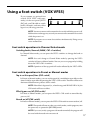
If you connect an optional foot
switch (VOX VFS5: sold separately) to the rear panel [FOOT
SW] jack, you’ll be able to switch
banks/channels and turn effect
bypass on/off using your foot.
NOTE: You must connect or disconnect the foot switch while the power is off.
Malfunctions or damage may occur if you connect or disconnect the foot switch
while the power is on.
NOTE: Do not press two or more foot switches simultaneously. Doing so may
cause malfunctions.
Foot switch operations in Channel Select mode
Switching banks/channels (BANK, CH1–4 switches)
In Channel Select mode, you can press the VFS5’s switches to change the bank or
channel.
NOTE: You can’t change to Channel Select mode by pressing the VFS5’s
switches in Preset or Manual modes. Nor can you save a program by holding
down the VFS5’s CH1–4 switches.
NOTE: Operations of the top panel will not be reflected by the VFS5’s LEDs.
Foot switch operations in Preset or Manual modes
Tap to set the speed/time (CH2 switch)
In Preset or Manual modes, you can set the speed of a modulation-type effect or the
time of a delay-type effect by pressing the VFS5’s CH2 switch. The time will be set to
the interval between two presses of this switch.
NOTE: If the effect is bypassed (i.e., when the top panel BYPASS LED is lit), the
CH2 switch will have no effect.
Effect bypass on/off (CH3 switch)
In Preset or Manual modes, you can press the VFS5’s CH3 switch to turn effect bypass on/off.
Reverb on/off (CH4 switch)
In Preset or Manual modes, you can press the VFS5’s CH4 switch to turn reverb on/off.
NOTE: The reverb will turn on when you switch modes, switch programs, turn
the power off, or operate the [REVERB] control.
NOTE: If you save (write) a program with reverb turned off, the program will
be saved with the reverb mix amount at 0.
17